





JustOverride
Members
-
Joined
Everything posted by JustOverride
-
I’m experiencing a recurring issue where my NVMe drive, used as a ZFS cache pool, intermittently fails. This causes the kernel to disable the device, ZFS to suspend the pool, and Unraid to enter a looping state where it cannot cleanly unmount user shares or datasets. This loop ultimately forces me to perform a hard reset, resulting in an unclean shutdown. Key Details: Initial NVMe Drive Failure: The NVMe drive starts by showing timeout errors (I/O timeout) in the kernel logs, followed by repeated reset attempts. Eventually, the kernel disables the device, reporting errors like Device not ready; aborting reset and Disabling device after reset failure. Once the device is disabled, ZFS encounters uncorrectable I/O errors (error=5), which causes it to suspend the affected pool. ZFS Pool Suspension: After the drive failure, ZFS reports that the cache pool is suspended and cannot process I/O. Logs show errors such as: WARNING: Pool 'cache' has encountered an uncorrectable I/O failure and has been suspended. Repeated messages about specific datasets being unavailable, e.g., cannot open 'cache': pool I/O is currently suspended. Unmounting Loop and Forced Shutdown: Following the failure, Unraid attempts to unmount user shares and ZFS datasets but fails repeatedly with "resource busy" errors: umount: /mnt/user: target is busy rmdir: failed to remove '/mnt/user': Device or resource busy This looping behavior prevents the system from shutting down cleanly. I am forced to perform a hard reset, leading to an unclean shutdown. Behavior After Reboot: Rebooting temporarily resolves the issue, with the NVMe drive and the ZFS pool working normally for some time before the problem repeats. After stopping the Array, this is what keeps looping: Jan 27 18:53:39 [SERVER_NAME] root: cannot unmount '/mnt/[DATASET_1]': pool or dataset is busy Jan 27 18:53:39 [SERVER_NAME] emhttpd: shcmd (816026): exit status: 1 Jan 27 18:53:39 [SERVER_NAME] emhttpd: shcmd (816027): umount /mnt/user Jan 27 18:53:39 [SERVER_NAME] root: umount: /mnt/user: target is busy. Jan 27 18:53:39 [SERVER_NAME] emhttpd: shcmd (816027): exit status: 32 Jan 27 18:53:39 [SERVER_NAME] emhttpd: shcmd (816028): rmdir /mnt/user Jan 27 18:53:39 [SERVER_NAME] root: rmdir: failed to remove '/mnt/user': Device or resource busy Jan 27 18:53:39 [SERVER_NAME] emhttpd: shcmd (816028): exit status: 1 Jan 27 18:53:39 [SERVER_NAME] emhttpd: shcmd (816031): /usr/local/sbin/update_cron Jan 27 18:53:39 [SERVER_NAME] emhttpd: Retry unmounting user share(s)... Jan 27 18:53:44 [SERVER_NAME] emhttpd: shcmd (816032): /usr/sbin/zfs unmount -a Jan 27 18:53:44 [SERVER_NAME] root: cannot open '[POOL_NAME]': pool I/O is currently suspended Jan 27 18:53:44 [SERVER_NAME] root: cannot open '[POOL_NAME]/[DATASET_2]': pool I/O is currently suspended Jan 27 18:53:44 [SERVER_NAME] root: cannot open '[POOL_NAME]/[DATASET_3]': pool I/O is currently suspended Jan 27 18:53:44 [SERVER_NAME] root: cannot open '[POOL_NAME]/[DATASET_4]': pool I/O is currently suspended Jan 27 18:53:44 [SERVER_NAME] root: cannot unmount '/mnt/[DATASET_1]': pool or dataset is busy Jan 27 18:53:44 [SERVER_NAME] emhttpd: shcmd (816032): exit status: 1 Jan 27 18:53:44 [SERVER_NAME] emhttpd: shcmd (816033): umount /mnt/user Jan 27 18:53:44 [SERVER_NAME] root: umount: /mnt/user: target is busy. Jan 27 18:53:44 [SERVER_NAME] emhttpd: shcmd (816033): exit status: 32 Jan 27 18:53:44 [SERVER_NAME] emhttpd: shcmd (816034): rmdir /mnt/user Jan 27 18:53:44 [SERVER_NAME] root: rmdir: failed to remove '/mnt/user': Device or resource busy Jan 27 18:53:44 [SERVER_NAME] emhttpd: shcmd (816034): exit status: 1 Jan 27 18:53:44 [SERVER_NAME] emhttpd: shcmd (816037): /usr/local/sbin/update_cron Jan 27 18:53:44 [SERVER_NAME] emhttpd: Retry unmounting user share(s)... Jan 27 18:53:49 [SERVER_NAME] emhttpd: shcmd (816038): /usr/sbin/zfs unmount -a Jan 27 18:53:49 [SERVER_NAME] root: cannot open '[POOL_NAME]': pool I/O is currently suspended Jan 27 18:53:49 [SERVER_NAME] root: cannot open '[POOL_NAME]/[DATASET_2]': pool I/O is currently suspended Jan 27 18:53:49 [SERVER_NAME] root: cannot open '[POOL_NAME]/[DATASET_3]': pool I/O is currently suspended Jan 27 18:53:49 [SERVER_NAME] root: cannot open '[POOL_NAME]/[DATASET_4]': pool I/O is currently suspended Jan 27 18:53:49 [SERVER_NAME] root: cannot unmount '/mnt/[DATASET_1]': pool or dataset is busy Jan 27 18:53:49 [SERVER_NAME] emhttpd: shcmd (816038): exit status: 1 Jan 27 18:53:49 [SERVER_NAME] emhttpd: shcmd (816039): umount /mnt/user Jan 27 18:53:49 [SERVER_NAME] root: umount: /mnt/user: target is busy. Jan 27 18:53:49 [SERVER_NAME] emhttpd: shcmd (816039): exit status: 32 Jan 27 18:53:49 [SERVER_NAME] emhttpd: shcmd (816040): rmdir /mnt/user Jan 27 18:53:49 [SERVER_NAME] root: rmdir: failed to remove '/mnt/user': Device or resource busy Jan 27 18:53:49 [SERVER_NAME] emhttpd: shcmd (816040): exit status: 1 Jan 27 18:53:50 [SERVER_NAME] emhttpd: shcmd (816043): /usr/local/sbin/update_cron Jan 27 18:53:50 [SERVER_NAME] emhttpd: Retry unmounting user share(s)... I don't know if it is a bad NVMe or what, but either way I think Unraid needs to handle this error better to be able to gracefully reset/shutdown. I'm still looking into this issue, and will report back if it is a hardware (NVMe) problem. Smart test (short) shows no errors with the NVMe. Self-test status: No self-test in progress Num Test_Description Status Power_on_Hours Failing_LBA NSID Seg SCT Code 0 Short Completed without error 3684 - - - - - 1 Short Completed without error 3342 - - - - - 2 Short Aborted: Self-test command 0 - - - - - 3 Extended Completed without error 0 - - - - - 4 Short Completed without error 0 - - - - - 5 Short Aborted: Controller Reset 0 - - - - - 6 Short Completed without error 0 - - - - - 7 Short Aborted: Self-test command 0 - - - - - 8 Short Aborted: Self-test command 0 - - - - - 9 Short Aborted: Controller Reset 0 - - - - - 10 Short Aborted: Self-test command 0 - - - - - 11 Short Aborted: Self-test command 0 - - - - - 12 Short Aborted: Controller Reset 0 - - - - - 13 Short Aborted: Self-test command 0 - - - - - 14 Short Completed without error 0 - - - - -
-
This is currently a user modification that I believe should be added to the main Unraid system. https://forums.unraid.net/bug-reports/stable-releases/683-unnecessary-overwriting-of-json-files-in-dockerimg-every-5-seconds-r1079/page/3/?tab=comments#comment-20248 Perhaps a feature that is toggle-able but it is auto-on if Unraid detects a UPS. Perhaps one of many things that should make Unraid behave differently if it detects a UPS.
-
After 'Array Health Report' two folders (each named after their respective VM) appeared in my ZFS NVMe root. One for each of the new VMs I created. Note: I have the default 'domains' folder exclusively in this ZFS NVMe. These new folders are empty, and all the VMs disks appear to be in their correct location. Nothing is broken, and there are no errors. Just reporting this odd issue.
-
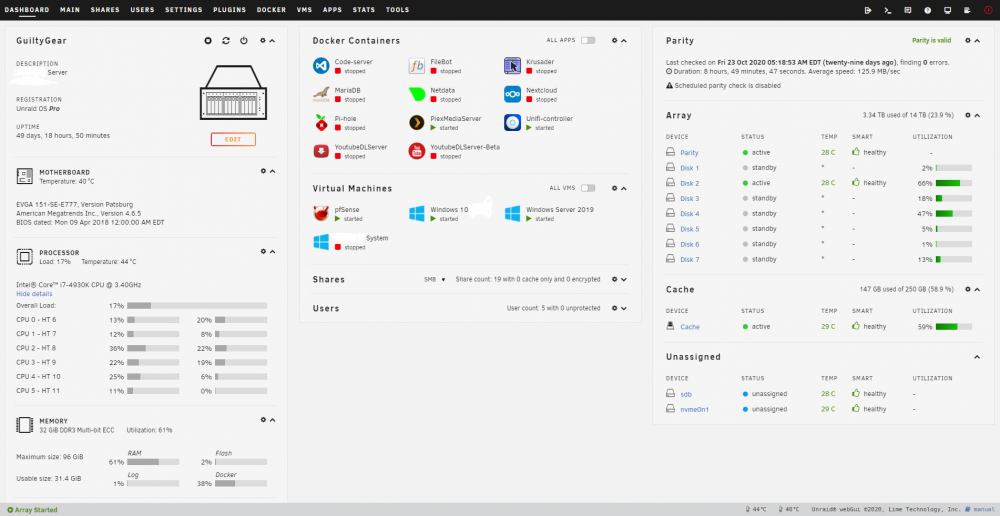
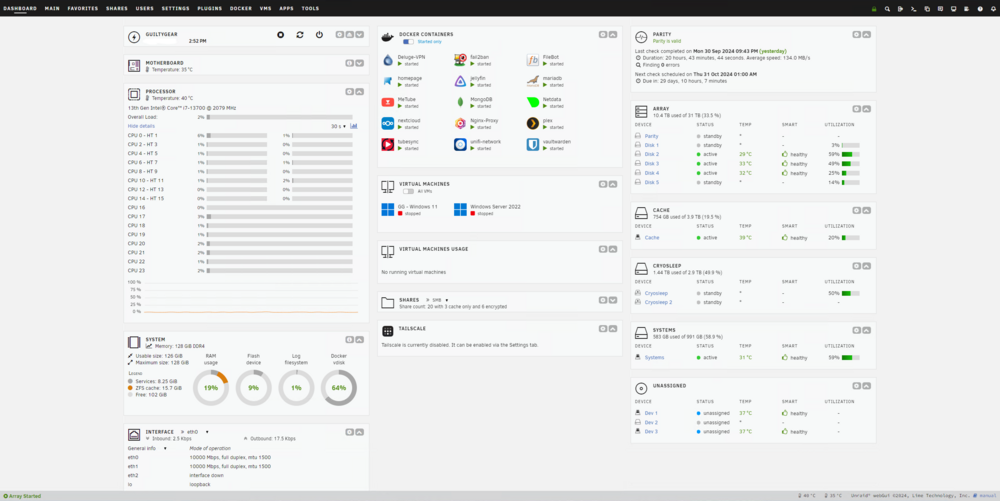
Send help... I'm lost in the rabbit hole.
-
Not sure how I missed that, disregard my post then. Keep up the great work LT.
-
Let me start by saying that I love Unraid. I’ve been using it since I bought it, and I don’t see myself straying from it. However, if it wasn’t for the lifetime membership, I highly doubt I would have bought it. I know you have your reasons, and they’re 100% legitimate. I’m just saying I wouldn’t have made the purchase otherwise. I might have even bought another license down the road, but now I’m looking at alternatives like TrueNAS, XCP-NG, and Proxmox instead. It’s the same reason I mainly use Plex over Jellyfin—I bought the lifetime license. Despite some of the bad decisions Plex is making, I’m overall okay with it. So I’m just saying that maybe there are other ways to monetize this platform, and those should be explored. Joining the subscription bandwagon is not the way, in my humble opinion. Again, just my feedback. #loveUnraid
-
I think this project has been abandoned.
-
I'm getting the following message: "Share SHARENAME set to use pool ZZZZ, but files / folders exist on the YYYYY pool" So pool ZZZZ is a NVM cache pool in ZFS, YYYYY is a separate pool of a HDD in XFS. All I did was add the cache drive to work for the HDD as that is something you can do on the latest Unraid version. I'm on 7.0.0-beta.2 (so thats probably why I got the error). But I thought I'll mention it.
-
Soooo, lets say someone 😐 entered a YT channel, and now the whole channel is downloading. Stopping/Restarting the container is not cancelling the download. How do I do that does someone cancel the process now? (Edit) I loove its simplicity, and clean layout, but really why isn't there a stop button?
-
-
🙃 I thought this was implemented but when I went to actually use it today I see that it isn't. I guess we wait now.
-
This seems like a great option for unraid. Should be added to unraid by default IMO. I haven't added it yet just because I can't be bothered to stay on top of it to ensure it works well. For example Nextcloud is already pushing its luck with the random issues it has that requires manual updates, etc.
-
I updated without backing up the USB, restarted without stopping the array...lolyolo Updated without issues, no parity check, (everything went as expected). Thank you team!
-
Not sure what kind of black magic you guys did but my Unraid server runs about 50w lower on idle. I read somewhere that someone mention they were having lower power usage too from this update. I'm still on 6.12.3 and my system is running pretty solid (I will upgrade once I'm ready to mess with ZFS, need a few new hard drives too). Anyway, great job Unraid team!
-
I can't find this location and/or file: "Upon boot, if all PCI devices specified in 'config/vfio-pci.cfg' do not properly bind, VM Autostart is prevented. You may still start individual VMs. This is to prevent Unraid host crash if hardware PCI IDs changed because of a kernel update or physical hardware change. To restore VM autostart, examine '/var/log/vfio-pci-errors' and remove offending PCI IDs from 'config/vfio-pci.cfg' file and reboot." I found the second one, the config file. Where can I find this? (Don't have a var folder in the USB, and the 'logs' folder has other type of logs) So, I went and deleted the 'config/vfio-pci.cfg' file. Hopefully this will fix it, If it doesn't I'll edit and update. 1. If the system knows about it (by throwing the error) why doesn't it just fix it? 2. Please see one again.
-
Getting this email when I start the server: Event: VM Autostart disabled Subject: vfio-pci-errors Description: VM Autostart disabled due to vfio-bind error Importance: alert Please review /var/log/vfio-pci-errors
-
Upgraded from 6.11.5 to 6.12 without problems. Everything seems to be working fine... ... but how do I reset the dashboard layout, I know I read it sometime before but I forgot. Doesn't seem to be something that is clearly visible. found it.. its the blue wrench at the main panel.
-
Just checking back to report the issue. Seems like the slight OC I had on the CPU started to catch up to it. During Plex schedule tasks which are a bit CPU intensive caused the CPU to thermal lock. Once I turned the OC off now it reaches 83c (which is still a lot) but continues to run without issue. Looking to upgrade the cooler now, maybe just update the whole system as it was just an old gaming computer that became the server kinda thing. Any recommendations?
-
I have copied the syslog from the USB's log folder.
-
Ok, Turned that option to Yes. Meanwhile, here are the logs for this mornings crash using the previous settings I posted. Let me know if these help any. Also, curious to know where in the logs do you look? I was checking out \logs\syslog.txt
-
Is that it? It doesn't let me select the local syslog folder, the only option is '<custom>'.

-
Randomly Unraid becomes unresponsive. VM's weren't running, just Dockers but nothing new recently. Unraid cannot be reached from the web, cannot check physically as it is running headless. However, connecting a keyboard to the system to attempt a blind shutdown does not work (keyboard does not get power) and I have to forcefully reset/shutdown.
-
Could you provide me with directions on how I would go about using rsync?
-
So, asking for a friend... What is the best way (verifying data integrity) to move the data out of Unraid into another data storage system like Truenas or just back into a regular disk? Like what is the actual safe process, because technically there are a bunch of ways of achieving this. My assumption is: 1. Buy a new hard drive as large as the array. 2. Run pre-clear to ensure it is clear and to pre-test it. 3. Turn off dockers/VM's, have nothing using the Array. then.. ?4. Add the hard drive as a UD and copy everything from the array '/unraid/user/' using Krusader. ?4. Add the hard drive in another system, and then copy everything using robocopy (with a 10G nic). 5. Wipe the USB and array drives and use a new system. 6. Move data back into new system.
-
On the report after the parity check (green notification), it says it took longer than it actually took. This has happened twice. The schedule is to start at 8pm.




