





FrequencyLost
Members
-
Joined
-
Last visited
Everything posted by FrequencyLost
-
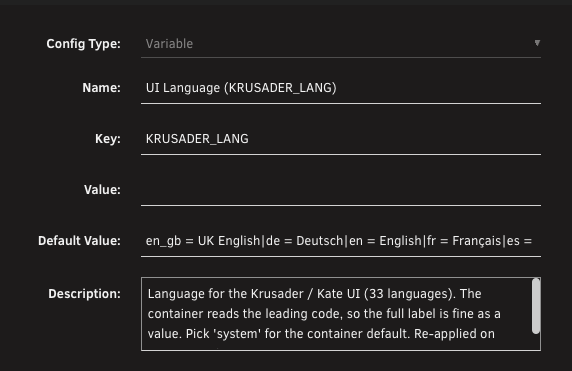
Thanks for creating this Krusader image. It looks great! and I've switched over to this as my main file browser. FYI in the Unraid template, UI Language KRUSADER_LANG setting en=English sets file date format as US date, ie MM/DD/YY, rather than DD/MM/YY Have added en_gb to the template which fixes it
-
Is there an option of a trial licence for individual? €100 is a steep jump without being able to test at home. And I only found out about the existence of this application today, couple days after apparent black friday offer
-
Following what others posted, this worked for me Repository: ghcr.io/binhex/arch-qbittorrentvpn:5.1.0-1-01
-
I'm having 2 issues since the latest update. The same as above, I used to be able to use Root Share with global exclusive shares enabled, but these folders simply wouldnt show up in Root Share, which was fine for my needs as it allowed an easy enable/disable button for SMB access to media. The 2nd issue I'm having is an XFS (non encrypted) HDD that was full of media that was showing up in Unassigned Devices, after server reboot is now showing Format Disk, and unable to mount. I only rebooted server trying to fix the Root Shares glitch before realising it was the update Thank you for any support yuki-diagnostics-20250225-1631.zip
-
Unraid's former core design of a non-striped HDD array with a single cache pool, there probably wasn't much demand for Thunderbolt transfer speeds, since there'd be a bottleneck for the majority of storage. Compared to a TrueNAS always striped array. But since Unraid has added features like multiple cache pools and ZFS, Thunderbolt support has a bigger use case now. And I imagine more users will be looking at Thunderbolt as an alternative to 10GbE. Since 10GbE is still an unusually expensive/premium add-on for desktop computers/Macs despite its age. I ended up on this forum post because I was looking at using thunderbolt instead of 10GbE
-
Hmm, scratch my previous post. Just seen it happen on my Unraid 6.12. And now on Gmail. I'm a dumbass by forgetting I'm running MacOS Beta atm. Oddly, i've been running MacOS beta for a while and only seen these Safari page refreshes start when I installed Unraid 7 beta 3 days ago
-
Is this where the webUI page will randomly auto reload to the Main tab? "IPaddress/Main" I'm on Safari and noticed it happen since Unraid 7 beta. Its annoying as hell when I'm in the middle of something, like adding a new container from scratch on the Docker tab, filled in half the details and suddenly the webpage reloads to Main tab
-
Awesome thank you
-
I'm probably going to do this with Unraid 7. Fresh install on a new USB and keeping my Array data. Is there any way to move my paid licence key across to a new USB, but temporarily boot the old USB in an old PC with a trial licence? The old USB would just have a single cache disk so Docker will initialise. So I can side by side browser copy paste the docker/app settings I want to keep without having to screenshot everything. Thanks
-
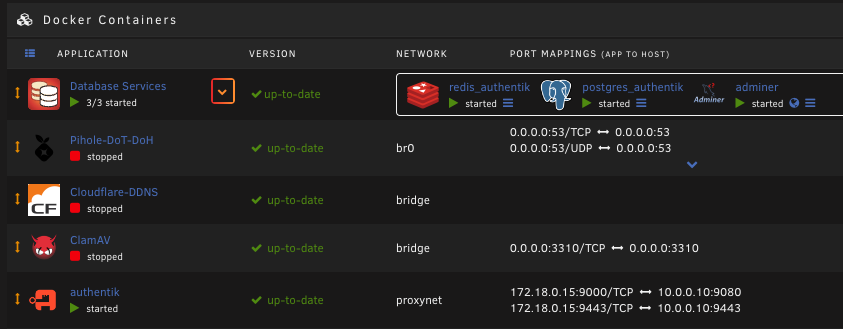
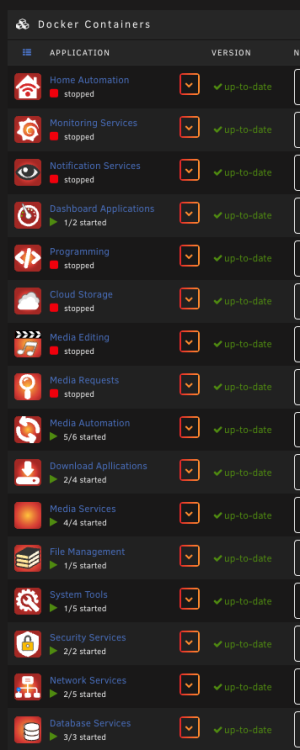
Many thanks for creating this. Just had an odd bug. I had all my docker apps setup nicely in folders with FolderView. This was after removing old DockerFolder and a reboot to be safe. I installed a new docker app (adminer) onto my Unraid server, then added it to an existing folder (Database Services), but its now lost all other folders except the one I just updated. I tested it in multiple browsers and it was the same, just one folder. Added debug if it helps debug-DOCKER.json EDIT: After the above, I tried to re-create one of the folders that were lost, by clicking Add Folder, then I decided to cancel and postpone till tomorrow instead. After starting and cancelling the process of adding a folder, i've now got all my original folders again, just in reverse chronological order
-
Brilliant thank you for this. When you say not compatible does this mean rebuilding the folders from scratch? Or can config json file be exported from old plugin into your new plugin?
-
Waiting for AI to devolve into responses like "Only boomers use XFS." FYI I'm sticking with XFS in my array, for now.
-
Can you please confirm which Intel you're referring to here? The ARC 770 or the iGPU on the 13700K? Thanks
-
Seems so as that stopped working for me when I upgraded to 6.12
-
Followed this, but sadly for me its not honouring the folder arrangement in userprefs.cfg. The preferred order in the file is maintained between reboots. However, once the array starts, its in a different order
-
I'm guessing theres no major benefit in converting array disks from XFS to ZFS at this time? as its all single disks with no bitrot protection
-
Hi, has jq/jq-onig been removed from Nerd Pack? Can see it listed in https://raw.githubusercontent.com/dmacias72/unRAID-NerdPack/master/packages/packages-desc But not as an available option within the Nerd Pack plugin itself Thanks
-
Just updated to 2022.01.02a and confirming the issue is resolved now. That's awesome, thank you
-
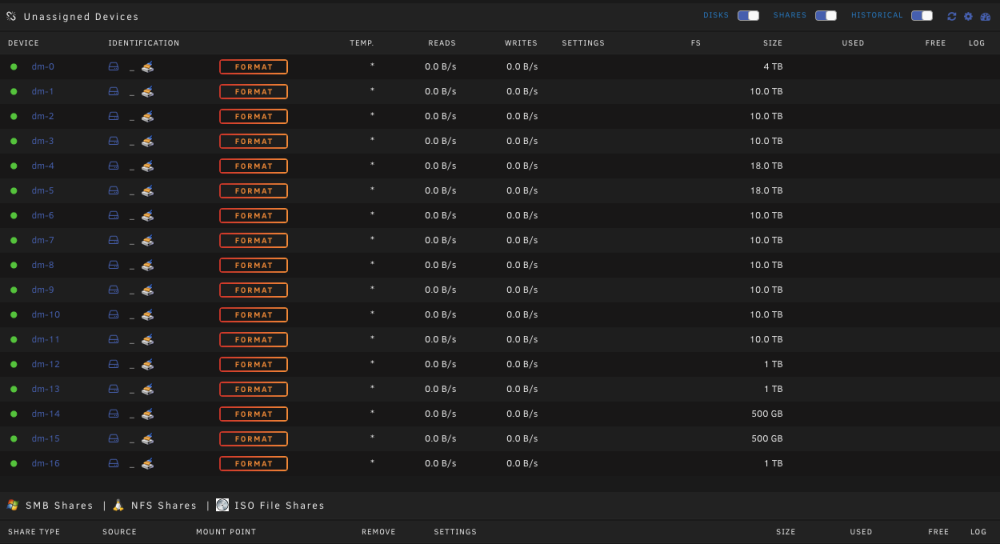
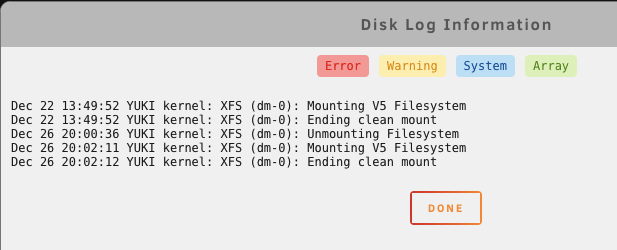
Hello. Updated to the latest version of this plugin today and seeing some unexpected behavior. All the entries in the screenshot we're not there before. One entry for each disk in the array, plus the bottom 5 for disks in various cache pools. I clicked disk log information for the 1st disk (dm-0) which is a 4TB disk in the main array, Please let me know if you need further logs/info. Many thanks
-
Thank you for this amazing app. And really loving the latest update with suspend/resume/kill now available from the GUI. Also GUI interaction seems quicker
-
+1 for this Having switched from Xpenology/Synology to Unraid, the one thing I really miss is a well made built-in file manager. The current Unraid options are extremely clunky in comparison. Without previously using file managers from other NAS/Storage solutions like Synology and QNAP, it may not seem that way or seem like a downgrade, but it certainly is. Considering how underpowered CPU/RAM wise most consumer Synology is, and it has a great file manager. Compared to how powerful some of our Unraid setups are, I dont think resources will be an issue. Having a visually pleasing and modern built-in file manager would be a great addition to the Unraid solution.
-
Thanks for that information I use command line considerably for networking equipment, but my unraid/linux knowledge is still of beginner level. I read somewhere not to mess with unraid disk shares, so have avoided it so far. But your explanation makes sense, disk to disk or user to user. I've got Krusader installed so will try that method for now and then try rsync later when I'm feeling more confident.
-
Thanks for this plugin. I have my shares setup so they each use their own hard drive exclusively. I prefer the order of keeping things together, and i've been using this plugin to shift files when necessary to the drive its share is assigned to. One of my shares now exceeds the size of its hard drive, so I've added an additional drive for that share so it uses 2 disks exclusively, similar to the example below, Share 1 = Disk 1 Share 2 = Disk 2 Share 3 = Disk 3, Disk 4 As far as I can tell its not possible, but can you please confirm if there is any way to use this plugin (or other means) to gather the files from Share 3 scattered across all disks and place them on either Disk 3 or Disk 4? Thanks in advance for any information you can provide




