





Squid
Administrators
-
Joined
-
Last visited
Everything posted by Squid
-
Can you reply back with your diagnostics
-
Run a memtest for at least a couple of passes from the boot menu. Your dimms are weird. 2 of them are running at 2134 (Likely the proper SPD speed for them, but the others are at 1067)
-
"currentSrc" (or the file content.js) doesn't exist within Apps (or AFAICT on anything else within Unraid or plugins). Odds on, a browser extension is causing issues here by injecting code
-
-
Can you right click on the window and click "Inspect". A new window will pop up. What errors are listed in the console section?
-
There should be no problem. Presumably you've exported the flash drive, but you should also ensure that a user is set for access and Windows has issues with public shares with their latest releases
-
What created the share / files in the first place?
-
appdata permissions are not necessarily conducive to sharing / editing over a network. You can always use dynamix file manager to edit any given file
-
No they're not
-
Are you typing in /media/movies within Plex or are you hitting "Browse"? Hit the "x" next to that path in Plex, then Browse and select /media/....
-
@MedjuhServ @frajen Can you right click on the window and click "Inspect". A new window will pop up. What errors are listed in the console section?
-
/var/log total 76312 -rw-r--r-- 1 root root 17458 Dec 7 08:30 Xorg.0.log -rw------- 1 root root 0 Nov 27 16:00 btmp -rw-r--r-- 1 root root 16190982 Jan 2 10:51 cache_dirs.csv -rw-r--r-- 1 root root 58609986 Jan 2 10:51 cache_dirs.log -rw-r--r-- 1 root root 182 Dec 7 08:30 cache_dirs_lost_cache.csv -rw-r--r-- 1 root root 0 Apr 29 2021 cron -rw-r--r-- 1 root root 0 Apr 29 2021 debug -rw-r--r-- 1 root root 92468 Dec 7 08:29 dmesg -rw-r--r-- 1 root root 23392 Jan 1 00:04 docker.log -rw-r--r-- 1 root root 7008 Dec 7 08:29 faillog -rw-r--r-- 1 root root 2656496 Jan 2 10:50 file.activity.log Looks like you've got logging enabled in folder caching and file activity plugins. Those options probably aren't meant to be enabled for long periods of times
-
Are you using a standard English keyboard or something else? Tab doesn't do anything
-
IDK I did test 6.12.14 and had no problems logging in on the local GUI. If still issues, post your diagnostics after a failed login on local and a successful one via the Web
-
Run memtest from the boot menu for at least a couple of passes
-
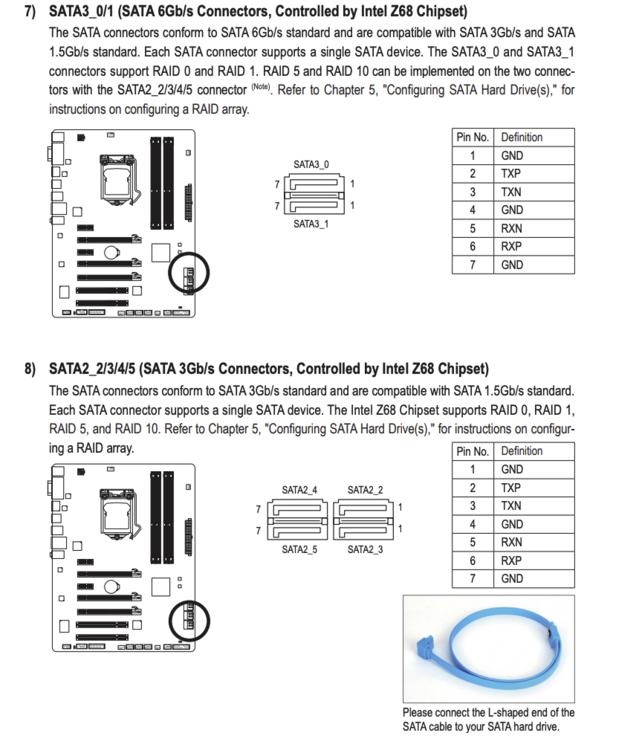
Which ports are you using on the motherboard? Only two of them support 6gbs
-
Do you have a really complicated root password with special characters etc?
-
Would imply that nchan is failing for some reason. FCP though is designed that if you wait a couple of minutes and then reload the page it should bring up the problems it finds. Otherwise, post your diagnostics
-
post your diagnostics.
-
What happened between 6:49 am and 8:32 am this morning? Do these diagnostics cover when the array "stopped" during the rebuild?
-
Looks like you've got a docker container continually restarting. Docker tab looking at the uptime should tell you which
-
Obvious templates that are created by Community Applications itself (conversions from dockerHub) are not allowed within CA
-
Dec 25 11:22:33 UnRAID kernel: mce: [Hardware Error]: Machine check events logged Dec 25 11:22:33 UnRAID kernel: [Hardware Error]: Corrected error, no action required. Dec 25 11:22:33 UnRAID kernel: [Hardware Error]: CPU:1 (19:21:2) MC22_STATUS[-|CE|MiscV|-|-|SyndV|-|Poison|Scrub]: 0x98a889440000010e Dec 25 11:22:33 UnRAID kernel: [Hardware Error]: IPID: 0x0000000000000000, Syndrome: 0x0000000000000000 Dec 25 11:22:33 UnRAID kernel: [Hardware Error]: Bank 22 is reserved. Dec 25 11:22:33 UnRAID kernel: [Hardware Error]: cache level: L2, tx: RESV, mem-tx: GEN Whatever it is, the system corrected it
-
From the terminal, rm /tmp/plugins/pluginPending/* or reboot
-
n 1 09:37:43 Tower kernel: BTRFS info (device loop2): bdev /dev/loop2 errs: wr 0, rd 0, flush 0, corrupt 72, gen 0 Go to Settings, Docker. Disable the service. Delete the docker vdisk file then re-enable the service and try again.


