





Espressomatic
Members
-
Joined
-
Last visited
Everything posted by Espressomatic
-
You only open a vault to the internet if you open your vault to the internet. In other (less cheeky) words, opening means opening ports on your firewall/router - don't do that. Running a reverse proxy without opening ports doesn't expose anything to the outside. Everything will be accessible only to your LAN (the starting point). Now to make it work with you mobile clients, you'd set up Tailscale. That doesn't require opening any ports and lets you access your lan machines/services from anywhere else on your devices that are set up as part of the same "tailnet." This is how I've got my network set up. No one can come in. Only my family can access our vaults, via our personal devices which are part of the same tailnet. That works. You won't be able to access the admin features if there's no token. If that solves it for you, just make the changes to your docker settings. Otherwise, the reverse proxy solution is nice because you can maintain admin access for local connections and deny it for external. But if exposing it to the outside, you really should consider Tailscale or another mesh VPN, to avoid opening ports on your LAN.
-
In addition to the reason you gave (tailnet going down), it also means opening ports on your firewall/router. Which counters one of the benefits of running a tailnet as well, not having to open any ports to the outside. Headscale is pretty easy to deploy on a self-hosted instance in the cloud. Mine is set up on a minimal VPS running at IONOS, which costs a few $ a month. If someone is interested in this type of deployment, make sure your provider offers root, or at minimum sudu access. My long-term host, Dreamhost, doesn't on what they call "VPS." In addition to Headscale, I also deployed Portainer and Nginx Proxy Manager to make it easy to manage and resolve (plus valid certs). One requirement is that the Headscale instance use a different domain name than the tailnet. The tialnet/LAN domain can be made-up, but the Headscale, living on the public internet, has to be legit/registered. About the only caveat with Headscale is that it doesn't have any kind of GUI. There are a few third-party offerings, but I couldn't get any of them to work as they're seemingly not up to date with the latest Headscale developments. So everything has to be managed from SSH. The end result is a tailnet about as secure as going through Tailscale. Just make sure to keep Headscale up to date when necessary.
-
Yeah, one of the (few) things that drives me up the wall with the plugin, one other being the slave share warning. All ignored errors are duplicated twice on the screen and take up more space than the functional part of the UI on my systems. I suppose I wouldn't have any issue if ignored issues were completely hidden from the UI - then I'd be able to truly ignore them.
-
Completely separate apps, one will not (can not) interfere with the other unless you start removing media from one that the other still wants to access. You might as well try Jellyfin too, for the trifecta.
-
Hmmm... You're putting the same amount of faith in that $60 snake-oil USB key that I place in the $5 Sandisk. I have a lot more faith in Sandisk than some unknown company selling a magic-bean USB key. What I'm telling you is that my systems don't go down. And if a USB key fails, they still don't go down. And if one did, for whatever reason, AND at the same time there happened to be a USB failure, it's back up almost immediately because I have or can have extra keys on hand. Having spent $60 or $600 on a USB key doesn't change any of that. Something else on the system can die as easily or more so than the USB key - and that, from a hardware perspective is what takes the most time to recover from. But the most time-consuming recovery, even with backups, is software failure. So ya, IMO, you're focusing on the completely wrong potential failure point. It's like worrying about the color of an umbrella rather than whether it'll stop the rain. You make that point numerous times. Did you miss the part where I said I also have 4 systems (not including backups)? My eggs aren't in a single basket. There can never, due to hardware or software failure, be a scenarios where I lose everything you've just described. Home Automation lives on one system. NVR is its own dedicated system . Plex lives on a media serving system. Vault warden lives on my edge router. They're all backed up - recovery is restore time - which does take time. But USB key failure? That's a few minutes maximum for any of the systems. So, again and 1000x over, I'd rather have 12 $5 USB keys than a single $60 key. That's planning for failure and recovery. Not magic beans. If you value uptime, split apart your Unraid system and have at least a few extra USB keys on-hand.
-
Not sure if anyone else has seen these type of power-saving settings drastically affect their VM-based network speeds, but I finally tracked down (roughly) what happened to my system. Mini system running Intel i5-1235U with 16GB and 256GB NVME. Unraid 7.00 (beta 2, 3 or 4) 4x 2.5Gbit ports 2x 10Gbit ports VM running pfSense with 1x 2.5Gbit bridged port for WAN and x 1x 10Gbit bridged port for LAN (virtio). Unraid runs on (other) 1x10Gbit port eth0 connection. Prior to making any BIOS changes I could measure a consistent 1700 Mbit download and 1080 - 1100 Mbit upload directly on the pfSense VM or a wired Mac. This matched the speed measured directly on the modem. If I apply the various settings in BIOS required/suggested, such as non-auto setting for max C-state, Turbo OFF, my download speeds drop to 600-800 Mbit and upload to 800-900 Mbit consistently. However, if I boot pfSense bare-metal on it own, I don't see these speed reductions. It took me a few days to figure out what was going on because I hadn't correlated the BIOS changes to the time at which the issue started happening. Eventually it was the only thing left to look at and simply resetting BIOS to defaults immediately resolved the issue. Since then I've gone back and applied only a few settings as mentioned above, and immediately the issues come back.
-
I went with 7 to allow running without an array and for the upgraded ZFS support. IMO, it's just as stable as 6.12 I was running before. It's running on 4 systems, all of them production, 1 of them is my edge router/firewall and another my home automation system which need 24/7 uptime.
-
That's part of my point. Amazon, click, $5, next morning it's here. Same USB key since 2018 and it's going to last longer than me. No need to overthink this.
-
If all 4 of my current Unraid systems have USB drive failures on a regular basis and each time I replace with a new drive, it'll cost me less than $60 over 30-40 years. USB booting is a great asset, and a $5 drive is all that's needed for years and years of trouble-free use. If in doubt, replace the drives on a schedule - restoring is painless. I needed a spare USB drive today for some testing and just formatted one of my Unraid drives. Restored when i was done and back into its system.
-
I'm running MacOS 15.01 on M1 Air with no such issues. Unraid 7 however and not 6.12.13. Fiirefox/Floorp, Safari, Orion and Chome browsers all working with Unraid. No network speed issues related to Unraid. The speed issue I'm facing is that at various times during a Time Machine backup, all cores go to 100% which affects various tasks. It can cause window update issues, video playback pauses, page loading (in any browser), etc. So 2 avenues to check out: 1. Maybe Unraid 7 (beta 3 currently) will work better for you guys 2. Make sure you're not getting affected by background MacOS processes killing performance/network
-
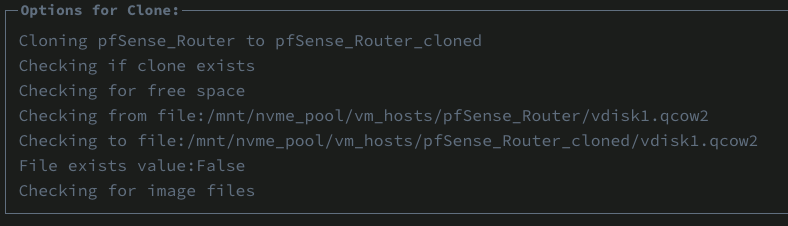
You got it. After renaming the VM: Is it normal for a VM on zfs to fail cp and need rsync?

-
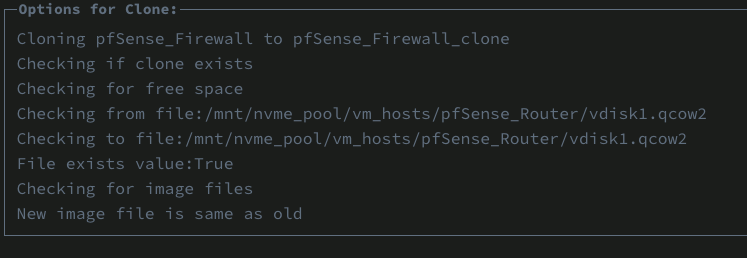
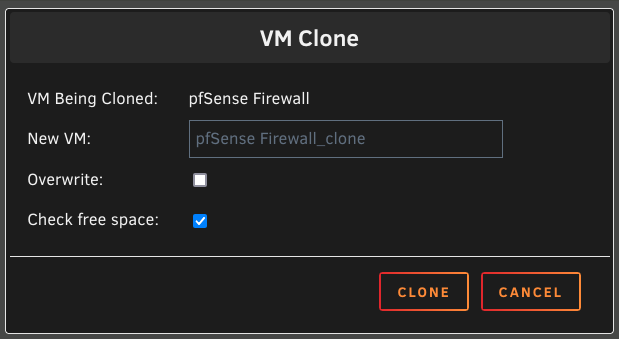
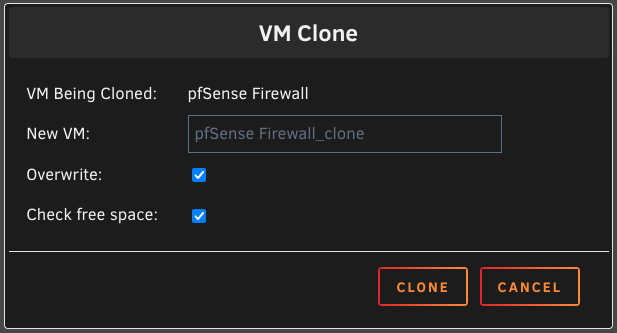
Gotcha. OK, looks like it's checking the source twice: Also odd, sometimes the clone window appears with both boxes checked, sometimes empty. Also, clicking in the filename field automatically selects all the text and it's impossible to deselect it with any mouse clicks - need to use the cursor keys.
-
Here's domain.cfg SERVICE="enable" IMAGE_FILE="/mnt/nvme_pool/system/libvirt/libvirt.img" IMAGE_SIZE="1" DEBUG="no" DOMAINDIR="/mnt/nvme_pool/vm_hosts/" MEDIADIR="/mnt/nvme_pool/vm_isos/" VIRTIOISO="/mnt/nvme_pool/vm_isos/virtio-win-0.1.208-1.iso" BRNAME="br0" VMSTORAGEMODE="auto" DISABLE="no" HOSTSHUTDOWN="shutdown" TIMEOUT="60" CONSOLE="web" RDPOPT="no" USAGE="N" USAGETIMER="3" and diagnostics after installing the new php file, rebooting, and trying the clone operation trillian-diagnostics-20241019-1057.zip
-
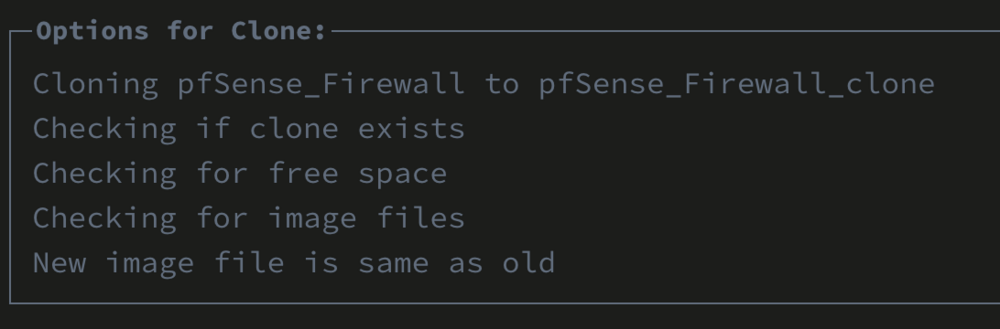
Well, nevermind about the above. On my edge router system I still can't clone the pfSense VM, regardless of the check-marks. Something's odd. Take a look a this error - it thinks the source and destination names are the same, no matter what I use for a destination name. This is with the Overwrite check-box checked.
-
Here's a thought... Is the check for an existing destination path (existing clone) happening AFTER the path is created? (on beta 2?) I used another VM on a different system running beta 3 and both check-marks defaulted to un-checked (unlike beta2) and the clone process worked, unlike beta2 on the first system. I've rebooted the first system to beta3, but I can't take down the VM right now to try cloning it again. Beta3 still doesn't remove the VM's dataset when removing the VM and disks from the VM panel.
-
Here's the XML for the VM <?xml version='1.0' encoding='UTF-8'?> <domain type='kvm' id='3'> <name>pfSense Firewall</name> <uuid>c1a5ff0a-7bcc-d017-ecff-7d7c616a6361</uuid> <metadata> <vmtemplate xmlns="unraid" name="FreeBSD" icon="pfSense2.png" os="freebsd" webui="" storage="default"/> </metadata> <memory unit='KiB'>8388608</memory> <currentMemory unit='KiB'>4194304</currentMemory> <memoryBacking> <nosharepages/> </memoryBacking> <vcpu placement='static'>4</vcpu> <cputune> <vcpupin vcpu='0' cpuset='0'/> <vcpupin vcpu='1' cpuset='4'/> <vcpupin vcpu='2' cpuset='8'/> <vcpupin vcpu='3' cpuset='9'/> </cputune> <resource> <partition>/machine</partition> </resource> <os> <type arch='x86_64' machine='pc-q35-9.0'>hvm</type> <loader readonly='yes' type='pflash'>/usr/share/qemu/ovmf-x64/OVMF_CODE-pure-efi.fd</loader> <nvram>/etc/libvirt/qemu/nvram/c1a5ff0a-7bcc-d017-ecff-7d7c616a6361_VARS-pure-efi.fd</nvram> </os> <features> <acpi/> <apic/> </features> <cpu mode='host-passthrough' check='none' migratable='on'> <topology sockets='1' dies='1' clusters='1' cores='2' threads='2'/> <cache mode='passthrough'/> </cpu> <clock offset='utc'> <timer name='hpet' present='no'/> <timer name='hypervclock' present='no'/> <timer name='pit' tickpolicy='delay'/> <timer name='rtc' tickpolicy='catchup'/> </clock> <on_poweroff>destroy</on_poweroff> <on_reboot>restart</on_reboot> <on_crash>restart</on_crash> <devices> <emulator>/usr/local/sbin/qemu</emulator> <disk type='file' device='disk'> <driver name='qemu' type='qcow2' cache='writeback'/> <source file='/mnt/nvme_pool/vm_hosts/pfSense_Router/vdisk1.qcow2' index='1'/> <backingStore/> <target dev='hdc' bus='virtio'/> <serial>pfsense</serial> <boot order='1'/> <alias name='virtio-disk2'/> <address type='pci' domain='0x0000' bus='0x04' slot='0x00' function='0x0'/> </disk> <controller type='usb' index='0' model='ich9-ehci1'> <alias name='usb'/> <address type='pci' domain='0x0000' bus='0x00' slot='0x07' function='0x7'/> </controller> <controller type='usb' index='0' model='ich9-uhci1'> <alias name='usb'/> <master startport='0'/> <address type='pci' domain='0x0000' bus='0x00' slot='0x07' function='0x0' multifunction='on'/> </controller> <controller type='usb' index='0' model='ich9-uhci2'> <alias name='usb'/> <master startport='2'/> <address type='pci' domain='0x0000' bus='0x00' slot='0x07' function='0x1'/> </controller> <controller type='usb' index='0' model='ich9-uhci3'> <alias name='usb'/> <master startport='4'/> <address type='pci' domain='0x0000' bus='0x00' slot='0x07' function='0x2'/> </controller> <controller type='pci' index='0' model='pcie-root'> <alias name='pcie.0'/> </controller> <controller type='pci' index='1' model='pcie-root-port'> <model name='pcie-root-port'/> <target chassis='1' port='0x8'/> <alias name='pci.1'/> <address type='pci' domain='0x0000' bus='0x00' slot='0x01' function='0x0' multifunction='on'/> </controller> <controller type='pci' index='2' model='pcie-root-port'> <model name='pcie-root-port'/> <target chassis='2' port='0x9'/> <alias name='pci.2'/> <address type='pci' domain='0x0000' bus='0x00' slot='0x01' function='0x1'/> </controller> <controller type='pci' index='3' model='pcie-root-port'> <model name='pcie-root-port'/> <target chassis='3' port='0xa'/> <alias name='pci.3'/> <address type='pci' domain='0x0000' bus='0x00' slot='0x01' function='0x2'/> </controller> <controller type='pci' index='4' model='pcie-root-port'> <model name='pcie-root-port'/> <target chassis='4' port='0xb'/> <alias name='pci.4'/> <address type='pci' domain='0x0000' bus='0x00' slot='0x01' function='0x3'/> </controller> <controller type='pci' index='5' model='pcie-root-port'> <model name='pcie-root-port'/> <target chassis='5' port='0xc'/> <alias name='pci.5'/> <address type='pci' domain='0x0000' bus='0x00' slot='0x01' function='0x4'/> </controller> <controller type='pci' index='6' model='pcie-root-port'> <model name='pcie-root-port'/> <target chassis='6' port='0xd'/> <alias name='pci.6'/> <address type='pci' domain='0x0000' bus='0x00' slot='0x01' function='0x5'/> </controller> <controller type='virtio-serial' index='0'> <alias name='virtio-serial0'/> <address type='pci' domain='0x0000' bus='0x03' slot='0x00' function='0x0'/> </controller> <controller type='sata' index='0'> <alias name='ide'/> <address type='pci' domain='0x0000' bus='0x00' slot='0x1f' function='0x2'/> </controller> <interface type='bridge'> <mac address='52:54:00:62:24:28'/> <source bridge='br4'/> <target dev='vnet4'/> <model type='virtio'/> <alias name='net0'/> <address type='pci' domain='0x0000' bus='0x01' slot='0x00' function='0x0'/> </interface> <interface type='bridge'> <mac address='52:54:00:62:24:30'/> <source bridge='br5'/> <target dev='vnet5'/> <model type='virtio'/> <alias name='net1'/> <address type='pci' domain='0x0000' bus='0x02' slot='0x00' function='0x0'/> </interface> <serial type='pty'> <source path='/dev/pts/0'/> <target type='isa-serial' port='0'> <model name='isa-serial'/> </target> <alias name='serial0'/> </serial> <console type='pty' tty='/dev/pts/0'> <source path='/dev/pts/0'/> <target type='serial' port='0'/> <alias name='serial0'/> </console> <channel type='unix'> <source mode='bind' path='/run/libvirt/qemu/channel/3-pfSense Firewall/org.qemu.guest_agent.0'/> <target type='virtio' name='org.qemu.guest_agent.0' state='connected'/> <alias name='channel0'/> <address type='virtio-serial' controller='0' bus='0' port='1'/> </channel> <channel type='qemu-vdagent'> <source> <clipboard copypaste='yes'/> <mouse mode='client'/> </source> <target type='virtio' name='com.redhat.spice.0' state='disconnected'/> <alias name='channel1'/> <address type='virtio-serial' controller='0' bus='0' port='2'/> </channel> <input type='tablet' bus='usb'> <alias name='input0'/> <address type='usb' bus='0' port='1'/> </input> <input type='mouse' bus='ps2'> <alias name='input1'/> </input> <input type='keyboard' bus='ps2'> <alias name='input2'/> </input> <graphics type='vnc' port='5900' autoport='yes' websocket='5700' listen='0.0.0.0' sharePolicy='ignore'> <listen type='address' address='0.0.0.0'/> </graphics> <audio id='1' type='none'/> <video> <model type='qxl' ram='65536' vram='65536' vgamem='16384' heads='1' primary='yes'/> <alias name='video0'/> <address type='pci' domain='0x0000' bus='0x00' slot='0x1e' function='0x0'/> </video> <watchdog model='itco' action='reset'> <alias name='watchdog0'/> </watchdog> <memballoon model='virtio'> <alias name='balloon0'/> <address type='pci' domain='0x0000' bus='0x05' slot='0x00' function='0x0'/> </memballoon> </devices> <seclabel type='dynamic' model='dac' relabel='yes'> <label>+0:+100</label> <imagelabel>+0:+100</imagelabel> </seclabel> </domain>
-
At the moment, 7.0.0beta2 as I just rolled back to it from beta3 to test something else. I'm waiting on a reboot to get back to beta3 but can't do that right now as I need to wait for the wife who's on a video meeting. This system is dedicated as my edge router Destination being the new name I enter in the clone window right? So there is no existing clone with that name and I'd expect not to get that error. My VM storage path is a ZFS dataset. /mnt/nvme_pool/vm_hosts/XXXXX/ - where XXXXX is the folder for each VM. After starting the clone process above, I end up with a new dataset (XXXX-newname) for each clone I attempt to create. Each path is empty after the error.
-
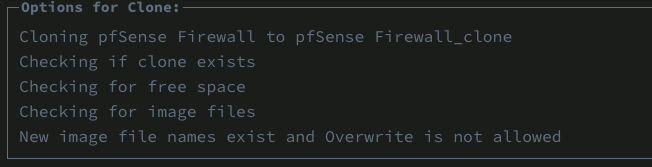
Is it possible to clone a VM including its vdisk, resulting in 2 distinct, independent, but otherwise identical copies of the VM? Maybe I'm misunderstanding the UI, so any additional info would be greatly appreciated. This is what I'm seeing/doing... With the VM stopped, I select the clone option and then a window pops up asking for name and a couple of options: I don't know if the "overwrite" option means to overwrite the original (doesn't make sense) or whether to overwrite any other clone with the same name I'm providing here (what I expect) Either way, I deselect the overwrite option and then press the clone button - I have no clones at this point on the system. The result I get is the following error: New image file name exists. What image filename? At this point I don't know what's going on, because I don't have any clones, nothing with the clone name I just specified. It would be easier to understand if the filename it thinks already exists was displayed in the error. Can anyone shed some light here?
-
The first option might be workable if there's a new beta available before the previous one times out, but I'd still argue that's a bad solution because it would prevent A/B testing. The second option is out of the question and would impact people's ability to test/report, not to mention just run the OS. I've been running 7.00 betas since they first came out on every one of my production machines and I'd hate to have anything change that would prevent that in the future. So maybe there needs to be a special optional BETA testing key type that has these limits such that it won't impact anyone using their standard keys with the beta releases.
-
It would be cool if TS and a select number of other plugins were installed by default when making a new Unraid boot drive. Even if many of them are "OFF" by default like many other Unraid features. This could greatly simplify the discovery process for everyone, not just people new to Unraid.
-
I thought to post here first to get any possible feedback to add to a bug report - especially since I'm now using Headscale and not Tailscale's own coordination server. So this has nothing to do with Unraid specifically, but this is the only forum I participate in with other Tailscale users.
-
I'm pretty sure the DNS issues discussed above are the result of a bug in Tailscale - and I've found another (in general, not the plugin). At the very least it's some kind of edge-case that runs into a wall and needs a change to resolve the behavior. I've set the Global DNS to my own private DNS resolver, which means when using Tailscale DNS, this global address is used for anything outside the tailnet. I also have set the search domain (base domain) to the FQDN I used for all my local machines/services (mandatory for Magic DNS). Up above we saw this fail with outbound addresses. On my iPhone and Mac, outbound addresses however work. I can go to any outside domain without issue. The issue is I can't go to any host on my local FQDN. The lookups can never be resolved. Specifying an address matching the base domain defined for the tailnet will not hit my local DNS resolver with the query. If I change the base domain to anything else (something I'm not using), then these queries work as expected. This behavior isn't outlined in any documentation I've been able to find. What I've found indicates that specifying the base name means that when you query a local name without the base.tld, that base.tld will be added to it to make a FQDN. That's more or less what's said about that. So if this search domain/base_url setting defines a domain to NOT query to global DNS, then I really don't see the point, nor how it's ever supposed to actually work unless you define all the hosts in your configuration. One caveat with the latest testing. For the original DNS testing a few days ago I had been using Tailscale coordination servers, but now I'm using Headscale exclusively.
-
Can I help test? I'm using HAOS in Unraid 7 beta 3. My Aqara door lock (via hub) is connected with Matter to HA - however I believe it's using WiFi and not Thread.
-
Nope. And it won't work anyway. Game servers aren't using http nor https, the only thing NPM is used for and the only thing it can apply certificates to. Same as every other IP address on your network: DHCP - you can set a static lease (aka fixed lease, static assignment, static IP, fixed IP, etc.) from your router, which assigns your chosen IP to a specific MAC address (of your game system)
-
I don't think so. When you update the container, it'll already include any necessary changes. There are breaking changes all the time, and if you're maintaining your own compose and config files, then you have to make the various changes outlined in each release. BUt as we're using someone else's container, it's up to them to make changes and releases. I just checked and an update didn't show up - but forcing an update will pull 118. Seems to work fine.


