






ChatNoir
Moderators
-
Joined
-
Last visited
Everything posted by ChatNoir
-
I might have worded that poorly, it was too early. You say that access from domain name is not working, is local access from LAN and IP working ?
-
Yes. Sep 17 00:01:49 Tower kernel: mpt2sas_cm0: LSISAS2308: FWVersion(15.00.00.00), ChipRevision(0x05), BiosVersion(07.29.00.00)
-
When are the SSD trim or your pools scrub scheduled ?
-
Are the containers running locally ? Please attach your diagnostics to your next post.
-
I see several things repeating in the log that do not seem normal : Sep 18 13:48:13 KRAKEN zed[6752]: Diagnosis Engine: error event 'ereport.fs.zfs.deadman' Sep 18 13:48:13 KRAKEN zed[6752]: Missed 25 events Sep 18 13:48:13 KRAKEN zed[6752]: Bumping queue length to 2147483647 Sep 18 13:48:13 KRAKEN zed[6752]: Diagnosis Engine: error event 'ereport.fs.zfs.deadman' Sep 18 13:48:13 KRAKEN zed[6752]: Missed 20 events Sep 18 13:48:13 KRAKEN zed[6752]: Bumping queue length to 2147483647 Sep 18 13:48:13 KRAKEN zed[6752]: Diagnosis Engine: error event 'ereport.fs.zfs.deadman' Sep 18 13:48:22 KRAKEN kernel: sd 1:2:12:0: [sdg] tag#7259 task abort SUCCESS!! scmd(0x000000008d67e782) Sep 18 13:48:22 KRAKEN kernel: sd 1:2:12:0: [sdg] tag#7259 CDB: opcode=0x0 00 00 00 00 00 00 Sep 18 13:48:22 KRAKEN kernel: sd 1:2:12:0: [sdg] tag#7259 OCR is requested due to IO timeout!! Sep 18 13:48:22 KRAKEN kernel: sd 1:2:12:0: [sdg] tag#7259 SCSI host state: 5 SCSI host busy: 1 FW outstanding: 0 Sep 18 13:48:22 KRAKEN kernel: sd 1:2:12:0: [sdg] tag#7259 scmd: (0x000000008d67e782) retries: 0x0 allowed: 0x5 Sep 18 13:48:22 KRAKEN kernel: sd 1:2:12:0: [sdg] tag#7259 CDB: opcode=0x8a 8a 00 00 00 00 05 e6 f5 d8 60 00 00 00 b0 00 00 Sep 18 13:48:22 KRAKEN kernel: megaraid_sas 0000:13:00.0: megasas_disable_intr_fusion is called outbound_intr_mask:0x40000009 Sep 18 13:48:22 KRAKEN kernel: megaraid_sas 0000:13:00.0: megasas_enable_intr_fusion is called outbound_intr_mask:0x40000000 Sep 18 13:48:32 KRAKEN kernel: sd 1:2:12:0: Power-on or device reset occurred The first one seem to be related to ZFS, so I would suggest asking in the support thread for the plugin. The second seem to be sdg being reset. I'd guess that this device is part of a ZFS file system ? You should check the drive connections (data and power). Note that RAID controllers are not recommended even if that's maybe not the cause of your issue.
-
This looks like an app configuration issue, not an Unraid issue. You should seek support on the app support thread available through the 'support' button on the docker page.
-
Simply exclude the system share ? From my understanding, the plugin only looks at the Array and this share is best on a Pool. So this should not be an issue.
-
Only increases by 10% increments.
-
Also, can you describe what you mean by 'stability issues' ?
-
I guess that most people have a larger RAM than Flashdrive.
-
There is no 'support' for specific drives. It should just work. How is the drive connected ? Is it possible that it is disabled by the 3.3V pin ?
-
Does for me. Maybe a DNS issue on the OP's side ?
-
That's odd, it works fine for me (Chrome of FF).
-
@ljm42
-
Might be possible to recover some data from the drive ? rm probably only removed the pointer to the files, not the actual data. I'd suggest to prevent any writes to the drives until you have investigated those options. Unless it's non-critical as you said and you can start over.
-
Pull your flash drive and check the content on another computer.
-
Hey, thanks for the support, I sure everyone appreciate the time you take for the community.
-
What are the HDDs ? Did you check that it is not the 3.3V disable issue ? Maybe your old PSU did not provide 3.3V on the SATA power cables and the new one does. The easiest way to find out is a Molex to SATA power splitter. How the old PSU did ? Is it possible that it fried the drive at the same time ?
-
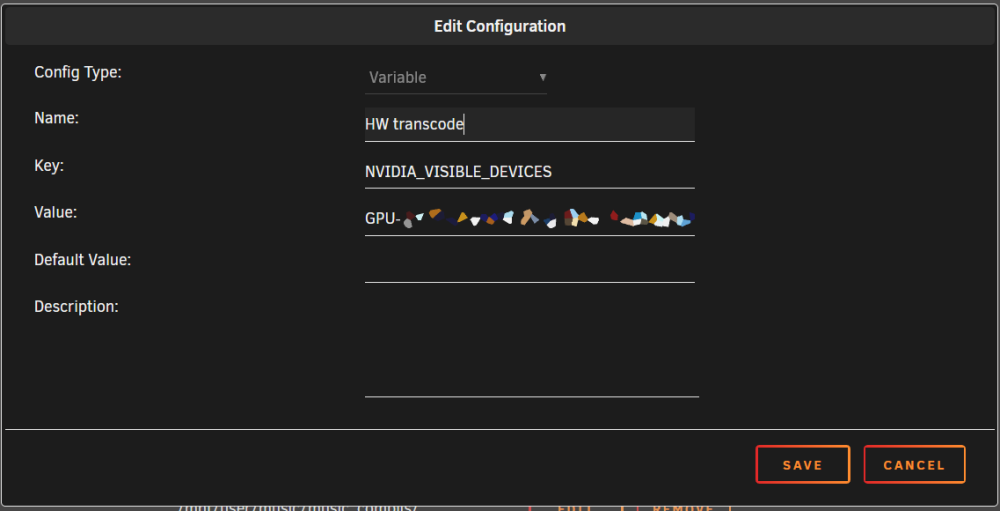
Then you should create the variable. An example from my official Plex, but that should be the same.

-
Can you tell us more on what is not working properly ? I suppose that you know this procedure as it seems it is not the first time you have a problem : https://wiki.unraid.net/Manual/Changing_The_Flash_Device
-
🤘
-
Did you provide power to the drives the same way as before ? (SATA power, Molex, etc.) It is possible some drives are disabled via the 3.3V pin.
-
It's not that overclocking is not supported. There is as much support than in every other OS. I am pretty sure that if you ask a Windows engineer, he would prefer you don't use an unstable overclock on his OS. The thing is that servers are built to run 24/7 and are supposed to be as stable and reliable as possible. Overclocking is the opposite of that. Now, as why people are still buying K models I see several reasons : they are used to when building a gaming rig they use their old gaming rig as a server K variants often offer higher stock clocks and are generally faster than the non-K model But its fine to use them if you keep the stock clocks and power settings.
-
Please attach your diagnostics to your next post. Do you have an idea of your drives allocation ? Maybe a recent daily array health report ?
-
Is there a question or an issue ?