






bmartino1
Members
-
Joined
-
Last visited
Everything posted by bmartino1
-
The cloud is just some one elses computer... What I do. I have a ring network between friends and a few servers. We use Unifi and Site Magic to make a vpn connection to each network. so i can go to \\there newrok ip and hit their system. they can go to \\ and hit my system in this ring network we each have a backup folder that get sftp each week/month etc to sftp transfer files via machine key (ssh keys used instead of a username and password) this way i can run things like the appdata plugin on unraid that makes a unraid flash drive, backups my dockers configurations. and if needed, can tell the sftp rsync to copy xyz. user script plugin to cron schedule scripts. https://docs.oracle.com/cd/E18752_01/html/819-5461/gbchx.html We also implement zfs and use zfs snapshots. I can use sftp and send a zfs snapshot of data to the remote's system... This way if someone has a issues we can atleast be online and have data access.
-
this is possible... I would recommend making a staging area for your backups especial when using additional backup systems and plugins like the appdata plugin. This way you have 1 folder to send, receive. Depends on your cloud service and what they accept for transferring files to and from the cloud service. I'm a fan of sftp. I've even built and support a updated docker instance for sftp. Their are Other solutions, usually linux bash scripting with rsync or if your cloud server supports it, docker application running such as synching. then the question is who is instating the transfer? is the cloud service connection to unraid (and how?tail scale?vpn?other) or is unraid connecting to the cloud and transferring? it is best practice to use the 3-2-1 backup strategy Essential 1 single important file needs to be on 3 disks, on 2 separate server systems and 1 remote location that is not in house. this guarantees that you have 3 locations for the same file, that if a system goes down you still have access adn in the event of everything in house (a fire as example) that the file exist offsite for a restore https://www.backblaze.com/blog/the-3-2-1-backup-strategy/ do you have a cloud service in mind? using the CA rclone per example can also connect to cloud systems like Amazon s3 and other. although, configurations can be triky at times. or using something like lucky backup https://www.youtube.com/watch?v=_kc4rIdUhdc there are pre-existing scripts as well via other community member. Example: https://forums.unraid.net/topic/126028-simple-automated-offline-backup-script/
-
Are you referring to how the docker bridge network is created. As that broadcast IP is for the docker default bridge network. https://docs.docker.com/engine/network/drivers/bridge/ my understanding is that this broadcast is in the docker daemon config: https://docs.docker.com/engine/daemon/
-
contact support. Licensing and documentiaotn exist and clearly sate that if you blacklist the usb that device id can't be reused...
-
Due to the changes spaceinvaders videos are now more general overview of how to install and what to look for: https://bmartino1.weebly.com/immich-on-unraid-ca-docker.html
-
alot has changed and is needed to use immich on unraid. redis is gone use valkey. I've made guides for this exact reason...
-
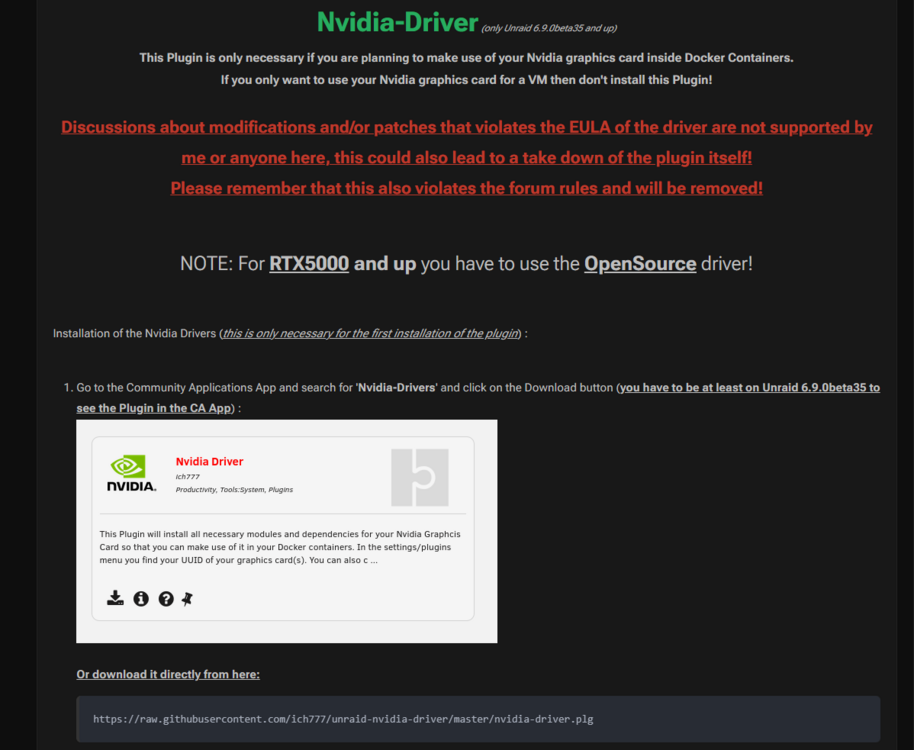
the gpu is also a bit weird to use on unraid due to kerneal driver: https://www.reddit.com/r/unRAID/comments/1kwp2ac/intel_arc_a310_eco_support/ https://forums.unraid.net/topic/187952-need-help-with-intel-arc-a310-and-unraid/ do you have intell top installed? also for the nvdia rtx 5000 series did you take a look at the nvdia support page??? https://forums.unraid.net/topic/98978-plugin-nvidia-driver/
-
the gpu is also a bit weird to use on unraid due to kerneal driver: https://www.reddit.com/r/unRAID/comments/1kwp2ac/intel_arc_a310_eco_support/ https://forums.unraid.net/topic/187952-need-help-with-intel-arc-a310-and-unraid/ do you have intell top installed?
-
your trying to pass a gpu via a thoundbolt pcie adapter? Please post a diag file. whats the output of lspci and lsusb it could be a usb thunderbolt deivce thus the /dev/drive for the gpu is not shown...
-
you are the probelm. CLealry you didn't read any of the nerdtools post nor how this coamnd exist and works. also don't take over someone else post and thread make your own general post!
-
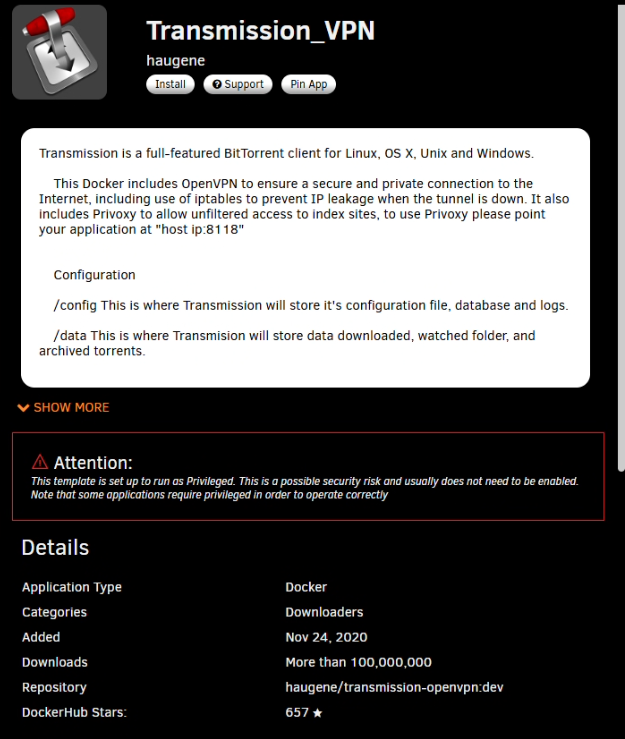
per the CA template support forum Transmission_VPN - Docker container which runs Transmission torrent client with WebUI while connecting to OpenVPN. It also will update the open port every hour for those using PIA only as their provider. Based on Haugene's Currently the Container is set up for PIA with all the available OpenVPN configs listed as defaults. If your provider is someone else then the defaults need to be changed to the appropriate OpenVPN config names found here Anyone having issues with Watch folder permission issues, please read this POST & this POST
-
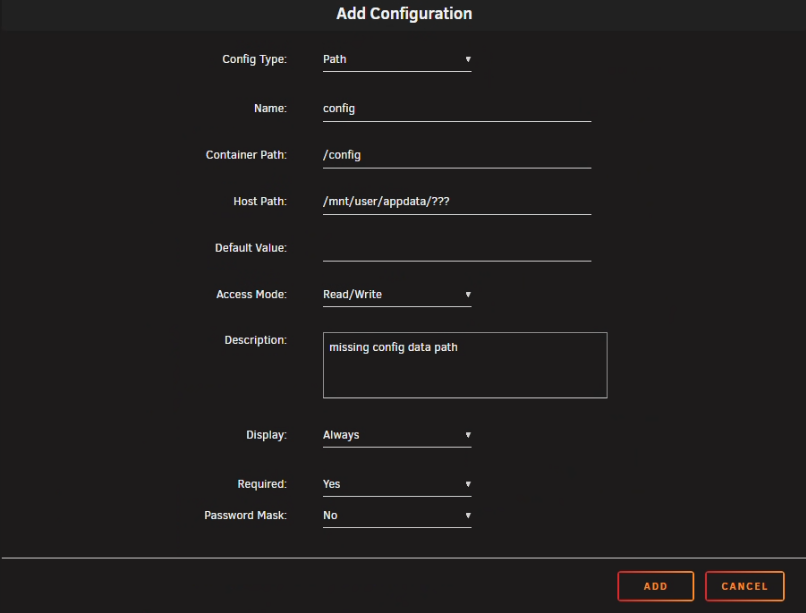
ok no worries. I assume your using this CA template the: the above is example as the tempate essential builds a docker run line you may need to click the advance togle at the top right some setting and options are only avliable with that togle so in the above docker run shared. I gave exampels not direct paths. the bare mini as well. so the data folder should be located to /mnt/user/T_Media/Torrent/ unless you set its path and the config folder path doesn't exist in the current CA template even with the advance toggle and show more settings. I was pulling data form there docker hub / git hub. The have adatioal support forum found here https://forums.unraid.net/topic/60143-support-clowryms-docker-repository/ the template is also using the dev tag github: GitHubGitHub - haugene/docker-transmission-openvpn: Docker cont...Docker container running Transmission torrent client with WebUI over an OpenVPN tunnel - haugene/docker-transmission-openvpnDocker hub: https://hub.docker.com/r/haugene/transmission-openvpn/ so without it int he tempalte its inside teh docer via termail cd /config /your/config/path/:/config \ you will have to edit the repositry to a named tag and add that path: as ths is the latest image: sha256:ecc30da79114d801295fd10a5dbaf8640b19707d012fb55be0671ddbe0503037 haugene/transmission-openvpn:latest





-
otherwise you may need to contact PIA support for how to configure and/or generate a OPVN file for your vpn connection https://helpdesk.privateinternetaccess.com/kb/articles/linux-setting-up-manual-openvpn-connection-through-the-terminal
-
Thank you for clarifing. I would recomend using docker compose (more to easliy add and use mutple networks... there’s a solid all-in-one: haugene/transmission-openvpn. It supports PIA (OpenVPN or WireGuard), does automatic port-forwarding for PIA regions that allow it, and exposes Transmission’s web UI. Below are two clean ways to run Transmission behind PIA. Pick A (two-container) if you specifically want to use that PIA container you linked; pick B (all-in-one) if you want simpler ops. A) Two-container setup itsdaspecialk/pia-openvpn (VPN) + linuxserver/transmission sharing its network https://hub.docker.com/r/itsdaspecialk/pia-openvpn/ and this docker https://hub.docker.com/r/linuxserver/transmission step 1 setup and make ports for use with the PIA VPN Dokcer run (can be made into custom tempatles) # 1) PIA OpenVPN container (owns the network + the host port mappings) docker run -d \ --name pia \ --cap-add=NET_ADMIN \ --device /dev/net/tun \ -e OPENVPN_USERNAME='PIA_USERNAME' \ -e OPENVPN_PASSWORD='PIA_PASSWORD' \ -e OPENVPN_CONFIG='*.ovpn or region name' \ -e LOCAL_NETWORK='192.168.1.0/24' \ -p 9091:9091 \ # Transmission web UI (mapped on the VPN container) -p 51413:51413 \ # BitTorrent TCP -p 51413:51413/udp \ # BitTorrent UDP (DHT/Peers) -v /path/to/openvpn:/etc/openvpn \ -v /path/to/pia-config:/config \ --restart unless-stopped \ itsdaspecialk/pia-openvpn:latest # 2) Transmission shares the VPN container’s namespace (no ports on this one) docker run -d \ --name=transmission \ --network=container:pia \ -e PUID=1000 -e PGID=1000 \ -e TZ="America/Chicago" \ -e TRANSMISSION_WEB_HOME=/combustion-release \ -v /path/to/downloads:/downloads \ -v /path/to/watch:/watch \ -v /path/to/transmission-config:/config \ --restart unless-stopped \ lscr.io/linuxserver/transmission:latest or use the docker compose plugin and paste and edit the docker compose file version: "3.8" services: pia: image: itsdaspecialk/pia-openvpn:latest container_name: pia cap_add: [ "NET_ADMIN" ] devices: [ "/dev/net/tun:/dev/net/tun" ] environment: OPENVPN_USERNAME: "PIA_USERNAME" OPENVPN_PASSWORD: "PIA_PASSWORD" OPENVPN_CONFIG: "region_or_ovpn_file" LOCAL_NETWORK: "192.168.1.0/24" ports: - "9091:9091" - "51413:51413" - "51413:51413/udp" volumes: - /path/to/openvpn:/etc/openvpn - /path/to/pia-config:/config restart: unless-stopped transmission: image: lscr.io/linuxserver/transmission:latest container_name: transmission network_mode: "container:pia" environment: PUID: "1000" PGID: "1000" TZ: "America/Chicago" TRANSMISSION_WEB_HOME: "/combustion-release" volumes: - /path/to/downloads:/downloads - /path/to/watch:/watch - /path/to/transmission-config:/config restart: unless-stopped If you reviewed the guid site I made... How it works You only expose ports on pia (the VPN container). Hit Transmission at http://HOST_IP:9091. Make sure your PIA region supports port forwarding; otherwise peers can’t connect inbound on 51413. Keep LOCAL_NETWORK to your LAN so you can reach the web UI from inside your network. B) All-in-one (simplest): haugene/transmission-openvpnThis is the usual “Transmission + PIA VPN in one container” approach. It handles PIA auth, OpenVPN, and port forwarding automatically. *But loooks like you tried and had some issues? docekr run that can be made into a unraid template: docker run -d \ --name=transmission-vpn \ --cap-add=NET_ADMIN \ --device=/dev/net/tun \ -e OPENVPN_PROVIDER=PIA \ -e OPENVPN_USERNAME='PIA_USERNAME' \ -e OPENVPN_PASSWORD='PIA_PASSWORD' \ -e OPENVPN_CONFIG='ca_montreal' \ # use a PIA region that supports PF -e OPENVPN_OPTS='--inactive 3600 --ping 10 --ping-exit 60' \ -e LOCAL_NETWORK='192.168.1.0/24' \ -e TRANSMISSION_RATIO_LIMIT=0 \ -e TRANSMISSION_RATIO_LIMIT_ENABLED=false \ -e TZ='America/Chicago' \ -p 9091:9091 \ -p 51413:51413 \ -p 51413:51413/udp \ -v /path/to/data:/data \ -v /path/to/config:/config \ --restart unless-stopped \ haugene/transmission-openvpn:latest or use compose via the compose plugin make the necessay edits: version: "3.8" services: transmission-vpn: image: haugene/transmission-openvpn:latest container_name: transmission-vpn cap_add: [ "NET_ADMIN" ] devices: [ "/dev/net/tun:/dev/net/tun" ] environment: OPENVPN_PROVIDER: "PIA" OPENVPN_USERNAME: "PIA_USERNAME" OPENVPN_PASSWORD: "PIA_PASSWORD" OPENVPN_CONFIG: "ca_montreal" # pick a PF-enabled region LOCAL_NETWORK: "192.168.1.0/24" TZ: "America/Chicago" TRANSMISSION_RATIO_LIMIT: "0" TRANSMISSION_RATIO_LIMIT_ENABLED: "false" ports: - "9091:9091" - "51413:51413" - "51413:51413/udp" volumes: - /path/to/data:/data - /path/to/config:/config restart: unless-stopped Quick checks & tipsVerify egress via VPN docker exec -it transmission-vpn curl -s https://ifconfig.io Should show a PIA IP. Port forwarding: With PIA, only certain regions support PF. Choose one that does (e.g., many folks use CA/Montreal; the exact list changes). The haugene image auto-fetches the PF and sets Transmission’s peer port. RPC/Web UI: http://HOST_IP:9091. If you set TRANSMISSION_RPC_USERNAME/PASSWORD, the image will enforce auth. Unraid: Same configs work via the GUI—just mirror the env vars, add /dev/net/tun, and NET_ADMIN. If you want the most painless route, go with B (haugene/transmission-openvpn). If you specifically want modularity or to reuse itsdaspecialk/pia-openvpn for multiple apps, go with A and put each app on --network=container:pia.
-
with what vpn provider? esential the older docker image and data that had your previous data was wiped when you cleared the chage drive. and the template didn't have nor contain some of the data. as docker temples are on the flash drive unless you ran them a different way like compose / docker run user script lines... Review: https://bmartino1.weebly.com/guide-dockernetworks.html as you may need 2 separate dockers now and some docker network know how to use the vpn docker... you may need to use a side vpn connector docker and use linux server transmission and us the gluten vpn docker to connect to the vpn provider and have transmission container network connect to have transmission use the vpn... or find a compatible transmission/vpn docker... or use a LXC. (what I would recommend...) install debain and connect the lxc to your vpn provider and install vnc / transmission and use a web vnc connections... and follow your vpn provides documentation on install... the point being is without knowing your vpn provider i can't point you to a good solution to move forward. If its a issue with a docker image https://hub.docker.com/r/activ/arch-transmissionvpn in the existing template change the tag to activ/arch-transmissionvpn:2.0
-
slackpkg does exist and can run... But, I would refer to using unget to install per work with nerdtools at the end... unraids slackpkg doen't have a repo set... unraid makes atempts to disable it for stabiltiy... i gave taht as an example not as a flol along ... go find you rbinary and thro it in the extra folder... ...no ai tools like grammly adn lanuage tool to help corect other issues...
-
what's your data path on unraid that maps the docker database? You may need to run unraids docker safer permission. chmod 777 -R /mnt/user/appdata/path_to_database chown nobody:users -R /mnt/user/appdata/path_to_database
-
due to forum chagnes post geting deleted and other issues I've rewriten the guide post with the updated dockers... New guide post Due to confusion can be used for support... https://bmartino1.weebly.com/guides.html Linked this Thread as it was THE OG SUPPORT POST!
-
As it appears that that integrated Graphics done't follow the intel kerneal default stable standard and may require 3rd party driver/software install to use.... Since unraid is not kernel 6.13 yet. (Waiting on openzfs that has slowed kernel updates and adaptations... (Really wish they would stay in LTS kernels....) )... You could try to install it via other means like teh boot extra folders... You may need to install 3rd party slack ware packages... Example... The intel-media-va-driver-non-free package is not part of the standard Slackware distribution and must be installed by compiling a SlackBuild or finding a pre-compiled package from a third-party repository Where I'm not seeing pre builts nor a slackbuild script to compile it your self... So that hardware will most likley need to wait until unraid kernel cathes up...
-
do you have the intel top plugin installed? For the Intel N355, you don't typically need to install a separate Linux driver; instead, you should use your Linux distribution's kernel and packages to get support for the integrated Intel Graphics, ensuring your OS kernel is at least version 6.13 or later for full functionality like hardware video transcoding. Installing the intel-media-va-driver-non-free and intel-opencl-icd packages is often necessary for media acceleration and OpenCL support, according to Intel linux instlations... https://dgpu-docs.intel.com/driver/installation.html as there has been some changes to the Slackware Linux kerneal that unraid complies. https://docs.unraid.net/unraid-os/release-notes/7.1.4/ unraid is RC in 7.2 whcih may have a updated driver fix. 7.14: Linux kernel version 6.12.24-Unraid (no change) Version 7.2.0-rc.1 2025-10-01 | Unraid DocsThe Unraid webGUI is now responsive! The interface automatically adapts to different screen sizes, making it usable on mobile devices, tablets, and desktop monitors alike. The Unraid API is now built7.2 RC Linux kernelversion 6.12.47-Unraid built-in: CONFIG_EFIVAR_FS: EFI Variable filesystem CONFIG_INTEL_RAPL: Intel RAPL support via MSR interface CONFIG_NLS_DEFAULT: change from "iso8859-1" to "utf8" Added eMMC support: CONFIG_MMC: MMC/SD/SDIO card support CONFIG_MMC_BLOCK: MMC block device driver CONFIG_MMC_SDHCI: Secure Digital Host Controller Interface support CONFIG_MMC_SDHCI_PCI: SDHCI support on PCI bus CONFIG_MMC_SDHCI_ACPI: SDHCI support for ACPI enumerated SDHCI controllers CONFIG_MMC_SDHCI_PLTFM: SDHCI platform and OF driver helper
-
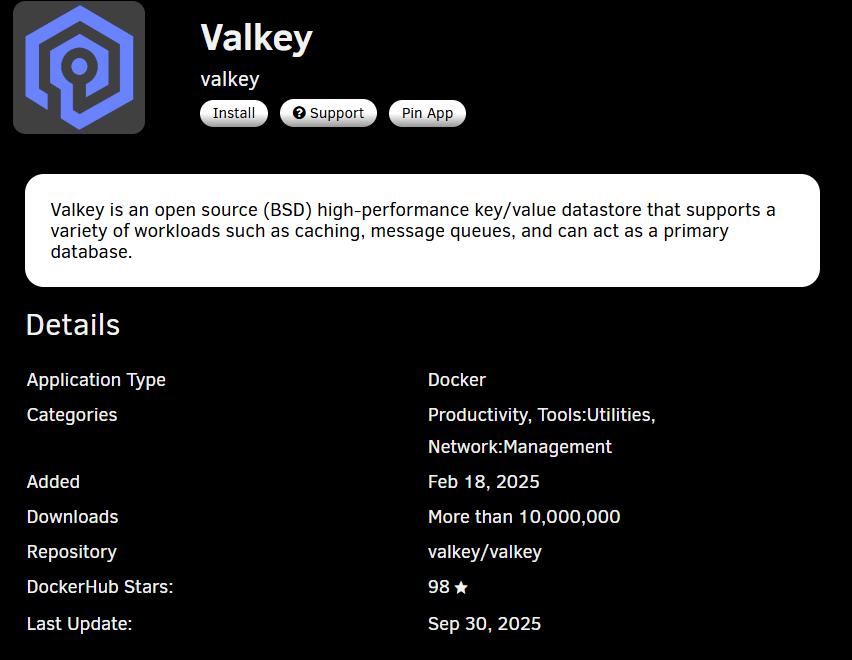
yep wiht bitani licesne owner ship and boradcom doing what they did with license bitnami redis will not be getting any more updates. https://hub.docker.com/r/bitnamilegacy/redis/tags As I've been monitoring this. https://www.reddit.com/r/immich/comments/1k6mo49/regarding_valkeys_redisimage/ I recommend moving off bitnami reddis and into valkey open-source reds https://valkey.io/topics/migration/
-
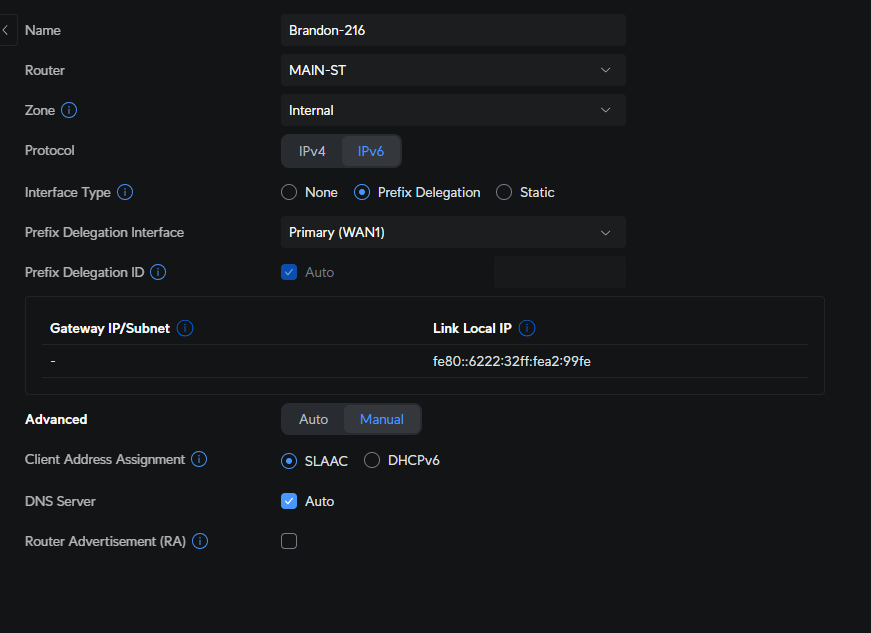
using unfi equipment, I can turn off ipv6 RA (Router announcement) and use ipv6 dhcp via slacc. Unraid will not see nor use ipv6. If i turn on RA in my unifi device for example, then unraid will see ipv6 and enable ipv6 stuff as it should. I usually use unfi to test ipv6 on multiple OS. That's what I've found with unraid... If using Ipv6 SLAAC on unraid then the ipv6 slacc dhcp server need the RA option on... there is known configurations with Mikrotik router and ipv6 this is most likely a router misconfiguration. see forum: https://forum.mikrotik.com/t/intermittent-issues-with-ipv6-slaac-and-or-ra/176567 More on ipv6 and RA https://www.juniper.net/documentation/us/en/software/junos/security-services/topics/concept/port-security-ra-guard.html
-
For continued back and forth please make a general post. Replied to the PM. it was most likely removed by a mod. I highly recommend making and using a python venv. info can be found earlier in this post.
-
unraid needs ipv6 via ra to function and use ipv6 correctly per its inet rc script. slacc alone is not enoth for ipv6 on unraid... (more a linux and fored implementation and backwards compability due to andriods networking for ipv6... With a dhcp server for ipv6 using RA. then unraid wil corectly detect and use ipv6 corectly... Othwersie unraid will not coretly enabled ipv6 forwarding for dockers. I usualy use a user script at first array start to enabled ipv6 across dockers. Enable Unraid br0 IPV6 forwarding for Dockers #!/bin/bash # Delay before starting sleep 10 # Apply sysctl settings apply_sysctl_settings() { echo "Applying sysctl settings..." sysctl -w net.ipv6.conf.all.forwarding=1 sysctl -w net.ipv6.conf.br0.accept_ra=2 sysctl -w net.ipv6.conf.br0.accept_ra_rt_info_max_plen=64 #sysctl -w vm.overcommit_memory=1 echo "Verifying sysctl settings..." sysctl net.ipv6.conf.all.forwarding sysctl net.ipv6.conf.br0.accept_ra sysctl net.ipv6.conf.br0.accept_ra_rt_info_max_plen #sysctl vm.overcommit_memory } apply_sysctl_settings docker inspect is your friend here. docker network ls docker inspect br0 this will tell you if your docker network can use and is seeing ipv6. this was due to internal ipv4 do per communication to guarantee a host connection.
-
Please post a diag file. Your docker vdisk may be full. or an existing docker layer exist and is breaking the docker download. Docker Guides: Immich Docker-compose Setup Immich Unraid-Template in the CA I would recommend running the docker prune and cleanup scripts. as you may have deleted the docker but not the image. https://forums.unraid.net/topic/178033-bmartino1-user-scripts/#findComment-1478647 also that docker may not be pulling the correct docker as its taged for latest. try docker pul the current lates build first, then build immich... docker pull imagegenius/immich:v1.143.1-ig424 https://github.com/imagegenius/docker-immich/releases/tag/v1.143.1-ig424




