





Twinkie0101
Members
-
Joined
-
Last visited
Everything posted by Twinkie0101
-
I had the same issue. I removed the external database and django variables as I didin't plan to use them and was able to get to the GUI.
-
@digiblurI have the same problem as well. Also, on reboot of the server the container will not autostart either. @bigbanguswere you able to find a solution?
-
@dja I definitely have the folder, but my inexperience in accessing this location is the challenge. In my xml file I have the following entry: <nvram>/etc/libvirt/qemu/nvram/.... I can see the root directory using Krusader, but cannot access the folder: There are no rwx permissions which I am definite is preventing access (even though signed in with my root user). Do I need to do this through another tool? Thanks for your help as I really want to understand how to handle this manually as you suggested.

-
@PaulieORFI just set up the same backup for my HA. Curious on how you executed the restore option. I am curious how you handled the .fd file. Looking at the directions posted above (pinned), I don't see the etc/libvert.... folder (at least on my server). But the libvert entry is in my .xml file from the backup. Appreciate your insights.
-
Thanks for setting this up. Not sure why, but the ALLOW_REGISTRATION variable is not working. I set it to False and tried removing the variable completely but registration can still happen. Submitted a issue on github, but PhiTux confirmed it's working as expected using docker compose. Any idea why it's not stopping registration?
-
Can you please share how you solved this?
-
First, thank you for this! This is what I've been looking for! The files transfer to Plex nicely with metadata, poster, etc. Now I can set it and forget it and use plex to watch vs. YT! Also, just an FYI, but the template has the resolution as 1080p. Tried this and the dler pulled 4k. Changed it 1080 and it's dling 1080p files now.
-
Hi, probably a dumb question and I'll be shaking my head after this, but does the printer need to be connected via USB to my server or can I use a wifi based printer? Also, and related, but I don't understand Printer variable. I am assuming this means the printer is connected directly to the server. Thanks!
-
Thanks! Can confirm it’s working! Looking forward to checking out in detail.
-
The app won't start for me. Looking through the logs, the exception below is the only error being generated when trying to start. I didn't setup the app to use my gpu as I am intersted in the moving functions. Unhandled exception. code = Error (1), message = System.Data.SQLite.SQLiteException (0x800007BF): SQL logic error no such table: DbObject at System.Data.SQLite.SQLite3.Prepare(SQLiteConnection cnn, String strSql, SQLiteStatement previous, UInt32 timeoutMS, String& strRemain) I wish I could provide my perspective, but still learning and don't have the knowledge to speak with confidence.
-
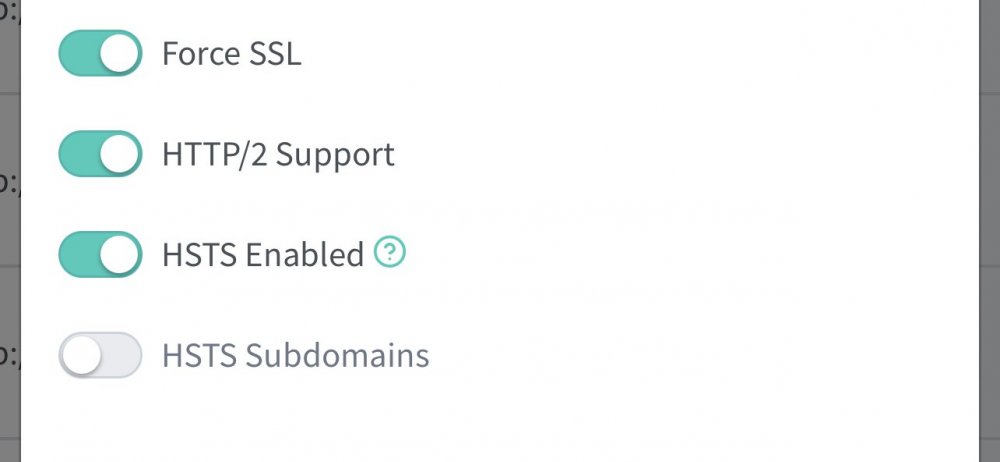
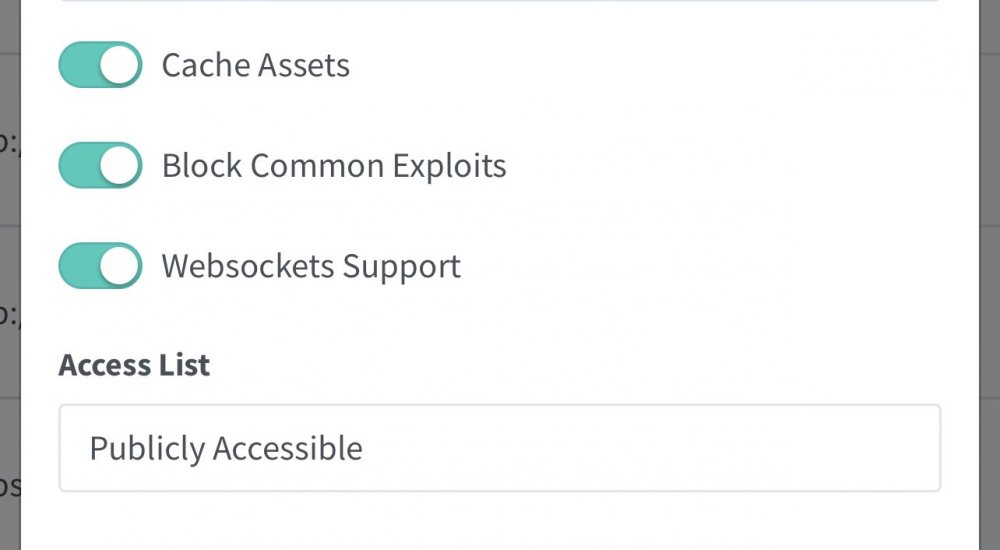
Has anyone tried using with NGINX Proxy? Works flawless when using up address but once I put it behind the proxy videos won’t play on my iPhone. appreciate any support or experiences others have had. Here’s my settings in NGINX:
-
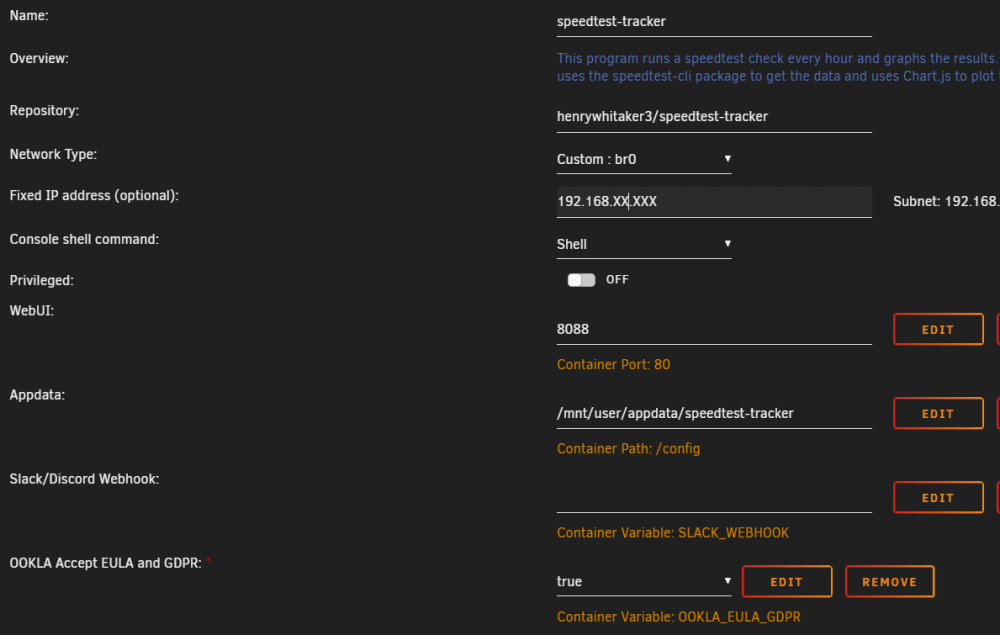
Recently installed speedtest-tracker and tests run successfully, but have errors daily. Below is recent log entries: {"type":"log","timestamp":"2021-10-17T17:00:07Z","message":"Failed to resolve host name. Cancelling test suite.","level":"error"} {"type":"log","timestamp":"2021-10-17T19:00:06Z","message":"Error: [11] Cannot read from socket: Resource temporarily unavailable","level":"error"} {"type":"log","timestamp":"2021-10-18T00:00:07Z","message":"Failed to resolve host name. Cancelling test suite.","level":"error"} {"type":"log","timestamp":"2021-10-18T15:00:03Z","message":"Error: [104] Cannot read from socket: Connection reset by peer","level":"error"} {"type":"log","timestamp":"2021-10-18T16:00:08Z","message":"Error: [110] Cannot open socket: Timeout occurred in connect.","level":"error"} {"type":"log","timestamp":"2021-10-18T17:00:02Z","message":"Error: [104] Cannot read from socket: Connection reset by peer","level":"error"} {"type":"log","timestamp":"2021-10-18T23:00:05Z","message":"Error: [110] Cannot open socket: Timeout occurred in connect.","level":"error"} {"type":"log","timestamp":"2021-10-19T01:00:05Z","message":"Error: [0] Cannot read from socket: ","level":"error"} {"type":"log","timestamp":"2021-10-19T02:00:07Z","message":"Error: [110] Cannot open socket: Timeout occurred in connect.","level":"error"} {"type":"log","timestamp":"2021-10-19T22:00:05Z","message":"Error: [104] Cannot read from socket: Connection reset by peer","level":"error"} {"type":"log","timestamp":"2021-10-20T20:00:07Z","message":"Error: [110] Cannot open socket: Timeout occurred in connect.","level":"error"} {"type":"log","timestamp":"2021-10-20T21:00:03Z","message":"Error: [0] Cannot read from socket: ","level":"error"} {"type":"log","timestamp":"2021-10-21T14:00:03Z","message":"Error: [104] Cannot read from socket: Connection reset by peer","level":"error"} {"type":"log","timestamp":"2021-10-21T15:00:05Z","message":"Error: [110] Cannot open socket: Timeout occurred in connect.","level":"error"} {"type":"log","timestamp":"2021-10-21T20:00:07Z","message":"Error: [11] Cannot read from socket: Resource temporarily unavailable","level":"error"} {"type":"log","timestamp":"2021-10-21T21:00:06Z","message":"Error: [0] Cannot read from socket: ","level":"error"} {"type":"log","timestamp":"2021-10-21T22:00:03Z","message":"Error: [104] Cannot read from socket: Connection reset by peer","level":"error"} {"type":"log","timestamp":"2021-10-22T01:00:06Z","message":"Error: [11] Cannot read: Resource temporarily unavailable","level":"error"} Not really sure what is causing the issue so would appreciate any insight others may have. Here is my config:
-
No worries, I thought the behavior was weird too. This is still helpful once you get the config changed IMO.
-
Is this variable working for you? Once I add the variable, the config option goes away (great!) but when I change the value to false, the conifg is still not displayed. I've added the variable like you did above, so curious if you're having the same issue I am. I can view the config if I remove the variable.
-
So I got wireguard set up and can access all of my containers via the web ui except binhex-sabnzdb vpn container. Tried searching for container access topics here but didn't find any comments with this particular issue. I have sab set up in bridge mode. Wireguard is set up with remote tunneled access and tried remote access to server peer set up with the same results. Would appreciate any thoughts on why this is occurring only for sab and if there is something I can change to make it accessible.
-
@goose_wsI am guessing it was a PIA issue, just tried starting up my container and all worked smoothly.
-
For my sab container - toronto, and it's working now (just tested it) so I don't want to restart (i'm afraid lol)
-
The weird thing is my sab instance is working fine with wireguard with the default endpoint.
-
Hi Everyone, This noob could use a little help. I was able to get the binhex-sabnzbdvpn setup and have it working as expected with wireguard. I tried to set up binhex-privoxy but the docker won't download the json to generate the wireguard token: 2021-05-19 16:09:03,674 DEBG 'start-script' stdout output: [crit] Unable to successfully download PIA json to generate token for wireguard, exiting script... 2021-05-19 16:09:03,674 DEBG fd 8 closed, stopped monitoring <POutputDispatcher at 23174333001936 for <Subprocess at 23174333003664 with name start-script in state RUNNING> (stdout)> 2021-05-19 16:09:03,674 DEBG fd 10 closed, stopped monitoring <POutputDispatcher at 23174332630112 for <Subprocess at 23174333003664 with name start-script in state RUNNING> (stderr)> 2021-05-19 16:09:03,674 INFO exited: start-script (exit status 1; not expected) 2021-05-19 16:09:03,674 DEBG received SIGCHLD indicating a child quit 2021-05-19 16:26:48,764 WARN received SIGTERM indicating exit request 2021-05-19 16:26:48,764 DEBG killing watchdog-script (pid 152) with signal SIGTERM 2021-05-19 16:26:48,764 INFO waiting for watchdog-script to die 2021-05-19 16:26:48,802 DEBG fd 11 closed, stopped monitoring <POutputDispatcher at 23174332630880 for <Subprocess at 23174332630208 with name watchdog-script in state STOPPING> (stdout)> 2021-05-19 16:26:48,803 DEBG fd 15 closed, stopped monitoring <POutputDispatcher at 23174332665136 for <Subprocess at 23174332630208 with name watchdog-script in state STOPPING> (stderr)> 2021-05-19 16:26:48,803 INFO stopped: watchdog-script (terminated by SIGTERM) 2021-05-19 16:26:48,803 DEBG received SIGCHLD indicating a child quit It performs the 12 attempts and ends with the info above. Appreciate the help!
-
I am having this issue as well. My photos share path is defined as: /mnt/user/photos backup/ I can get to the webui but every variation of the data path I try gets the error: Something went wrong Server error: invalid root path at (userAddRootPath) I've set up the mariadb and reverse proxy and all appear to be working as expected except the inability to import my photos. Here's my log from photoview: 2021/05/11 02:33:59 Starting Photoview... 2021/05/11 02:33:59 No .env file found 2021/05/11 02:33:59 Connecting to MYSQL database: user:password@tcp(Server IP:3306)/photoview?multiStatements=true&parseTime=true 2021/05/11 02:33:59 Migrating `media_exif.flash` from string to int 2021/05/11 02:33:59 Initializing scanner queue with 3 workers 2021/05/11 02:33:59 Queue waiting 2021/05/11 02:33:59 Periodic scan interval changed: 24h0m0s 2021/05/11 02:33:59 Scan interval runner: Waiting for signal 2021/05/11 02:33:59 Scan interval runner: New ticker detected 2021/05/11 02:33:59 Scan interval runner: Waiting for signal 2021/05/11 02:33:59 Found executable worker: darktable (this is darktable-cli 3.4.1) 2021/05/11 02:33:59 Found executable worker: ffmpeg (ffmpeg version 4.3.2-0+deb11u1 Copyright (c) 2000-2021 the FFmpeg developers) 2021/05/11 02:33:59 Found exiftool 2021/05/11 02:33:59 Initializing face detector 2021/05/11 02:34:00 Photoview API endpoint listening at http://127.0.0.1:80/api 2021/05/11 02:34:00 Photoview API public endpoint ready at /api 2021/05/11 02:34:00 Photoview UI public endpoint ready at / 2021/05/11 02:35:11 Registering notification listener 2021/05/11 02:35:11 [0;32;49mPOST [0;32;49m200[0m 192.XXX.XX.XX:8694/api/graphql [0;36;49m732.451µs[0m [0;31;49muser: scottyb2210[0m Appreciate your help in advance!
-
Total noob to unraid and dockers so appreciate the kindness from the group! I am lost on creating the bind mount. Can someone ELI5 on how to execute this please?



