





FreeMan
Members
-
Joined
-
Last visited
Everything posted by FreeMan
-
Well, that could well be the issue... Will adjust as soon as I get home and try again. Thanks! Sent from Tapatalk
-
I have 943 forwarded, do I need anything else? Sent from Tapatalk
-
Thanks! I did get that part sorted with wgstarks' help. I'm still struggling with the timeout issue when I try to connect with the openvpn client, though. Any thoughts on that? Sent from Tapatalk
-
Sounds great,@gridrunner! Sent from Tapatalk
-
Yeah, since it server isn't reachable from the outside world, it really doesn't have an FQDN... Thanks for looking into the automatic discovery, too. Let me know if there's any additional info you need from my end. Sent from Tapatalk
-
I'll leave them as-is, then. Thoughts on the timeout issue? It's the same thing I'm getting with my LetsEncrypt/NGINX server (I posted in that thread and never got it resolved). Everything else responds quite promptly from the WAN, but I'd like to close up all those open ports.
-
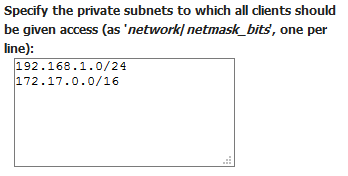
Once I get the timeout issue resolved, should I change this by removing the 172... line since I'm only using 192.168 addresses? Also, should I be dynamically assigning addresses to VPN users in the 172 range? Is that a reasonable thing to do since all my PPN (Physical private network ) addresses are in 192.168? I'll only have a half-dozen or so people who will have accounts, so I don't actually mind statically assigning them (in the 192.168 range) - I've got most other machines on the network assigned static IPs anyway...
-
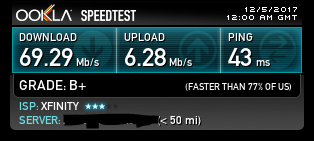
That did the trick! I really appreciate the work @gridrunner has done with his video, but it seems that it really needs to be updated. Additionally, since so many places around here point users to that video, it would be super helpful if the linuxserver page contained a couple of notes on what's out dated and the current best methods. (hint, hint, @CHBMB ). I've got port 943 forwarded to my server and from my phone (WiFi off) I'm able to browse to https://domain.com:943 where I can log in with my newly created user name & pwd. I downloaded the .ovpn autologin file, opened it with the Android OpenVPN client, but now it's timing out every time I try to connect. CPU load on the server ran about 25-50% with a few spikes to 60-75%. I've got decent network speed: That's about normal for my hourly speed test runs. I've attached the last 100 or so lines from the openvpn.log file. It looks like this is what's generated when I tried to connect. ovpn.timeout.log
-
Nope, created the user from the command line as demonstrated in gridrunner's video. Nothing contradictory to that in the LinuxServer page, so I ran with it. Is it now preferred to create the users in the admin console instead of at the command line?
-
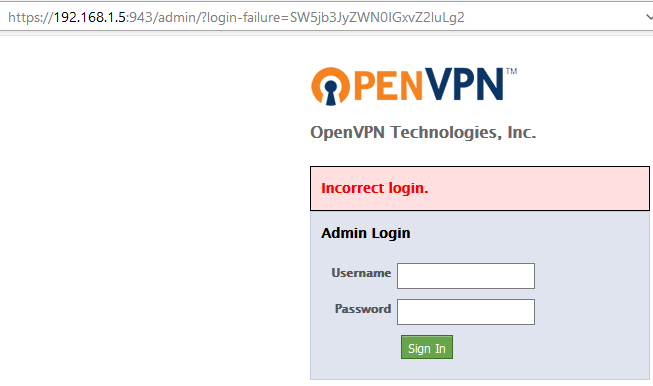
I tried that but it won't let me log in with my "localadmin" user:
-
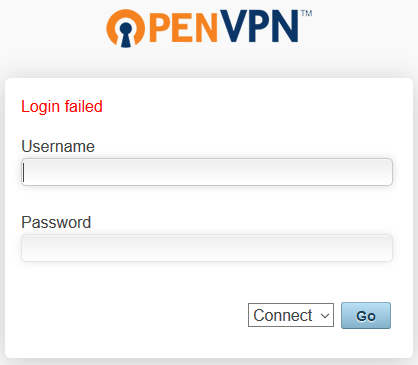
Thanks, wgstarks. Seems I wasn't clear enough - those are the instructions I've been following (along with gridrunner's somewhat outdated video). I've done all these steps: With the exception of #3 because the default admin account is the only one that will allow me to log in to the web interface. I'd hoped that the screen shots provided would have shown that or shown where I thought I was following those steps but missed something. I've created another user for me to use, but when I go to 192.168.1.5:943 to login using my user name and the password I created, I get a "Login Failed" message. Doesn't matter whether I try "Connect" or "Login". (Still not clear on the difference - I'll get that sorted once I can actually log in.)
-
This is the 2nd time I've tried installing OpenVPN-AS, and I've had trouble logging in as any user other than default admin both times. Here's my config screen: Per the recommendations at Linuxserver's site, I've created a new users "localadmin": I usually use KeePass to create long, complex, random passwords, but, because I've been having issues (which I thought may be related to pasting the password into the telnet session), I created a simple password for this account that I knew I could type correctly. I've granted this new user admin rights: I have authentication set to local so my users & passwords survive reinstall: Yet every time I try to log in as my new "localadmin" I'm told that it's an incorrect login: I've attached the log after the most recent login attempt. If someone would point me in the right direction, I'd be most grateful! openvpn.log
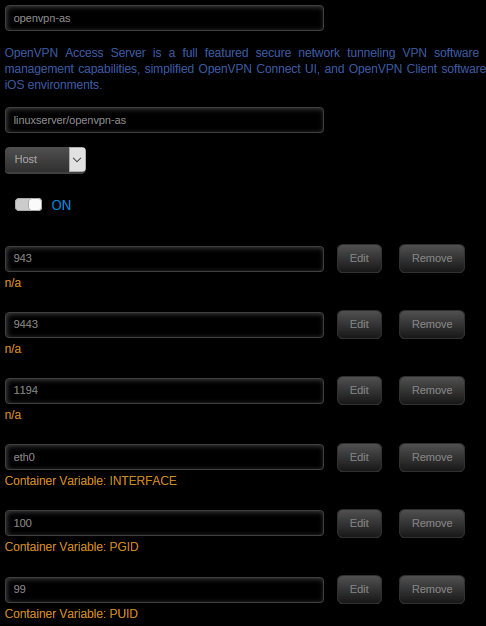


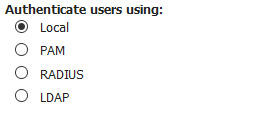
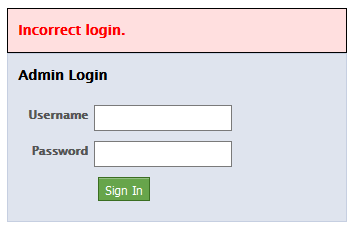
-
Server name is "NAS". I was quite creative in my naming... I can send logs if you need those, too. Sent from Tapatalk
-
Not picking on just steve1977, but as a note to all who are asking for in-app external access: With all respect to jbrodriguez and all the great work he's done on this app and the various plugins and dockers he's worked on, security isn't "just". It's hard work to get it right, and as he mentioned several pages back, if something goes wrong he'd feel responsibility for it, and some might try to (legally) make him responsible for it. VPN access may be somewhat more complex and more of a hassle, but the OpenVPN project has a large(ish) team of people who know what they're doing and focus primarily on the security side of things so applications like this one don't have to. Remember - they have a commercial product that, according to their site, is used by a large number of paying customers - they have a lot on the line to get it right. I've not set up the OpenVPN docker on my server yet, but that's my next project, and I, for one, will be more than happy with the minor hassle of having to go through a VPN client to keep my server secure. Once I've got it setup and working, I'm going to ensure I can get access to all my other dockers via VPN, then turn off their external access, too.
-
I remember checking into this app about a year ago, but didn't install it. In the Christmas spirit, I decided to give myself an early gift and just bought a copy. My only regret now is that I have but one server to manage from my phone! I do seem to have one issue, though. It will not find the server in Automatic mode. I've set the automatic timeout to 30000 ms (it saves the changes), I've left the port at the default of 80, user name: root, and I've entered my root password. I click 'Discover', and it returns instantly to the Servers screen with the "No servers available" message. I've tried this 5-10 times, so I'm pretty sure I haven't mistyped my password that many times. (To be fair, the first time I tried, I didn't add my password. I figured the "automatic discovery" would find unRAID servers on the network then prompt me to select (if more than) one, and ask for user/pwd at that point. I guess the layout isn't 100% intuitively obvious to everyone, but I figured it out after reading the first page or two of the thread.) If I type in the IP address in the the manual server add (with all the other info), it will add it immediately, no issues. If I enter the server name, though, I get an error telling me to "Please enter a valid IP address / Hostname" My server is running 6.3.5, my phone is a Moto G5+ running Android (7.0, August 1, 2017 security patch). I just installed CrontrolR tonight, so I'm running. 3.3.0, and I've got the ControlR plug-in 2.6.1 installed as well. For me, this is more of a minor annoyance issue than a problem because I can type my on static IP address in quite easily, but I'd imagine you'll want to look into it. Let me know if there is any additional info you'd like to hunt this down. I've noted that you've been through this one a few times (yes, I actually read all 30 pages - it was a slow day), so I was quite surprised that I had issues with it at all. I've been very impressed with the speed with which you've tracked down & patched bugs and released new features. Not bad at all for a solo effort!
-
Once again, @Benni-chan has come to the rescue and gotten my TV share about 98% cleaned up. However, what I'm finding is this: A season has been nicely consolidated to a single disk, but the various show-level metadata is still scattered about. So I ran a combo script that, when I ran it in test mode seemed to have taken care of things nicely: find "/mnt/user/Media/TV" -mindepth 1 -maxdepth 1 -type d -print0 | xargs -0 -n 1 consld8 -f | tee TVlog-season.txt However, when I started running it in real mover mode, it started to move season folders. I read the find man page and changed -type d to -type f in the hopes of finding only the files at the <show> level. That worked, but... it ended up passing file names to consld8, instead of directory names. It looks like the issue I'm running into is that consld8 will, by default, move all files and sub-directories to the specified destination disk, and I want it to only move files. Is my understanding of this issue correct? If so, is there a possibility of adding a switch to consld8 that would have it move files only and leave the sub-directories where they are? Still really a fan of these two tools! Even with the OCD cleanup of the <show>/<files> I'm certain that this will end up saving me many, many, many hours of manual work vs what I was doing before. I've accomplished more clean up by letting two command lines run on their own than I had in a week of sessions with mc or even unBalance!
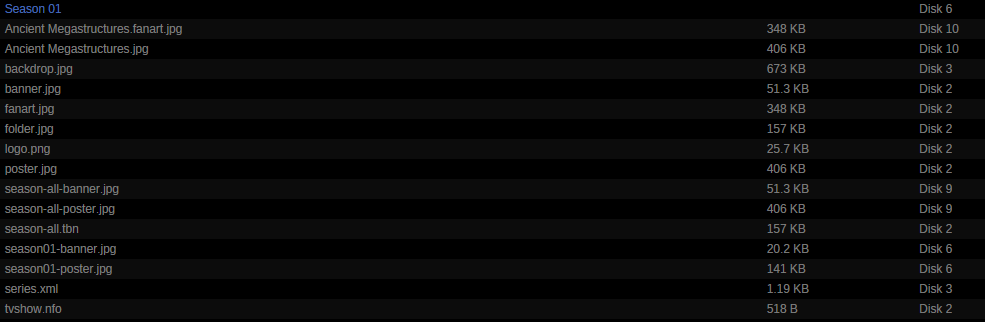
-
I've also noted that it's left quite a few empty directories behind. This is probably something in diskmv since unBalance does it too, and I understand that it uses diskmv in the background.
-
Jumping on the THANK YOU bandwagon! I was using unBalance, but its one big drawback is resolved with @Benni-chan's excellent commands here. I used that to straighten up my Movie share in about 2 hours. I'd spent a couple of hours at a time using unBalance one movie at a time because uB won't automatically pick a disk to move everything to. I did note that it left a few files behind, but when I went back through the log ( | tee movielog.txt to the rescue!) to investigate, I discovered that it was skipping duplicate files. Somehow, I'd gotten different versions of the <movie>.nfo file. I deleted about a dozen of them and all is good! Off to clean up my TV shows next. Also, Ctrl-C is a great way to stop a shell script without killing the telnet session and losing all your command history. /late to the party...
-
Figured there'd be much more of a storm about the latest Code42 announcement... This is exactly how I'm feeling about the whole thing. HUGE appreciation to everyone who's helped with support of the CP app & docker over the years, but it looks like it's getting to be time to move on.
-
What's the difference between a mismatch: and corruption: I would expect that a mismatch would happen any time a file is updated on the server and that's something I don't need to worry about at all (for files that I expect to change). Is the file corruption a corruption of the stored hash key or a corruption of the file itself? I've looked into many of the files that FIP has reported with corruptions, and I've not had any issues with them that I could detect (many of them are JPGs, and I can pull up the picture and look at it without any software complaining about it).
-
I don't think they're throttling: Can't complain much about 93.6Mbps effective rate. Is it possible that there's something else going on with your machine that's slowing down the compression & encryption? Maybe you've hit a batch of files that won't compress well? I would definitely followup with Code42, and I think we'll all appreciate it if you were to post back anything you hear from them.
-
Hey, whadayaknow, that works! Thanks for the tip.
-
Ah, got it. I'll give that a shot. Thanks Sent from Tapatalk
-
I just noticed that there's a link to what I presume is the standard speedtest.net graphic showing the tested speed. The hover over says "click to show image", but when I click, nothing happens. It doesn't show in the WebGUI page, nor does it open a new tab in Firefox 56.0.2 or 57.0 (both 64-bit). Not so sure I'm thrilled with 57.0, but that's not your responsibility...
-
As a "late adopter", I'm happy for them to go through all the RC versions they want before the Release version comes out... Sent from Tapatalk

