





elgatobavaria
Members
-
Joined
-
Last visited
Everything posted by elgatobavaria
-
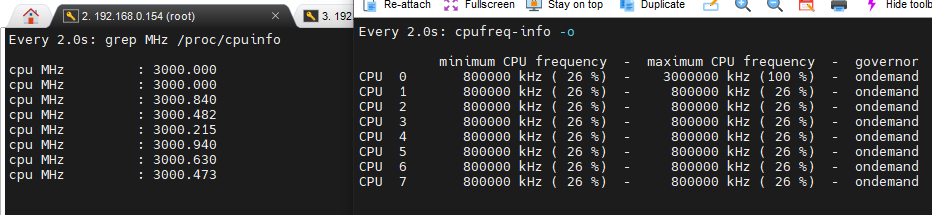
Meine Erwartung für folgendes Szenario wäre das gewesen: cpufreq-set -c 0 -u 0.8GHz -g ondemand cpufreq-set -c 1 -u 4.5GHz -g ondemand cpufreq-set -c 2 -u 4.5GHz -g ondemand cpufreq-set -c 3 -u 4.5GHz -g ondemand Ohne Belastung: Core 0 bis Core 3 Frequenz = 800 Mhz Mit Belastung: Core 0 Frequenz = 800 Mhz , Core 1 bis Core 3 = 4.5Ghz Langsam nehmen die Versuche mehr Zeit ein als mein Arbeitsplatz 🤔
-
Im Bios hab ich jetzt folgendes auf "Disabled" gesetzt: - Intel SpeedStep - Intel TurboBoost - Intel SpeedShift Nach dem Reboot liefen alle Kerne wie gewünscht auf 800 Mhz. Anschließend hab ich Kern 0 via "cpufreq-set -c 0 -u 4.5GHz -g ondemand" auf 4.5Ghz gesetzt. Hier das Ergebnis: Dass nur 3Ghz erreicht werden ist ok, da TurboBoost deaktiviert ist. Aber ansonsten ist das ganze für mich sehr verwirrend... Interessant ist auch, dass die Kerne im idle auf 800 Mhz bleiben und bei Last alle hochspringen.
-
Driver: Intel CPU Freq ist bei mir aktiv.
-
Ich bin leider kein Linux / VM Experte, aber Frequenz via "cpufreq-set" anpassen geht bei mir nicht. Die gerade aktuelle Frequenz wird via "/proc/cpuinfo" auch falsch angezeigt. ---> Bei der WIN10 VM steht auch immer 3.0 Ghz .... Ich schalte meine VMs eh via Script um: #!/bin/bash #Shutdown all running VMs for i in $(virsh list | grep running | awk '{print $2}'); do virsh shutdown "$i" done #bash -c kill $(pidof nvidia-persistenced) #sleep 5 #Start WIN10 after waiting some time sleep 15 virsh start "Windows10" Da würde sich das mit der Frequenz relativ leicht einsetzen lassen.
-
@mgutt Ich ging heute eure Ideen an meinem System noch einmal alle durch. Hier sind meine Ergebnisse: Versuch 1 ( nvidia-persistenced ) : Driver: Intel CPU Freq intel_pstate=passive govenor = ondemand CPU cores fest auf : ( i7 9700 8 cores , kein HT ) @*0.8Ghz - Idle:40W - Max:60W @*4.6Ghz - Idle:40,5W - Max:145W Falls nvidia-persistenced = OFF --> +20W (3060TI) ------------------------------------------------------------------------------------------------------------ Versuch 2 ( nvidia-persistenced = OFF + LubuntuVM mit 2 cores und GPU = ON ) : @*0.8Ghz - Idle:40W - Max:60W @*4.6Ghz - Idle:41W - Max:146W ------------------------------------------------------------------------------------------------------------ Für mein System und meine Bedürfnisse bedeutet das folgendes: 1. Ich benötige ausser für die VMs keine GPU --> Somit ist Methode 2. für mich die einfachere 2. Nichtsdestotrotz ist das reduzieren der coreFrequency wie von @alturismo beschrieben für mich von Vorteil, denn ich kann ( wenn das NAS nicht verwendet wird ) die maximale Verlustleistung reduzieren und so das Gerät leiser betreiben. 3. Sollte ich die GPU dennoch irgendwann im Docker etc. brauchen, lässt sich über @alturismo Methode die GPU beliebig zwischen VM <-> Unraid übertragen. Hoffe die Infos helfen dem einen oder anderen. ( irgendwo in den Bios Einstellungen hab ich noch 3W verloren , da guck ich nochmal ) EDIT: Eigenartig war, dass ich die CpuFrequency nicht für einen core alleine höher stellen kann --> Es werden dann alle CoreFrequenzen angehoben. Eventuell benutze ich den Befehl nicht korrekt ... ( z.B. für Core0 --> "cpufreq-set -c 0 -u 4.6GHz -g ondemand" Gruß Mathias
-
Update for others who are interested in the ASUS P11C-I: Testbench: - Asus P11C-I - intel 9100 - Pure Power 10 300W - 1x WD Red 3 TB - 1x WD Red 4 TB - 1x ECC RAM 16 GB Not connected are: Monitor, GPU, Peripherie, Fans Power consumption is: Idle: 16W @ 4100 Mhz (HDDs spindown) Idle: 14,5W @ 800 Mhz (HDDs spindown)
-
Ich hab festgestellt, dass die kleine Linux VM weniger Strom verbraucht als WIN10 ( ich denk die Hintergrundprozesse etc. ). Die Lösung von @alturismo werde ich aber auf jeden Fall auch noch im Detail ausprobieren. Heute war ja nur mal ein "schnellschuss"... . Wenn ich was zu updaten habe meld ich mich
-
Danke für dein Feedback ! Ich habe in der Zwischenzeit das VFIO mal deaktiviert und ohne VM Unraid + Treiber laufen lassen. Stromverbrauch ist nahezu identisch... ( wenn ich die WIN10 VM nicht brauche, lasse ich eine kleine Ubuntu VM + GPU laufen ) Zu erwähnen ist bei meinem aktuellen Verbrauch auch, dass ich lediglich zwei SSDs verbunden habe. Zudem wurde der 9900 via Fixed Voltage auf 1.15V festgenagelt. ( + im Bios alles deaktiviert, was ich nicht brauche wie Thunderbolt ) . Das ändern der Frequenz via CoreFreq bringt bei mir vielleicht 3W ( von 4500Mhz auf 800 Mhz ). Ich denk mit den Anpassungen ist dann jetzt das ende der Fahnenstange erst einmal erreicht. Weist du ob sich cores "abschalten" lassen bei bedarf ? Ohne VM würden mir 2 Kerne reichen. Gruß Mathias
-
32GB DDR4 3200
-
Wenn ich das richtig sehe nutzt du den Nvidia-Treiber in Unraid und deaktivierst ihn, damit du die GPU in der VM nutzen kannst ? Das würde ja bedeuten, dass du die IMMO Group der GPU nicht angehakt hast ? Aktuell ist bei mir die GPU immo group angehakt und daher steht das Device nicht für Unraid zur Verfügung. Kann ich da an den Settings noch was drehen ? Mit einem 9900 (non k) und einer 3060Ti komme ich derzeit auf 37,4W runter. Falls es geht würd ich gern noch weiter runter. Gruß Mathias
-
Maybe you need the nvidia vBios. I use the 3060Ti in VM, too. Here´s my WIN10 setting: EDIT: For ERROR 43 on UnraidVM there are some youtube-videos, too <?xml version='1.0' encoding='UTF-8'?> <domain type='kvm'> <name>Windows10</name> <uuid>4e9f7b00-0853-5385-180e-a014c1a031c3</uuid> <metadata> <vmtemplate xmlns="unraid" name="Windows 10" icon="windows.png" os="windows10"/> </metadata> <memory unit='KiB'>25165824</memory> <currentMemory unit='KiB'>25165824</currentMemory> <memoryBacking> <nosharepages/> </memoryBacking> <vcpu placement='static'>8</vcpu> <cputune> <vcpupin vcpu='0' cpuset='0'/> <vcpupin vcpu='1' cpuset='1'/> <vcpupin vcpu='2' cpuset='2'/> <vcpupin vcpu='3' cpuset='3'/> <vcpupin vcpu='4' cpuset='4'/> <vcpupin vcpu='5' cpuset='5'/> <vcpupin vcpu='6' cpuset='6'/> <vcpupin vcpu='7' cpuset='7'/> </cputune> <resource> <partition>/machine</partition> </resource> <os> <type arch='x86_64' machine='pc-q35-6.1'>hvm</type> </os> <features> <acpi/> <apic/> <hyperv> <relaxed state='on'/> <vapic state='on'/> <spinlocks state='on' retries='8191'/> <vendor_id state='on' value='none'/> </hyperv> </features> <cpu mode='host-passthrough' check='none' migratable='on'> <topology sockets='1' dies='1' cores='8' threads='1'/> <cache mode='passthrough'/> </cpu> <clock offset='localtime'> <timer name='hypervclock' present='yes'/> <timer name='hpet' present='no'/> </clock> <on_poweroff>destroy</on_poweroff> <on_reboot>restart</on_reboot> <on_crash>restart</on_crash> <devices> <emulator>/usr/local/sbin/qemu</emulator> <disk type='file' device='disk'> <driver name='qemu' type='raw' cache='writeback'/> <source file='/mnt/user/SSD/12_VM/Windows10/WIN10_2.img'/> <target dev='hdc' bus='virtio'/> <boot order='1'/> <address type='pci' domain='0x0000' bus='0x03' slot='0x00' function='0x0'/> </disk> <disk type='file' device='cdrom'> <driver name='qemu' type='raw'/> <source file='/mnt/user/SSD/12_VM/ISO/Win10_21H1_German_x64.iso'/> <target dev='hda' bus='sata'/> <readonly/> <boot order='2'/> <address type='drive' controller='0' bus='0' target='0' unit='0'/> </disk> <disk type='file' device='cdrom'> <driver name='qemu' type='raw'/> <source file='/mnt/user/SSD/12_VM/ISO/virtio-win-0.1.208-1.iso'/> <target dev='hdb' bus='sata'/> <readonly/> <address type='drive' controller='0' bus='0' target='0' unit='1'/> </disk> <disk type='block' device='disk'> <driver name='qemu' type='raw' cache='writeback'/> <source dev='/dev/disk/by-id/ata-SanDisk_SDSSDH3_2T00_204088801431'/> <target dev='hdd' bus='sata'/> <address type='drive' controller='0' bus='0' target='0' unit='3'/> </disk> <controller type='usb' index='0' model='qemu-xhci' ports='15'> <address type='pci' domain='0x0000' bus='0x00' slot='0x07' function='0x0'/> </controller> <controller type='pci' index='0' model='pcie-root'/> <controller type='pci' index='1' model='pcie-root-port'> <model name='pcie-root-port'/> <target chassis='1' port='0x8'/> <address type='pci' domain='0x0000' bus='0x00' slot='0x01' function='0x0' multifunction='on'/> </controller> <controller type='pci' index='2' model='pcie-root-port'> <model name='pcie-root-port'/> <target chassis='2' port='0x9'/> <address type='pci' domain='0x0000' bus='0x00' slot='0x01' function='0x1'/> </controller> <controller type='pci' index='3' model='pcie-root-port'> <model name='pcie-root-port'/> <target chassis='3' port='0xa'/> <address type='pci' domain='0x0000' bus='0x00' slot='0x01' function='0x2'/> </controller> <controller type='pci' index='4' model='pcie-root-port'> <model name='pcie-root-port'/> <target chassis='4' port='0xb'/> <address type='pci' domain='0x0000' bus='0x00' slot='0x01' function='0x3'/> </controller> <controller type='pci' index='5' model='pcie-root-port'> <model name='pcie-root-port'/> <target chassis='5' port='0xc'/> <address type='pci' domain='0x0000' bus='0x00' slot='0x01' function='0x4'/> </controller> <controller type='pci' index='6' model='pcie-root-port'> <model name='pcie-root-port'/> <target chassis='6' port='0xd'/> <address type='pci' domain='0x0000' bus='0x00' slot='0x01' function='0x5'/> </controller> <controller type='virtio-serial' index='0'> <address type='pci' domain='0x0000' bus='0x02' slot='0x00' function='0x0'/> </controller> <controller type='sata' index='0'> <address type='pci' domain='0x0000' bus='0x00' slot='0x1f' function='0x2'/> </controller> <interface type='bridge'> <mac address='52:54:00:bb:7e:8e'/> <source bridge='br0'/> <model type='virtio-net'/> <address type='pci' domain='0x0000' bus='0x01' slot='0x00' function='0x0'/> </interface> <serial type='pty'> <target type='isa-serial' port='0'> <model name='isa-serial'/> </target> </serial> <console type='pty'> <target type='serial' port='0'/> </console> <channel type='unix'> <target type='virtio' name='org.qemu.guest_agent.0'/> <address type='virtio-serial' controller='0' bus='0' port='1'/> </channel> <input type='mouse' bus='ps2'/> <input type='keyboard' bus='ps2'/> <hostdev mode='subsystem' type='pci' managed='yes'> <driver name='vfio'/> <source> <address domain='0x0000' bus='0x01' slot='0x00' function='0x0'/> </source> <rom file='/mnt/user/SSD/12_VM/nVidiaVbios/3016_Fixed.rom'/> <address type='pci' domain='0x0000' bus='0x04' slot='0x00' function='0x0'/> </hostdev> <hostdev mode='subsystem' type='pci' managed='yes'> <driver name='vfio'/> <source> <address domain='0x0000' bus='0x01' slot='0x00' function='0x1'/> </source> <address type='pci' domain='0x0000' bus='0x05' slot='0x00' function='0x0'/> </hostdev> <memballoon model='none'/> </devices> <seclabel type='dynamic' model='dac' relabel='yes'/> </domain>
-
I can recommend the P11C-I from ASUS with a 300W Power supply for a NAS only device ( 9100, too ). I just replaced it with a z-Board for gaming. I can test the power usage in idle if you are interested in using this board. You can write me a PM if you need more information ( german / english )
-
Good to know about this adapters. But my PCIe slot is used by GPU. At the moment 4 HDDs are enough for me. But when i invest in something i want to get sure that its save for the adaptive for the future :-).
-
Are there any updates about the user-script thing ? I just installed the app and hoped that the 5 Year old request is solved , but cant find a function for starting/stopping user scripts... Best regards, Mathias
-
I thought about this kind of thing, too. But in the datasheets of some mainboards there is a mark "m.2 for wifi" and i do not know if this kind of adapter is working on them. Maybe the length of the slot is only not enough...
-
Update 🙂. I was looking on newegg and partpicker for a mainboard what i think can fit my needs. The result so far is the MSI MPG Z390I GAMING EDGE AC . There are only two things what i think is not optimal: 1. Second M2 slot is on the backside 2. I need no wifi --> So maybe the power consumption of the board is a little bit high If i understand everything correct to get more SATA ports i can use the m.2 slot on the top of the mobo for a pcie to SATA adapter ? I cant find any test of this board what is discussing about power consumption or immo groups 🙂 . Everything is about overclocking 🔥 ... Update again: Power consumption of a system with this board
-
Great ! Thank you for the information. I will go searching for the things we discussed.
-
Regarding to the specs of the Asus P11C-I the i7 CPU i use at the moment is not supported --> Link to spec ..> But its working so everythig is fine 🙂 Why especially the Zx90 series ? I thought the Z-series is only usefully if i plan to overclock RAM / CPU ? Good to know, thank you for the info . The spec sheet only says "GPU Controller - CPU pGFX" and i do not know what this means.
-
This Mobo was not on my list yet, thank you. On the P11C-I there is one more thing i am annoyed of, the iGPU of the CPU is not routed and can not be used. How is the behaviour on the ASROCK Rack C246 WSI ? Do you have any experience with this board ? In common do you prefer mobos with 'C" chipset and why should i use this kind of chipset in my case ? So many questions .... Sorry but i want to learn as much as i can 🙂. Thunderbold is only "nice to have"
-
Hi guys, as written above i need some help finding a motherboard that fits for my needs. Honestly iam not sure if a change is really a good decision. But maybe a discussion can help me to find out. My current situation: - Motherboard: ASUS P11C-I (mini-ITX) - Case: Fractal 304 (mini-ITX) - CPU: I7 9700 ( No ECC support ) ---> The i7 9700 replaced a 9100 because of the performance with VM - RAM: 16 GB ECC Ram ( I do not really need ECC ) - VM: WIN10 for Gaming / Working CAD - GPU: 3060 TI What are my needs / what would be great: - Reuse of my CPU (socket 1151) / Case - Low power consumption when idle - ~40W max - ( i know the GPU can not really "low power" ) - GBit ETH - Min 4x SATA 6Gb with the possibility to make 6xSata 6Gb (via adapter card etc.) - RAM with enough speed for gaming and no ECC ( P11C only support 2666 Mhz) - Good IMMO Groups for the VM + if possible IMMO groups for USB Ports, too - USB Header for front USB - If possible thunderbolt ? - In a price range what can be afforded A already saw in some forum entries suggestions for motherboards, but most of the time the context was NAS only (Sata > 4 or 6) without VM. Would be great if i can discuss with somebody here. EDIT: Trigger for this post was that 16GB ram is not enough and i do not need ECC RAM Best regards, Mathias
-
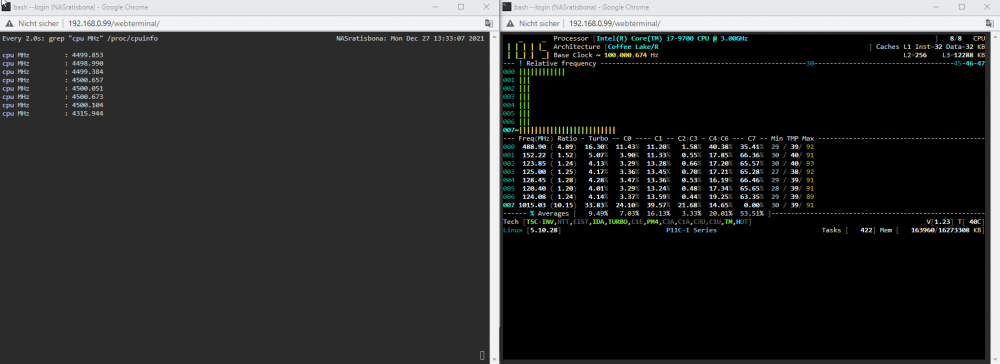
@Squid what are the frequencies on the right side ? On load the frequencies go up ...
-
Hi guys, im wondering how to see the 'real' CPU frequency. I tried two different approaches and got different frequencies. Maybe someone can make the things clear. As can be seen in the picture below i tried two different methods. The rigth one is via 'corefreq-cli'. Best regards, Mathias
-
In the first post you can find the download. The script name is "ExecuteFanControl.sh" . I think it should not be necessary to re-make "panq" again. Try the script on your system first.
-
I just tried the steam lib on the NAS share. Most of the games work, but for example Call of duty WW2 is not starting.
-
Hello together, maybe any expert can give me a hint with my question. At the moment i got a ASUS P11C-i mainboard working with an i3-9100 and 16GB ECC RAM. After buying a Geforce 3060 TI for working with a VM i recognized that the CPU is little bit to slow ( and not enough cores ) to work with the WIN10 VM ( gaming etc. ). I was looking for a faster CPU to replace the i3-9100 and found the i9-9900k. And now im asking myself a few questions .... 1. Is it possible to run the 9900k on the P11C-I mainboard ? ( regarding to the datasheet - NO, only i3, xeon, pentium ) --> But looking at the chipset - YES --> Maybe the i9 was not on the marked when the datasheet was released... 2. Is it possible to run the 9900k with the ECC RAM ( ECC is not supported by CPU but i dont need ECC ---> So if RAM is working without ECC it would be ok for me ) EDIT: A working CPU alternative which is not more expensive than the 9900k is welcome, too 🙂 EDIT2: Bought the CPU and tried if it works. And it works very good with low idle power. Best regards Mathias


