





foo_fighter
Members
-
Joined
-
Last visited
Everything posted by foo_fighter
-
Just got this installed. A couple of questions: Is there a way to separate which RTSP stream is used for detection(like a sub stream) vs which one is used for recording(main stream)? Edit: Looks like I can use sub stream under the ffmpeg component, let me give that a shot. In my recordings page, it only displays the last recording per camera, though the old ones are still retained in the recordings directory. Is that a feature or bug? How can I pull up the entire list of past recordings?(Maybe with some filters) Thanks!
-
It doesn't seem to matter. I created a brand new flash drive with the creator tool and it has these "mostly harmless" warnings.
-
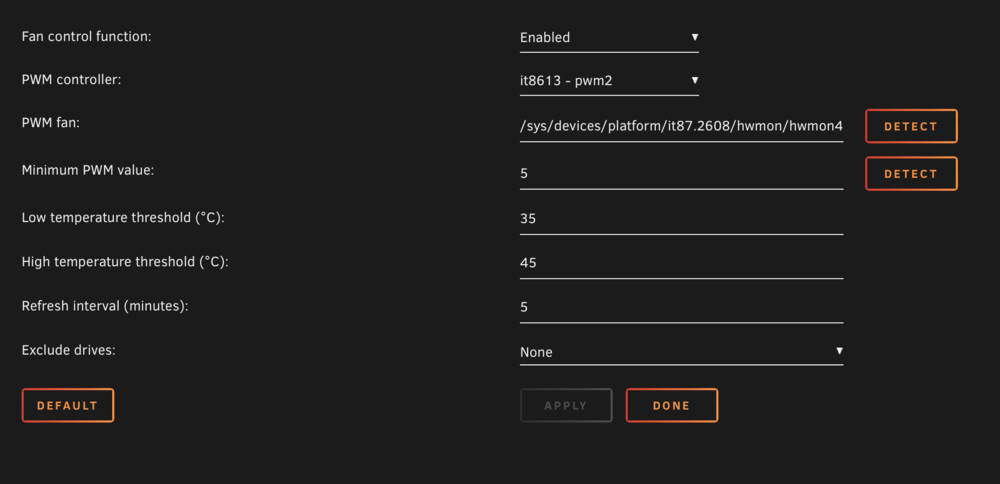
Got my 4800Plus unit today. Booted into Bios and disabled the watchdog BIOS seems pretty primitive - No way to set CPU voltage, You can turn off either NIC(Lan1 Lan2) and there is some fan control. I added 1 32GB SODIMM to the existing 8GB and am running memtest+ now. AutoFan works: pwm2 is the CPU Fan - Probably should let BIOS control that one pwm3 is the disk array 120mm Fan. It needs the IT87 driver plugin:

-
Upgraded to :29. Seems to have gone smoothly. Thanks!
-
Will this container be updated to V29 or stay on V28?
-
Ahh, I think it won't work then. I was trying to save some time by copying the data in an existing machine to a new array before moving to a new machine(I don't have the hardware yet) as a backup server. I guess I would need the 2 arrays feature that's not yet implemented. An old post suggested creating an unraid virtual machine and passing the second set of drives into a new array under that virtual machine.
-
I meant move from a zfs pool of 2 disks to a standard unraid array with 2 disks, 1 ZFS formatted data disk and 1 Parity disk. In the 2 disk special case, each drive is a mirror with identical information on each disk(you could swap the parity and data disk and it would be the same). My thought was that in a 2 disk ZFS mirror the data should also be identical on each disk unless ZFS does things differently.
-
If I have a ZFS Mirror share in an old box and then take those 2 drives to a new Unraid box with a 1 array disk : 1 Parity config, would it just work (No Parity Sync required?) Seems like it should.
-
Yes, 6.12.10 and all plugins updated. I also checked Chrome and Safari.
-
Am I mis-remembering or did there used to be 2 icons(Next to the X I think) to pop out the current pre-clear stage and status? Did they get relocated?

-
Kickstarter campaign has completed. Hopefully units will be shipping out soon. There have been many Unraid installs on Youtube. I have not seen anything about getting the LEDs to work though.
-
I'm guessing it's probably one of the plugins. I get the same error and haven't had time to remove/add plugins back 1 at a time to find which one it is.
-
You can put the parity drive in the "monitor external disks" section.
-
Single Parity is a Mirror, but you can also use a ZFS Pool of 2 devices and assign 1 throw away device to the array using a usb flash drive. Then you get scrub/bit-rot protection.
-
Try to get cameras compatible with RSTP/ONVIF. Frigate with coral TPU seem like a popular NVR choice: https://frigate.video
-
Depending on your budget, I would throw this case in for consideration: https://www.silverstonetek.com/en/product/info/computer-chassis/cs382/
-
Have you tried a microSD card reader with a high endurance SD card? Also, only use USB2.0 ports.
-
I meant "it exists" as in the hardware(4BayPlus has been at CES and in the hands of dozens of reviewers), not that you could buy it on Amazon yet. The older 4-bay version has existed for years in the Chinese domestic market and was also sent out to Beta testers to test the built-in software. I think the hardware is close to the final revisions, but the software is still baking that's why a lot people are asking to run 3rd party OSes like unRaid or TrueNAS or OMV.
-
Were they all pre-cleared?
-
Umm, for one thing it exists?! (sorry to those who backed storaxa) Kickstarter was a strange approach for an established company, but it did generate a lot of publicity. I see it as a nice off the shelf hardware solution that can hopefully run unRaid well, similar to the LincStation but in more varieties. I think it would be difficult to build something at the price point that it was initially offered. It ships with its own OS, but it's not fully mature and not as flexible as unRaid.
-
Anyone get in on the Kickstarter? Which model? Hopefully there will be enough critical mass of UnRaid users to get everything working, like Fan control, S3 sleep, WoL, LED control, 10Gbe ethernet drivers, Lowest Power C-States(It uses the ASM116X Sata controllers), even the watchdog timer.
-
why not use an external usb drive and unassigned devices?
-
Yes, I do use the unassigned devices plugin. I'll update it and see if that helps.
-
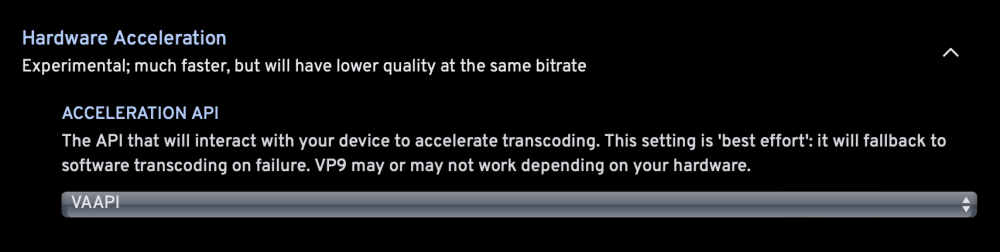
Edit: Seeing some instability(frozen machine) after the edits, I'm not sure if it's related to Immich/PostGres16 but there are some other reports of hung machines. It wasn't working for me either, but I just updated the containers and switched to SIO's postgres container and it seems like it may be working now. I used to just see tons of FFMPEG errors in the log and turned off HW accel. The quick sync setting seemed to generate ffmpeg error. I'm trying VVAPI:
-
You can use post commands to restore the speed(and other things).





