






MAM59
Members
-
Joined
-
Last visited
Everything posted by MAM59
-
Running pihole ON UNRAID is possible, running it FOR UNRAID is always a bad idea because it will not be available at boot time when it is already needed. So it makes no difference if you run in on a seperate IP or on a bridge, it simply will not work. UNRAIDs DNS settings must always point "elsewhere" outside the box. Also, UNRAID does not need any adfilter, it will hardly be used for browsing around because you cannot store any URLs/users/passwords. After every reboot they will be gone, this does not really attrack people :-)
-
not really anymore. (but little known to the public and not often used too) Althow 53 is still standard for DNS, modern resolvers can be configured to use any port with the ..#port syntax for " port=value This keyword changes the default TCP/UDP name server port to value from its default, port 53. The abbreviation for this keyword is po. " root@F:~# nslookup > set port=5353 > server 192.168.0.3 Default server: 192.168.0.3 Address: 192.168.0.3#5353 >
-
You have not read (or understood) my tldr plugin note. instead of "man find" you just type "tldr find" on the shell/ssh. It is just what you are asking for. root@F:~# tldr find info: cache is stale (last update: 14d, 5h ago), updating... info: downloading 'tldr.sha256sums'... 3.35 KiB info: downloading 'tldr-pages.en.zip'... 2.88 MiB info: validating sha256sums... OK info: extracting 'pages.en'... 6774 pages, 37 new info: cache update successful (total: 6774 pages, 37 new). warning: 1 page(s) found for other platforms: 1. windows (tldr --platform windows find) find Find files or directories under a directory tree, recursively. See also: fd. More information: https://manned.org/find. Find files by extension: find root_path -name '*.ext' Find files matching multiple path/name patterns: find root_path -path '*/path/*/*.ext' -or -name '*pattern*' Find directories matching a given name, in case-insensitive mode: find root_path -type d -iname '*lib*' Find files matching a given pattern, excluding specific paths: find root_path -name '*.py' -not -path '*/site-packages/*' very simple
-
Better you do 😉 The thing is, how you leave the session. UNRAID has no session timeout, so if you just close the window of/in the browser, it remains open. And then it depends on your browser's settings, if you have set them strict and paranoid, the browser "forgets" everything once he is reopened someday. So a "new" session is started on UNRAID (making them TWO running ones). And if this happens over and over again, you finally reach the configured limit of 50 and the warning starts to begin. If you restart unraid (or at least the NGINX Server for the GUI) all old sessions will be erased from memory too and the count begins again with "1". If the browser is configured to remember the old session, it is picked up again and just resumed, no new session is created. But again, it is a local setting in your browser.
-
the message means, you have too many open (GUI) sessions. Use fewer clients, or consider to log off before you close the browser tab. This can happen easily if you run the browser in private mode (or set the setting to delete everything on closing the window). UNRAID still has the session open then and they add up and up and up... So its more a sign that you are doing something wrong instead of beeing a bug in UNRAID (if you raise the limit it will still happen, just later)
-
Not really a great idea. Even if all your data disks are "zeroed-out", they contain a filesystem, which means, some sectors HAVE data on them. So, the parity drive cannot be "all-zeros". It MAY work, if all disk really only contain 0s in all sectors, but even newly shipped drives usually have undergone some tests and contain a partition table or something. What seems to work at the beginning, maybe boomerang back lately if you try to replace a faulted drive. It can happen, that the data is restored, but the disk is "unmountable or no filesystem found" and therefor useless. I would not take such a risk, I let it run, whatever time it takes (36hrs seem to be quite long for such small arrays ?!?!?)
-
I never futz around with port numbers, I use NPM as a reverse proxy and access those services by name. Only NPM "knows" the real port number, to the outside it is always port 80 or 443. Why should I fill my precious brain with some numbers???
-
any version will work. It just depends on personal taste and your will to stress your extended memory. It maybe fine to spill a lot of IP addresses if your lan is small, but I already ran out of addresses in the normal /24 range and had to extend the range. With a few hundred hosts to remember you do not als want to remember "where is this function now?". I prefer KISS (keep it simple (and) stupid)
-
Yeah I know, but why set something at risk? there is no benefit to gain from multiple docker-ips. Yeah, my bad english... What I mean is that you can edit the port in the docker's setting to avoid conflicts between dockers. So you can assign 8081 instead of 8080 and so on.
-
There are some routers out in the wilderness that struggle with multiple V4 addresses coming from the same MAC. So its better to play it safe and use only ONE address but multiple ports. If you have port conflicts you may use a reverse proxy to allow different names to the services. The internal (unique) port number is then hidden behind the proxy and does not matter. And it is even easier to remember "pihole.my-domain.tld" instead of an extra IP address.
-
What should those VLANs be good for? They do their job, they isolate the traffic. So how do you expect you could connect across the VLAN borders? I guess you are lacking the essential basics of VLANs and routing...
-
Stop using Jumbo Frames! See my article https://forums.unraid.net/topic/174720-intel-x540-t1-10gbps-nic-with-jumbo-frames-9000-breaking-all-connections-to-unraid/#comment-1462934 for details.
-
Another reason for these drops could be "too much power saving". If the nic (or the port on the switch) is powered down for some reason, these things can happen. On UNRAID the tool "powertop" is known for producing such problems. If you use it, delete it and reboot.
-
Also ich verstehe ja die Idee hinter diesem Bond, allein, sie funktioniert so nicht. Es ist recht unschlau Karten mit unterschiedlichen Geschwindigkeiten in einem Bond zusammenzufassen. Der Kernel weiss dann nicht so genau, wie schnell er die Pakete loswerden kann und die Queue Berechnung kommt durcheinander. Das ist dann Stottern bis hin zu Blockaden mit Abbrüchen. Also: deaktiviere den Bond auf beiden Karten geh in die Netzwerkregel und vertausche die MAC Adressen in den Listboxen (eth0 und eth1 tauschen dann die Karten, die Mellanox ist dann die "Haupt"karte) das Defaultgateway sieht richtig aus, allerdings sorgt die Metrik von 1008 (oder so), dafür, dass es unter Umständen gar nicht zum Zug kommt. Hier gehört eine "1" rein
-
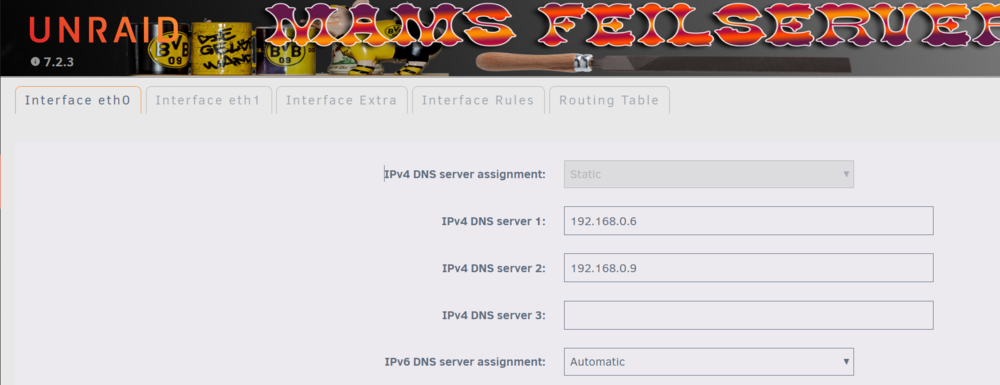
na ja, kommt drauf an. Wenn Du DHCP aktiviert hast, dann wird sie von dem Server geliefert, bei statischen Adresse wird sie von Hand in Unraid selbst eingestellt. (Die Felder werden aber erst sichtbar, wenn man das Array stoppt!) Und da gehört dann die Adresse der Fritzbox rein!!!

-
Das siehst Du falsch, aber sowas von... Nur bis zur Fritzbox gehts, dann ist Sabbat. (na ja, geht eigentlich bis zu allen Kisten im LAN, aber eben NICHT ins Internet) Komischerweise scheint die Defaultroute auf diesen "EFrameserver.Fritz.Box" (192l168.2.19) zu zeigen und nicht auf die Fritzbox selber (192.168.2.1) ? Das geht dann auch voll in die Hose, wie man an den vernichtenden Kritiker ("!H") sehen kann. Was und Wo hast Du denn als Defaultroute eingestellt (sollte bei DHCP ja automatisch und richtig gesetzt werden...) ???
-
in 99% this can be seen with bad cable (or too long one). But I agree, it is very hard to track because they wont tell you the truth if you buy one. Look at the cable, if there is something written on it like "rawcable", through it away. 10G only works almost stable with real cable and plugs at the ends. If you cant make it out (I gave up after 6months of depressing tries), switch to fiber and you are done. I would consider everything >5m lenght as a potentional source of evil. They say 30m would be fine, they lie...
-
welcome to the internet 😁 As soon as you open a port, you will have visitors. Depending on the service you run the attacks will be visible or not, but they are there, always. You COULD install a firewall, log these addresses and block them for further actions. You COULD install a program like FAIL2BAN that will do this blocking almost automatically for you. But still there will be time when somebody slips through. So make sure you have good passwords (2FA is even better) for all your accounts and never use standard users/passwords. Also it is good practice NOT to allow all outgoing traffic automatically like windows does. Better play it safe and restrict the outgoing ports too. So you will get informed about internal malware that tries to create a tunnel without your notice (but still there are enough "common" ports where tunnels can be set up too...)) (Also note that there are many companies / organizations that run active scanners. They do no harm (they say), they put you on a blacklist if they find an easy entry to your net and others use these blacklists to train their firewalls)
-
plugging the modem into either the switch or the computer wont really help you. You need to put it into the router you should have somewhere.
-
Sorry, I can't help you. I stay away from USB the far as I can (at least for be used with UNRAID, I have some mobile USB disks but they are not attached to a computer all the time).
-
You have a really dangerous external USB compartment there! It automatically generates "disk names", UNRAID needs them to find back the drives after a reboot. But your box seems to throw a dice every power on (actually I would more think it just renumbers them in the sequence they spin up), this is a sure source for desaster sooner or later (and repeatingly). Get rid of that thing and get something real!
-
Das die Platten im BIOS nicht auftauchen, ist nicht wirklich schlimm. Da wird wohl der Treiber für diese M.2 Karte fehlen (bzw, nur Port 1 im Emulationsmodus erkannt werden). Hauptsache, die gestarteten Betriebssysteme können damit umgehen. Einziger Nachteil: Du kannst nicht von Platten an diesen Ports booten (aber das willst Du mit UNRAID ja sowieso nicht)
-
Das Ganze etwas moderner (und mit halber Latenz) sieht so aus: root@F:~# traceroute www.heise.de traceroute to www.heise.de (2a02:2e0:3fe:1001:7777:772e:2:85), 30 hops max, 80 byte packets 1 ipv6-addr.wco.de (2a02:2c60:f18a:73b0:ab6:57ff:fe8d:401f) 0.236 ms 0.201 ms 0.177 ms 2 ipv6-addr.wco.de (2a02:2c60:a000::1) 10.759 ms 10.736 ms 10.713 ms 3 ipv6-addr.wco.de (2a02:2c60:a001:11::2) 10.688 ms 11.948 ms 10.642 ms 4 2a02:5a0:1f02:ff03::2 (2a02:5a0:1f02:ff03::2) 10.621 ms 10.598 ms 10.575 ms 5 et-2-0-5.0.vs-core-r1.6838.ip.vsenet.de (2a02:5a0:301:12::236:17) 11.742 ms 11.719 ms 47.202 ms 6 et-2-0-2.0.vs-core-r2.6838.ip.vsenet.de (2a02:5a0:301:11::236:18) 10.487 ms 10.742 ms 10.713 ms 7 * * * 8 * * * 9 2a02:2e0:3fe:0:c::1 (2a02:2e0:3fe:0:c::1) 15.661 ms !X 16.455 ms !X 15.971 ms !X Hmm interessant zu sehen, wieviel schneller "neue" Fritzboxen (0.2ms) im Vergleich zu "alten" (1,3ms) reagieren... Obwohl, in der Praxis merkt man wohl kaum was vom Geschwindigkeitsunterschied, aber es summiert sich auf...
-
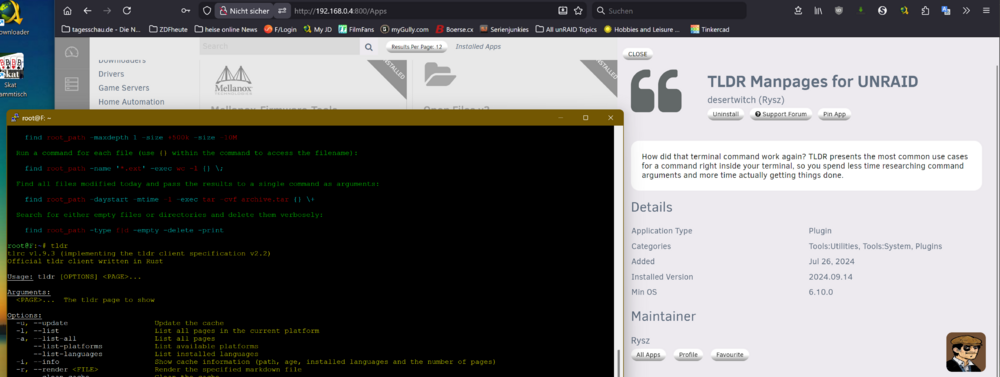
note that there is a plugin for UNRAID that will give you online access to man pages: Just type "tldr find" instead of "man find"
-
Keine schlechte Idee (sofern er die Namen überhaupt auflösen kann). Allerdings muß man darauf hinweisen, dass Heise zwar PINGs erlaubt, traceroutes von Linux aber blockt (tracert von Windows geht durch, aber der funktioniert auch komplett anders). Also: erst gucken, ob Namen gehen, dann "ping". Wenn der nicht geht, dann traceroute und protokollieren, wie weit man kommt. (ein besseres "Opfer" ist z.B www.bahn.de, da geht auch der traceroute komplett durch)





