





Vetteman
Members
-
Joined
-
Last visited
Everything posted by Vetteman
-
I am initiating sleep via the sleep button the plugin generates. My motherboard does have the latest bios. Cheers
-
Too bad. Prior to running Unraid on this computer, it was a Windows 10 storage pool server and the Windows 10 sleep mode was flawless. I am a bit timid to try this plugin on my other Unraid server for fear of having to do a hard reset resulting in file corruption. Thank you kindly for the replies, much appreciated. Many cheers from Nova Scotia...
-
Yes, I do have a kvm switch attach. I did switch to the kvm port the Unraid server was attached to and there was no monitor display, no response from the keyboard. Sorry I did not post this. I also watched SpaceInvader One's youtube video on this plugin Thanks for the reply.
-
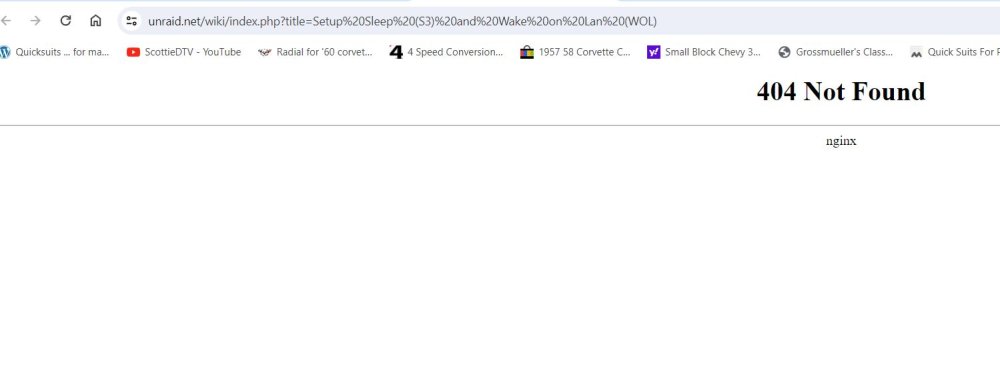
Dynamix S3 Sleep plugin is causing issues. Currently running Unraid ver 6.12.4 on both of my Unraid computers. Yesterday I installed Dynamix S3 Sleep plugin that is available via the APPS page on ONE of my Unraid computers. After installing I searched for documentation on how to properly set this plugin up and could find nothing. Link from the MAIN page displays the SLEEP icon and a link to wiki entry that does not work. See screen captures below. However I did find this recommendation in this thread here that I used. i set them to these settings. And exited the plugin. Then went back into the settings tab to verify I had saved them. And they were saved. Last night before retiring I pressed the SLEEP icon on the Unraid Dashboard and the server seemed to go to sleep, as I lost my web connection to the server and ALL lights and disk leds were now off. This morning I hit my power button, The computer seemed to awake and all lights and disk leds were no on. There was no usual bootup procedure, So I assumed it was awake. However I could not connect to the server via a browser, nor would it respond to a ping from my Windows 10 computer or Ubuntu pc. So I had to hard reset the beast via the power button. And now it is awake but running a parity check due to the hard reset. I checked the plugin settings this morning and they had returned to the default settings and not the settings I had entered. I checked my log entry for last night to see if the server did in fact go into S3 Sleep mode. I found these entries Mar 17 00:29:00 JUNKYARD s3_sleep: Enter sleep mode Mar 17 00:29:00 JUNKYARD kernel: PM: suspend entry (deep) Mar 17 09:27:16 JUNKYARD root: Delaying execution of fix common problems scan for 10 minutes The next after were for this morning. I've removed the plugin until I can find instructions on what are the proper settings to use. I do not want any hard crashes, as this server has been as stable as a finely tuned Chevy small block V8 until installing this plugin. I will NOT be trying this plugin on my other Unraid server. i usually do not have this issue with Dynamix plugins. Frustrated with the lack of documentation and broken link. Cheers & many thanks...

-
Yes, I just update Disk Location to version 2024.03.06c and the issue is resolved on both servers.
-
I am having the same issue with dashboard on BOTH of my Unraid servers. It occurred to both after updating the Disk Location plugin.

-
I am thinking I should convert some of my other pool devices to XFS.
-
1TB Team Group 2.5 inch SSD using btrfs was working fine as a Pool Device (not being used as Cache) for over 6 months. However on the weekend it suddenly became read only. As I started to copy the files off to the Array the drive became unmountable. I took the Array into "maintenance mode" but I could not run a check on the btrfs file system. On reboot of Unraid the SSD was recognized by the SuperMicro HBA card. But would not mount. It appears the file system was trashed. I removed the SSD from my Unraid server and placed it into my Windows 10 computer. Windows disk manager recognized the SSD but not the partition. So I created a NTFS partition and copied 16 gbs of files to it as a test. I also ran CrystalDiskInfo on the SDD. Everything was fine. No errors were found. Googling I found several threads on reddit of people reporting similar issues with SSDs using the btrfs files system. Many reported btrfs is a trash file system and converted their SSDs to Xfs and have not had an issue since. I placed the SSD back into Unraid and was able to re-assign it back to the Pool Device and reformated as Xfs. Have any users here had similar experiences with btrfs on their Pool Devices? I have other Pool Devices on my two Unraid servers formated as btrfs and I am now a bit concerned about having this issue reoccur. Thank kindly
-
Thanks kindly for the feedback. Syslog did report this "Jan 23 09:25:41 JUNKYARD unassigned.devices: Mount warning: The disk contains an unclean file system (0, 0). Metadata kept in Windows cache, refused to mount. Falling back to read-only mount because the NTFS partition is in an unsafe state. Please resume and shutdown Windows fully (no hibernation or fast restarting.) Could not mount read-write, trying read-only" I did try dismount and remounting the NTFS disk, but remains RO. My Windows Storage Spaces server is now my Unraid trial server...LOL.. And my main workstation Win 10 does not have a free SATA port available. I'm copying files off the NTFS share to another UA drive and then will reformat the NTFS as BTRFS or NTFS (if that option is available & I believe it is). Thanks kindly for your assistance, much appreciated.
-
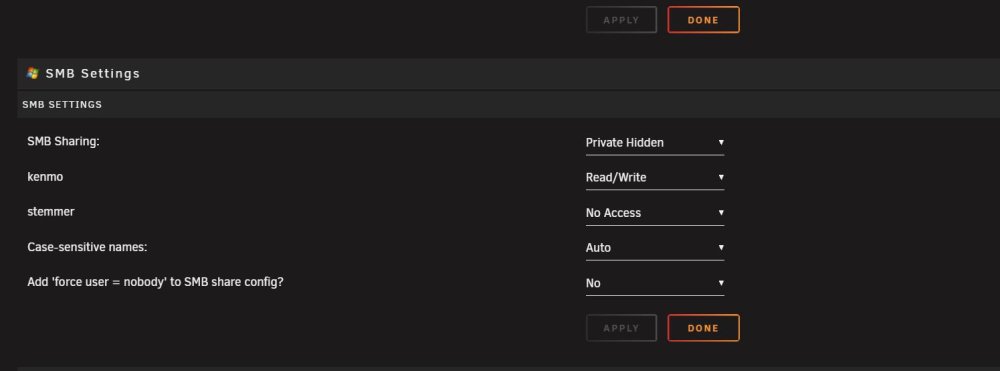
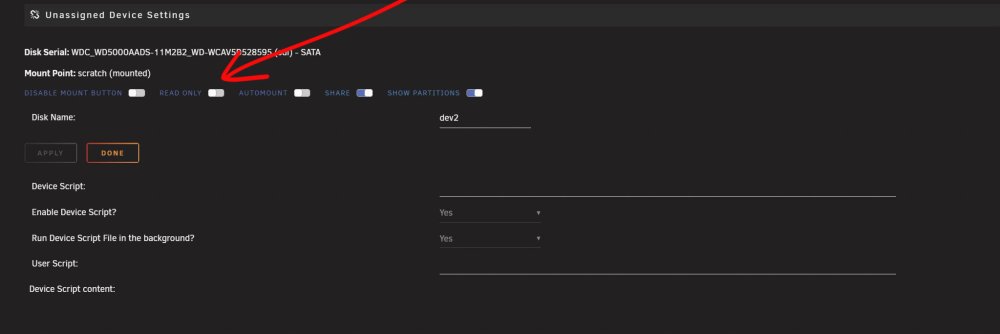
And these 2 screen caps are from the Settings UA. Also not sure why I am being asked to the UUID on the disk that is hosting the RO share on my trial Unraid server. UA NTFS shares on my registered Unraid server are fine after installing the recent upgrade "2024.0122b"

-
I noticed after applying the update 2024.0122b one of my NTFS UA disks is now a Read Only Share.

-
Are you running PAR2 from a Windows computer on the UNRAID share mapped as a drive? I checked the Unraid APP store and could not find anything for PAR2! i use the Windows gui Multipar which is the replacement for the older QUICKPAR gui. Cheers and many thanks from Nova Scotia....
-
I used to have the nerd pack installed but I recall last year or so, another plugin recommended it be removed. I can not remember why or what plugin, so I removed it.
-
Instead of selecting disks or shares, I would to prefer the root file within my share that contains all my photos and sub folders. Going through the setup I do not see an option to include a folder only exclude folders?
-
Sorry but my comment was not intended to offend you or start a debate. Being the author of this plugin you know much more about it plugin then I will ever know. My comment was only about my preference. Despite the progress in automotive technology, I still prefer the cars I grew up with in the 1950s, 60s and 70s. That is why I still own a 1960 Corvette for summer fun and I am fully aware of the risks involved in driving a 60 year old auto... Cheers and many thanks from Nova Scotia for such a wonderful plugin...
-
I just upgraded plugin to ver 2024-0122a and it is working fine on my registered Unraid server and on the trial server. Thanks kindly, however I do prefer the older version over the new. Too many places to check for share settings. Much prefer the simpler earlier version.
-
Looks like other members are having the same issue as me. So I will wait for the plugin update. The odd thing is, UA shares are fine on the trial server but not the registered server. Both are using the same version of Unraid OS and plugin...
-
You were able to assist me with my trial version of Unraid here... However now on my registered version of Unraid I can no longer share my unassigned devices. I no longer see the place to "Enable SMBsharing or NFS Export in Unassigned Settings" in in the Unassigned Devices->Settings. I love your plugin. BUT the earlier versions where so much simpler to understand and easier to use. I find these newer versions a bit frustrating. Cheers & many thanks...A youtube video on this plugin would be welcomed, since there appears to be youtube videos on just about every other plugin and docker.I was using PAR2.EXE but I am always editing my RAW files into new PSD and JPG files. However the folders are constantly changing. As Photoshop and Lightroom evolve with new or better features. Therefore I will re-edited my files to massage them a bit more. Since I have my root folders named by year, 2009, 2010,...2022 and subfolders named under the appropriate year by event/place, A&W CAR SHOW, PEGGYS COVE, BANGOR MAINE, MONCTON NB, running PAR2 can be quite time consuming. AND I have to delete the existing PAR2 files before running PAR2.For my array disks I use XFS. For cache and unassigned I use BTRFS and NTFS (NTFS - drives removed from Windows external drives which already have a file system and data). I thought somewhere here it was not recommended to use BTRFS on array disks, only XFS? Perhaps there is a PAR2 plugin for NTFS drives on Unraid? But searching I could not find any... I was hoping SpaceInvader One or someone like the "Bit my Bytes" bloke would have a video on Dynamix File Integrity. Cheers & many thanks....I was very excited when I found this plugin as I am an avid photographer and have taken many landscape and car show photos over the last 20 years. I also do digital illustrations and 3D modeling. Previously I was backing up all my edited and raw file photos and digital illustrations and 3D assets to external WD and Seagate USB NTFS hard drives. I started to schuck the hard drives leaving them as NTFS and placing them as unassigned devices in my Unraid server with all the files still intact, And continue to backup to them. This has worked quite well. File corruption and bitrot is a concern of any photographer or illustrator. It is mentioned XFS is the preferred file system? Will this work with NTFS or BTRFS or ONLY XFS? Also is there a video any where on setting this up or even a demo of this plugin? Thanks kindly...I agree 100% with this comment. As well as ease of use and stability sold me on Unraid.Thanks kindly for your reply. If I request a new trial with the flash drive, then I would have to manually reassign all the drives and not be able to copy the config folder from the old to new flash drive? Re-assigning drives to the array is not a big deal as I do have screen shots of the array assignment.


