





uldise
Members
-
Joined
-
Last visited
Everything posted by uldise
-
i have two of these at home, tested and worked with: - Brocade Active 10Gbit DACs - fs.com Brocade 10G-SFPP-LR as i have Brocade card in my PC - fs.com Cisco GLC-TA Compatible 10/100/1000BASE-T SFP SGMII Copper RJ-45 100m Transceiver Module - to connect more Ethernet cable if needed - fs.com Ubiquiti UF-SM-10G Compatible 10GBASE-LR SFP+ 1310nm 10km DOM Transceiver Module to interconnect both Mikrotik CRS305 with fs.com LC-LC UPC Duplex Single Mode Fibre Patch cable.
-
i just updated my https://hub.docker.com/r/uldiseihenbergs/meshcentral to the latest 0.6.81 version.
-
i just tested it without tag, and it works just fine for me.. if it simple disappears then something is wrong with settings.
-
it works just fine. my two unraid VMs is working on emulated cpu without any problems.
-
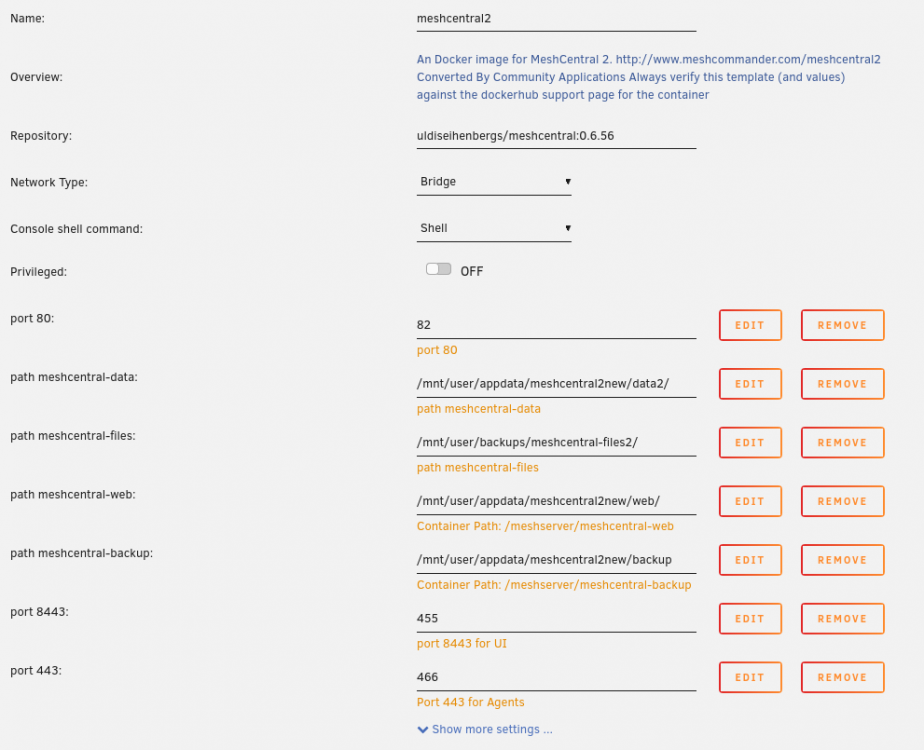
here you go but some of these settings depends on meshcentral config inside container. and this is my redacted meshcentral config file - i redacted it and removed all unused config parts. i'm using meshcentral behind my Apache reverse proxy. { "__comment__" : "This is a sample configuration file, edit a section and remove the _ in front of the name. Refer to the user's guide for details.", "settings": { "Cert": "mesh.example.com", "WANonly": true, "_LANonly": true, "SessionKey": "redacted7", "_CookieIpCheck": false, "CookieEncoding": "hex", "_IgnoreAgentHashCheck": true, "Port": 8443, "AgentPort": 443, "AgentAliasPort":443, "_AliasPort": 443, "RedirPort": 80, "_ExactPorts": true, "WebRTC": false, "_Nice404": false, "ClickOnce": true, "_SelfUpdate": true, "_AgentPing": 60, "AgentPong": 300, "AllowHighQualityDesktop": true, "TrustedProxy": "192.168.50.248", "MpsPort": 0, "AutoBackup": { "backupIntervalHours": 24, "keepLastDaysBackup": 5, }, "MaxInvalidLogin": { "time": 10, "count": 10, "coolofftime": 10 }, "Plugins": { "enabled": true } }, "domains": { "": { "Title": "example mesh", "Title2": "", "NewAccounts": false, "novnc":true, "mstsc":true, "CertUrl": "https://192.168.50.248:443/", }, }, }
-
Yes, i'm running Meshcentral in docker for about a 5 months. here is my repo: https://hub.docker.com/r/uldiseihenbergs/meshcentral i can post a screenshots with config page, just ask.
-
so much drives on one power cable?
-
sure, but until there are no real user experience with this, it looks like more marketing thing - if your drive is beyond this limit, then please purchase new one..
-
and do you know how this will impact HDD's performance?
-
are you talking about SSD? SSDs don't need to be pre-cleared. and SSD's TBW is about writing. parity check won't write to disk.
-
i opened a Brand Image database, then when i click on particular disk, it throws 404 error.

-
it's the same for me too! i have Guacamole setup just running, but lastly i'm moving slowly to meshcentral2 https://www.meshcommander.com/meshcentral2. to me it adds a value to connect to another desktop like in teamviever to support another person. RDP still works, VNC too. according RDP, if you need it through browser, then Guacamole is still the champ in UX - works very well like native Windows RDP. i'm running this Meshcentral in docker too, so, if anyone have an interest, just ask.
-
i have a freeRadius on top of pfSense running as VM...
-
i have jitsi running on VM, so i don't know where the config file resides on this container. Usually all config files are on appdata config folder that is mapped to particular container. on my system there is a file logging.properties near videobridge config file, and you set .level variable to WARNING for example to log only warning level and above. according RAM usage - i don't notice any huge increase over time in my VM.
-
look at your LOG file sizes inside a container. by default, it logs all info messages. you should change log levels for each of container.
-
i have some success with Jitsi-meet install on VM, or more precisely on Ubuntu LXC container under Proxmox. the biggest problem was to get it working with Apache reverse proxy. and i don't have video recording know, cos it looks like it must be installed on Linux with X server?
-
yes, it should work best, if your unraid drives are on separate controller. if you use motherboard ports, then there will be a problem to identify drives in proxmox VM.
-
you can do this on same hardware - if you decide to go bare-metal, just reboot your host, assign unraid USB flash drive as boot device and it should just work. and for backups - proxmox backup system will help a very little to unraid - you simply backup proxmox VM config, so you should set unraid usb flash backup and also setup another system for unraid data backup - full or partial, it depends.
-
see here: https://forums.unraid.net/topic/82260-virtualizing-unraid-on-proxmox-604/ the biggest problem would be boot from USB - i'm still using plopKexec method and it works just fine. but for proxmox host: this looks very promising and detailed: https://forum.proxmox.com/threads/proxmox-beginner-tutorial-how-to-set-up-your-first-virtual-machine-on-a-secondary-hard-disk.59559/
-
in my case i don't see any performance decrease - i'm running unraid as pure nas + some dockers, including Nextcloud, Plex, duplicati.. i have no experience with AMD at all, but should work just fine. for VMs i prefer SSD, and in my newest server PCIe NVME drives, and i don't use any RAID, insteed i do regular backups for my other than unrad VMs to unraid over NFS. No, i have 10Gbit nics and 1Gbit nics in my servers and i'm using them in Active-backup bond mode on host side. all my VMs have virtual nics only and thats working just fine. if you go Proxmox or ESXi, you can assign more cores to VMs than you have total Cores available on server. just watch for usage - i think, your will never run at full speed all of your VMs at once. i have a 8 Core CPU with HT enabled, so host OS sees them as 16 CPUs. you don't need a GPU at all to run Plex, just avoid any transcoding. i'm running Plex as Docker on unraid VM and it runs just fine - i assigned max 6 of 8 CPU to Plex docker to not overload unraid VM itself, if in same case plex would start some transcoding. but i don't have any 4K content, 1080p/720p only, so i can do some transcodes to lower settings in CPU without problem.
-
i'm long time unraid user, and started using unraid when there was no option to run VMs on unraid itself. and for me, running simple unraid on one hardware looks like wasting hardware resource(see my sig for hardware details). so i started with ESXi, and my server was running for years on that configuration without any problems. if i would start know, i will consider an option to run unraid bare-metal and run another VMs on it. but for me ESXi looks more stable system over this years - you setup it and forget about it - it's very stable and can run for months without single restart. apart for unraid on bare-metal - if you need to change unraid version for example, then you restart you unraid and all VMs on it. i moved to Proxmox cos i wanted to try cluster with two servers - ESXi clustering are only on paid version only. if you have further questions, feel free to ask.
-
i'm migrated from ESXi to Proxmox about a month ago. Regarding unraid, all working as expected as it was on ESXi too. if you don't know, why you recommend then? what do you mean with "the right kind of drive access to safely "do it's thing""? looks like some bullshit..., sorry. Yes, unraid is no supported to run under VM, nor ESXi nor Proxmox. but many of us are running it on VMs just fine.
-
@joyson that's really strange.. one more thing to try - use plopKExec.iso instead of ploKExec64.iso.. if that don't help, try to use new ESXi7 builtin USB startup..
-
just download plopkExec.iso, attach it to VM as CD-ROM. Start your VM, it should boot from plopKExec. if there is unraid USB connected, then plopKExec will automatically choose it and continue to boot. so, are you attached your unraid USB to VM?
-
i'm asking cos i'm using Active DACs with Mellanox PCIe card in my server - i changed 1M to 2M Active DAC recently, and right after a few minutes of work, port started flapping.. i resolved it by adding one more fan inside a case to low directly to PCIe zone. i'm wondering, maybe additional heat-sinks on ports would help a bit more..



