dopeytree
Members
-
Joined
-
Last visited
Everything posted by dopeytree
-
Many thanks for this docker.. can I just check is this displaying read speed or is this capable of write testing? Would be good to have it say 'read' speed or similar. It displays an error when trying to share upload data for the database. Is there a problem with the database's end?
-
Most online benchmarks put usb3 real throughput at around 400MB/s. Have noticed USBc port doesn't work out the box with unraid. USB3.2 gen1 works tho. Anyway even internally avoiding USB & Sata seem to get slow copy's even just NVMe to NVMe.. any ideas I should explore?
-
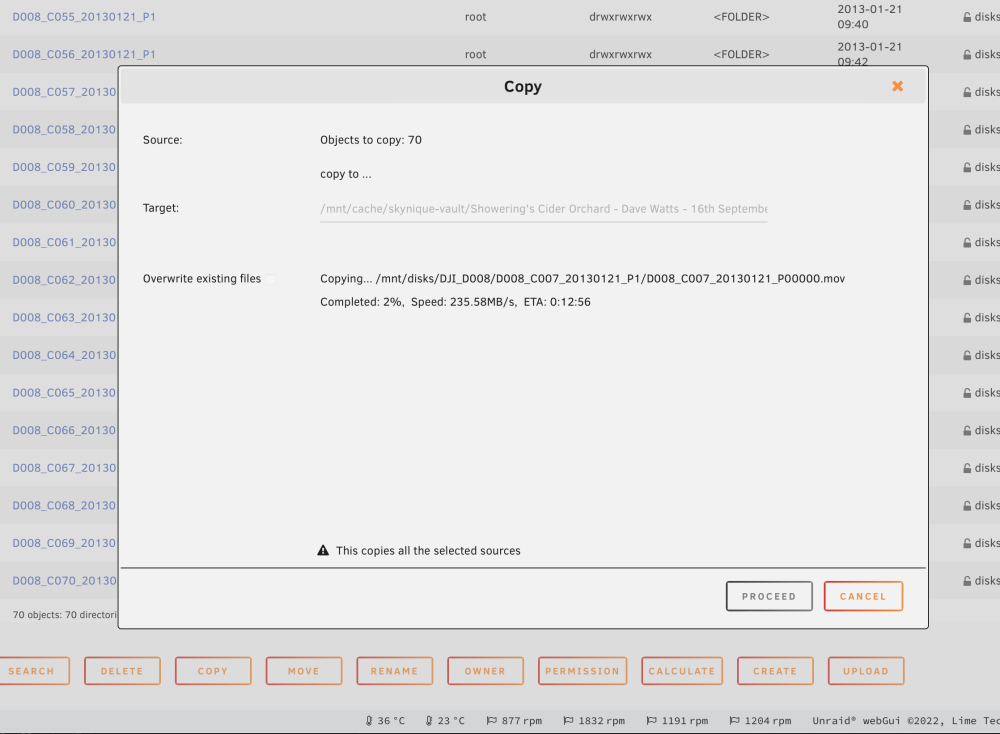
Copying from usb3 external NVMe ssd to cache drive NVMe so why is it so slow? Is there a problem with speed if you use a cache pool mirror? I have 1x gen4 NVMe & 1x gen3 NVMe on the motherboard as a cache pool - so the gen4 is mirrored to the gen3. When I use diskspeed test docker both SSD drives are around 2300MB/s. It shouldn't be touching the array disks. The share is set to use Cache. But anyway I am copying direct to cache rather than the user share. The array drives test around 240MB/s down to 108MB/s. My understanding is USB 3 provides up to 500MB/s read & write. ( Dependent upon encoding overhead ) And USB 3.1 up to 1200 MB/s read & write. ( Dependent upon encoding overhead )
-
Thanks - what ever it is it is inconsitent. Sometimes the pause is at bios sometimes halfway through unraid's loading... Would you mind sharing which stick you personally use? and is it USB2 rather than USB3?
-
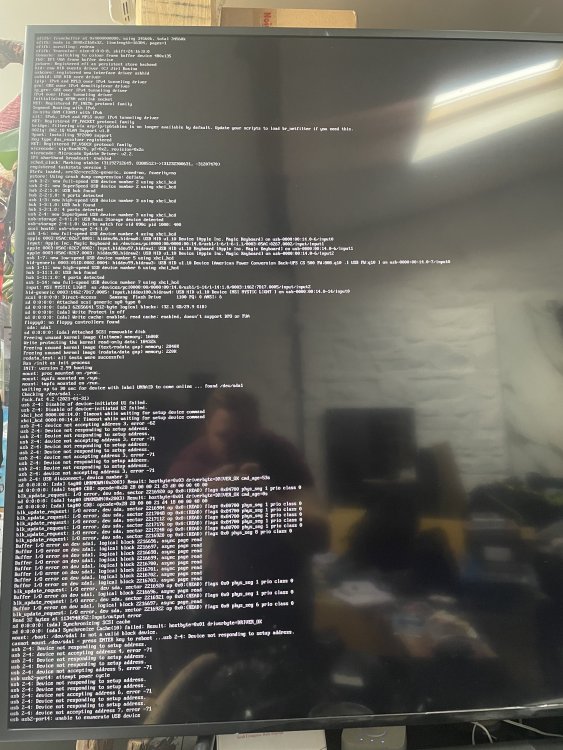
I had some USB stick issues with my innitial build but then swapped to a new samsung USB stick and was all ok until a few days ago. On system reboot I'm sometimes getting similar behaviour of where sometimes the usb stick is unrecognised by either the bios or will sometimes partial boot unraid but then hang at "Unable to enumerate USB device" Not sure if those are the same issue or 2 separate issues? It's like it doesn't always recognise the USB stick. I have to remove the drive boot up with no usb stick power down then boot up again. Usually 2 or 3 times... I'm using a a geuine "Samsung BAR Plus 32 GB Type-A 200 MB/s USB 3.1 Flash Drive Champagne Silver (MUF-32BE3)" https://www.amazon.co.uk/gp/product/B07CV9KCPN/ref=ppx_yo_dt_b_asin_title_o06_s00?ie=UTF8&psc=1 Which is reccomended by spaceinvader. Also happen to be on 2nd motherboard as wanted better PCIe layout. Only thing I can think of is maybe there's some odd USB power setting? Does unraid have a list of officially tested sticks? Or is it perhaps a problem related to the UPS's usb plug? Not sure why that would cause the system to hang but there it is... Once I get it to boot will post up some diagnostics. Thanks I'm on unraid 6.10.3 Motherboard: MSI MAG B560M MORTAR WIFI Gaming Motherboard, M-ATX CPU: Intel i9-11900T (11th gen) RAM: 32GB (4x 8GB) GPU: Nvidia RTX A2000 6GB PCIe: Expansion Card for ASMedia ASM1166 Master, PCI‑E to 6‑Port SATA3.0 Hard Disk, 6G ASM1166 Master GEN3 1 x Interface Array: 12TB parity + 12TB disk 1 (XFS) Cache: 2TB NVMe SSD x2 (BTRFS) Cache2: 2TB Sata SSD x2 (BTRFS) Case: Inovision NAS 8 bay case PSU: Inovision 600w Fans: Noctua fans CPU Cooler: Noctua NH-L12S low profile UPS: APC BK500ei 300w (UK version) with USB to RJ50 Data Cable
-
never mind figured it out: https://github.com/get-iplayer/get_iplayer/wiki/record#pid
-
Hi any help on how to use this? I tried 'his dark materials' then noticed it is over 30 days old so tried adding the weblink in to the PID section. It now searches and finds the content but then says it can't write it... Any pointers? 2022-09-20 17:29:42,115 DEBG 'get-iplayer' stdout output: WARNING: --modes is deprecated and will be removed in a future release. Use --quality. 2022-09-20 17:29:42,115 DEBG 'get-iplayer' stdout output: WARNING: Invalid values in --quality/--modes: 'tvbest,radiobest'. This will be a fatal error in a future release. get_iplayer v3.30, Copyright (C) 2008-2010 Phil Lewis This program comes with ABSOLUTELY NO WARRANTY; for details use --warranty. This is free software, and you are welcome to redistribute it under certain conditions; use --conditions for details. 2022-09-20 17:29:42,116 DEBG 'get-iplayer' stdout output: 2022-09-20 17:29:44,494 DEBG 'get-iplayer' stdout output: Episodes: His Dark Materials: Series 1 - Lyra’s Jordan, BBC One, m000b1v0 His Dark Materials: Series 1 - The Idea of North, BBC One, m000b9fj His Dark Materials: Series 1 - The Spies, BBC One, m000bj0x His Dark Materials: Series 1 - Armour, BBC One, m000bqjl His Dark Materials: Series 1 - The Lost Boy, BBC One, m000byxt His Dark Materials: Series 1 - The Daemon-Cages, BBC One, m000c6ps His Dark Materials: Series 1 - The Fight to the Death, BBC One, m000cfq8 His Dark Materials: Series 1 - Betrayal, BBC One, m000csdk His Dark Materials: Series 2 - The City of Magpies, BBC One, m000pb15 His Dark Materials: Series 2 - The Cave, BBC One, m000pk3m 2022-09-20 17:29:44,494 DEBG 'get-iplayer' stdout output: His Dark Materials: Series 2 - Theft, BBC One, m000prjm His Dark Materials: Series 2 - Tower of the Angels, BBC One, m000pzm6 His Dark Materials: Series 2 - The Scholar, BBC One, m000q6r9 His Dark Materials: Series 2 - Malice, BBC One, m000qf9z His Dark Materials: Series 2 - Æsahættr, BBC One, m000qpx2 INFO: 15 total programmes 2022-09-20 17:29:52,922 DEBG 'get-iplayer' stdout output: WARNING: A UK TV licence is required to access BBC iPlayer TV content legally 2022-09-20 17:29:52,923 DEBG 'get-iplayer' stdout output: WARNING: Recording quality settings 'tvbest,radiobest' corrected to 'hd,sd,web,mobile,hd,sd,web,mobile' WARNING: Please update your preferences, preset, or PVR search 2022-09-20 17:29:52,924 DEBG 'get-iplayer' stdout output: INFO: Downloading tv: 'His Dark Materials: Series 1 - 01. Lyra’s Jordan (m000b1v0) [original]' 2022-09-20 17:29:53,214 DEBG 'get-iplayer' stdout output: ERROR: Cannot open (write): /data/get_iplayer/incomplete/https:/www.bbc.co.uk/iplayer/episodes/m000b1v2/his-dark-materials/https:/www.bbc.co.uk/iplayer/episodes/m000b1v2/his-dark-materials_-_s01e01_-_Lyras_Jordan.video.ts 2022-09-20 17:29:53,246 DEBG 'get-iplayer' stdout output: [info] Env var SCHEDULE defined, sleeping for 2h...
-
Thanks for making this plugin. I now have cpu temps & also fan speeds working on MSI MAG B560M MORTAR WIFI Motherboard
-
Thanks for your speedy help - yes looks like a problem with Nord's threat protection and the self certifying SSL certificate. Have turned Nord's threat protection to LITE so only works when connected to a nord VPN rather than the blanket catch all.
-
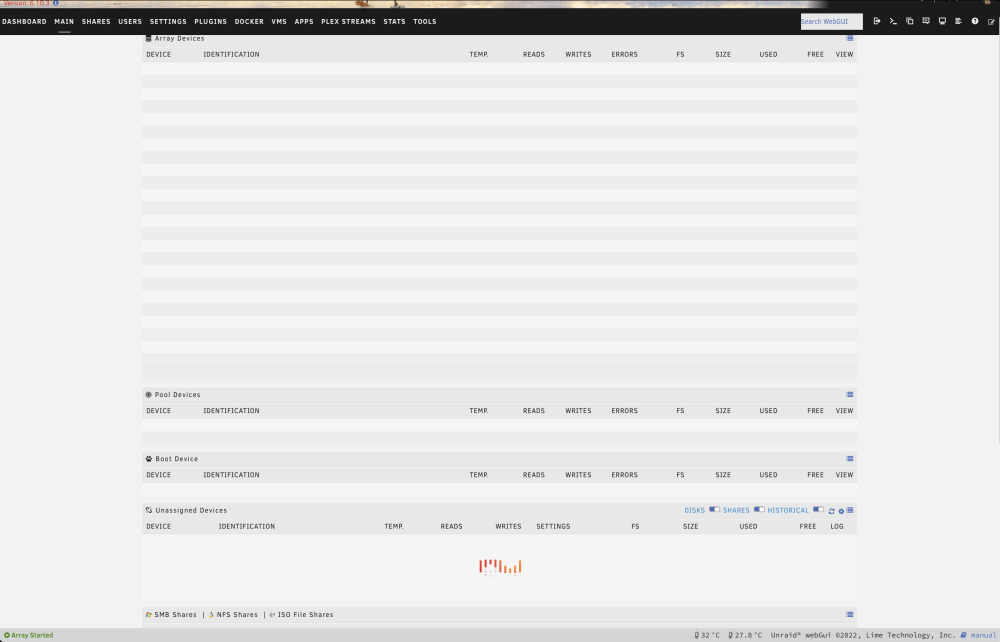
There were no drives showing see attached photo. Was displaying the unraid 'loading' logo. 192.168.33.2 VS moulin-rouge.local moulin-rouge-diagnostics-20220918-0958.zip
-
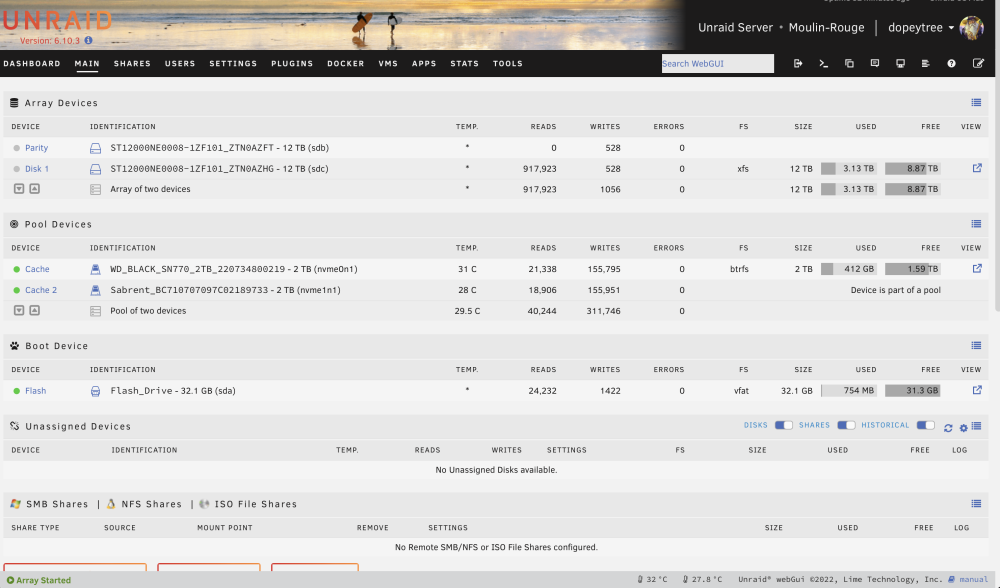
ha good spot. It wouldn't let me download the diagnostics.. but I have got them from the USB stick. All seems to be ok now so imagining it's something to do with SSL on ip address? if I go to server hostname.local it displays the main array & cache fine... I have noticed the server doesn't like me booting up with the UPS's 'usb' pluged in. It's APC's version so not proper usb it uses just 2 wires... seems to cause a usb problem then then at the same time the USB key can get dismounted requiring a reboot. Am about to swap motherboards anyway so perhaps will disappear?.. moulin-rouge-diagnostics-20220918-1707.zip
-
Is now working just had a look and it says updated. Then if you go to the https://forums.unraid.net/my-servers/ it should say something like 'generate flash backup'.
-
ok... all is ok if I visit the hostname.local wonder why it suddenly changed as have been accessing all morning on the ip address rather than hostname.
-
Not sure what's happened as was all working fine yesterday. The main page is just the headings with a large space. There's no drives showing for anything, array, cache, boot, unassigned etc. Have rebooted 3-4 times & I tried safe mode as-well and same result. Have I been hacked or something or is my USB key playing up again? Some variables are, removed 'denyhosts ssh log monitor app', removed 'custom tab app', installed new APC UPS via usb - rj10 cable. Diagnostics attached. There's nothing important on the system just annoying as was getting all set up ready to put into production. moulin-rouge-syslog-20220918-1609.zip
-
if you dont have 2factor authentication you need to scroll to the bottom of the google security page and choose allow less secure apps. You can then go back to unraid and test the email sender.
-
Ok now using a nice Samsung BAR Plus USB key instead of sandisk. Turns out this is the top drive that @SpaceInvaderOne reccomends here: Out of curiosity would there be a benefit in unraid using BTRFS for the usb key instead of fat32? I very much appreciated the automatic licence transfer feature. If anyone finds this it means you can transfer your licence to 1 new usb key once a year yourself - incase of damage etc.
-
Hooray after 17hours the disk is rebuilt and all looks ok. Will monitor the USB stick for corruption. Thanks for the help guys.

-
Blimey ok so there's something wrong with the USB stick? - Downloaded backup of the stick. - Formatted the stick. - Reinstalled unraid via the installer - Loaded up unraid that way. It instantly recognised both drives and is doing a rebuild now. I though a new installation would mean new config. Can't complain. Have ordered a samsung usb stick. The current one is sandisk. This whole build is new so no data is important.
-
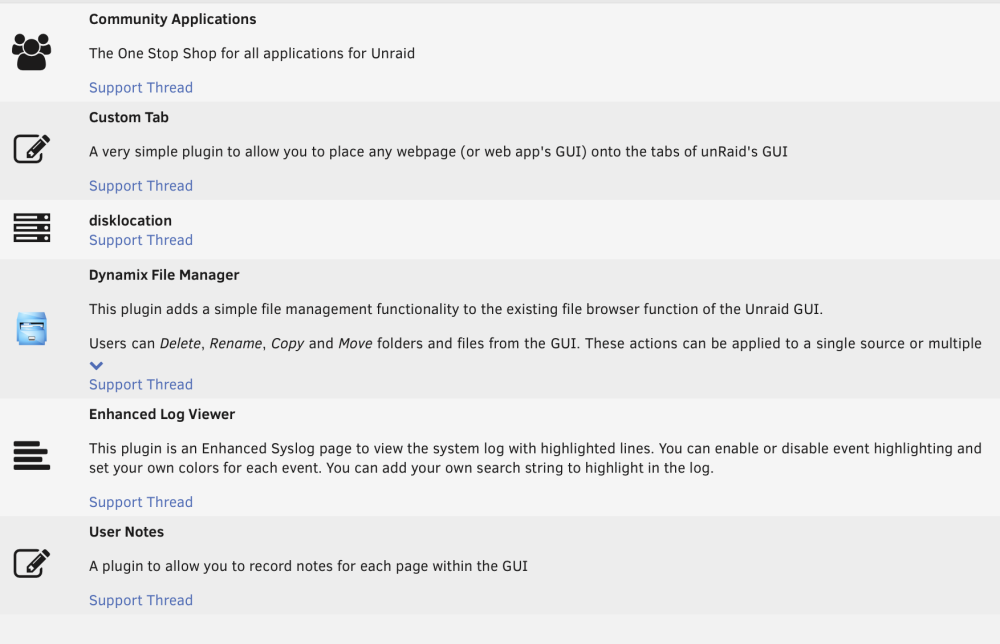
As it stopped the parity re-build at 37% today.. I took the opportunity to fit the newer CPU which will give me access to the 2nd m2 SSD slot on the motherboard. I removed most plugins. Installed new 11th Gen CPU for 2nd m2 slot access. (its disabled with current 10th gen) Installed new CPU fan. Removed & reseated all power cables. Re-freshed the BIOS. With the bios refreshed the energy settings are all back to normal so basically unraid has no energy settings built in it seems to default to running everything at full wack even if the motherboard is set to 'auto' Every 3.0s: cpufreq-info | grep 'current CPU' Tower: Tue Sep 6 20:47:25 2022 current CPU frequency is 4.29 GHz. current CPU frequency is 4.42 GHz. current CPU frequency is 4.41 GHz. current CPU frequency is 4.27 GHz. current CPU frequency is 4.04 GHz. current CPU frequency is 4.40 GHz. current CPU frequency is 4.23 GHz. current CPU frequency is 3.48 GHz. current CPU frequency is 4.24 GHz. current CPU frequency is 4.40 GHz. current CPU frequency is 4.10 GHz. current CPU frequency is 3.98 GHz. current CPU frequency is 4.41 GHz. current CPU frequency is 4.40 GHz. current CPU frequency is 4.51 GHz. current CPU frequency is 4.51 GHz. Booted up drives are there now whereas before they wouldn't always appear. I have checked the .ident file and yes it's changed but not by me.... It has the time zone set for LA where as it should be London. using ls -lah /boot it gives the below: root@Tower:~# ls -lah /boot total 295M drwx------ 10 root root 16K Dec 31 1969 ./ drwxr-xr-x 19 root root 400 Jul 17 2021 ../ drwx------ 3 root root 16K Aug 23 18:33 .Spotlight-V100/ drwx------ 3 root root 16K Aug 25 14:36 .TemporaryItems/ drwx------ 3 root root 16K Aug 25 14:41 .Trashes/ -rw------- 1 root root 180 Aug 23 18:44 .gitattributes drwx------ 3 root root 16K Sep 6 2022 EFI/ -rw------- 1 root root 16K Sep 6 2022 FSCK0000.REC -rw------- 1 root root 16K Sep 6 2022 FSCK0001.REC -rw------- 1 root root 16K Sep 6 2022 FSCK0002.REC -rw------- 1 root root 16K Sep 6 2022 FSCK0003.REC -rw------- 1 root root 16K Sep 6 2022 FSCK0004.REC -rw------- 1 root root 32K Sep 6 2022 FSCK0005.REC -rw------- 1 root root 16K Sep 6 2022 FSCK0006.REC -rw------- 1 root root 16K Sep 6 2022 FSCK0007.REC -rw------- 1 root root 16K Sep 6 2022 FSCK0008.REC -rw------- 1 root root 16K Sep 6 2022 FSCK0009.REC -rw------- 1 root root 16K Sep 6 2022 FSCK0010.REC -rw------- 1 root root 16K Sep 6 2022 FSCK0011.REC -rw------- 1 root root 16K Sep 6 2022 FSCK0012.REC -rw------- 1 root root 16K Sep 6 2022 FSCK0013.REC -rw------- 1 root root 111M Sep 6 2022 bzfirmware -rw------- 1 root root 65 Sep 6 2022 bzfirmware.sha256 -rw------- 1 root root 5.9M Sep 6 2022 bzimage -rw------- 1 root root 65 Sep 6 2022 bzimage.sha256 -rw------- 1 root root 18M Sep 6 2022 bzmodules -rw------- 1 root root 65 Sep 6 2022 bzmodules.sha256 -rw------- 1 root root 135M Sep 6 2022 bzroot -rw------- 1 root root 26M Sep 6 2022 bzroot-gui -rw------- 1 root root 65 Sep 6 2022 bzroot-gui.sha256 -rw------- 1 root root 65 Sep 6 2022 bzroot.sha256 -rw------- 1 root root 30K Sep 6 2022 changes.txt drwx------ 11 root root 16K Sep 6 12:19 config/ -r-------- 1 root root 120K Aug 23 18:33 ldlinux.c32 -r-------- 1 root root 68K Aug 23 18:33 ldlinux.sys -rw------- 1 root root 7.8K Sep 6 2022 license.txt drwx------ 2 root root 16K Sep 6 2022 logs/ -rw------- 1 root root 1.8K Sep 6 2022 make_bootable.bat -rw------- 1 root root 3.3K Sep 6 2022 make_bootable_linux -rw------- 1 root root 2.4K Sep 6 2022 make_bootable_mac -rw------- 1 root root 147K Sep 6 2022 memtest drwx------ 2 root root 16K Sep 6 2022 preclear_reports/ drwx------ 2 root root 16K Sep 6 2022 syslinux/
-
Ok thanks think I'll try a BIOS refresh to make sure it is ok.
-
See post above have already removed that from the go config. Think your looking at old diagnostics See current diags from today 6th september here: https://forums.unraid.net/applications/core/interface/file/attachment.php?id=169834&key=91c67006a19731592e00a4e57b27a6e3 In the bios I have turned "Agressive Link Power Management" to disabled. Powertop is uninstalled. As above I removed the powertop commands from the go config file. I think there is a bug in the latest my servers plugin... see screenshot.

-
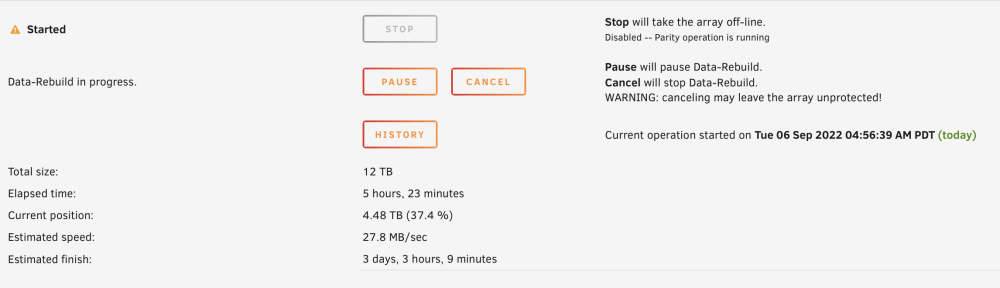
Noticed after a restart it's changed the server name... from moulin-rouge to tower Urghhh.. It's halfway through the re-build. Its at 37%. Anyway right now noticing now in the logs it saying: Sep 6 10:17:45 Tower kernel: ata4: COMRESET failed (errno=-16) Sep 6 10:17:45 Tower kernel: ata1: COMRESET failed (errno=-16) Sep 6 10:17:45 Tower kernel: ata1: hard resetting link Sep 6 10:17:50 Tower kernel: ata4: SATA link up 3.0 Gbps (SStatus 123 SControl 320) Sep 6 10:17:50 Tower kernel: ata4.00: configured for UDMA/133 Sep 6 10:17:50 Tower kernel: ata1: SATA link up 3.0 Gbps (SStatus 123 SControl 320) rebuild has slowed down to 37MB/s from 240MB/s How do I narrow it down more as to what the problem is? I have changed the sata cables. It's plugged into the sataports on the motherboard a gigabyte 560 d3h The smart monior passes for both drives... tower-diagnostics-20220906-1825.zip
-
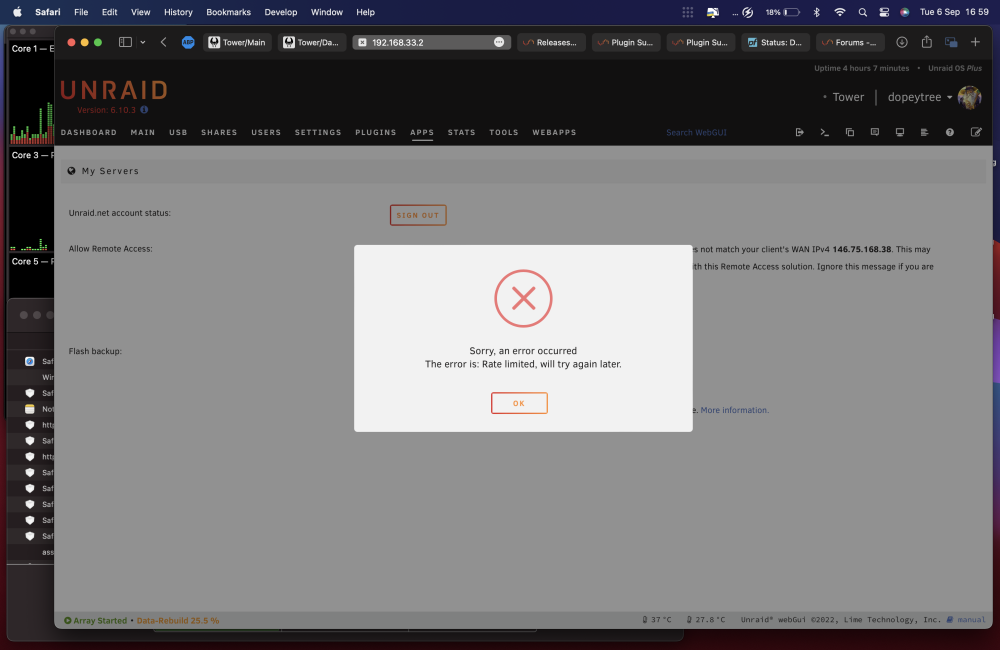
I know there's a few issues with the flash backup - this is the current message my server gives when trying to activate it. Note - Checked pfSense and there is no firewall alert or block. Latest my servers plugin release on 6.10.3 Perhaps you could move the 'Manual Key Backup Download' button to here until you get it working again as I always forget which heading the manual flash backup download button is located under.... tower-diagnostics-20220906-1702.zip
-
Same it says 'rate limited'
-
Thanks & very true but there is an energy crisis & most homelab people are thinking about energy usage for past 6months or so... I think I will just leave turned on 24/7. I got the cpu usage down in bios so it doesn't run at half tilt 2.8ghz while idle. Now runs 800mhz. It idles at 43watts which is about £0.30p a day. Remembered that as part of the powertop forum thread it recommends some changes to the go config file. So although tips & tweaks plugin removes the powertop package any modifications remain. This was the file: #!/bin/bash # Start the Management Utility /usr/local/sbin/emhttp & # ------------------------------------------------ # Disables FTP & Telnet # ------------------------------------------------ sed -i -e 's/^telnet/#telnet/;s/^ftp/#ftp/' /etc/inetd.conf /etc/rc.d/rc.inetd restart # ------------------------------------------------- # Set power-efficient CPU governor # ------------------------------------------------- /etc/rc.d/rc.cpufreq powersave # ------------------------------------------------- # Wake On Lan Ethernet # ------------------------------------------------- ethtool -s eth0 wol g # ------------------------------------------------- # powertop tweaks # ------------------------------------------------- # Enable SATA link power management echo med_power_with_dipm | tee /sys/class/scsi_host/host*/link_power_management_policy # Runtime PM for I2C Adapter (i915 gmbus dpb) echo auto | tee /sys/bus/i2c/devices/i2c-*/device/power/control # Autosuspend for USB device echo auto | tee /sys/bus/usb/devices/*/power/control # Runtime PM for disk echo auto | tee /sys/block/sd*/device/power/control # Runtime PM for PCI devices echo auto | tee /sys/bus/pci/devices/????:??:??.?/power/control # Runtime PM for ATA devices echo auto | tee /sys/bus/pci/devices/????:??:??.?/ata*/power/control If anyone else comes across these issues t's important to remove ALL the POWERTOP TWEAKS: So my file now looks like this: #!/bin/bash # Start the Management Utility /usr/local/sbin/emhttp & # ------------------------------------------------ # Disables FTP & Telnet # ------------------------------------------------ sed -i -e 's/^telnet/#telnet/;s/^ftp/#ftp/' /etc/inetd.conf /etc/rc.d/rc.inetd restart # ------------------------------------------------- # Set power-efficient CPU governor # ------------------------------------------------- /etc/rc.d/rc.cpufreq powersave # ------------------------------------------------- # Wake On Lan Ethernet # ------------------------------------------------- ethtool -s eth0 wol g Am I right in thinking ZFS wouldn't need / take asl-ong to fix the drive after a bad shutdown etc?