





Mainfrezzer
Members
-
Joined
-
Last visited
Everything posted by Mainfrezzer
-
Im curious, what did you do? How did you end up with a timezone that says "Europle/London" I tried to figure out if that is breaking the webinterface but i cannot manage to replicate all the php errors. Since it affects a couple of files, i wouldnt be too surprised if thats the cause.
-
Thats a bit tricky(given it seems to use python). Im gonna assume youre trying to run the script on Unraid itself as one script, in that case i would recommend using etherwake.
-
yes, (for the gui mode mainly)
-
Da fehlt wohl die Ausführungsberechtigung für die .sh Datei. chmod +x /root/update-lancache.sh würde es beheben Davon mal abgesehen, drunter sind 2 Templates die up-to-date sind mit LanCache als Option. https://github.com/Mainfrezzer/unraid_lxc_debian_adguard https://github.com/Mainfrezzer/unraid_lxc_alpine_adguard Falls es damit auch hapern sollte, einfach bescheid sagen^^
-
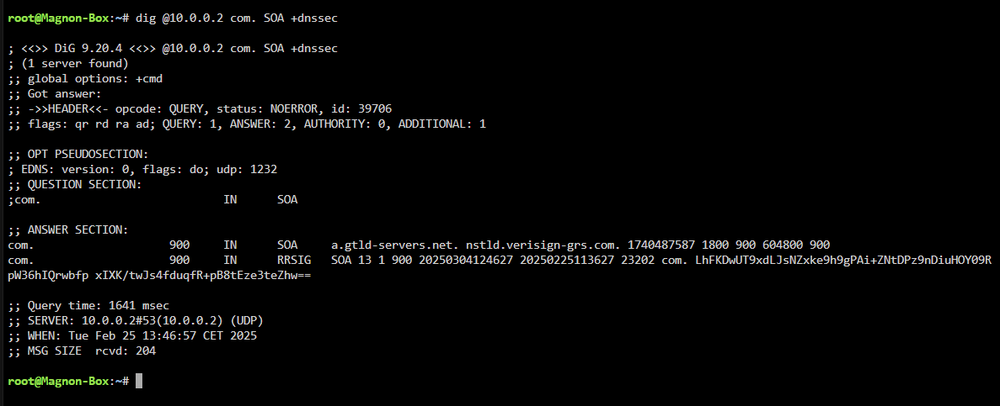
Yes it was more or less intended^^ f you want to get the unbound logs, the easiest way would be to include log-time-ascii: yes logfile: /opt/adguardhome/conf/unbound.log in the unbound config. (you have to modify the permissions for the config dir in appdata because its writing with the unbound user and cannot write by default in there) for your second problem. I did push an update which adds the option to create the root.key upon startup. You would have to include a new variable in your adguard template with the "DNSSEC_ENABLE" as key and a value of 1. Upon start it will start unbound-anchor and create the root.key file at /etc/unbound/ So adding auto-trust-anchor-file: "/etc/unbound/root.key" should work without a fuss. (hopefully) if it doesnt, complain please Edit: I actually needed to update the container twice now BUT im pretty sure it works now
-
i know^^
-
i hope you managed to fix your time servers in the meantime, because "_com" is not a valid domain. (i mean, i see what youre trying to accomplish but relying sole on one single one is a tat wild, get at least a second working backup one)
-
Wifi support will come soon based on the work done
-
Der inotify calltrace hat nix damit zu tun
-
set the basedomain in nextcloud to xxx.duckdns.org:8443 https://docs.nextcloud.com/server/stable/admin_manual/configuration_server/reverse_proxy_configuration.html#overwrite-parameters
-
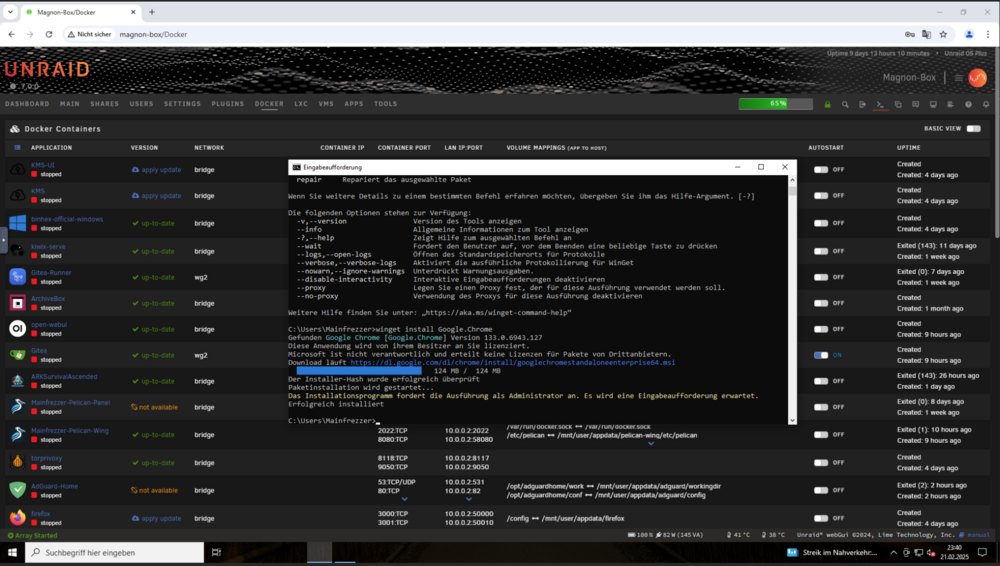
I did test the winget version and it seems to run without that error. There must be something else amiss
-
yes, as stated, it saves the repository login information on the flash drive, at /boot/config/plugins/dockerMan/config.json (thats the file thats usually at ~/.docker/config.json)
-
Which crome version are you using? I tested it with 133.0.6943.127 and its working without any issue
-
could it be that this is enabled? if so, it will automatically hash new files and then its just natural that the build is up to date. For your duplicate issue, it does look confusing. Edit: The duplicate hash output is certainly a lot more clear hash: 008d7cfa771fda2262418bb32b46978a8ce3a1b48211ea2f363d1f4aa8b70329 >disk3 Magnon-Box/Download Backup/Pre/elvui-12.74/ElvUI/Classic/Modules/Skins/Debug.lua >disk3 Magnon-Box/Download Backup/Pre/elvui-12.74/ElvUI/TBC/Modules/Skins/Debug.lua >disk3 Magnon-Box/Download Backup/Pre/elvui-12.76/ElvUI/Classic/Modules/Skins/Debug.lua >disk3 Magnon-Box/Download Backup/Pre/elvui-12.76/ElvUI/TBC/Modules/Skins/Debug.lua hash: 0091067a3546fbe739817e6df458a1fc6bd0c9df49dc83285f8eb917ea8923c0 >disk2 Magnon-Box/Tools/UT_PCE_AC68_2088/UT_PCE-AC68_2115/0x041e.ini >disk2 Magnon-Box/Tools/UT_PCE_AC68_2088/UT_PCE_AC68_2088/0x041e.ini >disk5 OneDrive/Treiber/UT_PCE_AC68_2088/UT_PCE-AC68_2115/0x041e.ini >disk5 OneDrive/Treiber/UT_PCE_AC68_2088/UT_PCE_AC68_2088/0x041e.ini

-
Depends on your isp. But since you had only ipv4 before you should never be directed to access a ipv6 address, because that doesnt work. Either, the dns gave you the wrong address, or something was/is fumbled and thinks you can do ipv6 Have a look at your network.cfg if that one is fixed now at least. Its on your usb in config (ie. /boot/config/network.cfg) to quote myself from earlier:
-
yeah, just dummy change it, so the apply button gets orange, so you can save again. If you want to use ipv6, you can of couse set it to that as well.
-
Just a notice for anyone who might use GPTWOL they changed the container a bit that needs an update to the template. The computer.txt is now located in /app/db. Changing the bind from "/app/computers.txt" on "/mnt/user/appdata/gptwol/computers.txt" to "/app/db" on "/mnt/user/appdata/gptwol/db" and then moving the file manually into the folder should migrate without issue.
-
the diagnostic showed that your network config doesnt have any protocol set, as the declaration of ipv4 or ipv4+ipv6 was missing. Re-saving in Settings/NetworkSettings should fix it Edit: Your network.cfg looks(looked) like this # Generated network settings USE_DHCP="yes" IPADDR= NETMASK= GATEWAY= BONDING="yes" BRIDGING="yes" While it should look more like this # Generated settings: IFNAME[0]="br0" BONDNAME[0]="bond0" BONDING_MIIMON[0]="100" BRNAME[0]="br0" BRSTP[0]="no" BRFD[0]="0" BONDING_MODE[0]="1" BONDNICS[0]="eth0" BRNICS[0]="bond0" PROTOCOL[0]="ipv4" USE_DHCP[0]="yes" DHCP_KEEPRESOLV="no" USE_DHCP6[0]="yes" DHCP6_KEEPRESOLV="no" SYSNICS="1"
-
After reading it a bit up, i suspect either immich or the PostgreSQL_Immich container to be the culprit(i never ran any of them, so i have no clue how they work). It seems to be attracted to redis, from what i read ( a case for postgresql is also to be found https://github.com/docker-library/postgres/issues/1054)
-
Bit hard to find out where it could be stuck (from our point of view), but if its a docker, you can enable "Advanced View" in the top right and it will display the cpu usage by the containers. alternatively you could look where that file is located (if its not stored in a docker image itself) "find /mnt/user/appdata -iname kdevtmpfsi" to search from inside docker containers, just use "find / -iname kdevtmpfsi"
-
*Noch nicht, noch.
-
While i agree, pushing people to sign up on dockerhub is also not a valid solution
-
What do you mean, workaround? This is permanent. Your credentials are used unless you use docker logout or delete the file. If you, have a need to create a dockerhub account, or even a github account, you can resonably expect to type 2 words (3 for github) into the terminal.
-
open the terminal and type "docker login" the ui uses the information. (well, it would be a surprise if it wouldnt, cause its the docker daemon doing things after all. the repository logins are all stored on /boot/config/plugins/dockerMan/config.json)
-
Nein, das egal mit 6.12.15 und 7.0.0. Der Bug wurde gefixt. (Es kann zwar sein dass Unraid wegen dem aufgezwungenen vhost meckert, wenn man keine Brücke oder Bond benutzt, aber da die Brücke an ist, ist es so simpel wie ich bereits oben sagte, einfach umstellen)






