Zonediver
Members
-
Joined
-
Last visited
Everything posted by Zonediver
-
Pffff das lief über diesen i915 Dingsiwasweißich - ich hab das vor Monaten eingerichtet und seitdem läuft's. Ich hab mir das aus dem Forum zusammengesucht.
-
Aktuell ist sie nur für Plex in Verwendung, da ich gelesen habe, dass man sie eben nicht "gleichzeitig" für Plex "und" VM nutzen kann...
-
Hmmmm.... da versteh ich zur Zeit nur Bahnhof... da brauch ich ne Anleitung, damit ich das begreife 🤣👍 Aber das würde mich schon stark interessieren, da ich keine Graphik mehr in den Server reinstecken kann, weil kein Slot mehr frei ist. Dann könnte ich vielleicht doch eine VM nutzen, die meinen Rechner (teilweise) ersetzt. Die iGPU muß aber weiterhin für das Transconding zur Verfügung stehen.
-
Ist das abhängig von der Plattform? Braucht's da Server-HW?
-
Was is das genau?
-
Nö - alles wie es sein soll.
-
Na "und ob" man das mit Plex machen soll - damit bleibt die Leistung der CPU frei für andere Dinge, wie z.B. VMs. Wenn die iGPU allerdings für VMs herhalten muß, dann geht das natürlich nicht, weil nur "entweder" (Transcoding) "ODER" (VMs) 😉 Du kannst aber für die VMs auch eine Graphikkarte einbauen, sofern noch ein Slot frei ist 👍
-
Da mußt du dir keine Sorgen machen bei deiner CPU - die kann das auch 👍 Das läuft nämlich (je nach Setting) über die iGPU. Die CPU selbst kann das natürlich nicht - das geht nur auf der iGPU - HW-Transcoding (Plex).
-
Schau dir mal meine Sig an. Der i7 ist zwar Overkill, aber man weiß ja nie. Das Ding kann sogar 8x 4k-zu-1080p gleichzeitig transkodieren und 8 Laufwerke kann das Board auch gleichzeitig ansprechen (2x NVMe + 6x SATA). EDIT: Ah - du hast deine HW schon... dann is das hinfällig...
-
I have a small question/problem: Since v6.9.0, every time I wake the server from sleep, all disks are running. The older versions of unraid didnt do that. So my question is: Is this normal or is there something wrong?
-
Interesting and good tho know that my hardware is not the culprit - thanks for this Info 👍
-
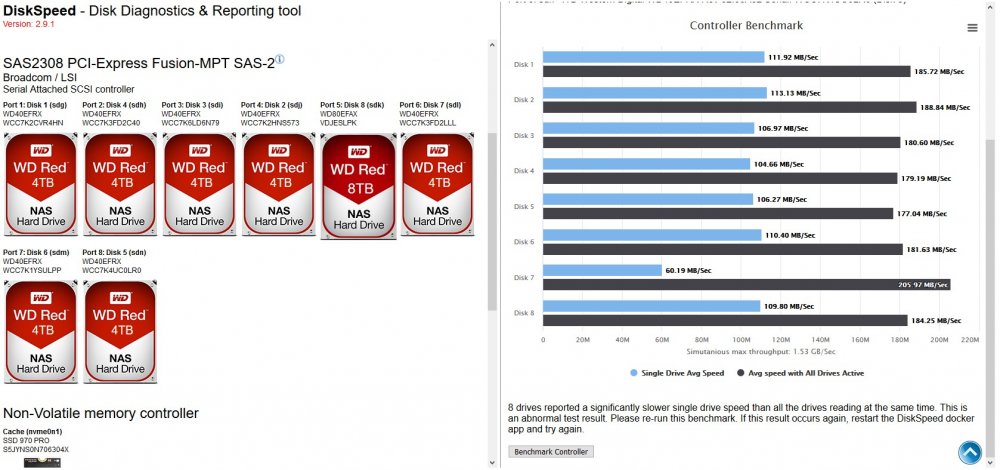
...then this is strange... The 8TB-disks are much faster then the 4TBs...
-
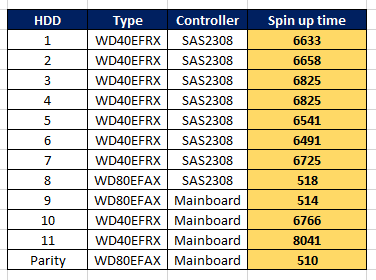
Yes - do you need this data for all drives or only for that on the HBA? Anyway, i will create a list of all disks containing this information.
-
Yep
-
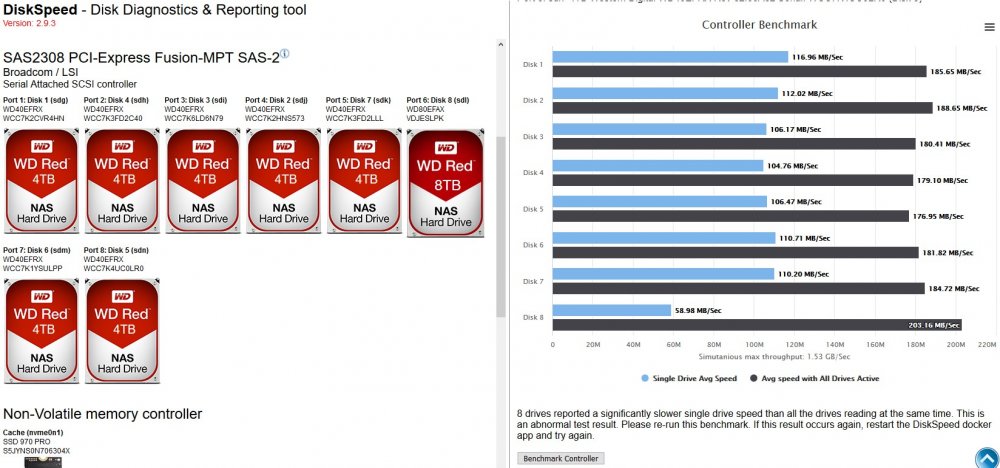
I know this option but thats not the point. The strange thing is, if all disk are in sleep and i start the benchmark, almost all disk are too slow and i dont know why... If all of them are spun up, all is fine and running normal.
-
...it's still strange... Dont know if unraid or something else is the culprit... But what i can say is this: I can remember that an older version of this docker started "all" disk and "then" did the testing. This version start a disk, do a test, start the next disk, do a test and so on...
-
BUMP Is there any new knowledge about this problem?
-
Something is very wrong here... If I start a film via Plex and the HDD on which the film is located is in sleep, it takes up to 2 (!) Minutes until the film starts - that is very unpleasant ... There is also an error message that says the disk is too slow... The problem is new - I've only been observing this since yesterday ... I hope it is a client problem on plex and not on unraid. EDIT: During the "filmstart", the CPU-load goes up to 27% - thats not normal... It seems the sys doesn't know on which HDD the film is located or the disk is terrible slow - but that's just a guess... EDIT2: Ok - command back - it's up to the Kodi-client... damn...
-
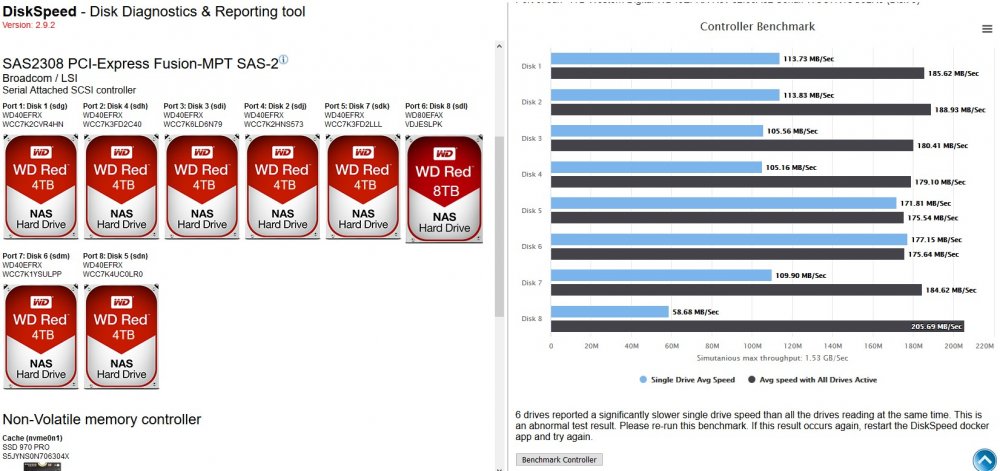
It's an intermittent problem. Every time when the disks sleep and i start the test, some weird things happen (see screenshot). But when i wakup all disk and "then" start the test, all is normal... stange but ok. I've only been observing this behavior since v6.9.2 but not sure if this is an unraid problem, a driver or something else...
-
FYI: Marvel controllers are "not" recommended for unraid. They have known issues with the firmware
-
Das könnte z.B. eine HP-Karte sein... dieses Problem hatte ich auch vor einigen Monaten. Mellanox hat an alle möglichen Hersteller Lizenzen vergeben... Es stellte sich heraus, dass meine Karte keine "original" Mellanox war... das Teil konnte man nicht flashen. Das ist so wie mit einem Asus-Mainboard in einem Aldi-Rechner - da bekommst auch kein Asus-BIOS drauf.
-
Funktioniert die "fehlerfrei" unter v6.9.2? Denke mal ja... Meine Asus-Karte hat nämlich kein WakeOnLAN... warum auch immer.
-
The stick is from 2011 and almost no longer available. A "replacement type" would be desirable...
-
Not really - my Stick is from Nov. 2012 and still working 👍
-
Yep - there is something wrong... or the DiskSpeed-Docker needs an upgrade...