





hawihoney
Members
-
Joined
-
Last visited
Everything posted by hawihoney
-
Die Lizenzdatei liegt auf dem Stick und ist mit ihm verknüpft. Ich würde den Stick sichern. Das machst Du mit Unraid. Klick in der GUI auf den Stick/Flash. Dort findest Du den Knopf zum Sichern. Zusätzlich würde ich noch die *.key Datei aus dem /config Ordner des Sticks manuell auf Seite legen. Wenn das geschehen ist und Deine Backups liegen vor, dann kannst Du den Stick komplett neu mit dem Creator Tool erzeugen. Anschließend die *.key Datei wieder drauf kopieren. Nun kannst Du komplett neu beginnenen.
-
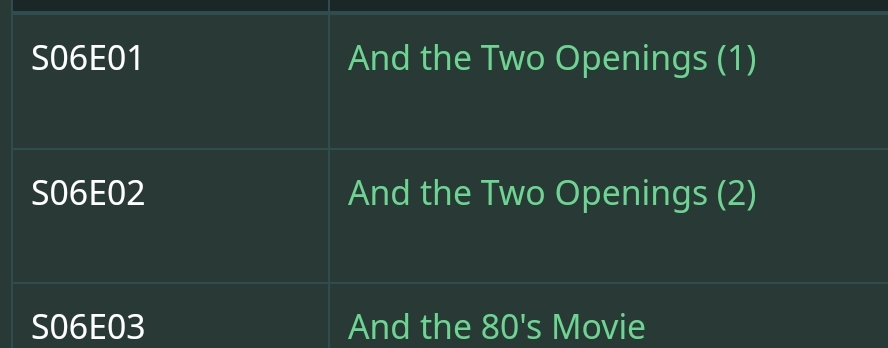
Hier mal ein Beispiel. Die beiden Episoden tauchen immer als Ganzes, als eine Datei, auf. Wenn das nicht über den Dateinamen zu erkennen ist, dann hat der Threadersteller die A-Karte. Wie soll Software das lösen? Er kann nur das "Normale" maschinell verarbeiten lassen und muss trotzdem das Ergebnis manuell überwachen.
-
Das geht nicht voll-automatisiert. Ich habe oben meine Antwort erweitert. Keine Software kann Hellsehen ... auch nicht wenn man sie KI nennt. Für TotalCommander habe ich mir eine Regex Regel gebastelt. Die deckt den Standard ab. Bei allem anderen muss auch ich oft manuell ran. Du glaubst nicht wie oft ich viel später denke "Da fehlt doch was" und mir die Dateigrößen anschaue. Dann sehe ich, dass eine Folge doppelt so groß ist wie die anderen. Dann muss ich halt alle Folgen noch mal neu zuordnen. Und nein, komme gerade nicht an die Regex Regel ran - liege am Strand 😉
-
Benenne halt alle - außer die Doppel-Episode - nach Deinen Vorgaben um und benenne die Doppel-Episode manuell um. Denn woher soll das Werkzeug wissen welche Datei zwei Episoden enthält? Wie lauten denn die ursprünglichen Dateinamen? Nenn mal eine normale und eine Doppel-Episode. Die Varianten aller Namen von Episoden haben sich über die Jahre massiv geändert. Ohne manuelle Eingriffe kann das kein Werkzeug automatisch leisten. Noch 2015 oder so stand oft nur die Episodennummer im Dateinamen -ohne einen Hinweis auf die Staffel. Die Staffelnummer stand dann manchmal im Ordnernamen. SxxExx hat sich zuletzt durchgesetzt aber auch heute wird schon wieder auf neue Varianten gesetzt. Da kommst Du in manchen Fällen nicht um manuelle Zuordnung oder Anpassung herum. Und nicht vergessen - es gibt auch 4-stellige Staffeln bei Jahresangaben in der Staffel z.B. S1940E26.
-
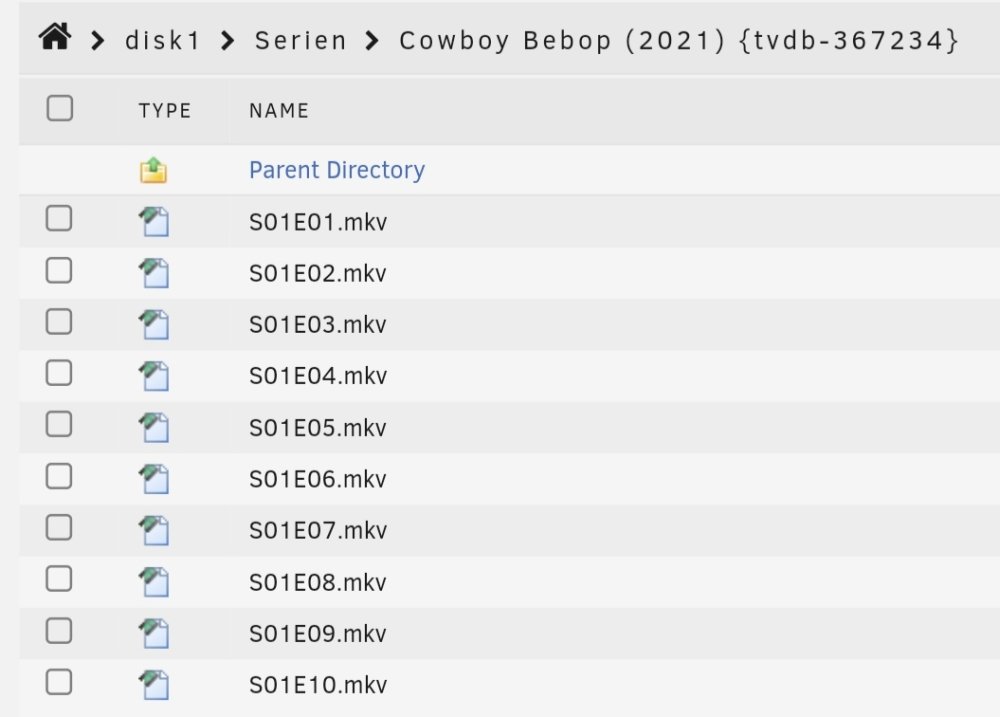
Oh, umbenennen. Das mache ich von Windows aus mit TotalCommander. Der hat ein mächtiges Rename Werkzeug. Dort habe ich ein Regex hinterlegt. Da TC zusätzlich eine ganze Ordnerstruktur flat darstellen kann ist das ganz schnell erledigt. Aber leider ändern sich ab und zu die Titel von Episoden. Deshalb habe ich irgendwann beschlossen nur die Staffel- und Episodennummer im Dateinamen zu verwenden:
-
Hier sind die korrekten Namenregeln für Serien beschrieben. Achtung: Sie unterscheiden sich zwischen Plex und Jellyfin bei den Separatoren: S01E01-E02 Jellyfin: S01E01-part1 S01E01-part2 Plex: S01E01 - part1 S01E01 - part2 https://jellyfin.org/docs/general/server/media/shows/
-
-
Oh, you didn't know that? Look at my Avatar. This is one server with three Unraid arrays. It's running 365/7/24. The Direct Attached Storage Boxes are Unraid VMs each using its own HBA. Network connected to the barebone server via SMB.
-
Ah, good to know. Before I copy/move I should close the GUI or leave the main tab. Didn't know that. Will remember that in the future.
-
Feature request: Don't df and refresh remote mounts if the list is collapsed: Thanks for listening.

-
The goal of Disk Shares is Plex. Never, ever had Plex to wait for all Disks of an 22-Disk array to spin up if Linux RAM-Cache is purged. Plex holds all individual disks and their content instead of user shares. When I used user shares in the past that happened from time to time. Waiting time was approx. 22x 10 sec then. If Disk Shares need to be deactivated, I will look further for a different solution. Did remove UD already from the two Unraid VMs (Direct Attached Storage Boxes). It doesn't work for me since 6.12.4. Currently investigating shell copy or something like that between Unraid boxes.
-
Sorry, don't know what a root share is. As I don't have User Shares enabled (I simply don't need them) is there a way to have a remote root share with /mnt/ ?
-
E.g.: 192.168.178.102 has not changed. Same count of disks, same type and size of disks. It was full and it is full. Never saw a single error line like that shown above in years. Ok will look for a different solution. I can't copy/move files between these three systems thru UD any longer. Not a Linux guy here, but I guess there must be a way to mount /mnt/ between systems ...
-
This system exists like that since 2020. Never had such problems before. This all will change with the arrival of multiple arrays. Why does UD request 44 df's if I use MC to move one file between two exact named disks. E.g. From: /mnt/remotes/192.168.178.101_disk1/... To: /mnt/remotes/192.168.178.102_disk1/...
-
Since 6.12.4 (coming from 6.11.5) I do have trouble to copy files over SMB remotes. It doesn't make a difference if I copy from Unraid barebone to Unraid VM or between two Unraid VMs. I always see the following errors and the system stalls. I do have to kill the sessions to free the systems from this. The error (example): Tower unassigned.devices: Warning: shell_exec(/bin/df '/mnt/remotes/192.168.178.101_disk1' --output=size,used,avail | /bin/grep -v '1K-blocks' 2>/dev/null) took longer than 10s! Remote SMB is registered like this: /usr/local/sbin/rc.unassigned mount //192.168.178.101/disk1 On 6.11.5 this was never a problem. Diagnostics attached. Thanks in advance. tower-diagnostics-20230910-1528.zip
-
Does it look fine if you activate "Desktop website" in the Chrome settings for this site? This setting brings this wrong white area to show up. And in addition: I simply can't confirm errors/warnings in the new notification system on my Android tablet running chrome. Can you please check that?
-
Can please somebody explain that new notification system to me. Goal: I want to confirm a new notification manually. This should remove the color from the icon, remove its entry from the list within the icon, but keep it in Archived Notifications under Tools. Is this possible? The only way I see currently is a Trash icon. But this removes the notification completely.
-
Die Erläuterung zum exklusiven Share findet sich hier: https://docs.unraid.net/de/unraid-os/release-notes/6.12.0/#exclusive-shares In diesem Kapitel wird Bezug genommen auf diese mit 6.12 eingeführten neuen Features (Primary/Secondary Storage): https://docs.unraid.net/de/unraid-os/release-notes/6.12.0/#share-storage-conceptual-change Kurz gesagt umgehen Exklusive Shares mit einem Symlink FUSE - die Basis der User Shares.
-
Welcher Fehler? Das große Problem der 6.12.x war die MACVLAN Problematik. Das ist mit 6.12.4 behoben. Allerdings sollte man sich, sofern man davon betroffen ist, die Release-Notes zu Herzen nehmen und abarbeiten. In Kürze: Network Bonding=yes, Network Bridging=no, Docker Host access to custom networks=yes.
-
Please have a look at this answer from @itimpi for my Bug Report regarding update_cron not running in a virtualized Unraid server. As far as I do understand, he adds required cron entries during plugin start. Perhaps you two can talk ... ? Thanks.
-
Starting with 6.12.4 update_cron is no longer running during system start in a virtualized environment (Unraid VM). This worked until 6.11.5. Not running update_cron has impact on the User Scripts plugin that relies on that tool to add it's "Custom schedules" to "/etc/cron.d/root". So a scripts with "Custom schedules" attached, no longer runs from within the User Scripts plugin. One can work around this by calling update_cron manually after system start to add these missing entries in a second step. Here's a post that describes the problem. Diagnostics attached. Thanks for listening. On a barebone server it looks like that. This is missing on a virtualized server. Don't know if this is required to run over and over again for three times: root@Tower:~# grep -i cron /var/log/syslog Sep 4 10:48:51 Tower crond[1870]: /usr/sbin/crond 4.5 dillon's cron daemon, started with loglevel notice Sep 4 10:48:59 Tower root: Setting up cron for background notifications *** *** The following lines are missing in a virtualized environment *** Sep 4 10:51:16 Tower emhttpd: shcmd (270): rm -f /boot/config/plugins/dynamix/mover.cron Sep 4 10:51:16 Tower emhttpd: shcmd (271): /usr/local/sbin/update_cron Sep 4 14:35:29 Tower emhttpd: shcmd (219514): rm -f /boot/config/plugins/dynamix/mover.cron Sep 4 14:35:29 Tower emhttpd: shcmd (219515): /usr/local/sbin/update_cron Sep 4 14:35:49 Tower emhttpd: shcmd (219643): rm -f /boot/config/plugins/dynamix/mover.cron Sep 4 14:35:49 Tower emhttpd: shcmd (219644): /usr/local/sbin/update_cron towervm01-diagnostics-20230906-0722.zip
-
Wenn Ausfallsicherheit kein Thema ist, dann baue halt ein Array ohne Parity Disks. Dann hast Du die native Performance. Kannst 1-2 Parity Disks bei Bedarf später hinzufügen.
-
This is TowerVM01 that's running a Disk-Rebuild currently and was rebootet upfront. I can confirm that the "custom schedules" worked during all reboots on all servers here on all releases before 6.12.4 (coming from 6.11.5). It's the virtualized servers that don't run upgrade_cron any longer. I will address that in a Bug Report. The only things I changed on all servers before upgrading to 6.12.4 were: - Enable bonding=yes - Enable bridging=no - Host access to custom networks=yes - Enable autostart=no (to make the three changes above before starting the array) Thanks for your time. towervm01-diagnostics-20230906-0722.zip
-
Zwei Sprachen gemischt untereinander? Oder hast Du den Screenshot zusammen geschnitten.
-
Blöde Frage: Wo kommen denn die unterschiedlichen Sprachen her (up-to-date vs. Auf dem neusten Stand)? Hab ich noch nie gesehen.


