





John_M
Members
-
Joined
-
Last visited
Everything posted by John_M
-
The bind package seems to download OK but it doesn't install. unRAID 6.2.2; Nerd Tools 2016.10.22
-
That's useful to know, Tom. Thanks. Trouble is, I'll probably have forgotten it by the time I ever need to use it. A button in the GUI, as Homerr suggests, would be a handy addition.
-
A suggestion: when the plugin notices that a disk needs updating because some files don't have checksums, could the Build process (and the Export process, if enabled - ie. orange circle, not blue cross) be triggered automatically? Perhaps include an option to enable this behaviour or leave it to be done manually.
-
I prefer to use mc too. It can be a little daunting at first for someone who is only comfortable with Windows Explorer though.
-
Did you try searching the boards for an answer? I found this: http://lime-technology.com/forum/index.php?topic=15767.msg232721#msg232721
-
Preclear job completed successfully - no issues Good to hear, but you're not using the latest version of the plugin. I wonder if 2016.09.27 is broken in some way.
-
As an alternative to mc you could use either the Krusader or Dolphin docker, either of which would make the experience even more like using Windows Explorer.
-
I've been trying to find out why I'm having this problem. There are two error messages that each get added to the /var/log/preclear.disk.log file twice every ten seconds. The first is Line 273 of the Preclear.php file is $state = is_file($state_file) ? @parse_ini_file($state_file, true) : array(); and it looks as though it's failing when it tries to parse the state.ini file. My state.ini file (listed in my original post) appears to be truncated, but since I don't know how that file is created and maintained I can't figure out why. The second error message is and the relevant line of Preclear.php is if (array_key_exists($device, $state) && ! $reload) which is failing because the type of the parameter state returned by the previous line of code is Boolean, where an array is expected. I'm not a PHP coder so I don't really understand enough to be able to work out exactly what's going on, but if I shut down and remove my two unassigned disks the problem goes away because then neither the /var/state/preclear.disk/state.ini file nor the /var/log/preclear.disk.log file is created. If I put them back in again the /var/log/preclear.disk.log file grows steadily and I'll be out of log space in a couple of weeks. If the plugin gave a single error message and then exited gracefully I could live with it for the time being and possibly troubleshoot some more but as it is I'm going to have to uninstall it. Is there a bug in the plugin code or is there something about my two unassigned disks that causes the state.ini file to be truncated? I took the opportunity to update to unRAID 6.2.2 (and I'm using the latest 2016.09.27 version of the plugin) but, as I expected, it has had no effect on this problem. Thanks to anyone who can shed any light. EDIT: I tried uninstalling and reinstalling, after first making sure all my other plugins were up to date, to no avail. EDIT2: I haven't been able to resolve the problem so I've uninstalled the plugin again for now. If anyone has any suggestions or if the plugin is updated I'll reinstall and try again.
-
Apologies. I've amended my post to include that information. EDIT: I should emphasise that the system is idle. I'm not running any preclears and haven't done for some months. I'm pretty convinced that the state.ini file is the cause of the problem. It looks wrong, with the extra newline at the top and the missing one at the bottom (line 8, as mentioned in the error message). And why is only /dev/sdl included? I would expect /dev/sdm to be there as well. What creates and maintains this file? Presumably the plugin itself does, given its pathname.
-
I have a problem with one server in that it is running out of log space. My investigation reveals a rapidly growing /var/log/preclear.disk.log file. My other servers don't have this file at all, but they don't have any unassigned devices either. Whenever the Main window of the GUI is open, or when I go to Tools -> Preclear Disks I get four entries added to the aforementioned log file every ten seconds: If I navigate away to some other page, such as the Dashboard, the log file stops growing until I switch back to either the Main page or the Preclear Disk page. I have two (unassigned) disks in the affected server, both mounted using the Unassigned Devices plugin. The problem seems to be associated with the file called /var/state/preclear.disk/state.ini mentioned in the error messages. This file also only exists on the affected server and is absent from my others. root@Lapulapu:~# cat /var/state/preclear.disk/state.ini [/dev/disk/by-id/ata-TOSHIBA_MQ01ABB200_44NSTB4DT] ID_MODEL = "TOSHIBA_MQ01ABB200" ID_SERIAL_SHORT = "44NSTB4DT" FAMILY = "Toshiba 2.5" HDD MQ01ABB..." MODEL = "TOSHIBA MQ01ABB200" FIRMWARE = "AY000U" SIZE = 2000398934016root@Lapulapu:~# This is obviously a reference to my /dev/sdl (see attached screenshots). Does anyone know what the problem is and how to fix it? Should there be a newline at the end of the state.ini file? EDIT: unRAID version 6.2.1, plugin version 2016.09.27 (both latest stable)


-
There's nothing mentioned in syslog and I haven't noticed any problems. I just thought I'd mention it. Thanks... Fixed... It was just a spurious error message (now suppressed) that only displayed on 100% clean installs. And it didn't affect anything at all. No update of the plugin is required, as I just changed the .plg to suppress it on clean installs. Cool. Thanks Squid. I confirm that it was indeed a clean install.
-
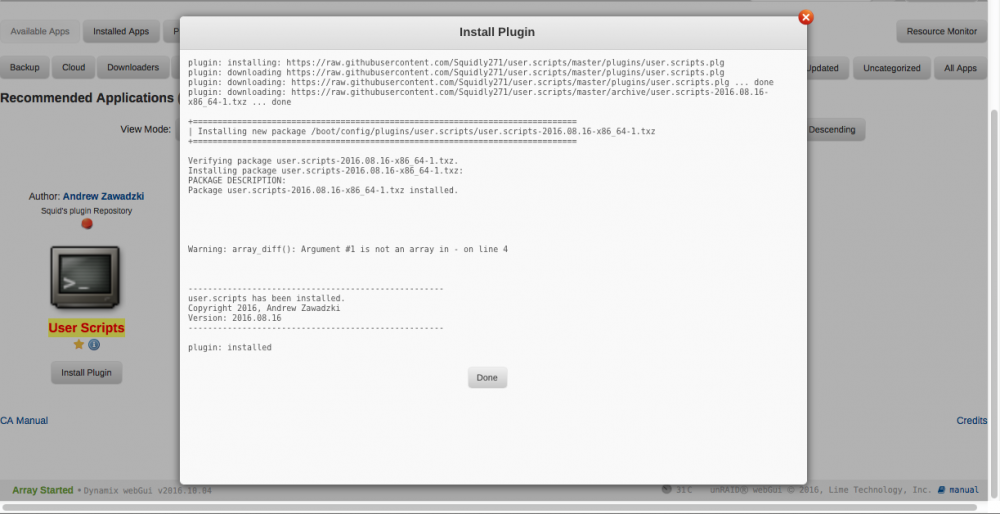
I installed the plugin onto unRAID 6.2.1 via Community Apps and noticed the following warning: There's nothing mentioned in syslog and I haven't noticed any problems. I just thought I'd mention it.
-
The original preclear_disk.sh has to be patched in order to work with unRAID 6.2
-
I see there's a new version (2016.08.28), so hopefully fixed now.
-
The interval depends very much on your usage pattern. I have mine set to every week, which isn't putting any unnecessary strain on the SSD, while the interval is short enough to avoid SSD performance degradation. I believe you can run fstrim as often as you want without putting any strain on the SSD at all. It will only free up pages of cells that are no longer in use. If there are none flagged then it doesn't do anything. I run it once a day. See here.
-
Since you're using unRAID 6.2 I'd download the Beta Preclear plugin and use it to pre-clear your cache disk - stop the array and unallocate it first. Basically, it writes zeroes all over the disk and it will destroy any partitioning you have left over from its previous use.
-
I decided to wait until the first major sync between the two servers is complete before changing the scan interval. And therein lies the problem - it never will complete because of the issue outlined on this page: https://docs.syncthing.net/users/ignoring.html#effects-on-in-sync-status. I have .stignore files set up to exclude Apple metadata (.AppleDB and .DS_Store) and also to exclude one particular sub-folder, which I want to keep local to each server. As a result, the Folders status alternates between Out of Sync and Scanning, while the Remote Devices status is permanently Syncing (100%). This keeps the unRAID disks spinning and CPU and RAM usage high (76% and over 4GB, respectively). It has also created a >20 GB database in the appdata/syncthing folder of each server. It's a heavyweight application with, I can see, considerable power and versatility, most of which I don't need. I don't need to sync with tablets and smartphones or workstations and I think for my purposes rysnc (run manually or maybe using cron) is much the better solution - faster and far less demanding of resources. I won't remove syncthing for the moment and I'll continue reading around the subject. It's rather disappointing but it's also educational. UPDATE: I've now changed the rescan interval on both servers to 1 day (86400 seconds) and the changes caused Syncthing to re-start. After a while both settled down, each indicating Out of Sync for its own local state and Syncing (100%) for the other server's state. CPU usage is close to zero and RAM usage down to 64 MB. I hope this will let the disks spin down until the next scan in a day's time. If that is indeed what happens I'll add some files to the main server and see if they propagate across to the backup when the next scan runs. To facilitate testing I might have to speed things up temporarily by setting the rescan time to 1 hour, but if this works as I hope I'll stick with Syncthing. UPDATE (the following morning): When I woke up this morning the parity disks in both servers had spun down but the data disks were all still spinning and, according to the syslogs, had been all night. I checked that my changes to the scan interval had stuck and then stopped the Syncthing dockers. An hour later the disks had all spun down. This is the deal breaker.
-
I don't use Dolphin but Krusader includes a text editor.
-
Thanks, it's just that it is such a huge change from the default. I'll give it a go and if I notice any unwanted side effects I'll report back.
-
I decided to install this docker to keep my backup unRAID server synced with my main unRAID server. Previously I've used rsync to achieve this, running it manually whenever I've added more than a few files to my collection and I decided I would like to automate the process. I chose the Linuxserver.io container and read about the subject before installing. I set the folder type to Master on the main server and, after a very long initial scan, changes I make on the main server are propagated to the backup server. But I notice that the default rescan interval is set to a mere 60 seconds, which I'm assuming will probably keep my disks from spinning down. I don't need anything like real-time backups and once a day is more than enough for my needs. Does anyone foresee any problem with me setting the rescan interval to 86400 seconds instead?
-
Love the concept of the file integrity plugin from Dynamix. I installed it and its running, but there is a whole section called "disk verification tasks" with rows and columns of check boxes, but no instructions on what should be done, how to use it or how to define a 'task'? Is there documentation or a sub-forum somewhere? I found the plugin extremely confusing until I realised it combines two separate functions, namely (1) automatic checksum generation as files are written to the array, with the checksums being stored in the files' extended attributes, combined with a scheduled check to verify the files agains these checksums; and (2) the ability to export those checksums as a separate file for each disk, for use with external verification applications. It became less confusing when the two functions were split into two separate places - the plugin now has an icon under Settings for the first, automatic function, and another icon under Tools for the second, manual function. I use the former but currently not the latter. The automatic function just works, now that I have excluded the Macintosh-specific files. The manual function was a pain because it was always complaining that it needed manual intervention to keep the exported files up to date, so I stopped using that part. There is a sub-forum here: http://lime-technology.com/forum/index.php?topic=36543.0
-
I've been following this thread but as I'm more a Mac user than a Windows user I've kept quiet so far. One thing that puzzles me is the comment by the OP in reply 4 about trying all logins and passwords that he knows and also not having "a login for Windows 10". I feel that is likely to be the cause of the problems. I always create a user called John_M on any computer I use, be it a Mac or Windows client or an unRAID or other server, and I always use the same password with that account. I never have any issues with logins or authentication. Just a thought.
-
If Samba is set up to hide the dot files but Windows is set to display them, they should appear greyed out. But I find it puzzling that you have Windows set to display hidden files when you don't like seeing them! I use the Krusader docker too and like it because it tells the truth - I don't like files that are present being hidden from me. I'm fundamentally opposed to a file server that is configured to ignore requests to create files with certain names, preferring the option of configuring the clients so they don't make the requests in the first place, but I'm pleased you have found a solution that works for you and maybe other people will find it useful too.
-
I have no problem deleting folders from OS X's Finder, whatever their contents. I don't use Windows so much these days but I don't recall having any problems there either. That's the difference between the hide and veto options. Hide just makes the dot files invisible to SMB users - it doesn't prevent them being deleted when the parent folder is deleted (assuming their permissions are the same as those of their associated data fork file, which I believe is always the case).
-
No, there doesn't appear to be that option. But is that because it isn't needed? Vetoed files prevent deletion of the parent directory unless the "delete veto files" option is set to "yes" but do hidden files prevent deletion of the parent directory ever? It's all a question of what you want to achieve. The reason behind the veto option was to hide the ._ files from Windows users in order to prevent them from deleting the files because they were important to Mac users. That was useful when Windows used SMB and Macs used AFP. If both operating systems now use the same protocol but there are different requirements then there's clearly a conflict. I use the hide option myself and my Macs connect to unRAID via AFP, with SMB only being used by the occasional Windows client, so it works for me. Perhaps a better option for other people might be to configure OS X not to create the ._ files on network volumes in the first place.




