





John_M
Members
-
Joined
-
Last visited
Everything posted by John_M
-
In case it helps, mine have non-zero values: root@Mandaue:~# cat /boot/config/drift 12.801 root@Mandaue:~# cat /var/lib/ntp/drift 13.768
-
No, I haven't made any changes. All I ever did was set my timezone and update the list of time servers. The only file present in the /var/lib/ntp directory is also called drift. There is no stats file. root@Mandaue:~# ls -l /boot/config/drift -rw------- 1 root root 7 Apr 7 22:45 /boot/config/drift root@Mandaue:~# ls -l /var/lib/ntp/ total 4 -rw-r--r-- 1 ntp ntp 7 May 10 11:06 drift root@Mandaue:~# It seems that the /var/lib/ntp/drift file is updated as necessary. I don't know for sure but I would expect that it is copied to /boot/config/drift when the ntp service is shut down and loaded from the same file when the service is started. That would be a customisation set up by the developers of Unraid. One thing you could try is to create a new temporary USB flash boot device using a trial licence and use that to boot your server. Don't try to start the array or configure any storage but set up your timezone and time servers and then leave it for a few hours to see if that works. If it doesn't then there's something strange about your hardware. If it does then the problem is with your configuration.
-
I have a drift file at /boot/config/drift (which allows it to be preserved when rebooting).
-
There isn't really much to set up with ntp. Most of it is done for you and all you have to do is set a timezone, enable ntp and choose up to four time servers. It usually works out of the box. So maybe you have indeed fu- messed something up. Your diagnostics show that you have the following four time servers configured [NTP_SERVER1] => time.google.com [NTP_SERVER2] => ntp.pool.org [NTP_SERVER3] => 192.168.178.1 [NTP_SERVER4] => which don't really seem to be a very good selection. The first one is pobably OK. The second one is incorrect. The third one is a host on your local network, probably your router. The fourth one isn't defined. Try setting them (temporarily) to 0.pool.ntp.org, 1.pool.ntp.org, 2.pool.ntp.org and 3.pool.ntp.org and then rebooting.
-
Occasionally it happens, depending on your connectivity to your nearest github server. Try again later.
-
It looks like a faulty CPU to me, if the error reports are accurate. You'll be covered by the warranty, assuming you bought it through official channels.
-
Why are you loading the Intel integrated graphics driver? # Load the i915 driver modprobe i915 This should really be posted in the General Support section. It isn't an Unraid bug and it isn't Urgent. Have you done a memory test? Have you tried enabling syslog mirroring to flash to see if it catches the problem?
-
No kind of hard linking is ever going to move a file from one disk to another.
-
Your CPU doesn't support VT-d so you can't pass a GPU through to a VM. https://ark.intel.com/content/www/us/en/ark/products/52210/intel-core-i5-2500k-processor-6m-cache-up-to-3-70-ghz.html
-
Interesting. I'm using Firefox on macOS. I just tried Chrome and get the same result as I did previously. I'll try clearing the cache and I'll give Windows a try. One thing I notice is that the URL that each of the three menu options links to is the same - https://<private-hash>.unraid.net/Dashboard/Device?name=disk4 where I would expect something along the lines of #attributes, #capabilities or #identity at the end (are they called fragments or anchors, or something?). Edit: I've cleared the caches and it still behaves the same. I've tried it on Firefox and Chrome on a different (Apple silicon) MacBook Pro. I've tried Firefox and Chrome on a real Windows 10 computer and a virtual one. I've tried Firefox on a Linux Mint computer and I've tried Chromium on a Raspberry Pi. They all behave exactly the same. Then I reapeated all tests with a second Unraid server, running 6.9.2 and got eactly the same results.
-
Has anyone else noticed the context menu of the "thumbs up" SMART health icons on the Dashboard not working? The three options all take you to the top of the relevant disk's page, instead of the appropriate section. I thought I'd ask here before posting a bug report, in case it turns out to be a browser issue.

-
The only thing I can guess from your post is that you're a Macintosh user because that's where files and directories with names beginning with dot-underscore come from. They are safe to delete - macOS will create them again if it needs to. For the rest, you'll need to post your diagnostics.
-
I usually find it in the AMD CBS section of the menu but wherever you go to find the Global C-states setting, you might find it there too.
-
There are a lot of posts about macvlan call-traces related to docker containers with custom IP addresses, such as this one: Don't do that. The only C-state that has ever been a problem with Ryzen processors is C6 and that only really affected the 1000-series. That said, it does no harm to find the BIOS setting that refers to Power Supply Idle Control and set it to Typical Current Idle instead of the default Low Current Idle.
-
The information you've given doesn't show what's wrong with them. You'd need to look at the full SMART report for that. As to your question, I'd ask how safe is it to use a failed parachute or a failed crash helmet? Better than none, but not much.
-
It's difficult, without more information. Your diagnostics might help. For the shares in question, how have you configured SMB Security Settings (Public/Private/Secure)? If not Public, then how have you set up Users (Settings -> Users)? Do you have a User for each of your Windows users (preferably using the same login name and password as they use for Windows)? Are you sure you are not falling foul of the following Windows "feature"?
-
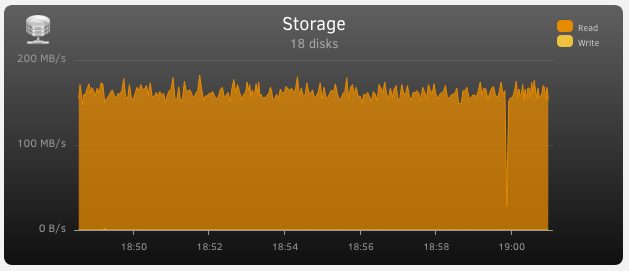
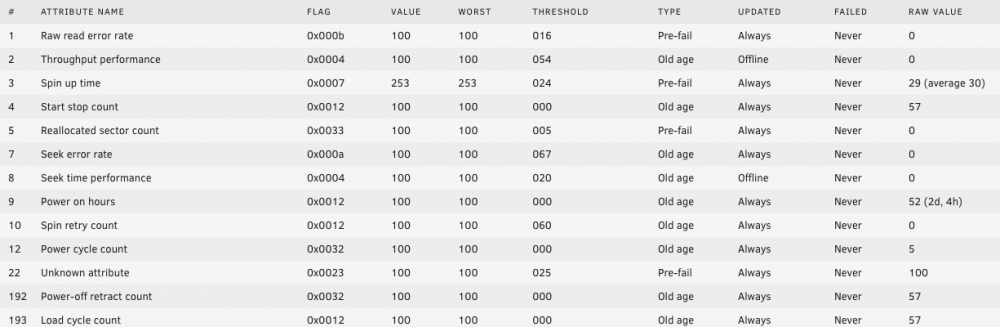
It's more than just cosmetic though. It increments SMART parameters 4, 192 and 193 and momentarily halts throughput. Spin-down is attempted hourly, just before the hour. Otherwise the pre-clear is proceeding well. disk-log.txt
-
Try this one: https://wiki.unraid.net/Manual/Storage_Management#Rebuilding_a_drive_onto_itself The best way to find the Unraid manual is to click on the link in the bottom right corner of the WebGUI.
-
Perhaps it become corrupted when you unplugged it. It would be worth shutting down, removing it from your server, plugging it into a PC and running a file system check on it.
-
I notice that the SMART report for Disk9 in the diagnostics dated 20210414-0910 is incomplete. There was definitely something wrong with it. Here it is, unedited: ST8000DM004-2CX188_ZCT0A49C-20210414-0910 disk9 (sdh).txt
-
The HEVC stream is using about half of its capacity and it's only 24 fps material. It would struggle with 60fps.
-
The screenshots indicate that both video decoding and video encoding are hardware accelerated. However, the GPU can only transcode the video stream. What it can't do is re-wrap from MKV to MP4, transcode the audio or burn in subtitles - they all use the CPU and the CPU also has to feed the GPU with data. I don't know what you were expecting to see but it looks about right to me. Try turning off the subtitles and see how much of a difference it makes.
-
Ah, OK. Concentrating on the evening in question, the string "mkfs" (as in "format a disk") appears only once on 12 April and concerns Disk 6. The process seems to start at 22:51:58 and finish at 23:01:32. That's getting on for ten minutes, compared with the 30 seconds or so it took to format Disk 7 on the previous day. So what's the difference? Well, the formatting of Disk 6 (a.k.a. /dev/sdf) was actually pretty fast but it was preceded by a call to sgdisk to partition it, here: Apr 12 22:51:58 HawkinsUnraid root: *************************************************************** Apr 12 22:51:58 HawkinsUnraid root: Found invalid GPT and valid MBR; converting MBR to GPT format Apr 12 22:51:58 HawkinsUnraid root: in memory. Apr 12 22:51:58 HawkinsUnraid root: *************************************************************** Apr 12 22:51:58 HawkinsUnraid root: Apr 12 22:51:58 HawkinsUnraid root: GPT data structures destroyed! You may now partition the disk using fdisk or Apr 12 22:51:58 HawkinsUnraid root: other utilities. Apr 12 22:51:58 HawkinsUnraid emhttpd: shcmd (17431): sgdisk -o -a 8 -n 1:32K:0 /dev/sdf Apr 12 22:51:58 HawkinsUnraid kernel: sdf: sdf1 Apr 12 22:51:58 HawkinsUnraid rc.diskinfo[7494]: SIGHUP received, forcing refresh of disks info. Apr 12 22:53:58 HawkinsUnraid nginx: 2021/04/13 01:53:58 [error] 27337#27337: *380481 upstream timed out (110: Connection timed out) while reading response header from upstream, client: 192.168.1.9, server: , request: "POST /plugins/unassigned.devices/UnassignedDevices.php HTTP/1.1", upstream: "fastcgi://unix:/var/run/php5-fpm.sock", host: "192.168.1.119", referrer: "http://192.168.1.119/Main" Apr 12 22:56:37 HawkinsUnraid nginx: 2021/04/13 01:56:37 [error] 27337#27337: *380767 upstream timed out (110: Connection timed out) while reading response header from upstream, client: 192.168.1.9, server: , request: "POST /plugins/unassigned.devices/UnassignedDevices.php HTTP/1.1", upstream: "fastcgi://unix:/var/run/php5-fpm.sock", host: "192.168.1.119", referrer: "http://192.168.1.119/Main" Apr 12 22:58:53 HawkinsUnraid preclear_disk_56474835384B3047[18453]: Zeroing: progress - 40% zeroed @ 179 MB/s Apr 12 23:01:19 HawkinsUnraid root: Creating new GPT entries in memory. Apr 12 23:01:19 HawkinsUnraid root: The operation has completed successfully. Apr 12 23:01:19 HawkinsUnraid emhttpd: shcmd (17432): udevadm settle Apr 12 23:01:19 HawkinsUnraid kernel: sdf: sdf1 Apr 12 23:01:19 HawkinsUnraid rc.diskinfo[7494]: SIGHUP received, forcing refresh of disks info. Apr 12 23:01:19 HawkinsUnraid emhttpd: shcmd (17433): /sbin/wipefs -a /dev/md6 Apr 12 23:01:19 HawkinsUnraid emhttpd: shcmd (17434): mkfs.xfs -m crc=1,finobt=1 -f /dev/md6 So the question is, does it take that long to set up the partition table or are the two nginx "upstream timed out" errors, where each time nothing seems to happen for two and-a-half minutes, to blame?
-
This is your problem: Apr 11 16:37:21 HawkinsUnraid preclear_disk_18RUS19KS[32513]: Zeroing: dd if=/dev/zero of=/dev/sdg bs=2097152 seek=2097152 count=500105764864 conv=notrunc iflag=count_bytes,nocache,fullblock oflag=seek_bytes Apr 11 16:37:21 HawkinsUnraid preclear_disk_18RUS19KS[32513]: Zeroing: dd pid [25302] Apr 11 16:37:51 HawkinsUnraid kernel: sd 8:0:3:0: attempting task abort!scmd(0x000000001e09371a), outstanding for 30027 ms & timeout 30000 ms Apr 11 16:37:51 HawkinsUnraid kernel: sd 8:0:3:0: [sdg] tag#6445 CDB: opcode=0x28 28 00 3a 38 5f 80 00 00 08 00 Apr 11 16:37:51 HawkinsUnraid kernel: scsi target8:0:3: handle(0x000d), sas_address(0x500c04f25cb9a71a), phy(26) Apr 11 16:37:51 HawkinsUnraid kernel: scsi target8:0:3: enclosure logical id(0x500c04f25cb9a700), slot(4) Apr 11 16:37:51 HawkinsUnraid kernel: sd 8:0:3:0: task abort: SUCCESS scmd(0x000000001e09371a) Apr 11 16:37:51 HawkinsUnraid kernel: sd 8:0:3:0: [sdg] tag#6445 UNKNOWN(0x2003) Result: hostbyte=0x03 driverbyte=0x00 cmd_age=30s Apr 11 16:37:51 HawkinsUnraid kernel: sd 8:0:3:0: [sdg] tag#6445 CDB: opcode=0x28 28 00 3a 38 5f 80 00 00 08 00 Apr 11 16:37:51 HawkinsUnraid kernel: blk_update_request: I/O error, dev sdg, sector 976772992 op 0x0:(READ) flags 0x80700 phys_seg 1 prio class 0 Apr 11 16:37:52 HawkinsUnraid kernel: sd 8:0:3:0: Power-on or device reset occurred There should be enough information there to identify the problem disk.
-
Your diagnostics might show something, if you haven't already rebooted. Tools -> Diagnostics. Post the zip file.



