





-Daedalus
Members
-
Joined
-
Last visited
Everything posted by -Daedalus
-
To be fair, this has been requested before, and I know I'm not the only one that's implemented this as a script. The standard answer is it's not an option because of how mover runs, but I don't think it's too much of an issue to add this functionality, with a big red warning to use array-only shares (or even just don't allow the destination share to be selected at all if it's set to use cache)
-
I think this has been asked before, but it was a while ago, so forgive me if you end up repeating yourself: Is there an option to have certain shares ignore tuning rules, but still get moved on schedule? There's an option to have files on a file list excluded, but this seems to exclude them from the mover entirely. My use-case is that I want my backups going to my cache for speed, but I don't want them sitting there for three days taking up space that could be used for actually frequently accessed files.
-
I'm not sure exactly what's involved, but any chance we can get storcli added? Handy to know what version of firmware your SAS controllers are running from the OS (can't seem to get it from lspci) https://docs.broadcom.com/doc/12352476
-
+1 I'm doing this manually at the moment, with a baseline VM that I copy vdisks from to a new VM's folder, than manually edit settings. Ideally, clicking "Clone" would bring you to a VM creation page, with all details filled out to match the previous VM. Starting at this point would give some sort of error, telling you to change at least the name, I guess.
-
Done. Any chance we might get some feedback on the unRAID survey results somewhere? Here, Discord, uncast(!), etc. Would be nice to hear Tom/Limetech's thoughts on community feedback, and how that might influence future plans.
-
+1 I have exactly the same use-case. I tried shoehorning something like this with Mover Tuning, but not possible.
-
I've asked for this previously as well. Context: I'll give another +1 here. sure there are cases that would have to be catered for, but I think given the nature of unRAID, it's a pretty natural thing that will happen. It would be nice to just have a toggle option for it with appropriate messaging.
-
I was, yeah. They both eventually finished, I just had to stop them every few hours to let things calm down for 10-15 minutes. No idea what the root cause was. I didn't try running only one, but I did try stopping the pre-clear on one drive, and waiting a couple of minutes. the I/O was still abnormally high. That's the only (not particularly useful) datapoint I have.
-
Running into a weird one here, not sure if this is normal behaviour or not. I have two new drives that I'm preclearing. Starts fine. Skip pre-read, straight to zeroing. For the first while (not sure how long, left running while I was out/asleep) everything is fine. Speed as expected. After that, I'm seeing high I/O from the dashboard. (CPU usage graph is high, but htop is normal, so I assumg that's what it is). Zeroing still going at a speed I'd expect for the drives. Server responsiveness is slowed, Plex complains about a busy DB, DayZ and Minecraft servers can't be connected to, etc. I stop the preclear on both drives and I/O drops, everything is working again. The drives are externals, connected over USB. They shouldn't interfere with any other drives in the server, surely. Any idea on what might be going on here?
-
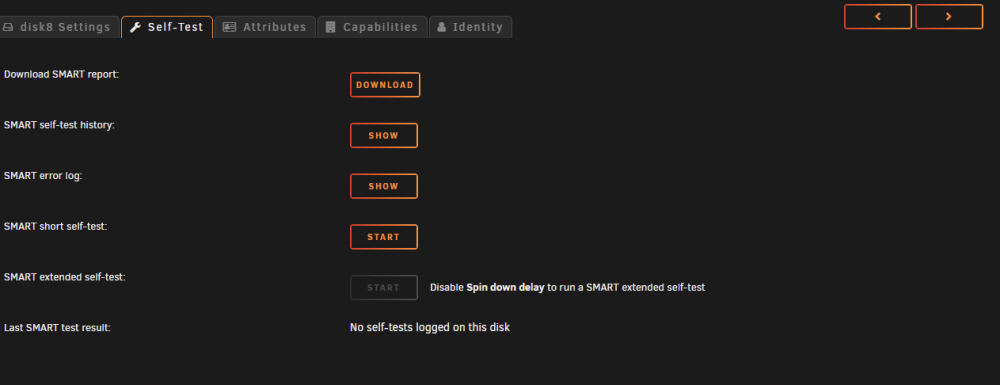
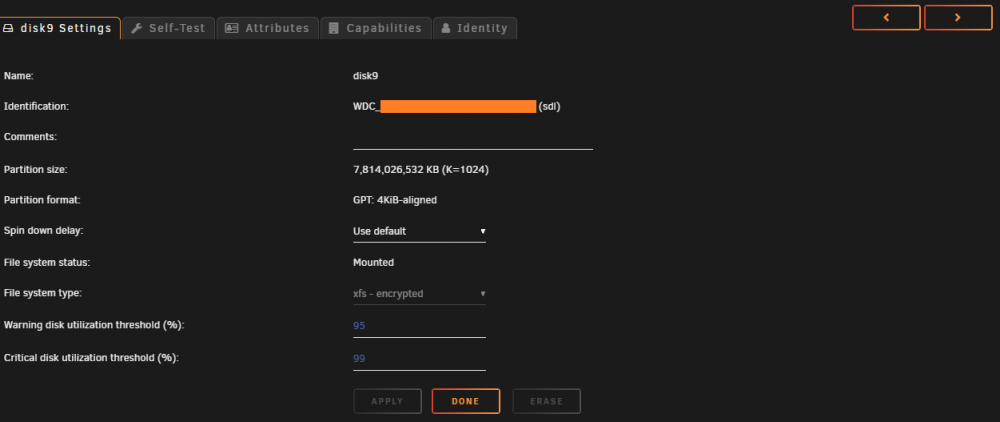
At the moment, if you're looking at a disk's info, other than the default "Settings" page, this page is not remembered when moving to another disk using the "Next" or "Previous" arrows on the UI: On a tab other than the default: Click the "Next" arrow at the top-right:
-
I'm assuming this isn't that simple (fuse needs to remount things if a new block device shows up?), or it would be included already. Having said that: +1, absolutely.
-
WD, for no reason other than you can't really beat the price/TB when the Easystore/Elements drives go on sale.
-
Here's some stuff I could think of. Small drives: Pros Shorter parity check times Shorter rebuild times More distributed files (less chance of thrashing) Cons Louder More power hungry Slower read/write speeds Large drives: Pros Quieter Less power hungry Faster read/write speeds Cons Shorter parity check times Longer rebuild times Less distributed files (more chance of thrashing)
-
Lovely little plugin. Two requests I'll give my +1 for: Theme-matching (or even just title font and a basic light/dark colour) No blinking icon when a page has a note (colour change is nice, but blinking is a little too much)
-
Got'cha, thanks for the explanation. Though what I was requesting was different: I'd like the ability to say "Move according to tuning rules for all shares except these ones. For these ones, just follow stock mover rules (daily, etc.)"
-
I saw that, but the wording of the help section makes it sound like it'll just never get moved off cache:

-
It goes without saying, but I'll say it anyway: Fantastic plug-in, on my list of must-haves. Feature request: Ability to exclude/include specified shares in mover tuning, vs just moving on whatever the set schedule is (as if tuning wasn't installed). Use case: Newly added files go to cache and are added to Plex, and usually watched over the next few days (they're popular at the time, etc) so I like them to hang around for a few days to avoid issues around hard drive thrashing. I have several things backing up to cache (perf reasons), which I'd like moved to array every night as they don't need to live on cache for the 5 days like everything else. Unless of course I'm missing a way to do this as-is!
-
+1 I'd like to see this everywhere, to be honest, and the ability to click a column to sort by would be nice.
-
If I remember right, Tom had mentioned looking into it, around the time of release originally. Haven't heard anything about it since though.
-
Slightly off-topic here, but I feel the Main tab UI towards the bottom could do with some work. There's a lot of very important info that feels a little like it's been bolted together over time, without much thought to cohesivness. Maybe something like a dedicated information box - maybe it's empty most of the time, but gets populated with important info when something changes: "Encryption key is missing" "Disk X has failed, and is being emulated" "Formatting will update parity information. Previously emulated data will be lost" etc...
-
Nice! Since there's lots of room, is it possible for us to get this shown by default in a column?
-
Yup, definitely +1 for this. The UI feels a little bloated when you start adding a lot of extra entries.
-
At the moment, this defaults to en-US. I have to manually set each of my VMs to en-UK to accommodate special characters in certain passwords. Would be nice to have a global option for this. Maybe under date and time settings or something?
-
.... How have I never noticed this?
-
Pretty much title. At the moment, we can see share type (public/secure/private) over SMB/NFS, but not if this is exported or not. It could be colours, or italics/bold, a symbol, or even the full word, but an indicator of some sort of no/yes(hidden)/yes would be cool.




