





tjb_altf4
Members
-
Joined
-
Last visited
Everything posted by tjb_altf4
-
I found ensuring appdata share had exclusive mode enabled, or hardcoding the cache path e.g. /mnt/cache/appdata/jellyfin made a very noticeable improvement.
-
-
The default config is for an all in one full node (node/farmer,harvester), this is the easiest way to get going. If you want to run the harvester separate its easiest to not give the full node access to plots, and set up a harvester only config as per Chia's config below. https://github.com/Chia-Network/chia-docker?tab=readme-ov-file#configuration
-
its a bug with connect plugin (I realised this after posting)
-
implement the change Squid noted and it'll have a dark header, it takes 5 seconds to apply I'd also add the header being white is a design choice by the Unraid devs, and is not a bug.
-
its the one in the usage section @JorgeB https://github.com/unraid/api?tab=readme-ov-file#usage
-
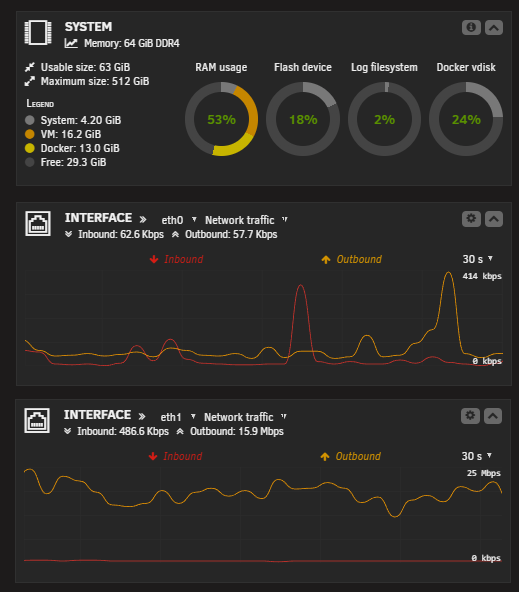
Would still like to see this, in case it's hard for some to visualise, or they've never found the original feature, we currently get a network usage graph for traffic, and can only choose one interface to monitor. This feature request is to have the ability to show one for each interface, like @SimonF made possible with his GPU stat plugin (for showing multiple GPU usage) This is a mockup of what that would look like on my system:
-
This method was broken in 7.2.0 to secure the GUI for Tailscale users. Before I worked out that method for myself, I used to host a very basic nginx instance that served up the contents of a folder with icons so it could be used in the docker template. You could also create a github repo and load your icons there. It's a stupid work around for a NAS OS that doesn't support using its own local storage, but it works.
-
Did some testing after reading some issues potentially around btrfs/zfs, decided it would be worth trying to bypass fuse and specify /mnt/cache instead of /mnt/user. I had some queries like Music library drop from 10 seconds to under a second, no more database locked errors. For whatever reason, my appdata wasn't in exclusive mode (legacy settings, so Unraid wasn't doing this for me. Something to try for others.
-
Docker only uses its internal DHCP, if you want a specific IP for a container, you have to set it in the docker container template. Pfsense (or any other router) cannot assign an IP to a docker container. You are simply reserving the IP for the container in pfsense, so that pfsense doesn't hand out that address to another computer, which could happen when container is stopped.
-
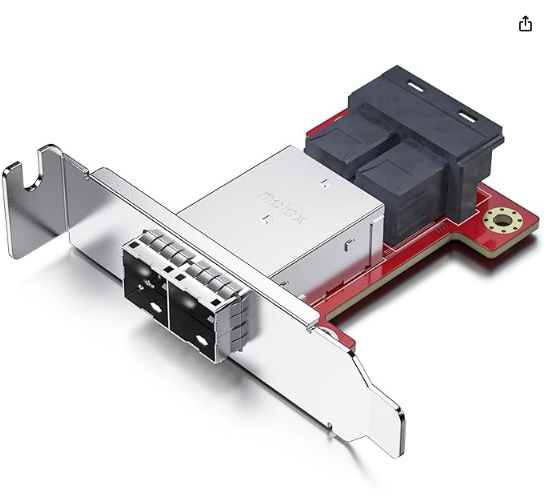
Just to add, I've daisy chained DS4246 directly off a 9305-16e, but not via an expander... it might be your issue. If you don't need the internal connections, a 9305-8e or 16e would be ideal. Otherwise the other option to try is a straight passthrough which would be better than going through an expander. e.g. SFF-8643 to SFF-8644 Mini SAS Adapter
-
If you are using RDP, I'm assuming you're on a full OS (and not mobile), in which case you could write a simple script to send WOL packets then start the RDP session (easiest if you save the rdp config to file). There are 3rd party RDP clients with WoL built in, but I have not used them personally. If the client machine is trusted, you could also skip WoL and have a script to SSH into Unraid and issue the virsh commands directly.
-
Double check to ports used to daisy chain, there is a specific way to daisy chain these units. A quick google will show correct way.
-
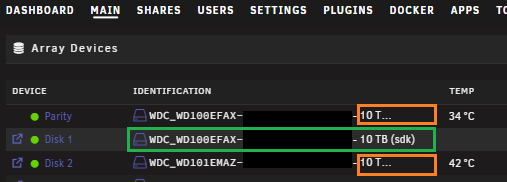
I'm assuming you have spare sata cables on your PSU, in which case it would be easier to modify your sata perif cables to use molex 4pin... or get additional molex cables from Seasonic supplier (same psu side pinout as sata typically). Or you can buy push on connectors, and modify what you have.the drives require 5V, backplanes that don't require 5V are converting 12V to 5V on the board. Looking at a few images online for this board, it doesn't look like it is doing this conversion. You should be able to spread the load across multiple peripheral cables, I've never seen a 1000W PSU with less than 20A on the 5V rail.... some even go up to 25ABump. I see similar idea has been added for the responsive design in Main tab for disk IDs, please add it for docker tags!
 I just upgraded from 7.0.1 to 7.2.0 5 minutes ago and didn't see that, but if you select Next you do see 7.2.0-rc1/2 etc with that warning, so maybe that's what was seenif you let docker assign its own mac, it will start with 02:42 (vendor portion of mac address), you don't need to override mac but it is an option. As above, first part of the mac is 02:42:0a, the rest is determined from its IP address it has been assigned, as explained here: If you change the IP address the mac will change, that was the point I was trying to make.Yes this works, you can statically assign an IP to a docker, and reserve the address in pfsense... I do this in my Unifi network. You will need to use macvlan for Docker network type, using ipvlan will mean the mac address of container will be the host's mac address. Also understand the mac is deterministically derived from the IP address, unless you define your own custom mac address for the container.I would suggest making a backup now just in case the issue returns so you can perform a clean wipe (sometimes all that is needed), or to migrate to new usbYour diagnostics indicate you have 2 networks in docker settings that don't exist in you Unraid network settings. 192.168.3.0/24 192.168.20.0/24 Remove old entries from your docker network settings, or add these additional networks into Unraid network settings. The must exist in both places.its a garbage release with massive performance regressions, particularly for some of the non-video libraries like music. The issues were picked up months ago during RC testing but the JF devs pushed on regardless. Hopefully the JF devs can rectify it soon.Migration was fine took 15 min tops, but it's mostly a music player (+42K songs). Performance is terrible now though, simply loading the home page or opening an album takes 10 seconds or moreCaution: next release has a long db migration, so upgrade knowing there will be some downtime https://jellyfin.org/posts/jellyfin-release-10.11.0



