





ZataH
Members
-
Joined
-
Last visited
Everything posted by ZataH
-
Do you know when 6.11 is expected to go into RC ?
-
Thanks. Working now And thank you for this plugin. It is a godsend when you have a lot of containers
-
I have an issue, when I create the folder, and sort containers by name. The folder does not open anymore
-
Any way to import SSL certificate with this container?
-
Any plans to integrate this with VPN?
-
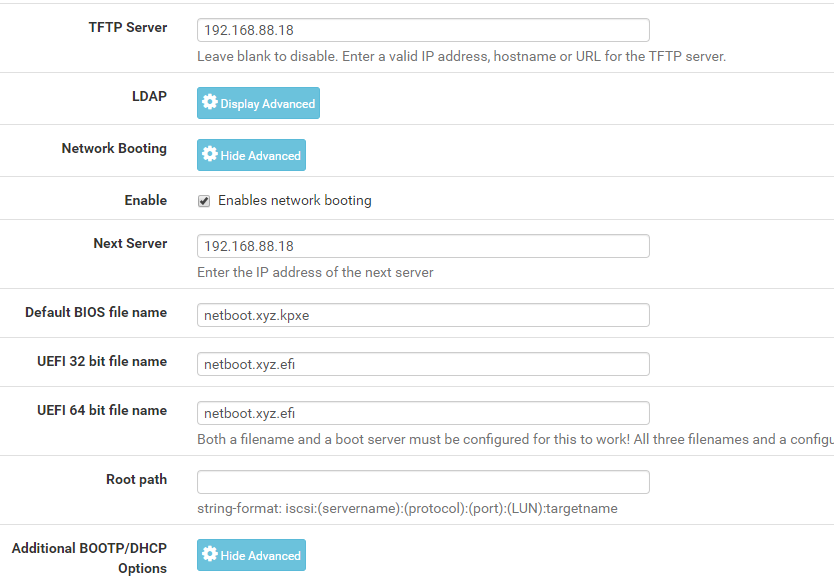
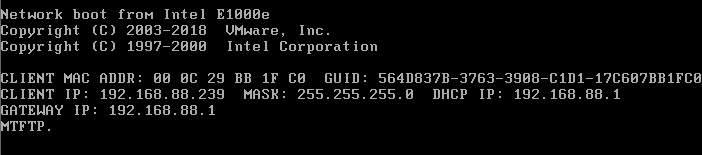
I am not sure what I am doing wrong here. I followed the guide on how to set it up with pfsense. Tried several VMs, and none of them can PXE boot. They get ip from my router and all that.
-
I have been a user for 3-4 years now, I think. I love how easy it is to manage docker containers, and how flexible the system is. I have used several other storage systems in the past, but I love how you can upgrade as you go with UnRAID. And you dont have to upgrade your whole array.
-
No, I think that was all I did. But I am not using qbit anymore. Maybe something has changed in the docker template since then? If you open a terman to the container, can you run unrar from there?
-
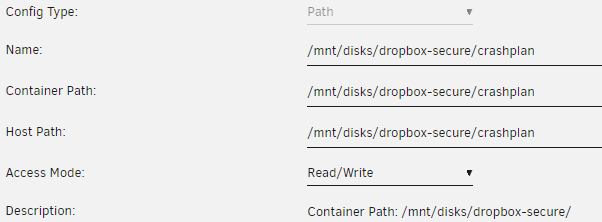
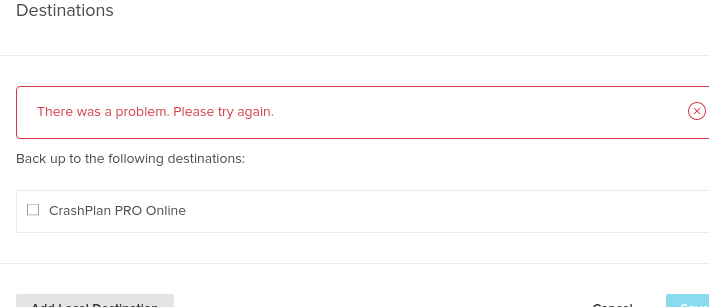
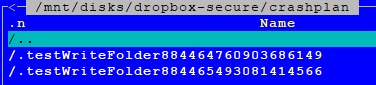
I have a issue writing to local disk. Tried with user share and rclone disk, but Crashplan fail to add it as destination
-
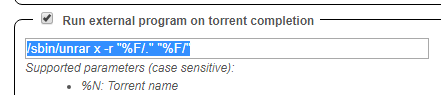
Yes it is in the docker I use this to extract to current folder: /sbin/unrar x -r "%F/." "%F/"
-
Both private and public. And both down and up Sendt fra min ONEPLUS A6003 med Tapatalk
-
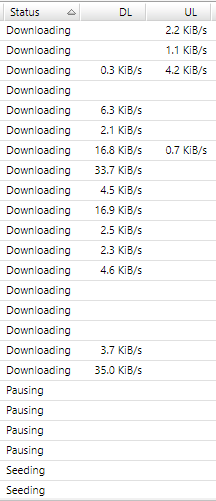
I am getting really slow transfer speed in rtorrent. I cant figure out why. I have tried different VPN endpoints, change rtorrent settings, checked log etc. If I restart the docker i will shortly get higher speed, and shortly after return to a few kb/s. All of these should easily could get 50-100mbit/s If I start the qbittorrentvpn container, I can easily max out my internet connection.
-
When can we expect this to be public available?
-
Didnt work. For some reason no matter what I do, logins does not work for me EDIT: Fixed it. Apparently I can´t login unless I use my reverse proxy. Not sure if it some setting in Qbit.
-
[AutoRun] enabled=false program= [Preferences] Bittorrent\AddTrackers=false Connection\PortRangeMin=21898 Connection\UPnP=false General\UseRandomPort=false WebUI\Address=* WebUI\CSRFProtection=false WebUI\LocalHostAuth=false WebUI\Port=8080 WebUI\ServerDomains=* WebUI\UseUPnP=false
-
Yes, tried with both copy/paste and write it my self. I even tried pasting a password string into the config file from another site, but with same result. Not sure why it is failing.
-
Still the same. I also tried to delete all appdata earlier with same result.
-
I have tried in 3 different browsers
-
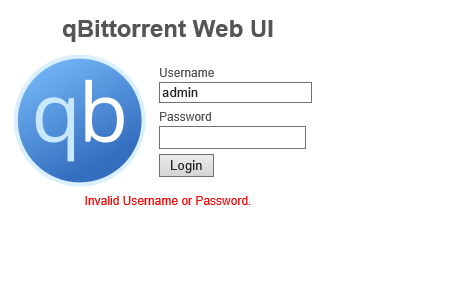
Am I the only one having issues with the web login? admin/adminadmin does not work for me
-
My rtorrent suddenly wont start after a reboot. It is just waiting for rtorrent process to start 2018-11-11 17:58:55,597 DEBG 'start-script' stdout output: Sun Nov 11 17:58:55 2018 Initialization Sequence Completed 2018-11-11 17:58:55,672 DEBG 'watchdog-script' stdout output: [debug] Valid IP address from tunnel acquired '10.31.10.10' [info] rTorrent listening interface IP 0.0.0.0 and VPN provider IP 10.31.10.10 different, marking for reconfigure 2018-11-11 17:58:55,677 DEBG 'start-script' stdout output: [debug] Valid IP address from tunnel acquired '10.31.10.10' 2018-11-11 17:58:55,679 DEBG 'watchdog-script' stdout output: [info] rTorrent not running 2018-11-11 17:58:55,709 DEBG 'start-script' stdout output: [debug] Valid IP address from tunnel acquired '10.31.10.10' [info] Strict port forwarding enabled, attempting to assign an incoming port... 2018-11-11 17:58:55,711 DEBG 'start-script' stdout output: [debug] Valid IP address from tunnel acquired '10.31.10.10' 2018-11-11 17:58:55,712 DEBG 'start-script' stdout output: [debug] Attempting to get external IP using Name Server 'ns1.google.com'... 2018-11-11 17:58:55,721 DEBG 'start-script' stdout output: [info] Attempting to curl http://209.222.18.222:2000/?client_id=f947b4e0f5edeb2a16d3b0fde4fa08504ae1c51c676b883e111ee6d5fba8365f... 2018-11-11 17:58:55,877 DEBG 'start-script' stdout output: [info] Successfully retrieved external IP address 185.230.127.231 2018-11-11 17:58:55,883 DEBG 'watchdog-script' stdout output: [debug] External IP address from tunnel is '185.230.127.231' [debug] Waiting for file '/home/nobody/vpn_incoming_port.txt' to be generated (contains PIA API generated incoming port number)... 2018-11-11 17:58:56,533 DEBG 'start-script' stdout output: [info] Curl successful for http://209.222.18.222:2000/?client_id=f947b4e0f5edeb2a16d3b0fde4fa08504ae1c51c676b883e111ee6d5fba8365f, response code 200 2018-11-11 17:58:56,538 DEBG 'start-script' stdout output: [debug] Successfully assigned incoming port 34842 2018-11-11 17:58:56,886 DEBG 'watchdog-script' stdout output: [debug] Incoming port for tunnel is '34842' [info] rTorrent incoming port 49160 and VPN incoming port 34842 different, marking for reconfigure [info] Removing any rTorrent session lock files left over from the previous run... 2018-11-11 17:58:56,888 DEBG 'watchdog-script' stdout output: [info] Attempting to start rTorrent... 2018-11-11 17:58:56,890 DEBG 'watchdog-script' stdout output: Script started, file is /home/nobody/typescript 2018-11-11 17:58:56,924 DEBG 'watchdog-script' stdout output: Script done, file is /home/nobody/typescript 2018-11-11 17:58:56,931 DEBG 'watchdog-script' stdout output: [debug] Waiting for rTorrent process to start... 2018-11-11 17:58:57,939 DEBG 'watchdog-script' stdout output: [debug] Waiting for rTorrent process to start... 2018-11-11 17:58:58,948 DEBG 'watchdog-script' stdout output: [debug] Waiting for rTorrent process to start... 2018-11-11 17:58:59,956 DEBG 'watchdog-script' stdout output: [debug] Waiting for rTorrent process to start... 2018-11-11 17:59:00,967 DEBG 'watchdog-script' stdout output: [debug] Waiting for rTorrent process to start... 2018-11-11 17:59:01,976 DEBG 'watchdog-script' stdout output: [debug] Waiting for rTorrent process to start... 2018-11-11 17:59:02,983 DEBG 'watchdog-script' stdout output: [debug] Waiting for rTorrent process to start... 2018-11-11 17:59:03,989 DEBG 'watchdog-script' stdout output: [debug] Waiting for rTorrent process to start... 2018-11-11 17:59:04,999 DEBG 'watchdog-script' stdout output: [debug] Waiting for rTorrent process to start... 2018-11-11 17:59:06,006 DEBG 'watchdog-script' stdout output: [debug] Waiting for rTorrent process to start... 2018-11-11 17:59:07,015 DEBG 'watchdog-script' stdout output: [debug] Waiting for rTorrent process to start... 2018-11-11 17:59:08,022 DEBG 'watchdog-script' stdout output: [debug] Waiting for rTorrent process to start... 2018-11-11 17:59:09,032 DEBG 'watchdog-script' stdout output: [debug] Waiting for rTorrent process to start... 2018-11-11 17:59:10,039 DEBG 'watchdog-script' stdout output: [debug] Waiting for rTorrent process to start... 2018-11-11 17:59:11,044 DEBG 'watchdog-script' stdout output: [debug] Waiting for rTorrent process to start... 2018-11-11 17:59:12,049 DEBG 'watchdog-script' stdout output: [debug] Waiting for rTorrent process to start... 2018-11-11 17:59:13,055 DEBG 'watchdog-script' stdout output: [debug] Waiting for rTorrent process to start... 2018-11-11 17:59:14,062 DEBG 'watchdog-script' stdout output: [debug] Waiting for rTorrent process to start... 2018-11-11 17:59:15,068 DEBG 'watchdog-script' stdout output: [debug] Waiting for rTorrent process to start... 2018-11-11 17:59:16,073 DEBG 'watchdog-script' stdout output: [debug] Waiting for rTorrent process to start... 2018-11-11 17:59:17,079 DEBG 'watchdog-script' stdout output: [debug] Waiting for rTorrent process to start... 2018-11-11 17:59:18,085 DEBG 'watchdog-script' stdout output: [debug] Waiting for rTorrent process to start... 2018-11-11 17:59:19,092 DEBG 'watchdog-script' stdout output: [debug] Waiting for rTorrent process to start... 2018-11-11 17:59:20,100 DEBG 'watchdog-script' stdout output: [debug] Waiting for rTorrent process to start... 2018-11-11 17:59:21,105 DEBG 'watchdog-script' stdout output: [debug] Waiting for rTorrent process to start... 2018-11-11 17:59:22,113 DEBG 'watchdog-script' stdout output: [debug] Waiting for rTorrent process to start... 2018-11-11 17:59:23,121 DEBG 'watchdog-script' stdout output: [debug] Waiting for rTorrent process to start... 2018-11-11 17:59:24,130 DEBG 'watchdog-script' stdout output: [debug] Waiting for rTorrent process to start... 2018-11-11 17:59:25,136 DEBG 'watchdog-script' stdout output: [debug] Waiting for rTorrent process to start... 2018-11-11 17:59:26,140 DEBG 'watchdog-script' stdout output: [warn] Wait for rTorrent process to start aborted [info] Waiting for rTorrent process to start listening on port 5000...
-
Thanks for clearing that up.
-
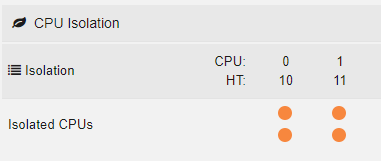
I think I misunderstood the concept as well. Thought isolating cpu meant that unraid only would use said cores. So unraid and containers will always use all cores, unless I pin a specific container to specific numbers of cpu cores? Just to be clear, this screenshot does not mean that unraid only will use 4 cores then?
-
Same thing happened to me. I had to remove/reinstall a few times before it worked.
-
Please make it possible to change back to the old UI. The new UI is way too inconsistent. Font are bigger than old ui, buttons are way too big etc etc.
-
Why do you have 3 UnRAID machines? Sendt fra min ONEPLUS A6003 med Tapatalk

