





MowMdown
Members
-
Joined
-
Last visited
Everything posted by MowMdown
-
Do you get a video output of the A770?
-
I leave my GLKVM(comet) connected to my A310 at all times. I however do not have an iGPU, i'm not sure if having both can affect it. I don't really see why it should but who knows.
-
Here's what I suggest trying. In the BIOS you should be able to disable the iGPU. Basically I want you to force the system to only recognize the A770. Boot up and see if unraid can still recognize the A770 and see what happens if you attempt plex playback ensuring you force a transcode. It's also possible that for whatever reason maybe you need an active HDMI connection to the GPU for it to initialize. Ive sometimes have seen it required to use an HDMI dummy plug to get the GPU to function. I personalty have a Sparkle Arc A310 installed in my system and it functions normal.
-
What happens when you select the A770 in plex and try to transcode playback?
-
Just want to confirm a few things more: You are on 7.1.3 with the stock kernel You have removed the i915 blacklist
-
Have you enabled Rebar in your BIOS?
-
curious what path did you set for the "backup destination" in the appdata backup plugin?
-
Do you run any user scripts that touch the "appdata" share? Also you should not be changing the permissions of the appdata, doing so will break docker containers. It's possible the containers themselves are reverting permissions but since you've messed with them, it breaks when they try to revert.
-
Attach your diagnostics.zip please.
-
That looks pretty normal. The one container Id probably keep an eye on is tdarr
-
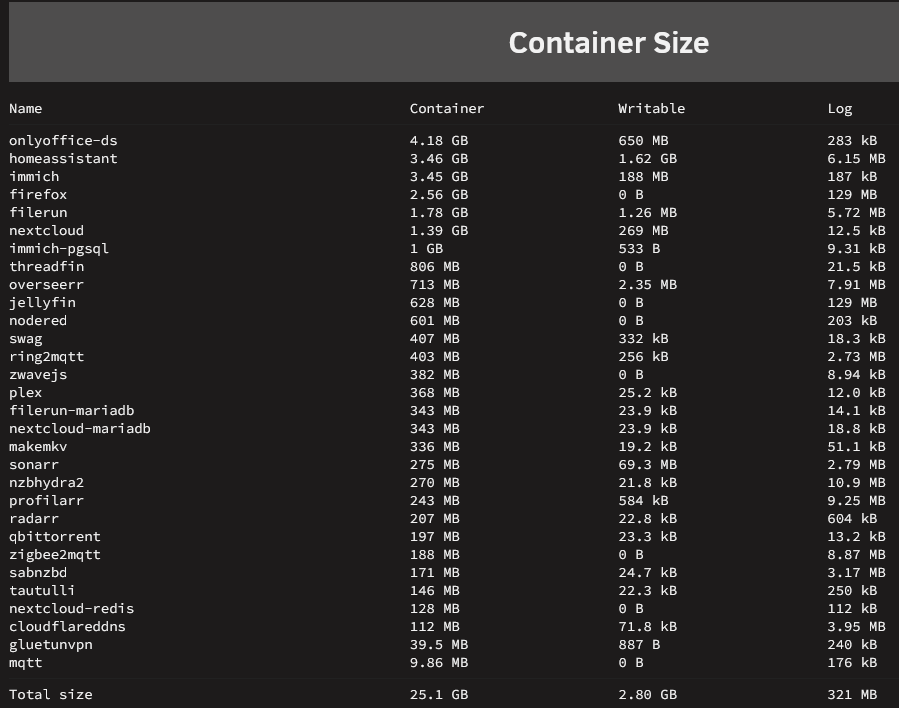
There's a button on the container page to calculate the size of the image and which container is eating the space. post the results like this
-
This is probably unraid's single biggest drawback. You're better off not giving access to the network to people who you don't trust to get access to unraid's services.
-
br0 network should be strictly avoided unless absolutely necessary. There is almost zero need for it except for running a dns server like pihole as well as a reverse proxy on the same machine. All other docker containers should remain using bridge network OR a custom docker network.
-
Looks like FCP plugin just needs to be updated to recognize that a parity disk is not installed and to instead recommend running a read check or just removed.
-
Is there a reason you created a pool using two differently sized HDDs? The typical unraid setup would have been to assign the two drives to the "Array" slots NOT a pool. While there is nothing wrong with using HDDs in pools, it's generally not ideal to mix disk sizes in pools. If you're going to use HDDs in a pool you'll want at least a minimum of 3 of the same sized disks and to use zfs raidz so you can get a speed benefit and a form of parity for the data on that pool. If I were you, I would put the 8TB disk in Array Slot 1 and the 3TB disk in Array Slot 2, and get a small SSD or two and assign them to a new pool. Otherwise you're going to end up with a less than optimal disk configuration which will likely lead to issues down the road.
-
You must’ve misconfigured a docker containers appdata path. you probably put “/mnt/cache/…” instead of “/mnt/cache/appdata/…”
-
Tower nginx: 2025/05/15 11:40:17 [error] 3835476#3835476: *917066 open() "/usr/local/emhttp/webGui/styles/default-popup.css" failed (2: No such file or directory) while sending to client, client: 10.0.0.2, server: , request: "GET /webGui/styles/default-popup.css?v=autov_fileDoesntExist HTTP/1.1", host: "10.0.0.2", referrer: "https://10.0.0.2/plugins/zfs.master/frontend/ZFSMCreateDataset.php?zpool=cache&csrf_token=XXXXXXXXXXXXXXXX&done=Done" Getting a lot of these since upgrading to Unraid 7.1.2. Error message shows up when clicking on the "Create Dataset" button. I don't see any actual issue with it but I figured Id report it just in case.
-
That should not have been necessary. There should have been nothing changed from the default onlyoffice document server docker. I would suggest deleting onlyoffice, the appdata for it, and the container template and starting over. The JWT secret key is the only thing you need to customize. post your swag proxy config for onlyoffice. The only thing you needed to do to get it working with seafile was adding those handful of lines to the seahub_setings.py file. these: ENABLE_ONLYOFFICE = True VERIFY_ONLYOFFICE_CERTIFICATE = False ONLYOFFICE_APIJS_URL = 'https://onlyoffice.example.com/web-apps/apps/api/documents/api.js' ONLYOFFICE_FILE_EXTENSION = ('doc', 'docx', 'ppt', 'pptx', 'xls', 'xlsx', 'odt', 'fodt', 'odp', 'fodp', 'ods', 'fods') ONLYOFFICE_EDIT_FILE_EXTENSION = ('docx', 'pptx', 'xlsx') ONLYOFFICE_FORCE_SAVE = True ONLYOFFICE_JWT_SECRET = 'your-onlyoffice-jwt-key-here' From this the only two lines you need to modify are the APIJS_URL and JWT_SECRET
-
Its not possible for me either, macvlan is the only option I have available when bridging is disabled. I am unsure if this is on purpose or not though.
-
@tomkenobi & @presence06 Delete the log from OnlyOffice appdata folder and test again. This log is persistent and not rotated so these could be old error logs Also in my onlyoffice nginx proxy config I commented out/removed this line include /config/nginx/ssl.conf; as it causes issues if you use nextcloud and/or altered the ssl.conf file in any way.
-
If you straight up copied my swag config, you need to replace 10.0.0.2 with the container name or the IP of your host machine.
-
Question 1. Are you using a custom docker network? For example from swag, they ask you to use "proxy-net" and both container would be included in "proxy-net" Im not sure what this is for, I personally do not use it. HTTP with 8585 or whatever should be fine. no need to use https here. This is MY swag config: server { listen 443 ssl; listen [::]:443 ssl; server_name office.*; client_max_body_size 0; location / { include /config/nginx/proxy.conf; include /config/nginx/resolver.conf; set $upstream_app 10.0.0.2; set $upstream_port 8585; set $upstream_proto http; proxy_pass $upstream_proto://$upstream_app:$upstream_port; } } All my dockers are using a bridge network, I do not use br0 for anything.

-
You have to have a secondary storage set so you can control the mover action "Primary -> Secondary" or "Secondary -> Primary" vs Keep in mind, mover depends on there being both because otherwise if there is only a primary there would be no reason for mover to try to move something that should only ever be on a single pool at all times. Without a secondary storage location, files should only ever be written to the primary storage location. There would never be files on any other pool/array for mover to even be concerned with.


-
the logs say the postgres password is invalid. Did something change? PostgresError: password authentication failed for user "postgres"
-
No you didn’t lose anything, just change it back to “:latest” and it should bring it back. apparently you might have to log into GitHub or something to pull the correct docker information. running “docker logout ghcr.io” from command line and then maybe running “docker login ghcr.io” and logging back in?




