





MowMdown
Members
-
Joined
-
Last visited
-
Currently
Viewing Topic: How to check if my (new-ish) parity drives are valid after OS crash
Everything posted by MowMdown
-
You might want to verify your hardlinks are working using something like "czkawka" from the CA app store
-
You can type in lsof /mnt/diskX and replace X with the disk# and see what files are being accessed.
-
Well im still not quite sure what the actual issue is but I do know docker.img being on an HDD isn't helping and will keep disks awake and I see in your syslog the disk constantly spinning up.
-
Sorry I didn't get a chance to check back in earlier. How did this go for ya?
-
Basically docker.img is where the containers run from, this will keep the HDDs awake while docker service is active. Stop both the docker service and VM service if enabled, set your system share to use cache and array (both is required for mover to run) then set mover action "Array -> Cache" run mover.
-
Can you tell me why your "System" share is located on your disks and not your cache pool? what files do you have within that share? system shareUseCache="no" # Share exists on disk1, disk2 I suspect your docker.img vDisk is located within this share and that will keep the disks awake. Edit: It sure is: DOCKER_IMAGE_FILE="/mnt/user/system/docker/docker.img"
-
This is due to the kernels newer cpu driver you can append the older one to get the old options back. I just can’t remember off the top of my head what it is.
-
My vote is for the NUT plugin
-
Unraid doesn't delete folders so either the data is simply being added to the wrong share or something else is deleting the data. Hard to diagnose without seeing how you setup your docker templates.
-
Can you post a few screenshots. One of your Sonarr Docker Template and the "SHARE" tab after clicking on Compute All
-
Basically that’s the idea. Once the disk is ready to be added as the new disk1 you should be able to run a new config from the tools menu, put the 8TB HDD in disk1 slot and then put the SSD in the cache pool slot one. From there you should be able to move the data over to the HDD then add the 2nd SSD to the cache pool and redo the cache pool. As long as you don’t format any of the existing disks you shouldn’t lose any data. When you’re all ready just reach back out before proceeding.
-
How full are your disks/pools?
-
Well plex might be keeping the disk away for another reason other than you left your appletv open since I do not believe plex reads the next episode ahead of time. I can confidently say that plex does not spin disks up when broswing media due to it just reading it's databse or wahtever which resides in the appdata folder. basically all that info is cached somewhere else probably not on one of your HDDs. I do not experience disk spin up with my appletv and plex like you seem to be. Please attach your diagnostics.zip in the reply to this comment. Do you by chance store any other data along side the actual media file? Posters or Subtitles?
-
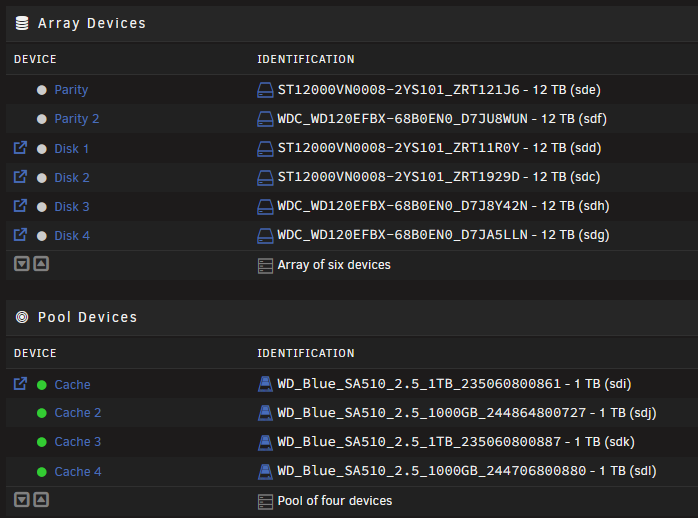
The general consensus is that SSDs should not be placed in the unraid array but in pools either mirrored or zfs raidz modes. HDDs can either be pooled or be placed in the unraid array. With that said your two NVME disks would be more appropriate for a pooled configuration and the 8TB HDD should be Disk1 in the unraid array. You'd want to get a 2nd 8TB HDD if you wanted to add parity. See below, HDDs up top, SSDs at bottom. HDDs are single disk filesystems, the Cache pool is a zfs equivalent of RAID 10
-
Post your diagnostics.zip please in a reply to this comment.
-
I would suggest using the unraid array for your disks. With that said you will need to make the 18TB disk your parity disk or get a second 18TB disk to make parity.
-
Click the thumbs down icon on the dashboard to acknowledge it.
-
post the output of docker system df -v
-
Keeping them on cache drive is fine, default mover does not delete empty folders after it moves them to the array. I’m positive this issue is only present when mover turning plugin is used in conjunction with its “delete empty folders” setting enabled.
-
There is only 30GB being used, 50GB seems overkill but something has to be misconfigured as these containers should not be writing data inside the docker.img
-
It has to be something to do with using tailscale. I know tailscale is supposed to use direct connections but I still find it seems much slower than a direct local connection. (I'm still not fully convinced that the direct connection TS makes is local) I personally use an internal DNS rewrite to go from photos.mydomain.com -> local dns -> SWAG -> Immich so I don't even have to worry about the possibility of an external dns lookup.
-
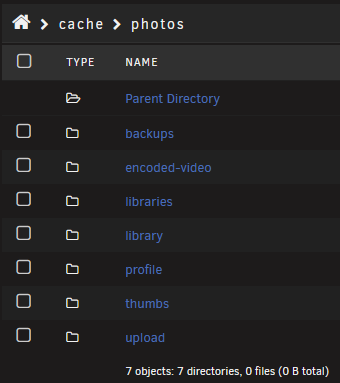
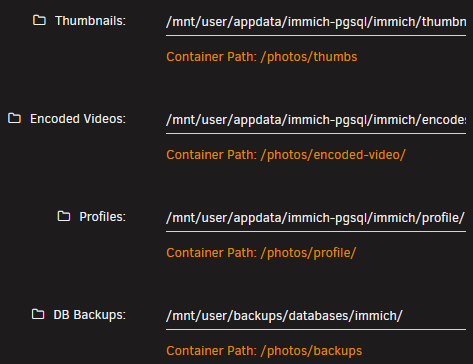
We solved the issue in discord, basically immich creates subfolders under it's preconfigued "photos" path. Those folders have to exist in their location regardless if you set their location to another share entirely. For example, these folders cannot be deleted(left photo) otherwise the link is broken even though these folders have been set to a different location (right photo): The OP seems to have mover deleting the empty folders (left photo) when mover is ran which results in a broken link.

-
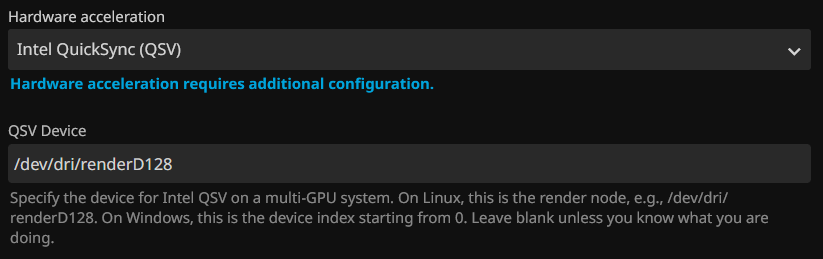
You have to add this to the docker template after toggling advanced view. Then under the Playback Transcoding section you input this:

-
Do you get a video output of the A770?
-
I leave my GLKVM(comet) connected to my A310 at all times. I however do not have an iGPU, i'm not sure if having both can affect it. I don't really see why it should but who knows.



