MowMdown
Members
-
Joined
-
Last visited
Everything posted by MowMdown
-
try this, instead of using the :latest tag, change it to this: ghcr.io/imagegenius/immich:1.132.3 On the immich template page, check the advanced view and replace the repository line with this ^ example of where to put it:

-
You have appdata located on disk3, you need to check it and move it to the cache pool. (because this says "yes" and not "only" here you're getting the appdata error in FCP.) appdata shareUseCache="yes" # Share exists on cache, disk3 Set secondary storage back to "array" and then set mover action "Array -> Cache" and run mover AFTER you stop docker service entirely. this should fix it. If mover does not move the data there is likely duplicate data on the cache pool already and you will have to figure out which copy is correct. Otherwise set the secondary storage back to "none" and ignore the error or rescan problems and it should go away.
-
There should be an extra folder on the boot USB. /boot is just the root level of the USB. There’s not an additional folder on the USB called boot.
-
Yeah that looks good. And you’re still not in 1.132.3 after that?
-
Click on the pool name and see if a scrub is running
-
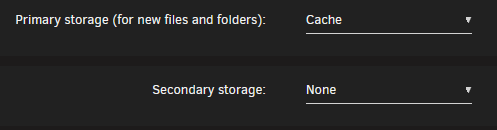
To fix the cache only setting you just set the “Primary Storage: Cache” and leave secondary storage set to none. this makes it “cache only” it just seems that fix common problems has not been updated to match the current version nomenclature. However the advice is still relevant.
-
The actual proper way is to use a docker container or a plugin if available. there is an ffmpeg docker you can download from Linuxserver
-
Download package from here and put in the existing /boot/extra folder on the USB. Reboot unraid https://packages.slackware.com/?r=slackware64-current&p=ffmpeg-7.1.1-x86_64-3.txz
-
Post the docker run output.
-
post the output of wipefs /dev/nvme1n1p1
-
See: and
-
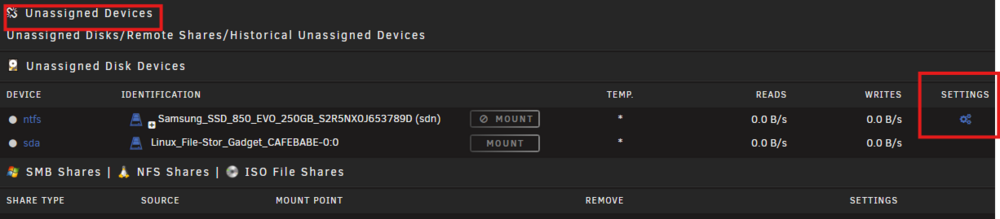
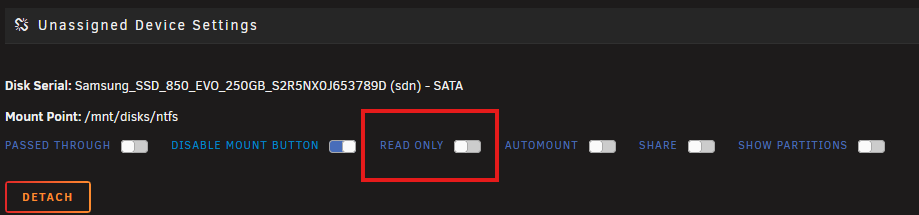
He's talking about the unassigned devices plugin, there should be a section on the MAIN tab closer to the bottom where you can mount disks that are not in the array slots at the top. There should be a toggle to mount it read-only from there.
-
Appdata backup plugin would be a good first start. You can write a backup script or use one of the many dockers that can backup stuff.
-
What are the disks in pool1 connected to hardware wise? Could it be a HBA controller going bad?
-
Stop and and all dockers you have running to see if its one of those you can also run this and see what files are being accessed. lsof /mnt/Storagenew
-
Post your docker run output
-
Yeah those look right. I don't see any issues with those. In radarr/sonarr, there is a wanted tab, there you can do a manual import. if you navigate to /downloads and click on interactive, does it show up anything
-
post your docker run commands for sonarr and sabnbd please
-
That's going to depend on many factors, it's probably trying to transcode to something your GPU doesn't support and it's falling back to software transcoding because chrome is requesting something your GPU cant do where firefox is requesting something compatible. You're better off using a plex client app to watch plex.
-
The simplest way to think about container paths is the container path can only see whatever the last folder is for the corresponding host path. Say we have "Container A" and we want to create a path to somewhere on the host. we will call the path "/abc123xyz" and it maps to "/mnt/user/share1/downloads" Lets say under "/mnt/user/share1/downloads" we have 3 files "file1 file2 and file3" Now in order for "Container A" to see file1, file2, and file3 we had to "create a window" (mapping a path) When you open up the interface for Container A, it has to use the container path we created for it which is just "/abc123xyz" so when we browse "/abc123xyz" we will see file1, file2 and file3. Sometimes in a container you might see a folder called "/mnt/ but when you browse this location you will NOT find /user/share1/downloads inside because it is isolated to only container paths we create.
-
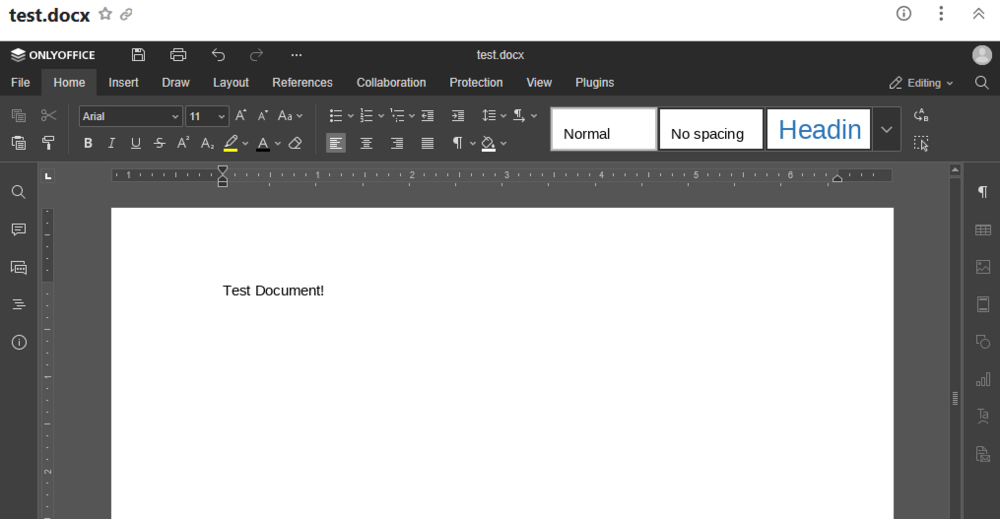
@tomkenobi @presence06 Step 1. Install OnlyOfficeDocumentServer docker. Step 2. Have a reverse proxy setup and add a proxy host/config for only office. Step 3. Edit seahub_settings.py and add the following and replace "onlyoffice.example.com" with your reverse proxy url. The JWT secret key has to match the key you created for the onlyoffice docker. ENABLE_ONLYOFFICE = True VERIFY_ONLYOFFICE_CERTIFICATE = False ONLYOFFICE_APIJS_URL = 'https://onlyoffice.example.com/web-apps/apps/api/documents/api.js' ONLYOFFICE_FILE_EXTENSION = ('doc', 'docx', 'ppt', 'pptx', 'xls', 'xlsx', 'odt', 'fodt', 'odp', 'fodp', 'ods', 'fods') ONLYOFFICE_EDIT_FILE_EXTENSION = ('docx', 'pptx', 'xlsx') ONLYOFFICE_FORCE_SAVE = True ONLYOFFICE_JWT_SECRET = 'your-onlyoffice-jwt-key-here' Step 4. Restart Seafile.
-
Check the three boxes on the left side next to each folder, then click move, then move them to cache/appdata. this will move them from cabpool to cache
-
IMO the regular version of Nextcloud works better for unraid instead of the AIO container. Unless you need all the extra features of the AIO container. The AIO version does not allow easy access to files on the host machine as everything lives within the container volumes which are hidden away from unraid(host) and not accessible.
-
post your diagnostics so we can see, but in all actuality, you have files/folders from a cache only share on the array disks somewhere. To fix this, click on the share(s) in question, set the following: PRIMARY STORAGE: CACHE SECONDARY STORAGE: ARRAY MOVER: ARRAY -> CACHE then run mover
-
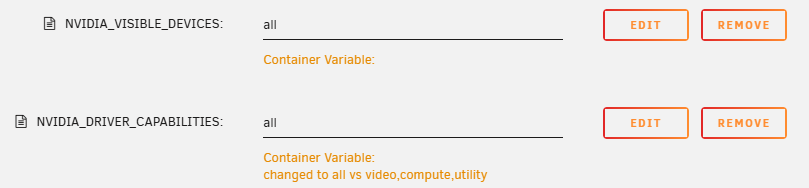
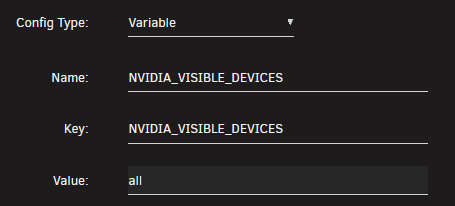
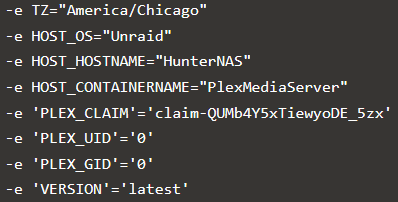
You named the variables correctly but I don't think you actually created the variables, click edit and post the screenshot of the edit page for the two See how the orange text is blank next to "Container Variable" Should look like this (repeat this for the driver capabilities variable as well): I think you missed the "key" portion the name portion is irrelevant (the name is just so you can identify it in the template) It would have shown up in this list: Like so docker run -d --name='plex' --net='media-net' --pids-limit 2048 -e TZ="America/New_York" -e HOST_OS="Unraid" -e HOST_HOSTNAME="Tower" -e HOST_CONTAINERNAME="plex" -e 'VERSION'='LATEST' -e 'NVIDIA_VISIBLE_DEVICES'='all' (this is missing from yours) -e 'NVIDIA_DRIVER_CAPABILTIES'='all' (this is also missing) -e 'PUID'='99' -e 'PGID'='100' -e '100'='100'