





m8ty
Members
-
Joined
-
Last visited
Everything posted by m8ty
-
I added protobuf and mosh. You will also need to install perl and utempter. Thanks Installing protobuf, and perl with mosh, finally working
-
I’m getting an error connecting to mosh-server blink> mosh root@defib mosh-server: error while loading shared libraries: libprotobuf.so.18: cannot open shared object file: No such file or directory Could not start mosh-server. blink> I found this thread on google search, there was one mention of it and the solution was to update mosh to the latest version. I’m running mosh-1.3.2-x86_64-9cf.txz
-
fyi I've encountered a bug where the "default save path" resets to /config/qBittorrent/downloads . Not sure when this happens. I've had to fix this multiple times now. Just trying to make people aware
-
I have noticed increased ram usage with htop and a couple of “general protection fault” errors in my logs. But I can’t say for certain if either were due to the changes I made. I also have stopped testing damselfly and simply using only photostructure at this time to manage the available ram better.
-
I was reading this stackexchange answer https://unix.stackexchange.com/questions/444998/how-to-set-and-understand-fs-notify-max-user-watches and reviewed the source for the "tips and tricks" plugin, to see how it modifies fs.inotify.max_user_watches https://github.com/dlandon/tips.and.tweaks/blob/master/source/scripts/rc.tweaks#L59 # Set the inotify max_user_watches. if [ "$MAX_WATCHES" = "" ]; then # Set the inotify max_user_watches. sysctl -qw fs.inotify.max_user_watches="524288" > /dev/null else # Set the inotify max_user_watches. sysctl -qw fs.inotify.max_user_watches="$MAX_WATCHES" > /dev/null fi So in my /boot/config/go file I add this line sysctl -qw fs.inotify.max_user_instances="2048" > /dev/null and when I "cat /proc/sys/fs/inotify/max_user_instances" it changed from 128 to 2048 like so. 2048 is an arbritary amount. since I changed fs.inotify.max_user_watches from the default of 524288 to 8388608 (x16) I increased fs.inotify.max_user_instances by the same factor. I like to experiment with multiple docker projects often, lately Damselfly, and I ran into this inotify problem as well.
-
Hi, does nerdpack install packages before the go file is executed? Meaning: if I place “pip3 install docker-compose” in my go file, docker-compose should install?
-
Thank you. Simply curious. I had a problem with unraid not booting after upgrading earlier this year I was not sure if the upgrade process was the issue.
-
Hello, What are the instructions to do a manual upgrade from the last stable version—Version 6.7.2?
-
I have a question about a setting: In the "Docker Auto Update Settings" settings tab, there is the setting "Time to wait for docker graceful stop before killing". What unit of time does this use? Seconds or minutes? What command is used for a graceful stop versus killing? Does it kill dockerd or only containers currently running? Thank you!
-
I just had a hell of a time getting the network interface working again after adding a mount tag in the tower/VMs page. (Btw this seems like an Unraid bug, hopefully it gets fixed eventually) I'm running an Ubuntu 19.04 VM When you add a mount tag, my Ubuntu VM's network interface logical name gets changed to enp3s0 (I don't know what it was before, but the problem is it has changed and now my netplan config needs to be fixed) A temporary fix to get the VM back on the network like @snailbrain mentioned: sudo dhclient enp3s0 I had to edit /etc/cloud/cloud.cfg.d/50-curtin-networking.cfg to setup static addressing instead of DHCP network: version: 2 ethernets: enp3s0: addresses: [192.168.88.25/24] - https://netplan.io/examples - https://askubuntu.com/questions/1036266/what-is-the-most-authoritative-file-process-for-managing-ip-addresses-on-an-18-0 I ran some commands I found on various stackexchange threads sudo cloud-init clean --logs sudo cloud-init init --local sudo netplan apply - https://askubuntu.com/questions/1104285/how-do-i-reload-network-configuration-with-cloud-init - https://askubuntu.com/questions/1029531/how-to-setup-a-static-ip-on-ubuntu-server-18-04 - https://askubuntu.com/questions/1036266/what-is-the-most-authoritative-file-process-for-managing-ip-addresses-on-an-18-0 Now my networking interface config persists between reboots
-
See this reddit thread
-
To disable the need to login as admin:rutorrent at http://<host ip>:9080/ aka HTTP Basic Authentication Per the nginx docs http://nginx.org/en/docs/http/ngx_http_auth_basic_module.html In file `/config/nginx/config/nginx.conf` eg `/mnt/user/appdata/binhex-rtorrentvpn/nginx/config/nginx.conf` You can set `auth_basic` to "off", like so: location / { index index.html index.htm index.php; #auth_basic "Restricted Content"; auth_basic off; auth_basic_user_file /config/nginx/security/auth; } HTTP Basic Authentication will be disabled after restarting the container 👍.
-
Hi, Lately my Unraid install has been crashing/unresponsive. That means no response from webui/ssh/ping, and the attached display connected to the actual server is frozen. I am attaching the diagnostics zip as well as the /var/log/syslog I was able to capture with a remote syslog server, hopefully that is helpful but I'm unable to find anything telling me what happened. The last recorded log was @ Jul 07 07:52:45 shoebox kernel: mdcmd (66): spindown 1 And then my girlfriend told me she couldn't access the Plex at 8:17am I assume it could be because of docker since Unraid crashes often when I experiment with containers outside of "community applications" shoebox-diagnostics-20190707-1752.zip syslog.txt
-
I recently upgraded my installation to 16.0.1 and I am getting the same warning: The "Strict-Transport-Security" HTTP header is not set to at least "15552000" seconds. For enhanced security, it is recommended to enable HSTS as described in the security tips ↗. Maybe it's a change in the nginx conf files between the last version (15) and the current (16) version by the LinuxServer.io author
-
If you correctly mapped the new port, and you correctly set the WEBUI_PORT environment variable eg: to set the port to 8090 you need to set -p 8090:8090 and -e WEBUI_PORT=8090 Now the qBittorrent.conf should have been automatically set to WebUI\Port=8090 now I think You could try this troubleshooting tip taken from the linuxserver/docker-qbittorrent container readme.md https://github.com/linuxserver/docker-qbittorrent#webui_port-variable If you have no webui , check the file /config/qBittorrent/qBittorrent.conf edit or add the following lines ``` WebUI\Address=* WebUI\ServerDomains=* ``` Lastly, binhex-qbittorrentvpn doesn't like it when I launch the WebUI from http://tower/Docker page, I get a blank white screen. So I directly visit in my browser http://192.168.88.8:8090/
-
Hi, I could not find it in the documentation, but what is port 6881 needed for? I assume Privoxy listens on 8118, and the qBittorrent web UI listens on 8080. Also, to change the qBitorrent web UI listening port to 12345, is the following correct?: 1. change environment variable WEBUI_PORT to 12345 (this sets qBittorrent.conf [Preferences]\WebUI\Port=12345) 2. map a docker port 12345:12345 3. delete the 8080:8080 mapping edit June 6, 2019 I should add that I deleted the -p 8080:8080 mapping because now it's useless.
-
I updated Unraid OS from 6.6.7 to 6.7 and after the reboot I can no longer ping my tower's IP address... I've been meaning to buy a cheap LCD screen to attach to it for diagnosing issues like these, any recommendations? Unraid isn't showing up on my router's DHCP leases, not sure where else to troubleshoot.
-
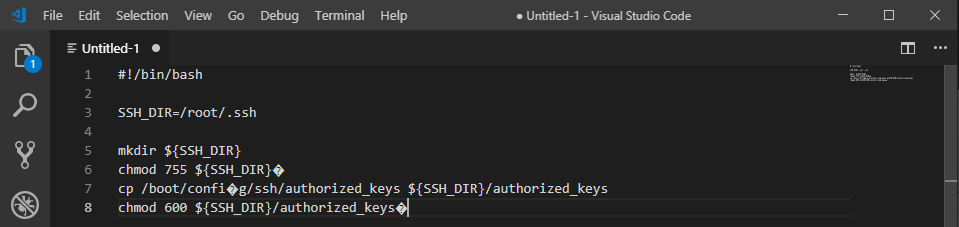
There's a bug on forums that introduces invisible characters to posts, so if you had copied text from a post into a script on your unraid machine, the script may not work--I realized recently this was the reason why passwordless SSH was not working for me. Example from georgez's post: You may need to manually type it or use a text editor to catch these errors.
-
I'd like to add my +1 to OP's request of searching within a thread. This feature is very useful when one needs to limit searches to a specific thread with many pages worth of replies. Usually these threads are for specific CA plugins where the plugin author interacts with the community and provides support. Because this forum is formatted to have replies broken up into multiple pages, it makes this type of feature needed when compared to other social media sites that are used for technical support, like reddit or stackoverflow, which displays all replies to a thread within a single page and allowing the user to use the browser's find function as necessary. One of the selling points of unRAID despite the lack of official support is the large community that has surrounded it. The removal of this feature is a blow to community interaction. I'd love to see it return one day, hopefully soon.
-
Subject: deluge thin client I see this docker build exposes the following ports https://github.com/linuxserver/docker-deluge/blob/master/Dockerfile#L58 EXPOSE 8112 58846 58946 58946/udp But which ports do I have to publish via unRAID template to get deluge's thinclient functionality working? http://dev.deluge-torrent.org/wiki/UserGuide/ThinClient Is the default listening port 58846 enough? Thanks!
-
Fantastic!
-
Does the linuxserver.io docker build use par2cmdline? see https://sabnzbd.org/wiki/installation/multicore-par2

