





Michael_P
Members
-
Joined
-
Last visited
Everything posted by Michael_P
-
Depends on how critical the data on the server is. If you don't have the capacity to back up the entire system, then figure out what data you can't afford to lose. I use this script in conjunction with the appdata backup plugin
-
https://docs.unraid.net/unraid-os/manual/changing-the-flash-device/
-
Cant help you there, but I'd suggest a reputable brand from a reputable seller - there's a lot of shadiness in the world of flash drives. From what I remember, a 16/32GB USB 2.0 device is what's usually what's recommended but don't quote me on that
-
try another port, or retry creating the USB
-
No worries I'm not familiar with Frigate so I can't tell you where exactly to go, but in its settings or config file there should be storage folders and working folders, make sure that wherever ffmpeg is set to place its work files (which briefly looking at the docs appears it may be /tmp/cache) is either limited or mapped to a disk folder
-
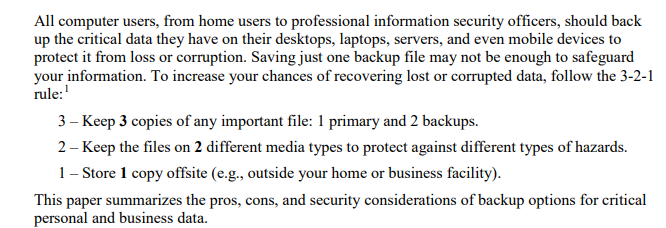
It's well enough known to anyone that 'competently runs NAS and network', but you know that. Here's the citation for those that don't (straight from CISA): https://www.cisa.gov/sites/default/files/publications/data_backup_options.pdf
-
Make sure it's not configured to transcode to a directory that isn't mapped to a drive
-
Here's the container that was running the process, see if any part of the string matches either of the container IDs (advanced view on the docker tab) - Frigate is the most likely as there were quite a few processes running at the time (via coral/cuda-EvtHandlr), and on the 10th it was Frigate capture that invoked the reaper (each time ffmpeg ran away with the RAM) Most likely Frigate: 42895499d47e566044b88aaad34d27527654e862a99663365824e302465beb4d Whatever you're using for GPU offload: 130189b80344b2fc2eb03b176497c5eba0aa27c18268a83afec3ba62771debc9
-
unRaid or RAID(1,5,10,whatever) does absolutely nothing to protect data. RAID is for maintaining uptime - period. It doesn't take a catastrophe to cause data loss, a simple press of the delete key is sufficient. That's why an actual, tested, backup strategy is critical for critical data. 3 copies, 2 on different media, and 1 offsite is the standard.
-
Check your immich config, looks like maybe it's the issue
-
Nothing reported in the logs, I'm not sure what FCP checks for but it may be flagging this line Mar 6 15:52:31 PrecisionRig emhttpd: cmd: /usr/local/emhttp/plugins/user.scripts/showLog.php Out of Memory Check
-
It looks like the Frigate container running an ffmpeg process - the VM's processes wouldn't be separately visible (they'd all be contained in the VM) Mar 4 04:03:19 Andromeda kernel: [ 6380] 0 6380 293668 24347 483328 0 0 frigate.logger Mar 4 04:03:19 Andromeda kernel: [ 6430] 0 6430 395035 33985 782336 0 0 frigate.recordi Mar 4 04:03:19 Andromeda kernel: [ 6449] 0 6449 3564 1318 61440 0 0 python3 Mar 4 04:03:19 Andromeda kernel: [ 6451] 0 6451 398660 28977 581632 0 0 frigate.detecto Mar 4 04:03:19 Andromeda kernel: [ 6455] 0 6455 496288 27344 638976 0 0 frigate.output Mar 4 04:03:19 Andromeda kernel: [ 6459] 0 6459 31705 2264 159744 0 0 ffmpeg Mar 4 04:03:19 Andromeda kernel: [ 6495] 0 6495 31705 1764 163840 0 0 ffmpeg Mar 4 04:03:19 Andromeda kernel: [ 6510] 0 6510 31705 1763 163840 0 0 ffmpeg Mar 4 04:03:19 Andromeda kernel: [ 6541] 0 6541 31705 1763 167936 0 0 ffmpeg Mar 4 04:03:19 Andromeda kernel: [ 6561] 0 6561 31705 1752 155648 0 0 ffmpeg Mar 4 04:03:19 Andromeda kernel: [ 7173] 0 7173 537950 39200 753664 0 0 frigate.process Mar 4 04:03:19 Andromeda kernel: [ 7174] 0 7174 537886 39269 753664 0 0 frigate.process Mar 4 04:03:19 Andromeda kernel: [ 7178] 0 7178 540778 42136 774144 0 0 frigate.process Mar 4 04:03:19 Andromeda kernel: [ 7179] 0 7179 542982 44344 794624 0 0 frigate.process Mar 4 04:03:19 Andromeda kernel: [ 7180] 0 7180 437282 33519 602112 0 0 frigate.capture Mar 4 04:03:19 Andromeda kernel: [ 7181] 0 7181 432781 33462 622592 0 0 frigate.capture Mar 4 04:03:19 Andromeda kernel: [ 7182] 0 7182 433060 35446 638976 0 0 frigate.capture Mar 4 04:03:19 Andromeda kernel: [ 7183] 0 7183 443746 35576 638976 0 0 frigate.capture Mar 4 04:03:19 Andromeda kernel: [ 7226] 0 7226 123878 11583 421888 0 0 ffmpeg Mar 4 04:03:19 Andromeda kernel: [ 7272] 0 7272 33524 3110 192512 0 0 ffmpeg Mar 4 04:03:19 Andromeda kernel: [ 7312] 0 7312 33272 4360 184320 0 0 ffmpeg Mar 4 04:03:19 Andromeda kernel: [ 7321] 0 7321 32862 3458 196608 0 0 ffmpeg Mar 4 04:03:19 Andromeda kernel: oom-kill:constraint=CONSTRAINT_NONE,nodemask=(null),cpuset=/,mems_allowed=0,global_oom,task_memcg=/docker/9c13b2c56bcbd99b2cd6b66f1f8009072a6cef3c76db3819560af169514f1c2b,task=ffmpeg,pid=25112,uid=0 Mar 4 04:03:19 Andromeda kernel: Out of memory: Killed process 25112 (ffmpeg) total-vm:35154720kB, anon-rss:34703828kB, file-rss:0kB, shmem-rss:0kB, UID:0 pgtables:68236kB oom_score_adj:0 Dunno, just a guess based on all the errors in the log Mar 4 04:21:02 Andromeda kernel: IPv6: ADDRCONF(NETDEV_CHANGE): veth622dd44: link becomes ready Mar 4 04:21:02 Andromeda kernel: br-fb0d039ca56f: port 28(veth622dd44) entered blocking state Mar 4 04:21:02 Andromeda kernel: br-fb0d039ca56f: port 28(veth622dd44) entered forwarding state Mar 4 04:21:04 Andromeda kernel: br-fb0d039ca56f: port 28(veth622dd44) entered disabled state Mar 4 04:21:04 Andromeda kernel: veth70b83b4: renamed from eth0 Mar 4 04:21:04 Andromeda kernel: br-fb0d039ca56f: port 28(veth622dd44) entered disabled state Mar 4 04:21:04 Andromeda kernel: device veth622dd44 left promiscuous mode Mar 4 04:21:04 Andromeda kernel: br-fb0d039ca56f: port 28(veth622dd44) entered disabled state Mar 4 04:22:04 Andromeda kernel: br-fb0d039ca56f: port 28(veth1e7adde) entered blocking state Mar 4 04:22:04 Andromeda kernel: br-fb0d039ca56f: port 28(veth1e7adde) entered disabled state Mar 4 04:22:04 Andromeda kernel: device veth1e7adde entered promiscuous mode Mar 4 04:22:04 Andromeda kernel: eth0: renamed from vethb1e8c0f
-
Looks like your NVR isn't configured correctly, the ffmpeg process ran the host out of RAM You also have a lot of network errors, check your docker containers to make sure you're not sharing ports or something
-
Do you have any other logs? The only instances in your attached diagnostics were mprime related.
-
mprime is probably your culprit. As soon as it started it killed the system, your VM was just the first thing the reaper saw - then after that it killed the mprime process because it was using 132GB of RAM Feb 28 21:50:13 Server kernel: process '/downloads/prime95/mprime' started with executable stack Feb 28 21:50:32 Server kernel: mprime invoked oom-killer: gfp_mask=0x140dca(GFP_HIGHUSER_MOVABLE|__GFP_COMP|__GFP_ZERO), order=0, oom_score_adj=0 Feb 28 21:50:40 Server kernel: oom-kill:constraint=CONSTRAINT_NONE,nodemask=(null),cpuset=55a7482a9a2d896c5ce337890b0711b65664b2c735e2fb64aabe326efab7bb4e,mems_allowed=0-1,global_oom,task_memcg=/,task=mprime,pid=31853,uid=0 Feb 28 21:50:40 Server kernel: Out of memory: Killed process 31853 (mprime) total-vm:132210072kB, anon-rss:128343568kB, file-rss:0kB, shmem-rss:2352kB, UID:0 pgtables:251728kB oom_score_adj:0 Feb 28 21:50:44 Server kernel: oom_reaper: reaped process 31853 (mprime), now anon-rss:0kB, file-rss:0kB, shmem-rss:0kB
-
Looks like maybe your NVR isn't configured correctly, ffmpeg looks like it was transcoding to RAM and ran the system OOM. Mar 2 01:16:28 Tower kernel: oom-kill:constraint=CONSTRAINT_NONE,nodemask=(null),cpuset=/,mems_allowed=0,global_oom,task_memcg=/docker/d4f9dee74e2b127f4e102ce05fada9f34016069af611ac5c91f41d49f669731c,task=ffmpeg,pid=8558,uid=0 Mar 2 01:16:28 Tower kernel: Out of memory: Killed process 8558 (ffmpeg) total-vm:56654772kB, anon-rss:56268620kB, file-rss:0kB, shmem-rss:0kB, UID:0 pgtables:110316kB oom_score_adj:0 Mar 2 01:16:31 Tower kernel: oom_reaper: reaped process 8558 (ffmpeg), now anon-rss:0kB, file-rss:0kB, shmem-rss:0kB
-
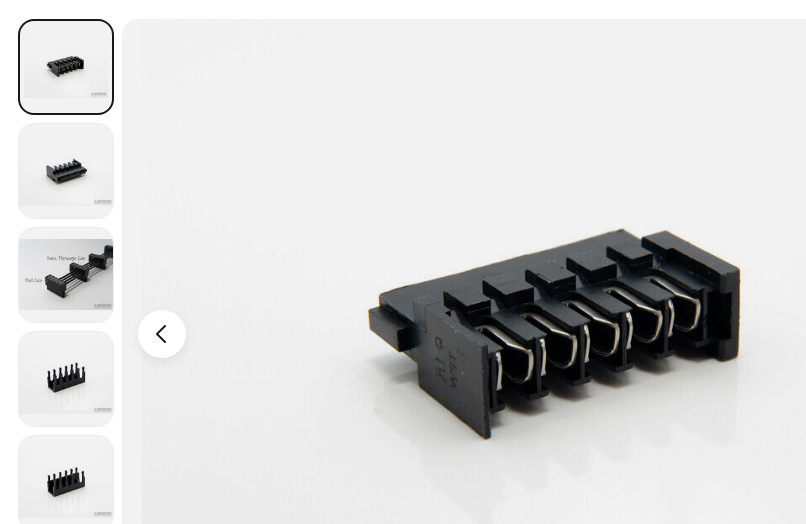
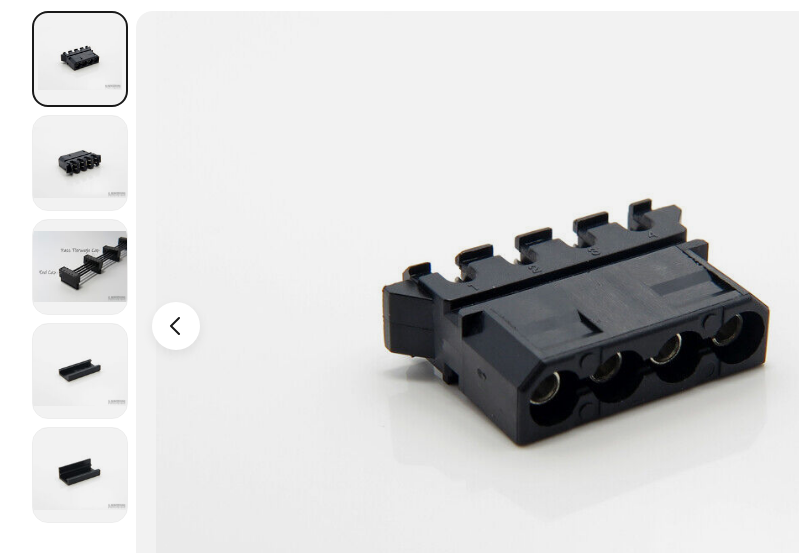
You can add either molex or SATA using punchdown/pass through connectors to the existing lines. Much better than trying to add too many drives to a single connector using a splitter. You can buy them for like a dollar on ebay.
-
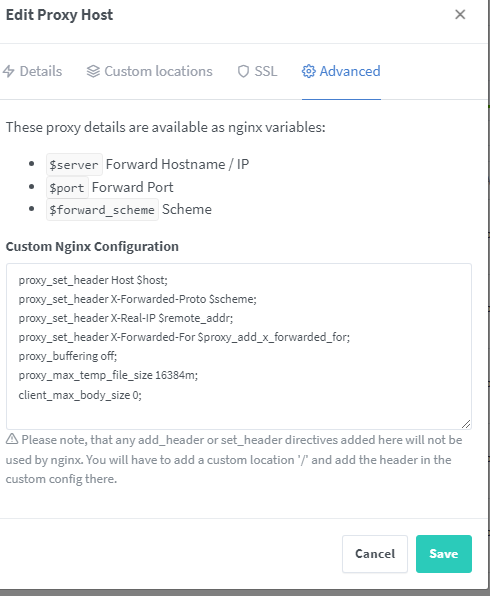
In the advanced tab/custom nginx configuration..
-
Add this to NGINX in the advanced tab/custom nginx configuration to allow for large file transfers in nextcloud proxy_set_header Host $host; proxy_set_header X-Forwarded-Proto $scheme; proxy_set_header X-Real-IP $remote_addr; proxy_set_header X-Forwarded-For $proxy_add_x_forwarded_for; proxy_buffering off; proxy_max_temp_file_size 16384m; client_max_body_size 0;
-
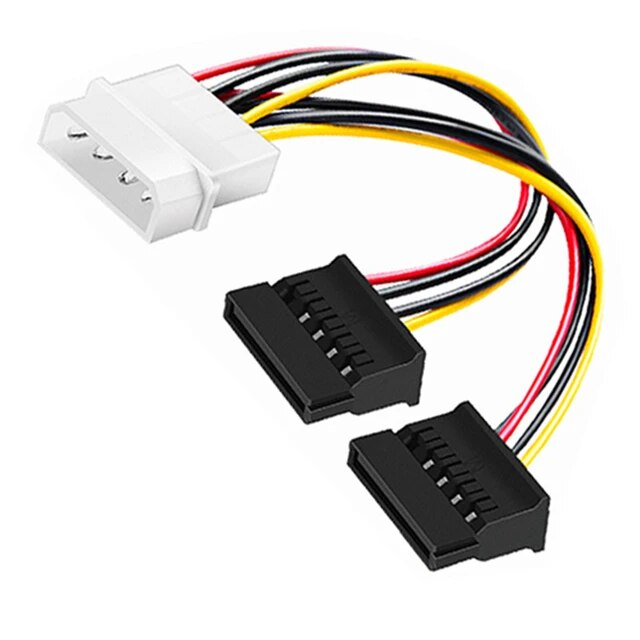
Single rail power is all well and good, but it's more important to limit the number of drives per connector. And don't, use molded style connector splitters. Use only quality individually wired and pinned connectors.
-
Alright, forget that bit then
-
Sorry, I meant they're blacklisted from the kernel by default. To enable them, you need to create the file corresponding to the driver on your USB boot device
-
The kernel Unraid is currently using doesn't support Arc cards You can use it in a VM , manually upgrade the kernel, or wait for Unraid to move to the new kernel
-
1 and 3: to enable the igpu for use with docker containers, you need to blacklist it by creating the i915.conf file 4 and 5- you can add the igpu to any VM, but you can only run 1 VM at a time that uses the igpu. Also, if your VM is using the igpu and a docker container attempts to use it as well, the host will crash
-
Because a lot of us have been bitten by the 'boil the frog' type of transitions.



