





Michael_P
Members
-
Joined
-
Last visited
Everything posted by Michael_P
-
Yep
-
Word on the street is they're making their own NAS solution?
-
Post your diagnostics or it'd just be a WAG
-
They said already 8x 8TB Sabrent Rocket 4 Plus Pretty much best of the best
-
Forward the ports on your router or use a reverse proxy
-
Could try taping the 3.3v pin on the drive, or use a molex to sata power adapter that doesn't carry the 3.3v wire.
-
Make sure anything writing to disk in your docker container is mapped correctly to an actual disk/share or it'll write to the docker image instead
-
Is it a shucked drive?
-
Subsonic / Airsonic is my vote
-
I made my own using this style connector by adding them to unused SATA power cables that came with the PSU. Simple enough, and you can add as many as you need. https://www.moddiy.com/products/DIY-IDE-Molex-Power-EZ-Crimp-Connector-%2d-Black.html
-
Try to keep at max 4 per connector, avoid splitters (use crimped style connections, not molded, if you absolutely must) and definitely add another run to the PSU if at all possible. I've found Toshiba drives to be particularly sensitive to voltage sag when too many drives are on one connector
-
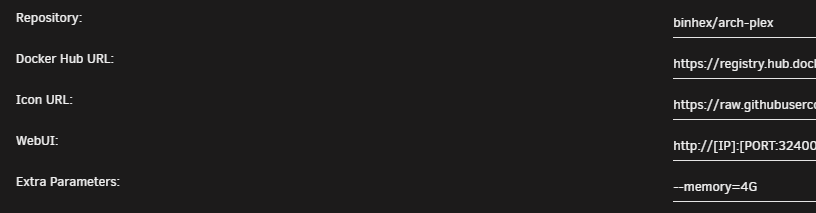
You need to switch from basic to advanced view Which will show you additional fields

-
Extra parameters line (in advanced settings for the docker container) --memory=4G That will limit the docker to 4GB before restarting the container (you can change to whatever you want to limit it to)
-
Plex can suck up a lot of RAM when doing its maintenance (very quickly), so best to limit all dockers to an amount well below your total free
-
-
Jan 8 17:22:46 Plex kernel: pcieport 0000:00:03.1: AER: Multiple Corrected error received: 0000:00:00.0 Jan 8 17:22:46 Plex kernel: pcieport 0000:00:03.1: PCIe Bus Error: severity=Corrected, type=Data Link Layer, (Receiver ID) Jan 8 17:22:46 Plex kernel: pcieport 0000:00:03.1: device [1022:1453] error status/mask=00000040/00006000 Jan 8 17:22:46 Plex kernel: pcieport 0000:00:03.1: [ 6] BadTLP Jan 8 17:22:49 Plex kernel: pcieport 0000:00:03.1: AER: Multiple Corrected error received: 0000:00:00.0 Jan 8 17:22:49 Plex kernel: pcieport 0000:00:03.1: PCIe Bus Error: severity=Corrected, type=Data Link Layer, (Receiver ID) Jan 8 17:22:49 Plex kernel: pcieport 0000:00:03.1: device [1022:1453] error status/mask=00000040/00006000 Jan 8 17:22:49 Plex kernel: pcieport 0000:00:03.1: [ 6] BadTLP Jan 8 17:22:50 Plex kernel: pcieport 0000:00:03.1: AER: Multiple Corrected error received: 0000:00:00.0 Jan 8 17:22:50 Plex kernel: pcieport 0000:00:03.1: PCIe Bus Error: severity=Corrected, type=Data Link Layer, (Receiver ID) Jan 8 17:22:50 Plex kernel: pcieport 0000:00:03.1: device [1022:1453] error status/mask=00000040/00006000 Jan 8 17:22:50 Plex kernel: pcieport 0000:00:03.1: [ 6] BadTLP Guessing it's your 1070 reacting badly to ASPM, just a guess tho
-
Your video card is sh*t'n all over your log, too
-
They'll last a good long time if you don't do a lot of writes/erases
-
Clicking on it and viewing the SMART data should provide you with enough infoYou can use the file integrity plugin, assuming the file is copied correctly in the first place then any changes to the file fail the hash check. If you have backups, I wouldn't stress too much about it - for family photos/videos I keep to the 3-2-1 backup stratagy, 2 on site and 1 off site. If I happen across a corrupted file (which, knock on wood, I haven't yet), just restore from the backup. It's very likely not somthing that would be Unraid's "fault", far more likely that the error was introduced in RAM and/or compunded by the ECC on the drive "correcting" the error. Tho a correcting parity check at any point could also "correct" bits in an unexpected manner.Check your connections, power and SATA cablesOn a new disk, return it for sureCheck out Craft Computing's cloud gaming series on youtube, should give you some ideasDone that too, stupid low profile flash drives



