




Xaero
Members
-
Joined
-
Last visited
Everything posted by Xaero
-
One thing that sticks out to me is consistent errors being logged for a bad mount on a docker in your docker.log: time="2020-02-10T03:00:28.206543882-06:00" level=warning msg="8bef78bb005287a7ed6759abcaba9f88efd104e42233fcce69b723c3b9544115 cleanup: failed to unmount IPC: umount /var/lib/docker/containers/8bef78bb005287a7ed6759abcaba9f88efd104e42233fcce69b723c3b9544115/mounts/shm, flags: 0x2: no such file or directory" We can also see in the ps output (line 327) the alarming memory usage here: nobody 3913 21.7 92.8 64691356 61261236 ? Ssl Feb10 510:05 | \_ /usr/lib/plexmediaserver/Plex Media Server Could you post the docker run command for the Plex container? I thought I had asked for it before, but am mistaken. I don't see anything suggesting "why" plex is using so much ram yet. It also looks like the plex docker log is not included in this diagnostics zip, unfortunately.
-
Sanity check here; I want to use this container to take advantage of DiskWarrior. I don't own any Apple devices, but I have family members that do and they have issues with HFS+ volumes that are corrupt. The directory tree is broken and FSCK can't fix it. DiskWarrior supposedly can. I also don't have terabytes of storage to do this sort of thing locally on my machine. Enter my unraid server. Can I: Access unraid shares within the OSX Guest? Pass thru the USB disks or the physical SATA volumes to this OSX Guest? If I edit the VM and add the things I want and save, it no longer boots. I get to the Clover screen, but am dead stopped there. I'm at work currently so it's difficult to obtain the vm XML or logs since we have a DPI firewall that prevents access over most protocols (ssh, vnc, rdp, even chrome remote desktop is blocked by DPI, and ports for common VPN are just completely disabled.)
-
FoldersToCreate=\{"Folder1/SubFolder","Folder2","Folder3","Folder4"\} eval mkdir -p /mnt/user/public/test/"$FoldersToCreate" This works. You need to store the brackets in the variable, and then also evaluate those brackets. So originally, you aren't storing the brackets, so that whole long chunk is treated as a single string (note my strings are separated by the commas) In my case, I store the brackets. mkdir -p takes its arguments literally which means it includes special characters and doesn't do any bash handling. eval continues until the next carriage return (\r) and evaluates that entire chunk. So it expands the variable "$FoldersToCreate" to "{Folder1/SubFolder",...}" We use double quotes to support spaces in the folder names.
-
Post the docker log. Thanks for reminding me to read. I reinstalled the docker - which got rid of my version=latest. It was falling back on docker version. I set to latest and it updated. It hung after updating (nothing in the log, other than complaining about not being able to delete the init directory. Just the usual services startup followed by "Done." at the end but no webui) restarting the container again fixed that. A bit strange behavior but seems to be up and working again.
-
Correct, /mnt/user is the array itself, including cache. It's all merged together into one big drive there. You could also just map /mnt/moves over and it will grab all movies from both the DVD and Blu-Ray folders. It goes as deep as the filesystem nests.
-
Interestingly, the current update doesn't seem to be happening on my server, as it has in the past. I'm currently running 1.18.4.2171 And plex is reporting an update is available to 1.18.5.2309 I've restarted, force updated, uninstalled and reinstalled. I imagine this issue will probably end up resolving itself eventually.
-
His cables have a sata power connector on the back of them. I was suggesting he do the mod there, rather than on the drive.
-
"The PWDIS function responds to the presence of 2.1-3.6V on pin 3 of the plug and presence of this voltage shuts down a hard drive with this function." The White Label drives had this feature supported. That's why the PIN 3 mod applied to them. It would be worth testing this with one cable and seeing if the issue is resolved (since you can modify your cable, rather than your drive in this case)
-
The primary takeaway: You can connect SATA drives to an SAS port and it is expected to work. You cannot connect SAS drives to a SATA port. Quoted from: https://www.ixsystems.com/community/resources/dont-be-afraid-to-be-sas-sy.48/ EDIT: Disregard, you are using SAS to SAS cables. This shouldn't be the problem. EDIT2: Those cables are reported as not working with drives that have the PWDIS feature. Looking at the data sheet for those hard drives I see Power Disable is listed on the connector pinout, making me believe that PWRDIS is supported by the drive. You may be able to do the Pin 3 mod to a cable to see if you can get a single drive to connect.
-
There isn't enough information in this post to accomplish what you are trying to do. PYTHONIOENCODING=utf8 Is an environment variable for the Python processor. Are you trying to set this environment locally on unraid, or remotely on the server the code will end up running on? Here's an example using a `heredoc` for the python script to be run on the SSH target: ssh -q user@host << ENDSSH PYTHONIOENCODING=utf8 /path/to/script.sh ... ... ENDSSH You can get fancier with stuff like capturing the return code etc, but this basic example shows how you can use data in a heredoc to execute effectively an entire script. Everything between << ENDSSH and ENDSSH is sent as commands over the established ssh connection.
-
You can use: set sftp:connect-program 'ssh -o StrictHostKeyChecking=no' To disable the hostkeychecking, but this isn't super secure. Someone could (in theory) MITM your seedbox and you'd be none the wiser. It's probably not a huge deal, but it could be. The best way would be to use instead: set sftp:connect-program 'ssh -o UserKnownHostsFile=/boot/config/known_hosts' Copy your known_hosts file from /root/.ssh/known_hosts to /boot/config As far as the getting stuck on sync, I'm not sure as I'm not super familiar with mirror and lftp.
-
You'll need to post the log while memory is full or near full. Keep an eye on memory usage and before it reaches the point of being unusable try capturing the diagnostics. Sadly, no process seems to be using an abnormal amount of memory in these logs, and I don't see any kernel OOM entries logged in syslog. MiB Mem : 64420.0 total, 60521.1 free, 1782.2 used, 2116.6 buff/cache MiB Swap: 0.0 total, 0.0 free, 0.0 used. 61152.4 avail Mem It may not be the plex process itself eating all your ram, it could be one of it's child processes.
-
Possibly, I'd still recommend a secondary dedicated management connection. If you make a configuration change that breaks stuff, now you have to wait until you have physical access to the server to fix it. If you have a dedicated remote management option you can get in still. For example in my case I have the remote desktop VM, which is only ok as long as it can access the internet. If I screw that up, I'm done. Except I have IPMI2.0 KVM. That isn't accessible from outside my network so I have to be able to get in still. For that I have a raspberry pi with ssh and key only authentication to get in. I use it to create a tunnel when needed, which isn't often. It's nice being able to reset stuff when I'm out of the state haha.
-
So this happens because of the way the unraid webgui works. Your connection is interrupted when you make the change so you can't send the next request to start the service. My suggestion would be to have a dedicated management profile on a separate tunnel. This way you have a way to change settings on the tunnel that actual does the work. Currently I have a windows 10 VM running chrome remote desktop in curtain mode that I use for making remote changes. But if you wanted to stay low resource consumption and be able to do things from the VPN connection like this, a dedicated management profile on a different tunnel would be needed. I'm not sure if it's possible to work around this on unraid's side.
-
Here's a neat trick I wanted a shared folder unique to each of my Wireguard clients. You know - somewhere people can drop their own files, without it being publicly visible to everyone else with access to the server. Samba is pretty flexible, so I decided to take a whack at it. I created a new share, "Personal" and set export to no in the Shares tab. Then I added this entry to smb-extra.conf in the samba settings tab: [Personal Folder] access based share enum = yes allow hosts = 10.253.0. root preexec = /bin/bash -c '[[ -d "/mnt/user/Personal/%I" ]] || mkdir -m 0777 "/mnt/user/Personal/%I" && chown nobody:users "/mnt/user/Personal/%I"' browseable = yes writable = yes hide unreadable = yes path = /mnt/user/Personal/%I What does this do? Have a line by line breakdown: Name - how it shows up in the file explorer. access based share enum - Only show this if the user has permission to view it. allow hosts = 10.253.0. - allow any client with an IP matching 10.253.0.* to view this share root preexec - execute this code before showing the root of the folder. This can be expanded substantially. Currently it just makes a new folder for the IP of the client if one doesn't already exist. You could enforce quotas here by making a new image if one doesn't exist, and then mounting said image or any other number of crazy things. The rest is pretty standard aside from the path also using the variable "%I" Also note that you can use this same trick outside of wireguard and clients, with pxe boot clients to have individual write shares.
-
Description This is an issue I had crop up when attempting to override default unraid settings or add additional settings to unraid shares. Basically the samba configuration file is loaded top to bottom in order, and includes are handled inline following the same logic. This allows tiered configuration files to override one another for different settings and creates a robust settings architecture. I want to override settings for several user shares to restrict wireguard clients to specific shares via IP, and to eventually create per-user storage volumes for quota based individual usage. Seems easy enough - add a new entry like so: [ShareName] Key = Value in the smb-extra configuration section in the settings menu! The problem is that these settings are loaded before the unraid shares are defined, which means my new entry is defining the share: /etc/samba/smb.conf: # hook for user-defined samba config include = /boot/config/smb-extra.conf # auto-configured shares include = /etc/samba/smb-shares.conf This is a problem because this new share has no path, so samba marks it unavailable and doesn't list it anymore: testparm WARNING: No path in service Backups - making it unavailable! NOTE: Service Backups is flagged unavailable. Simply reversing the order that these two conf files are included resolves this and allows settings to be overridden or added at will. Steps to Reproduce: Add an entry matching the name of any existing Unraid auto-configured share to smb-extra.conf Restart the SMB service or stop/start the array
-
Excellent, it is working as intended now. I do wonder how this wasn't a problem, perhaps I had manually done this prior to it being a supported feature and just never touched it until now haha.
-
I found the mistake: iptables -t nat -A POSTROUTING -s 10.253.0.0/24 -o br0 -j MASQUERADE;iptables -N WIREGUARD_DROP_WG0;iptables -A WIREGUARD -o br0 -j WIREGUARD_DROP_WG0;iptables -A WIREGUARD_DROP_WG0 -s 10.253.0.0/24 -d 192.168.1.254 -j ACCEPT,iptables -A WIREGUARD_DROP_WG0 -s 10.253.0.0/24 -d 192.168.1.74 -j ACCEPT,iptables -A WIREGUARD_DROP_WG0 -s 10.253.0.0/24 -d 192.168.1.93 -j ACCEPT;iptables -A WIREGUARD_DROP_WG0 -s 10.253.0.0/24 -j DROP;iptables -A WIREGUARD_DROP_WG0 -j RETURN The ACCEPT rules for the "Allow" filter are separated by a comma instead of a semicolon.
-
I think iptables is confused: wg-quick up wg0 [#] ip link add wg0 type wireguard [#] wg setconf wg0 /dev/fd/63 [#] ip -4 address add 10.253.0.1 dev wg0 [#] ip link set mtu 1420 up dev wg0 [#] ip -4 route add 10.253.0.6/32 dev wg0 [#] ip -4 route add 10.253.0.5/32 dev wg0 [#] ip -4 route add 10.253.0.4/32 dev wg0 [#] ip -4 route add 10.253.0.3/32 dev wg0 [#] ip -4 route add 10.253.0.2/32 dev wg0 [#] logger -t wireguard 'Tunnel WireGuard-wg0 started' [#] iptables -t nat -A POSTROUTING -s 10.253.0.0/24 -o br0 -j MASQUERADE;iptables -N WIREGUARD_DROP_WG0;iptables -A WIREGUARD -o br0 -j WIREGUARD_DROP_WG0;iptables -A WIREGUARD_DROP_WG0 -s 10.253.0.0/24 -d 192.168.1.254 -j ACCEPT,iptables -A WIREGUARD_DROP_WG0 -s 10.253.0.0/24 -d 192.168.1.74 -j ACCEPT,iptables -A WIREGUARD_DROP_WG0 -s 10.253.0.0/24 -d 192.168.1.93 -j ACCEPT;iptables -A WIREGUARD_DROP_WG0 -s 10.253.0.0/24 -j DROP;iptables -A WIREGUARD_DROP_WG0 -j RETURN iptables v1.8.4 (legacy): Cannot use -A with -A Try `iptables -h' or 'iptables --help' for more information. [#] ip link delete dev wg0 Was iptables updated in 6.8.1? Thats a pretty silly error. for now I'll stop using the allow filter, since I think it's the source of my frustration.
-
I disabled NAT, changed the firewall rules back to deny and deleted all my ips. Hit apply. Afterward checked iptables -L -v -n, the chain was still there. Changed the rule back to allow, added my IPs back in, and hit apply. Tried to start the tunnel, which it did not. Checked iptables again and the chain was still there. This is the latest version of the plugin on 6.8.1 EDIT: I need to read better. Let me retry with a start and stop of the tunnel between haha. EDIT2: Okay, so that didn't work, either. The chain remains with the tunnel stopped, so it vomits when trying to add the chain.
-
wg-quick up wg0 [#] ip link add wg0 type wireguard [#] wg setconf wg0 /dev/fd/63 [#] ip -4 address add 10.253.0.1 dev wg0 [#] ip link set mtu 1420 up dev wg0 [#] ip -4 route add 10.253.0.6/32 dev wg0 [#] ip -4 route add 10.253.0.5/32 dev wg0 [#] ip -4 route add 10.253.0.4/32 dev wg0 [#] ip -4 route add 10.253.0.3/32 dev wg0 [#] ip -4 route add 10.253.0.2/32 dev wg0 [#] logger -t wireguard 'Tunnel WireGuard-wg0 started' [#] iptables -t nat -A POSTROUTING -s 10.253.0.0/24 -o br0 -j MASQUERADE;iptables -N WIREGUARD_DROP_WG0;iptables -A WIREGUARD -o br0 -j WIREGUARD_DROP_WG0;iptables -A WIREGUARD_DROP_WG0 -s 10.253.0.0/24 -d 192.168.1.254 -j ACCEPT,iptables -A WIREGUARD_DROP_WG0 -s 10.253.0.0/24 -d 192.168.1.74 -j ACCEPT,iptables -A WIREGUARD_DROP_WG0 -s 10.253.0.0/24 -d 192.168.1.93 -j ACCEPT;iptables -A WIREGUARD_DROP_WG0 -s 10.253.0.0/24 -j DROP;iptables -A WIREGUARD_DROP_WG0 -j RETURN iptables: Chain already exists. [#] ip link delete dev wg0 It looks like the iptables chain is somehow already present? Looking at network settings in the Routing Table I don't see it: Listing iptables rules (iptables -L -v -n): iptables -L -v -n Chain INPUT (policy ACCEPT 32857 packets, 4938K bytes) pkts bytes target prot opt in out source destination 58614 11M LIBVIRT_INP all -- * * 0.0.0.0/0 0.0.0.0/0 Chain FORWARD (policy ACCEPT 0 packets, 0 bytes) pkts bytes target prot opt in out source destination 6239K 6624M LIBVIRT_FWX all -- * * 0.0.0.0/0 0.0.0.0/0 6239K 6624M LIBVIRT_FWI all -- * * 0.0.0.0/0 0.0.0.0/0 6239K 6624M LIBVIRT_FWO all -- * * 0.0.0.0/0 0.0.0.0/0 6239K 6624M DOCKER-USER all -- * * 0.0.0.0/0 0.0.0.0/0 6239K 6624M DOCKER-ISOLATION-STAGE-1 all -- * * 0.0.0.0/0 0.0.0.0/0 3432K 1589M ACCEPT all -- * docker0 0.0.0.0/0 0.0.0.0/0 ctstate RELATED,ESTABLISHED 1297 72041 DOCKER all -- * docker0 0.0.0.0/0 0.0.0.0/0 2804K 5034M ACCEPT all -- docker0 !docker0 0.0.0.0/0 0.0.0.0/0 147 10731 ACCEPT all -- docker0 docker0 0.0.0.0/0 0.0.0.0/0 0 0 ACCEPT all -- * br-0bee9d2a6b71 0.0.0.0/0 0.0.0.0/0 ctstate RELATED,ESTABLISHED 0 0 DOCKER all -- * br-0bee9d2a6b71 0.0.0.0/0 0.0.0.0/0 0 0 ACCEPT all -- br-0bee9d2a6b71 !br-0bee9d2a6b71 0.0.0.0/0 0.0.0.0/0 0 0 ACCEPT all -- br-0bee9d2a6b71 br-0bee9d2a6b71 0.0.0.0/0 0.0.0.0/0 0 0 ACCEPT all -- * br-e5c922ad1d14 0.0.0.0/0 0.0.0.0/0 ctstate RELATED,ESTABLISHED 0 0 DOCKER all -- * br-e5c922ad1d14 0.0.0.0/0 0.0.0.0/0 0 0 ACCEPT all -- br-e5c922ad1d14 !br-e5c922ad1d14 0.0.0.0/0 0.0.0.0/0 0 0 ACCEPT all -- br-e5c922ad1d14 br-e5c922ad1d14 0.0.0.0/0 0.0.0.0/0 0 0 ACCEPT all -- * pterodactyl0 0.0.0.0/0 0.0.0.0/0 ctstate RELATED,ESTABLISHED 0 0 DOCKER all -- * pterodactyl0 0.0.0.0/0 0.0.0.0/0 0 0 ACCEPT all -- pterodactyl0 !pterodactyl0 0.0.0.0/0 0.0.0.0/0 0 0 ACCEPT all -- pterodactyl0 pterodactyl0 0.0.0.0/0 0.0.0.0/0 Chain OUTPUT (policy ACCEPT 29406 packets, 6627K bytes) pkts bytes target prot opt in out source destination 52058 15M LIBVIRT_OUT all -- * * 0.0.0.0/0 0.0.0.0/0 Chain DOCKER (4 references) pkts bytes target prot opt in out source destination 0 0 ACCEPT tcp -- !docker0 docker0 0.0.0.0/0 172.17.0.2 tcp dpt:80 0 0 ACCEPT tcp -- !docker0 docker0 0.0.0.0/0 172.17.0.3 tcp dpt:80 0 0 ACCEPT tcp -- !docker0 docker0 0.0.0.0/0 172.17.0.4 tcp dpt:3306 0 0 ACCEPT tcp -- !docker0 docker0 0.0.0.0/0 172.17.0.6 tcp dpt:9443 0 0 ACCEPT tcp -- !docker0 docker0 0.0.0.0/0 172.17.0.6 tcp dpt:22 0 0 ACCEPT tcp -- !docker0 docker0 0.0.0.0/0 172.17.0.6 tcp dpt:9080 0 0 ACCEPT tcp -- !docker0 docker0 0.0.0.0/0 172.17.0.7 tcp dpt:25575 0 0 ACCEPT tcp -- !docker0 docker0 0.0.0.0/0 172.17.0.7 tcp dpt:25574 0 0 ACCEPT tcp -- !docker0 docker0 0.0.0.0/0 172.17.0.7 tcp dpt:25573 0 0 ACCEPT tcp -- !docker0 docker0 0.0.0.0/0 172.17.0.7 tcp dpt:25572 0 0 ACCEPT tcp -- !docker0 docker0 0.0.0.0/0 172.17.0.7 tcp dpt:25571 0 0 ACCEPT tcp -- !docker0 docker0 0.0.0.0/0 172.17.0.7 tcp dpt:25570 0 0 ACCEPT tcp -- !docker0 docker0 0.0.0.0/0 172.17.0.7 tcp dpt:25569 0 0 ACCEPT tcp -- !docker0 docker0 0.0.0.0/0 172.17.0.7 tcp dpt:25568 0 0 ACCEPT tcp -- !docker0 docker0 0.0.0.0/0 172.17.0.7 tcp dpt:25567 0 0 ACCEPT tcp -- !docker0 docker0 0.0.0.0/0 172.17.0.7 tcp dpt:25566 0 0 ACCEPT tcp -- !docker0 docker0 0.0.0.0/0 172.17.0.7 tcp dpt:25565 0 0 ACCEPT udp -- !docker0 docker0 0.0.0.0/0 172.17.0.7 udp dpt:25565 0 0 ACCEPT tcp -- !docker0 docker0 0.0.0.0/0 172.17.0.7 tcp dpt:8443 0 0 ACCEPT tcp -- !docker0 docker0 0.0.0.0/0 172.17.0.7 tcp dpt:8126 0 0 ACCEPT tcp -- !docker0 docker0 0.0.0.0/0 172.17.0.7 tcp dpt:8125 0 0 ACCEPT tcp -- !docker0 docker0 0.0.0.0/0 172.17.0.7 tcp dpt:8124 0 0 ACCEPT tcp -- !docker0 docker0 0.0.0.0/0 172.17.0.7 tcp dpt:8123 0 0 ACCEPT tcp -- !docker0 docker0 0.0.0.0/0 172.17.0.7 tcp dpt:8122 0 0 ACCEPT tcp -- !docker0 docker0 0.0.0.0/0 172.17.0.7 tcp dpt:8121 0 0 ACCEPT tcp -- !docker0 docker0 0.0.0.0/0 172.17.0.7 tcp dpt:8120 1141 60854 ACCEPT tcp -- !docker0 docker0 0.0.0.0/0 172.17.0.8 tcp dpt:51413 0 0 ACCEPT tcp -- !docker0 docker0 0.0.0.0/0 172.17.0.8 tcp dpt:6881 8 416 ACCEPT tcp -- !docker0 docker0 0.0.0.0/0 172.17.0.8 tcp dpt:80 0 0 ACCEPT tcp -- !docker0 docker0 0.0.0.0/0 172.17.0.9 tcp dpt:8181 0 0 ACCEPT tcp -- !docker0 docker0 0.0.0.0/0 172.17.0.9 tcp dpt:8080 1 40 ACCEPT tcp -- !docker0 docker0 0.0.0.0/0 172.17.0.9 tcp dpt:4443 Chain DOCKER-ISOLATION-STAGE-1 (1 references) pkts bytes target prot opt in out source destination 2804K 5034M DOCKER-ISOLATION-STAGE-2 all -- docker0 !docker0 0.0.0.0/0 0.0.0.0/0 0 0 DOCKER-ISOLATION-STAGE-2 all -- br-0bee9d2a6b71 !br-0bee9d2a6b71 0.0.0.0/0 0.0.0.0/0 0 0 DOCKER-ISOLATION-STAGE-2 all -- br-e5c922ad1d14 !br-e5c922ad1d14 0.0.0.0/0 0.0.0.0/0 0 0 DOCKER-ISOLATION-STAGE-2 all -- pterodactyl0 !pterodactyl0 0.0.0.0/0 0.0.0.0/0 6239K 6624M RETURN all -- * * 0.0.0.0/0 0.0.0.0/0 Chain DOCKER-ISOLATION-STAGE-2 (4 references) pkts bytes target prot opt in out source destination 0 0 DROP all -- * docker0 0.0.0.0/0 0.0.0.0/0 0 0 DROP all -- * br-0bee9d2a6b71 0.0.0.0/0 0.0.0.0/0 0 0 DROP all -- * br-e5c922ad1d14 0.0.0.0/0 0.0.0.0/0 0 0 DROP all -- * pterodactyl0 0.0.0.0/0 0.0.0.0/0 2804K 5034M RETURN all -- * * 0.0.0.0/0 0.0.0.0/0 Chain DOCKER-USER (1 references) pkts bytes target prot opt in out source destination 6239K 6624M RETURN all -- * * 0.0.0.0/0 0.0.0.0/0 Chain LIBVIRT_FWI (1 references) pkts bytes target prot opt in out source destination Chain LIBVIRT_FWO (1 references) pkts bytes target prot opt in out source destination Chain LIBVIRT_FWX (1 references) pkts bytes target prot opt in out source destination Chain LIBVIRT_INP (1 references) pkts bytes target prot opt in out source destination Chain LIBVIRT_OUT (1 references) pkts bytes target prot opt in out source destination Chain WIREGUARD_DROP_WG0 (0 references) pkts bytes target prot opt in out source destination Should I just delete the chain WIREGUARD_DROP_WG0?
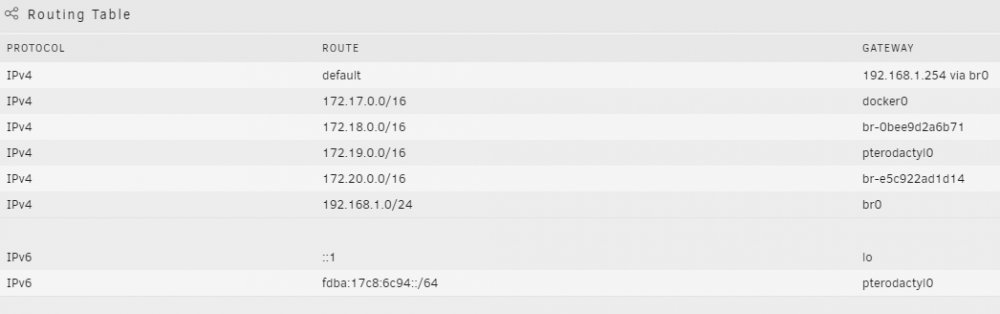
-
For the 3rd time now I can no longer start wireguard. I deleted a peer. Hit apply, and now it will not start. There's no log output for wireguard anywhere, so it's impossible to troubleshoot. I know this is by design. The only thing in syslog is "Tunnel WireGuard-wg0 started" refreshing the page reveals that it is not running. Before I delete ALL of my peers again and start over is there anyting I should be looking at? I don't like having to resend a new config every time this happens. But that's usually what I end up having to do.
-
https://gitlab.freedesktop.org/bolt/bolt It's part of the `bolt` package. Not sure if there are any slackbuilds of it currently.
-
I've finally solved my issue with the rutorrent process being deadlocked in IOWAIT. If this is your problem you will see all of the below symptoms: rutorrent will load, but you will get an error 500, 504, or 502 on getplugins.php and the queue will not load when the queue does load you will rarely get updates and "the request to rtorrent timed out" will be your most common response. torrents will get stuck in checking status torrents that are downloading/seeding will get abysmal performance. all of the above will be intermittent and will usually occur after adding new, large torrents, or several smaller torrents Checking "iotop" when the above is occuring will have the rtorrent process listed at the top, with 99.99% IOWAIT and very low read/write speed. I had previously attempted many things to fix this problem: changing nginx scgi buffer size. increasing rtorrent memory allocation changing php-fpm workers and memory allocations changing php-fpm and nginx timeout to allow rtorrent more time to respond to requests. The final nail in the coffin was switching IO Schedulers. I swapped from mq-deadline to BFQ and the problem has entirely gone away. Not entirely sure why internally this was the fix - but immediately upon switching to BFQ the problem is completely gone and I can actually watch checking progress on a 200gb torrent while data is moving on the other torrents in the queue.
-
+1 I'd also like to see the ability to start specific docker containers. If the data lives entirely on cache would be the condition to allow this. I.E. anything mapped to /mnt/user* would immediately disable this capability. I think RegEx could probably handle checking VM XML and Docker config for any reference to a non cache directory.

