





rutherford
Members
-
Joined
-
Last visited
Everything posted by rutherford
-
@newmember I had that same problem with the screen. A few bits of info had not gotten fixed in the XML. It's in this post: These lines <os> <type arch='x86_64' machine='pc-q35-3.1'>hvm</type> <loader readonly='yes' type='pflash'>/usr/share/qemu/ovmf-x64/OVMF_CODE-pure-efi.fd</loader> <nvram>/etc/libvirt/qemu/nvram/64fb8168-c7cf-4563-8466-30409f6c1da9_VARS-pure-efi.fd</nvram> </os> should have been these lines: <os> <type arch='x86_64' machine='pc-q35-3.1'>hvm</type> <loader readonly='yes' type='pflash'>/mnt/user/domains/MacinaboxCatalina/ovmf/OVMF_CODE.fd</loader> <nvram>/mnt/user/domains/MacinaboxCatalina/ovmf/OVMF_VARS.fd</nvram> </os>
-
Take a look at the first post of this thread. In the picture following "Now install the Docker via Apps. Here's the setup:" You can see the settings for one of the entries. To get that entry option to pop-up, hit the "+ Add another Path, Port, Variable, Label or Device" button. Then make the entries match the examples given in the first post.
-
@steve1977 I bet you still need to pay. This thread is about using our existing unRaid servers for Roon.
-
@mikelathat is awesome! Would you post a few screen shots of your settings for posterity?
-
You've got plenty of good will around here @Squid: no worries.
-
@jowi2000 the other post above, @mikeladid put path mappings. I bet the port is just another variable in there that you specify. Also, @Squidposted up there they (I assume the community of active super users, (thank you very much for your freely given hard work and advice!)) don't want to help all users with all dockersq that don't already have a pre-configured docker template. Which is exactly what we're trying to figure out here! Of someone gets around to a working configuration before I do, great. But one of these days, I'll get to it. And I'll post detailed instructions, screen shots, the whole kitten caboodle as an EDIT on the original post. Until then, I've been suffering through Plex flac playback. Which is mediocre, but paid for. Oo what about putting in a request for a docker with the Linux.io docker dudes? If we go through proper channels, and a few users show interest, perhaps one of then would template it up for us. Done. https://discourse.linuxserver.io/t/request-roon-music-server/720
-
Trying to get some settings to save in ruTorrent GUI, the default save directory. Seems to get in there for only a few minutes, then is overwritten minutes later. Where can I stick settings that will persist between restarts and for longer than xx minutes? thanks!
-
Yeah, I dunno, it's not in there! Is it perhaps because I only have one docker repository listed? Under Docker > scroll to bottom "https://github.com/limetech/docker-templates" It's been a while since I've even added a docker, I might be in the wrong tab or something. But I did a little digging and didn't see it. thanks!
-
Current Roon Server support thread is now here: ================================ ==== DEPRECIATED ============== ================================ please refer to above linked thread for support moving forward. Info below may be helpful for legacy or specific setups. ================ To find the roon docker ================ APPS tab on the top Search for "roonserver", it'll pop right up ================ Install setup Roon docker ================ Now install the Docker via Apps. All defaults should be fine. The pre-filled in fields are pretty self explanatory. I left depreciated (lingo for old and dated) details below. As of Roon 2.0, they've added remote listening, yay! It's called Roon ARC, and requires a few extra steps. Edit the default Docker Template to Add Port/Path/Variable Config Type: Port (drop down) Name: Roon ARC Host Port: 55000 Default Value 55000 Connection Type: TCP (drop down) Description: Roon ARC The finished docker template should look something like this: You will also have to forward ports on your router to get it to fully work with ARC. Check out this post over there: https://help.roonlabs.com/portal/en/kb/articles/arc-port-forwarding#Still_having_problems and also portforward.com for steps specific to your router. Once you get that done, and it's hunky-dory, Roon > Settings > ARC should look like this: I didn't specify a port. I installed the Desktop version of Roon on my Windows 10 machine: https://roonlabs.com/downloads.html, just the Roon for Windows, not the Roon Server. When you run the software, it will detect a Roon Core on your server; use that. http://i.imgur.com/8sMWG0il.png I had to put in a credit card ("Don't worry! Your card won't be charged the $199 until 14 days is up!" riiiight), and sign up for the free 14 day account. I pointed the software to my audio collection, and it's plugging away. ================ DEPRECIATED ================ ================ Get it working on yer phone ================ Install the bitchin' Wireguard VPN, howto blog. You may have to wrestle with some ports, and some duckdns action, but it ain't that bad: and is outside the scope of THIS thread. Perform the first run of the app at home which will do initial discovery. Once your phone identified the Roon server the first time, you should be able good to go for remote vpn access. This same process worked for my laptop. (I wonder about a work computer.... if there's a way to force discovery on a computer that has never been at home... ? If anyone knows, let me know and I'll update this thread! dk 2/2021) Network type: Host Console Shell Command: Shell Privileged: On Add these Paths: Config type: Path Name: Container Path: /app Container Path: /app Host Path: /mnt/user/appdata Access Mode: Read/Write Description: Config type: Path Name: Container Path: /data Container Path: /data Host Path: /mnt/user/appdata Access Mode: Read/Write Description: Config type: Path Name: Container Path: /music Container Path: /music Host Path: /mnt/user/audio/music (***for me, this is my location of music***) Access Mode: Read/Write Description: Config type: Path Name: Container Path: /backup Container Path: /backup Host Path: /mnt/user/backup/roon/ Access Mode: Read/Write Description: thanks to @mikela for these settings Old VPN info: The most promising post I've found so far https://community.roonlabs.com/t/vpn-step-by-step/49564/55 hello folks, I wanted to make a post before I start diving into the technicalities of getting this done. From what I've seen on a few other threads, people have started a VM just to run the Roon server. I'm not opposed to doing that, but if there was a straight up docker, wouldn't that be better or less overhead or easier to configure? Anyone else have any luck with running a Roon server out of an existing unRaid box? I already have a Plex server that's solid and will serve up direct stream FLAC files, but the interface and experience leaves a lot to be desired. (we'l see about $500 worth of desire...) https://roonlabs.com/downloads.html This Roon docker does not come up via the unRaid Applications search, updated 3/2019 https://hub.docker.com/r/steefdebruijn/docker-roonserver/ thread from 2016 https://community.roonlabs.com/t/roon-running-in-docker-on-unraid-6-x/10456/13 another docker last updated 2016 https://hub.docker.com/r/ronch/roon-server/
-
@sizo try what @Stupifier mentioned above. "Update: Figured out how to access UnRAID GUI. Did NOT figure out how to be assigned a local address on my primary WiFi subnet though. In Admin Page ----> VPN Settings go to Routing section and add a line for the subnet you want your clients to have access to (for example, I added 192.168.1.0/24 which is my primary WiFi subnet and where I can access my UnRAID GUI locally)"
-
@aptalca thank you very much! Almost got it working - I would like to mention that the README.md (github link) wasn't specific enough for me to follow. I'm sorry! I'm not the sharpest tool in the shed for sure. I need more concise instructions for unRaid. The Spaceinvader video is great, but it's got old info now. But thank you thank you again for all your work here - and answering the same questions again and again. I'm definitely guilty of that! I donated $5 to you guys. 1. use bridge networking 2. don't set interface variable (like Spaceinvaderone video) 3. make sure correct ports are forwarded and mapped 4. add the cap-add statement looks like the cap_add statement is already in the command root@localhost:# /usr/local/emhttp/plugins/dynamix.docker.manager/scripts/docker run -d --name='openvpn-as' --net='bridge' --log-opt max-size='20m' --log-opt max-file='1' --privileged=true -e TZ="America/Los_Angeles" -e HOST_OS="Unraid" -e 'PGID'='100' -e 'PUID'='99' -p '943:943/tcp' -p '9443:9443/tcp' -p '1194:1194/udp' -v '/mnt/user/appdata/openvpn-as':'/config':'rw' --cap-add=NET_ADMIN 'linuxserver/openvpn-as'
-
@aptalca you are exactly right, I'm guilty of RTFM no doubt. I did try and read it, but it was beyond me. [SOLVED] I got the regular docker template, and made some changes/additions. Repository: "linuxserver/openvpn-as:2.6.1-ls11" Network type: Host Privileged: ON and had to add a couple VARIABLES, I think: INTERFACE, and one of the PGID or PUID variables too. Once I muddled through those bits, it came back up. It did take a minute or two. It was tripping over something initially (something about finding an old configuration, and I should run command DELETE), but I didn't do anything, and it came up. I don't see any errors in the logs any longer. Weird that I had to make additions and changes to the template. Last time, it was only a couple changes that @SpaceInvaderOne made in his video. But it's a little old now, 12/2017.
-
I'm finally getting around to fixing openvpn-as, and it looks like I'm a few weeks behind all the threads. My openvpn-as stopped connecting, can't get to web-ui either. I deleted the docker, image, and appdata. The new settings don't match what Spacedinvader's video has, there's no INTERFACE section. A bunch of the defaults that come up are not the same. When I just do the best I can in there, and hit Apply, still no web-gui. I see that some folks posted docker pull linuxserver/openvpn-as:2.6.1-ls11 But I can't get this command to work in either the Main ">_", or in the docker Console >_ docker pull does return a message, so there is a "docker" command in the Main console, but it gets confused when I put the rest of the "linuxserver/openvpn-as:2.6.1-ls11" on the line, also with "double quotes". I tried installing the docker, then updating the Repository in the Docker template to "linuxserver/openvpn-as:2.6.1-ls11" but I still don't get any of the correct fields. Would someone spell out the steps for rolling this back correctly to make it work for the interim? Including turning off auto-update to keep it from breaking automatically during the next update? whuffie in advance.
-
It out put the correct info: IP, the mysite.duckdns.org, and the alias nextcloud.mysite.com, it's the nextcloud config.
-
@ijuarezah yeah, DDNS, like dynamic dns right? I use Duck DNS my host is Zuver for both DNS and web hosting. @j0nnymoe something tells me there's more to it. Like here chbmb adds a few lines to /config/www/nextcloud/config/config.php, and the 'trusted_domains' array. Adding those lines don't do the trick, and also break it locally. As soon as I revert back to a saved config.php, it works locally again, but I still can't get to my sub-domain, nextcloud.myserver.com:444
-
Thanks @j0nnymoe I was hoping it was going to be that easy, but it's not responding. I opened port 444, forwarded it on the router to the server. I can get to nextcloud locally, 192.168.11.53:444 I get a time-out unreachable for both my subdomain, and my direct IP (from whatismyip) the port is open, I checked port 444 at https://www.canyouseeme.org/
-
Got nextcloud up and running, and I'd like to make it visible outside of my network without using Letsencrypt. It was my understanding I could use SSL, have it not be valid, and still get the benefit of the encryption - with a nag screen. Where are the settings to allow Nextcloud to function with a subdomain, nextcloud.myserver.com:5678 ? thanks!
-
Wondering if it's possible to set this up without being able to forward external ports to different internal ports, as Spaceinvader One suggests port 80 > 180, 443 > 1443. My crap-tastic router doesn't support it! So, will I be able to get my Nextcloud visible outside my LAN? thanks!
-
Doesn't look like this is current any longer, 6.6.7..?
-
hilarious problem I just had. Put pihole with this docker, followed SpaceinvaderOne's video, terrific. I had my unRaid Network setup to get it's IP from the DHCP server, which was reserved in the DHCP server on the router to the MAC address. When I the DHCP over to pihole docker, as the server was coming up, it couldn't figure out it's IP. SOLUTION I used my phone to scan IPs and found 169.254.186.233. I manually set my computer to 169.254.186.232, and was able to get to unRaid's webGUI and change my Network settings to static (after disabling Docker and VM Manager <enabled> in Settings. It was a crazy hassle! I could get to pihole on 192.168.11.3, but my server itself was on a lost IP.
-
@bluntcascade @MasterMark ***SOLVED*** Was having the same issue, trying to get Mojave, following step by step video, unRaid server has an AMD RYZEN 3 1200 4-Core YD1200BBAEBOX processor with SVM turned on in BIOS. There was no "install macOS" big picture button above the Clover buttons. I believe I found the issue: I didn't let the Disk Creator step entirely finish (there was no blue progress bar, and I quit out before I got the "Creation Completed. Click <OK> to continue" pop-up, so my install media was bunk. Once I redid that install media in Install Disc Creator, waited for the completion dialog window to pop-up, bing, all working. I verified with High Sierra install, and am going to just go with that one. This also reminds me, I had a bit of a stumbling block at the download Mojave from the app store steps. For some reason, when I did that, I only got a 22.5MB file, who's icon and name was the exact same thing. I ended up using the "macOS Mojave Patcher.dmg" to download the full 6GB "Install macOS Mojave" file. Also short PSA: great everyone is posting css details, but how about using pastebin, or hastebin, to keep the goods more succinct on these long threads? 😉
-
Is it possible to make the boot/install media on a Windows machine, for people who don't have easy access to a computer already running Mac?
-
@CyberMew I'm pretty sure one of them is for the https and the other is for regular http access. You should be able to uncheck one of them, and free up the port.
-
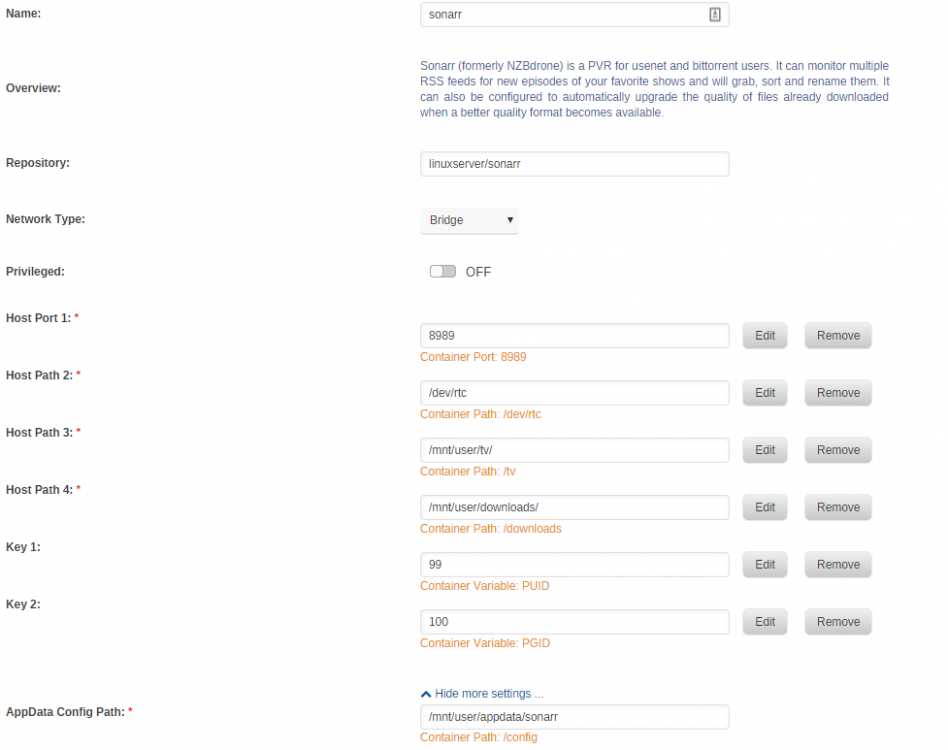
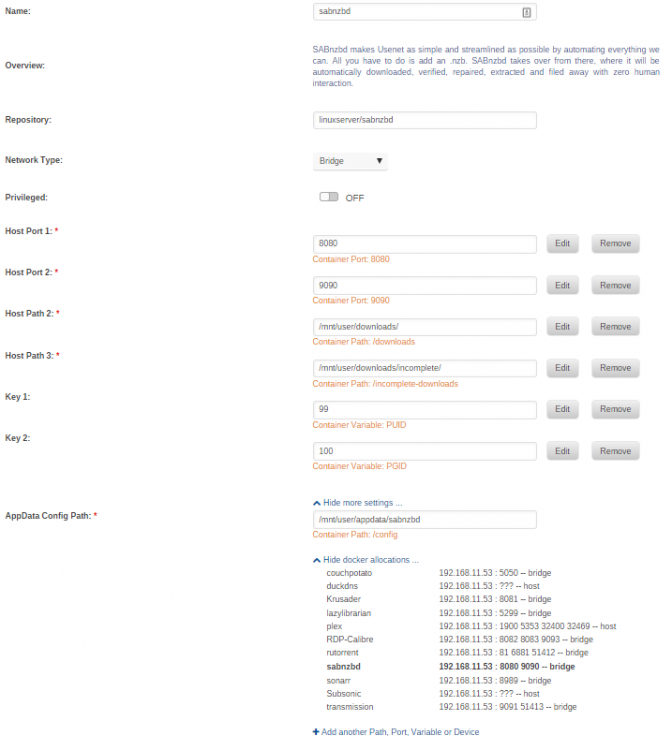
(deleted from Unraid > General and moved here) I see that Sonarr (docker linux|server.io 2.0.0.5163) sends a download to Sabnzbd (docker linux|server.io 2.3.3 [1f04343]) successfully. But the download just sits there, and no mkv is extracted from the rar files. sabnzbd reports Repair [630d80d5bde8430a9bc59eb7932c8288] Quick Check OK Unpack [630d80d5bde8430a9bc59eb7932c8288] Unpacked 0 files/folders in 0 seconds [630d80d5bde8430a9bc59eb7932c8288] Unpacked 0 files/folders in 0 seconds While Sonarr just thinks the episode is downloading 100%, and sitting there. As soon as I manually unrar e "blah blah.rar.part001.rar" the mkv comes out, and Sonarr immediately files it away. I know Sabnzbd is sitting in a container, and doesn't have access to the normal /user/bin/unrar. I do have some odd settings in there to keep Sabnzbd from thrashing the server if it's working on a dozen or more episodes at once. Settings > Switches > Post processing > Nice Parameters -n10 IONice Parameters -c2 -n4 Extra PAR2 Parameters -t0 I don't recall where I got those things. I'll try pulling them out and seeing if that makes a difference. Anything jump out at anyone? Any other specific logs to include? attached. Not sure where the "docker run command" was, so I'll include a couple of screen shots of the config screen for both dockers. rubble-diagnostics-20180512-2139.zip sabnzbd 20180513.zip
-
@lux_en_veritasI have the same question, although I already have a library. I noticed that I download books directly from lazy librarian interface, so maybe I/we don't need the calibre server...? I'll monkey around with it more, and see what I come up with.




