





letrain
Members
-
Joined
-
Last visited
Everything posted by letrain
-
great plugin! intuitive and easy to setup. per pool is a nice way to go! wish it had hours for file age instead of days, but pools is a nice way to set these up!
-
Sorry if I missed answer in the shuffle. This error fills my logs so much that I have no other info in my logs except this...
-
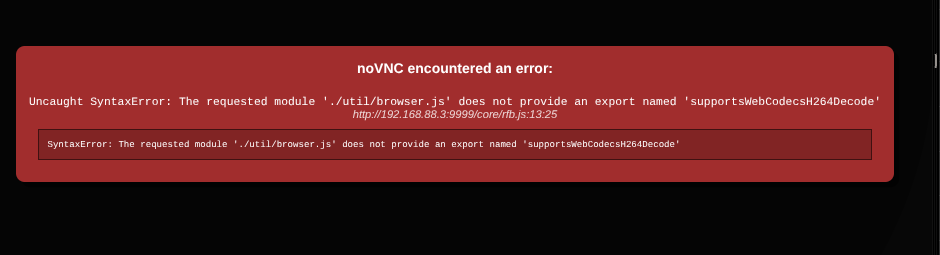
just updated lucky backup and WEBUI (VNC) no longer working. EDIT UPDATE: so I opened the webui in an incognito browser and it works...so its something with the browser cache... hate when that happens.
-
error filling logs.i also noticed that the support link in plugin settings page takes me to the original zhtengw thread. Sep 12 17:03:36 Tower kernel: i915 0000:00:02.0: [drm] *ERROR* GT0: GUC: CT: Sending action 0x550b failed (-EIO) status=0XE0000102 Sep 12 17:03:36 Tower kernel: i915 0000:00:02.0: [drm] GT0: IOV: Failed to save VF1 state (-EPROTO) Sep 12 17:03:36 Tower kernel: i915 0000:00:02.0: [drm] *ERROR* GT0: GUC: CT: Sending action 0x550b failed (-EIO) status=0XE0000102 Sep 12 17:03:36 Tower kernel: i915 0000:00:02.0: [drm] GT0: IOV: Failed to save VF2 state (-EPROTO) Sep 12 17:03:36 Tower kernel: i915 0000:00:02.0: [drm] *ERROR* GT0: GUC: CT: Sending action 0x550b failed (-EIO) status=0XE0000102 Sep 12 17:03:36 Tower kernel: i915 0000:00:02.0: [drm] GT0: IOV: Failed to save VF3 state (-EPROTO) Sep 12 17:03:36 Tower kernel: i915 0000:00:02.0: [drm] *ERROR* GT0: GUC: CT: Sending action 0x550b failed (-EIO) status=0XE0000102 Sep 12 17:03:36 Tower kernel: i915 0000:00:02.0: [drm] GT0: IOV: Failed to save VF4 state (-EPROTO) Sep 12 17:03:36 Tower kernel: i915 0000:00:02.0: [drm] *ERROR* GT0: GUC: CT: Sending action 0x550b failed (-EIO) status=0XE0000102 Sep 12 17:03:36 Tower kernel: i915 0000:00:02.0: [drm] GT0: IOV: Failed to save VF5 state (-EPROTO) Sep 12 17:03:36 Tower kernel: i915 0000:00:02.0: [drm] *ERROR* GT0: GUC: CT: Sending action 0x550b failed (-EIO) status=0XE0000102 Sep 12 17:03:36 Tower kernel: i915 0000:00:02.0: [drm] GT0: IOV: Failed to save VF6 state (-EPROTO) Sep 12 17:03:36 Tower kernel: i915 0000:00:02.0: [drm] *ERROR* GT0: GUC: CT: Sending action 0x550b failed (-EIO) status=0XE0000102 Sep 12 17:03:36 Tower kernel: i915 0000:00:02.0: [drm] GT0: IOV: Failed to save VF7 state (-EPROTO)
-
Thanks. Sometimes release notes are not explicitly clear. It was working fine before so I wasn't sure what had changed.
-
I saw that 7.0.0 has sr-iov Intel support. is this plugin still needed?
-
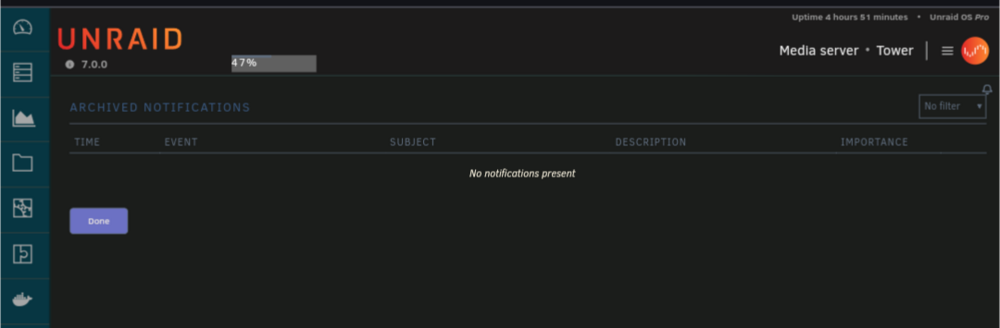
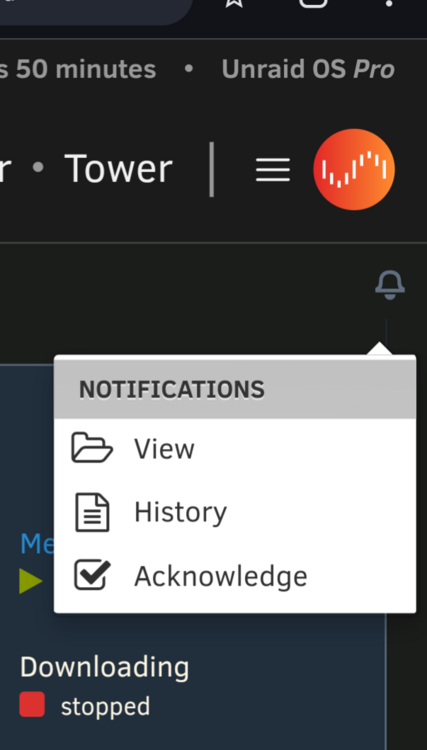
Notifications aren't working for me. tower-diagnostics-20250110-2133.zip
-
getting call traces for the first time ever. and i've got ipvlan with bridging. I never had call traces with macvlan and bridging. I don't know what i'm reading in the logs. NETDEV WATCHDOG: eth0 (r8125): transmit queue 1 timed out tower-diagnostics-20241128-1847.zip
-
I should learn to read.... Thanks 😊
-
I installed this plugin. Is there a log showing when it reconnects the USB? I haven't seen anything in system log. I'm trouble shooting an issue. Thanks.
-
did you still have to use the user script? or does it just work?
-
I keep getting crashes once a week after upgrade. i've replaced the USB stick (it was 5 years old, thought it might be the issue), and it crashed in a day. loss of gui access, no terminal (local) access, no ssh. at least today I was able to ping the server, and a couple Dockers kept working. other than that no idea. I downgraded to 6.12.11. we shall see if that remains stable. when I am at work I get complaints from the house that everything has stopped working and by the time I return its 100% unresponsive and a hard shutdown is required. never had this issue before. thanks Edit 10/20/2024- so after downgrading it has been working fine. The server uses a 13900k (Intel crash issues? I don't overclock, was just cheaper than 13900 non K). So i updated the bios as recommended. Had no issues for a week on 6.12.11 with updated bios. So thought I'd try upgrading again... 1 day on 6.12.13 and sever crashed. Downgrade to 6.12.11 again working fine after 24hrs. changed to urgent as I am unable to upgrade and stay stable. 6.12.11 is working fine. 6.12.13 continues to crash. i'm fine riding this out on 6.12.11 until next release. tower-diagnostics-20241012-1946.zip
-
13th Gen Intel® Core™ i9-13900K working fine over here.
-
migrate to postgresql14. i was tired of mariadb borking everytime i updated next cloud... https://docs.nextcloud.com/server/latest/admin_manual/configuration_database/db_conversion.html also pgadmin4 is great for making databases and users... i've moved all my *arrs to postgres as i was tired of radarr or sonarr malformed databases and not knowning for weeks.
-
this is an old post but best i could find for xen-pciback.hide , what did you end up doing?
-
You are correct however user scripts can be used to delay vm startups, or well... Tell them to start using virsh commands. It's in the forums. I'm mobile so difficult to share a link. But its in here somewhere.
-
Auto start delay options like dockers have. Auto start vms at set interval, or when a network requirement is met is possible via user scripts. I would be fine with being able to put a delay time on the auto start a vm. Several people including me appear to be using pfsense/opnsense, etc. in a vm for networking and DHCP assignment.
-
derp. haha yup. the post i linked didn't say anything about reboots. i got it sorted, edited my go file. thanks! hope it helps others. it is working for me currently.
-
got it to work and persist. what i did. Edited /etc/slim.conf to my liking based on the information above. You do not need to copy an original (backup) as etc folder is dumped from ram on every reboot, and reloaded so any changes made to slim.conf do not persist, you can make one but save it somewhere else besides the etc folder if you feel safe having it around. then i moved a copy of slim.conf to the usb drive in a convenient folder. cp /etc/slim.conf /boot/config/slim.conf this created a copy that would not be changed after reboots. then i edited my go file to replace the one the system loads #blank monitor after 1 minute cp /boot/config/slim.conf /etc/slim.conf # Start the Management Utility /usr/local/sbin/emhttp & make sure it goes before emhttp it works just fine now.
-
unless you found another solution.. currently it doesn't work. so tried reboot and slim is over written.
-
anyway to "kill" slim and go back to cli without rebooting?
-
it doesn't appear to get screen blanking to work for me.
-
how did this work for you? any issues?
-
guessing its your docker i found on dockerhub/github? these variables work for that? tried your guide but it says "/usr/bin/samba.sh: line 160: $2: unbound variable" and the container won't start
-
get anywhere with this? i'm interested as well.


