





JustinChase
Members
-
Joined
-
Last visited
Everything posted by JustinChase
-
My bad, I didn't realize which thread this was in, I thought I was in a different thread. My mistake, sorry.
-
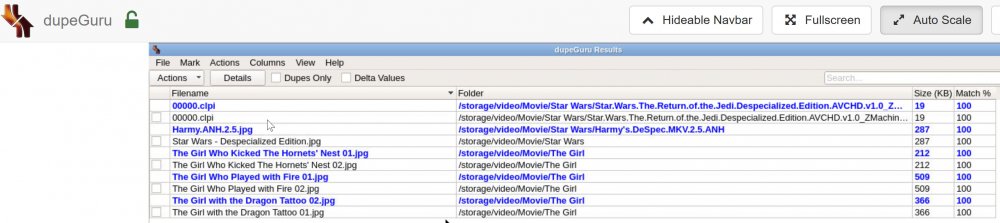
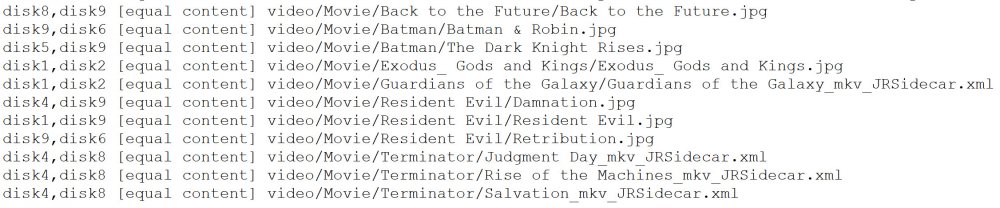
It looks like it only showed duplicate files with different paths/names, and has no reference to the disk they are on. the file integrity plugin shows dups on different disks, like 2nd screenshot. This is what I was looking for. It just seems this tool doesn't update in real-time, as some of the dups it reported have been corrected, but it's still showing them. Oh well.
-
I just added a new disk and wanted to be sure it's protected. I checked and all the other disks showed green checks for Build up-to-date and also for Export up-to-date. All good so far. I built for the new disk, green check. I exported for that disk, blue X. It's brand new to the array, and blank, so fine, nothing to export I though. then I noticed the include duplicate file hashes in Find command checkbox and thought 'what's this?', so I checked it and hit find. I saw that it searched for duplicate files; awesome!! I realized that I had lots of duplicated music files in one folder, so I used Midnight Commander to move them from one disk to the other, and told it to overwrite. I confirmed that the folder was no longer on the old disk I copied from; perfect. I then came back to the tool and re-ran the find, but the list shows these same files as duplicates. I didn't expect this, since i just moved them, and also because it's telling me the build up-to-dates are correct on both disks. I assume that I need to re-build the hashes, so I'm doing that now, but was concerned that it says up-to-date, but seems it maybe isn't. I just wanted to confirm where it's actually checking for duplicates, because MC shows one of the duplicated folders isn't on the disk this tool shows it to be on. Where did I go wrong; or is there some bug here?
-
ha, funnily enough, I'm working on finding duplicates right now. I noticed in the file integrity plugin, there's an option to do so, and I didn't realize how many of my files have gotten duplicated (not sure how). I checked community applications for "duplicate" and found dupeguru docker, and it just finished installing. I'm running it for the first time right now, but so far it doesn't seem to be doing much/anything. I'd prefer if this tool would do it for me instead; less to install/maintain. **it only looks for duplicate files in the shares, not duplicates on multiple disks, so not a solution anyway
-
It does. Thank you again for sharing your work with us. It's been very helpful!
-
I can confirm that this worked for me also. I suspect this port was added to the template after I originally installed the docker. fix common problems checks against the current template, which includes this additional port. Sent from my HTC6545LVW using Tapatalk
-
I was just concerned the ad block issue is/was related to the scanning taking forever. I just went back to the page and the scanning window came back up; even though it had finished the last time i was on the page. I checked credits and see where it comes from. I didn't realize it would scan that part of the page if credits window wasn't opened. Guess I was wrong. Link works Thanks again for everything,
-
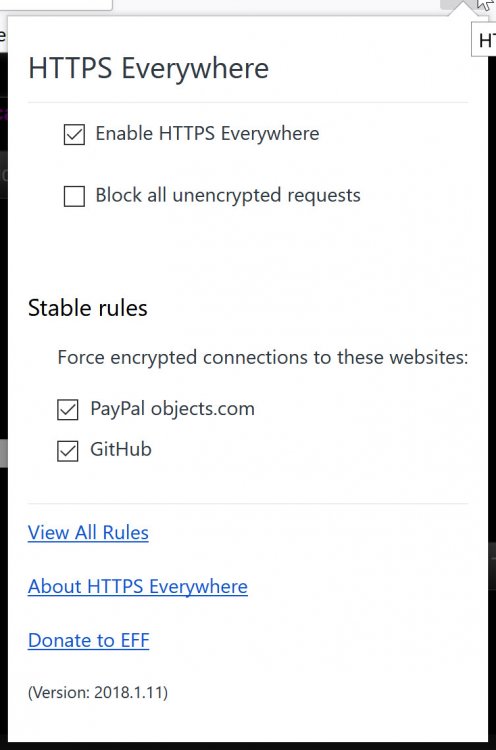
that page gives me a warning about my adblocker, but ghostery shows nothing for that page, uBlock Origin only shows the server IP and paypalobjects (which really concerns me now that I've seen it), but both are green/allowed. I'm not sure what it's detecting as an ad blocker, nor how/where to whitelist. I opened another tab, went to the server, and can navigate fine, and stopped the array. Went back to the fix common problems and it pops up telling me its scanning and blocks navigation on/from that page. i guess I'll have to reboot the server?? No, the scanning window went away, so I restarted the array, and checked again, and it's showing an error 'array not started'. it's as if it's not refreshing. I re-scanned again, and it finished quick enough, and now I have no errors I am concerned about the redirects though, paypal objects and github (screenshot below). github is fine, but why is paypay objects.com being linked from this page?
-
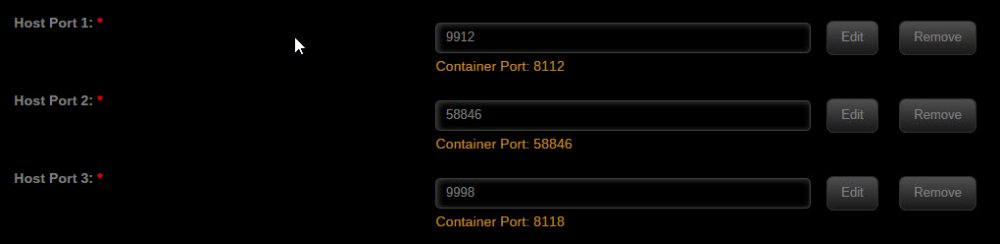
thanks for the quick response. I'm curious where your test determines that I'm 'missing' 58946, since it's not listed in the docker settings (until I just added it)? Do you compare it to the template you install from? If so, I suspect that template has been changed since I originally installed my docker (very likely). If not from your template, how do you determine it's missing? I don't expect you to add special tests for certain dockers, for the reasons you've stated. I would like it if I could get the 4 errors I see to consolidate to just the one error it's actually finding, it would just feel less 'messed up' with the one error, instead of showing 2 under errors, and 2 more (the same?) under all errors. But, as I said I respect your time, and if it's not easy to do, so be it. I started to re-scan before writing this, so maybe adding the 58946 to the docker will take care of all this; but it's not finished scanning yet, so I'm not sure. Anyway, thanks again. **it's still scanning, should it take this long?
-
I inquired about some errors last June, and never followed up on it again, but am now hoping to get them resolved. I posted in the binhex-delugevpn thread, since they refer to that docker, but wanted to ask here also, since this is the application throwing the errors. errors refer to host ports 58846 and 58946 I tried adding host port 58946 to the docker, and re-ran the extended test, but still show same errors. also, they show under the Ignored Errors & Warnings header and also (slightly differently) under the All Ignored Errors & Warnings header. I honestly don't know what the difference is between the two sections, why show some, then all right after? Why not just show all?
-
searching this thread didn't reveal the answer to me, so I want to ask, why is community applications giving me 2 errors, which are almost identical... Docker Application delugevpn, Container Port 58946 not found or changed on installed application Docker Application binhex-delugevpn, Container Port 58946 not found or changed on installed application I'm only running the binhex-delugevpn docker on this machine (I probably had regular delugevpn a LONG time ago, but no longer.) I checked and the template seems to have included port 58846, but not 58946, and I did not remap it. I asked about this in the community applications thread, but was suggested to ask here about it. I don't really care about the error, but I'm confused why it's there (repeatedly) and how to 'fix' it so that I'm not getting warnings about errors that seem irrelevant. I've read this port is necessary if not running with VPN, so I suppose I could delete it, but again, my template only shows 58846, and the error is 58946, so I suspect it's just as easy to get more errors if I remove this port. I could add the 58946 port to the docker, but I'm not sure that would help either. Anyway, just trying to 'fix' all errors that fix common errors is showing me, and this is the last one. Any help is much appreciated.
-
a search didn't reveal anything. Why have the 450MB reserve requirement? I want to completely fill my full disks, so they can't be written to. They are just for storage, so there's no point in me leaving space and having unRAID try to manage such a small amount of free space. Sadly, I didn't realize this issue until I'd filled most disks, so most have only this amount of free space, and many of my files are larger than this, so it will not be easy to fill up these disks without much work of me finding small files and manually moving them. Is there any way around this limit? the program says it's hard limited, so I guess not, but thought I'd ask.
-
Sorry, I meant a warning on-screen, without having to go into logging to see what the problem is/was. Not a big deal if it's not possible, but from a user-friendlyl experience point of view, not having to check logs is much more friendly.
-
Turns out, my pw had a $ in it, and that seems to have been the problem. Once I removed special characters, it all worked again. Perhaps a warning message can be displayed if the special character issue can't be fixed (allowed). Anyway, I'm working again.
-
I had to change my PIA password today, but I cannot get the new password to stick in the deluge (or SAB) setup. I've tried just editing the value in the screen then saving, and I tried hitting the edit button next to the value, updating it there, saving that, then saving the whole settings page, but that doesn't save the new value either. How do I get it to save the new value?
-
Does anyone know a way to eliminate the password prompt from Deluge? even if I make the password blank, it still prompts me for a password. I don't allow remote access, so it's just me, and I'm tired of the prompt now. I use Firefox as my browser, and have tried to have it remember the password, but it doesn't, and I can't manually add any sites to the list, so I seem to be stuck. Also, anyone know a way to have Deluge be the default handler of magnet links, without a plugin? Thanks in advance.
-
This looks like a great guide for me; after I get pfsense actually setup and running on a VM under unRAID. Do you happen to know of a good guide for the initial setup of pfsense on unRAID, to get me started? My regular wifi router (ASUS RT-N66W) runs Tomato (shibby 1.40), but Tomato seems to not be updated very frequently, and the CPU in that router simply cannot handle and VPN duties, as it just slows my (already terrible) satellite internet to a crawl. I'm hoping I can just use the wifi part of the router to allow devices to connect, but put all the 'processing' onto pfsense. thanks.
-
It seems to have been coincidental. I still have unRAID using bandwidth, but now when I stop the Deluge container, the uploading continues. I've posted in the main unRAID help thread. Sorry for the seemingly false alarm.
-
I've got a strange issue with deluge. It's paused, but still using data. I can see from my router that there's a steady stream of data being used by unRAID. nothing should be using data, except for maybe a systemic check for updates, but all my dockers should be paused. While trying to figure out what was using this data, I stopped the Deluge docker , and it stopped. I restarted Deluge and the data stream resumed. not super scientific, but it does seem to be Deluge using the (very small amount of) data. Any way to diagnose this further?
-
I'm getting this after every restart of unRAID in my SABnzbd container... I see mention of other errors, and a pointer to the FAQ for an answer, but i can't find anything, and I just want to be sure everything is fine, and if there's anything I should do to resolve this particular issue?
-
Right, but I never changed it (at least I don't remember doing so), so how do I stop it complaining? I don't care which port it uses, I just want to eliminate any "errors" going forward? I don't see any easy way to change 58846 to 58946, nor do I know any reason to do so, other than to get the errors to stop? ideas?
-
I'm not sure if this is specific to 6.3.5, or if this has been there for some time, but I'm seeing an error related to the delugevpn docker container port... " Docker Application delugevpn, Container Port 58946 not found or changed on installed application" I'm actually seeing this error listed twice, with exactly the same message. I checked the delugevpn settings, and I don't see any issues...
-
Darn math! Yeah, I wasn't converting all the way. My bad. Thanks for pointing out my error, I feel better about my internet now (but worse about myself) thanks again.
-
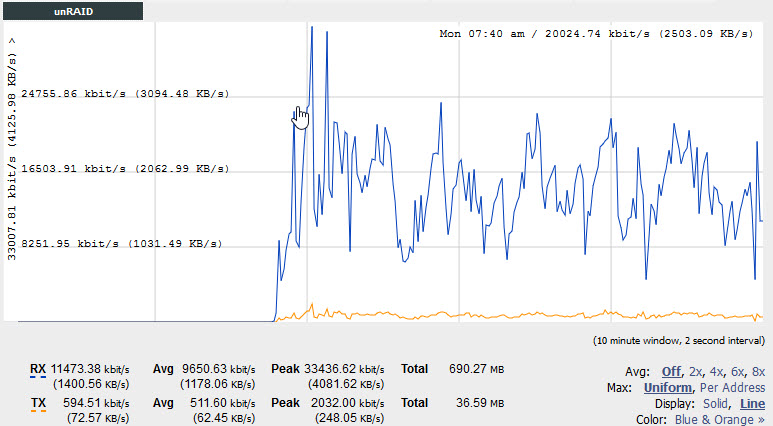
almost every nzb i send to SAB now tells me it's an invalid/empty nzb, but they seem to be working. I'm also getting terrible speeds after updating to the latest docker. I just ran a speed test and got about 30MB download speeds. I started SAB and am getting about 2MB/s download right now. Here are images showing the speed test before turning on SAB, the first about 6 minutes of SAB starting to work, with the average speed I'm downloading at, and the speed test I ran while SAB was still downloading, showing there's still another nearly 30MB/s available while SAB is downloading. Is it just my PIA server choice, or have I got something else going on? I don't really expect SAB to saturate the connection, but I'd like to get better than 10% utilization of my bandwith. ideas?

-
Great, I look forward to trying it. I was going to report that the current version wasn't working for me. I am trying to move everything off of disk 3, and it appears I have plenty of room on all the other disks to clear disk 3, but unbalance is telling me there isn't enough room. It feels like it's doing its math on the one remaining folder on disk 3, which contains 1.5 TB of movies, and no single other disk has this much room, but there is almost 2TB of free space on all the other disks, so it should all fit. I'll update and try again when I get home, but wanted to report the issue anyway, in case it is a bug the hasn't gotten fixed already. Also, thanks for changing the way it works, I think it will be far more intuitive with your changes. Posted from my phone, forgive any spelling errors.


