





Frank1940
Members
-
Joined
-
Last visited
Everything posted by Frank1940
-
Hook up a monitor and keyboard, (having a camera ready) and watch the boot process when it actually fails. Take a photos if it fails before the Unraid login prompt comes up. (When that happens, your server is fully up and running.)
-
From syslog: Jan 25 11:15:59 mtower unassigned.devices: Remote Server '192.168.68.113' is offline and remote share 'P' cannot be mounted. Jan 25 11:15:59 mtower unassigned.devices: Mounting Remote Share '//MTOWER/Doorbell'... Jan 25 11:15:59 mtower unassigned.devices: Mount SMB share '//MTOWER/Doorbell' using SMB default protocol. Jan 25 11:15:59 mtower unassigned.devices: Mount SMB command: /sbin/mount -t 'cifs' -o rw,hard,relatime,noserverino,nounix,iocharset=utf8,file_mode=0777,dir_mode=0777,uid=99,gid=100,,actimeo=10,rsize=1048576,wsize=1048576,closetimeo=30,credentials='/tmp/unassigned.devices/credentials_MTOWER_Doorbell' '//MTOWER/Doorbell' '/mnt/remotes/MTOWER_Doorbell' Jan 25 11:15:59 mtower kernel: CIFS: enabling forceuid mount option implicitly because uid= option is specified Jan 25 11:15:59 mtower kernel: CIFS: enabling forcegid mount option implicitly because gid= option is specified Jan 25 11:15:59 mtower kernel: CIFS: Attempting to mount \\MTOWER\Doorbell Jan 25 11:15:59 mtower unassigned.devices: Successfully mounted '//MTOWER/Doorbell' on '/mnt/remotes/MTOWER_Doorbell'. Jan 25 11:15:59 mtower unassigned.devices: Adding SMB share 'MTOWER_Doorbell'. Jan 25 11:15:59 mtower unassigned.devices: Waiting 5 secs before retry mounting Remote Shares... What is this server at IP address 192.168.68.113? And what is this share MTOWN/doorbell that you are attempting to mount?
-
What is this thing? I can't find it in the Apps plugin for Unraid. Is a Docker Container or something running in a VM?
-
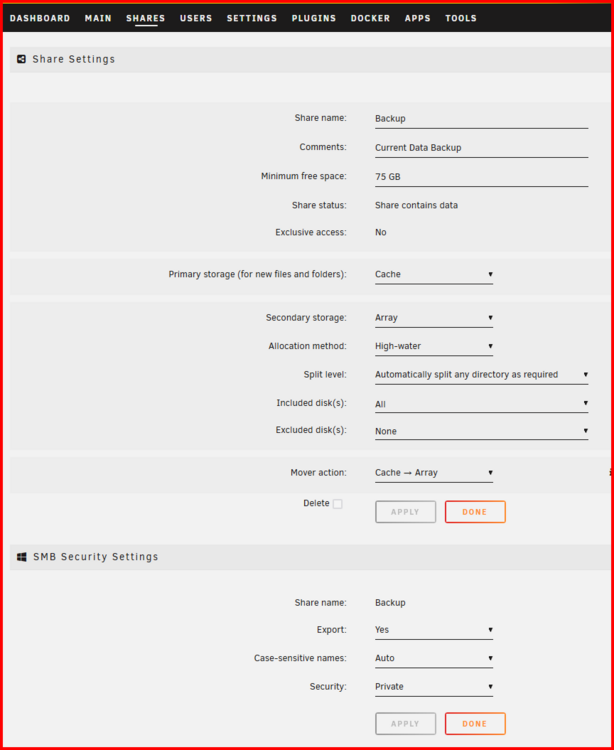
Does this fix it-- even temporarily? If not, give us a screenshot of this portion of the setup tab for the Doorbell share:
-
Please attach the diagnostics file to a new post in this thread. That might give some clues to the Gurus as to what your problem is.
-
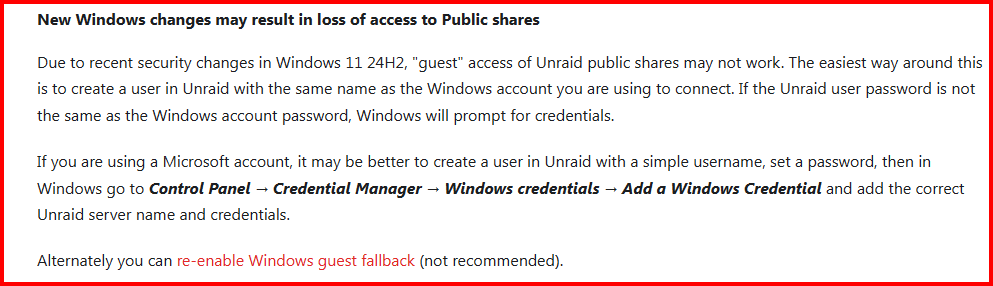
From the release notes of Unraid ver 7.0: Personally, I would recommend the use of the method in the second paragraph as that allows you to change your Windows password independently of your Unraid password and vise verse.
-
This 'problem' computer isn't connected via WIFI and, perhaps,using a 'Guest' WIFI network?
-
Basically, USB Flash Drives are the least reliable storage device currently in use today. Write operations shorten their life the most. Read operations do less damage. Most knowledgeable Unraid users try to limit write-read operations to a minimum as failure of the boot drive is one of the biggest forum issues for which assistance is requested-- Even though there is a boot drive backup utility built into Unraid!
-
Run the tool New Permissions on only the share for which you do not have access.
-
Try googling how to enable ping in windows 11 There are a number of suggestions from that query line. If you don't find something that way, try changing the way you ask google the question... Beyond that suggestion, I am at a complete loss as to how to proceed from here! EDIT: One more thought (and this is a wild one), if you are running anti-virus software other than Windows Defender, check its settings.
-
Open the Unraid server's GUI Terminal and see if you can ping the 'problem' computer.
-
You mentioned have other devices/computers that are working fine. Get the IP addresses of those devices (It may be quick to look on your modem for these) and try to ping them from your server and the 'problem' computer. Also try to ping the 'problem' computer from those 'working' devices.
-
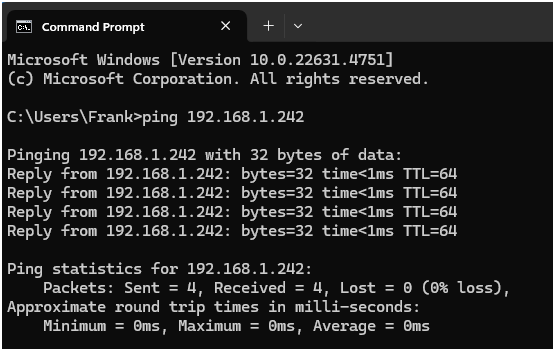
Another thing to try. Open up a Command Prompt on the Windows computer and ping your Unraid server using both the IP address and the server name. You should get something like this:
-
One more thing to check. Open Control Panel then click on Change advance share settings in the left pane. Now make sure that Network discovery is turned on. Windows help for this is something that I have always found a bit confusing. In Windows 11 Pro ver 23H2 it reads like this: This explanation is a bit clearer than in earlier versions but why the setting in the first place? Is it there to allow corporations to prevent the users of the company-owned laptops from being access any server on the road? What happens when that user comes home to his office? How is the user to connect to the corporate network there? Jumping back to Win10 from Win11 may not change settings that are in Windows Registry. Win10 is not that different from Win11 in the base code and I don't think the old Registry is restored when you revert back to Win10. It will probably still contain any updates that Win11 put/made there.

-
One more thing, give us the IP addresses of both the server and that Windows computer that won't connect. (Ask back if you need help finding them.)
-
Open up Windows File Explorer/Manager and type \\{Server_Name} on the address bar. If that does not work, try \\{Server_IP_Address} Post up the screenshot of any failure with the error message. Also provide the Version of Windows 11 you are using-- example; Win11 Pro, ver 23H2.
-
Attach the diagnostics file to your next post in this thread.
-
One thing you can always try in this type of situation, is to do a quick push of the power switch (about one second). That is suppose to start a normal shutdown of any OS. If the system is unresponsive to that action, then push the power switch for five-to-ten seconds. That will force a poweroff condition in much the same manner as pulling the power cord. (But avoids breaking the earth ground to the system which might cause other problems in a certain sets of unusual circumstances!)
-
Today, I was looking for some other info on SMBv1 and came across this post on the Microsoft Community website: https://techcommunity.microsoft.com/blog/filecab/stop-using-smb1/425858 Scroll down to the section entitled "Explorer Network Browsing" and read that information. I don't know if it will help in fixing this problem of not... By the way, Unraid does have a switch under SETTINGS >>> SMB to enable WSD. (I know that some folks in the larger MS networking world have turned off WSD because it seems to contribute to a 'disappearing' printer problem.)
-
You could use the GUI Terminal. From there, you could use the Command line or the Linux Midnight Commander ( mc on the CLI) File Manager. Since you are on version 7.0, I would think that the built-in Dynamix File Explorer would be available.
-
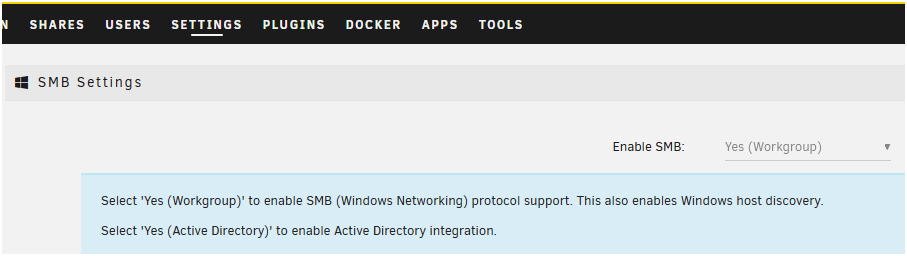
I looked at your Diagnostics for Stella. Specifically at testparm.txt. It appears that you may have it set up for 'Active Directory' rather than 'Workgroup'. Unless, you actually want to use Active Directory, it should be set to Workgroup. See below:
-
You should really be posting this on the Support thread for this Docker. You can find that here:
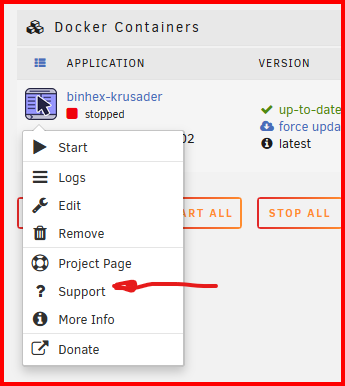
-
Let me ping @bonienl and see if he might have any thoughts on your problem.
-
I don't know if this might help but here is a link to the Samba configuration settings file parameters: https://www.samba.org/samba/docs/current/man-html/smb.conf.5.html You might want to check on the sections about "mangled names (S)". I don't know if it will help or not. What happens if you rename the file from the CLI or mc or the built-in Unraid File Manager? What happens if you create a file using on of these file tools with one of these characters on your array? Do things work right then?
-
Why not start here with these two sections of the manual: https://docs.unraid.net/unraid-os/manual/security/vpn/ and https://docs.unraid.net/unraid-os/manual/security/tailscale/ (Point of disclosure: I do not use Wireguard or Tailscale so I can not provide any technical help. But there are links to threads in the Docs which point to forum threads where you could post up any questions you have after reading the Docs and the information links within them.



