





mgutt
Moderators
-
Joined
-
Last visited
Everything posted by mgutt
-
Which is correct. A domain is nothing else as an easy reminder for an IP address. So if IP:port works, you can use domain:port if the domain has a DNS entry returning the correct IP address. If you don't like to add a port to a domain name you need to change the IP of the domain so it points to a reverse proxy like npm. In NPM itself you need a rule which points to itself. This is how I solved it: And my domain "npm.gutt.it" returns the IP address which points to NPM. Side note: As you are trying to add a DNS entry by using Adguard. Did you verify it is working? So "ping your-npm-domain" on your client should return this IP address. If it is returning the IP address, but failing to reach the target, you maybe have a router which does not support "NAT loopback" or it disallows DNS resolution to local IPs called "DNS rebind protection"?! Additional note: If you use Adguard as your DNS server in your router, you need to add a public DNS IP to unraid or everytime adguard isn't running (for example server reboot), Unraid is not able to reach domains.

-
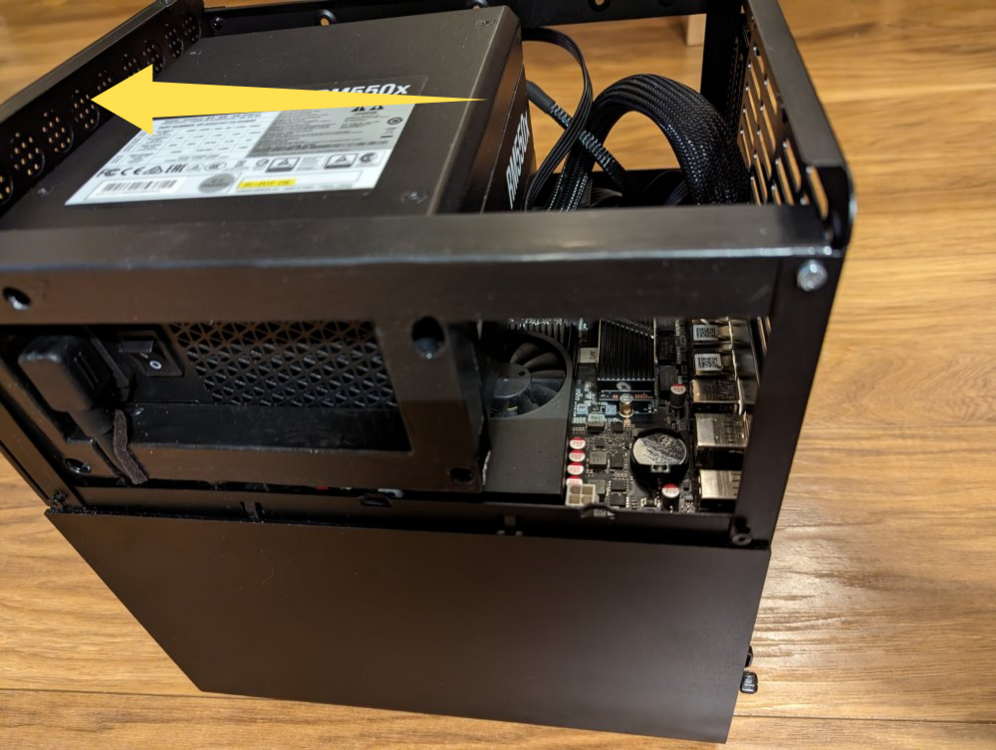
Ich habe gerade das Ergebnis in dem anderen Thread gesehen. Gefällt mir. Hab ich auch gerade überlegt, ob ich das mache 😁 Konnte man nicht insgesamt höher, damit man nicht so nah ans Board kommt? Da links sieht es ja so aus als hätte man noch 1 bis 2 cm Luft nach oben:
-
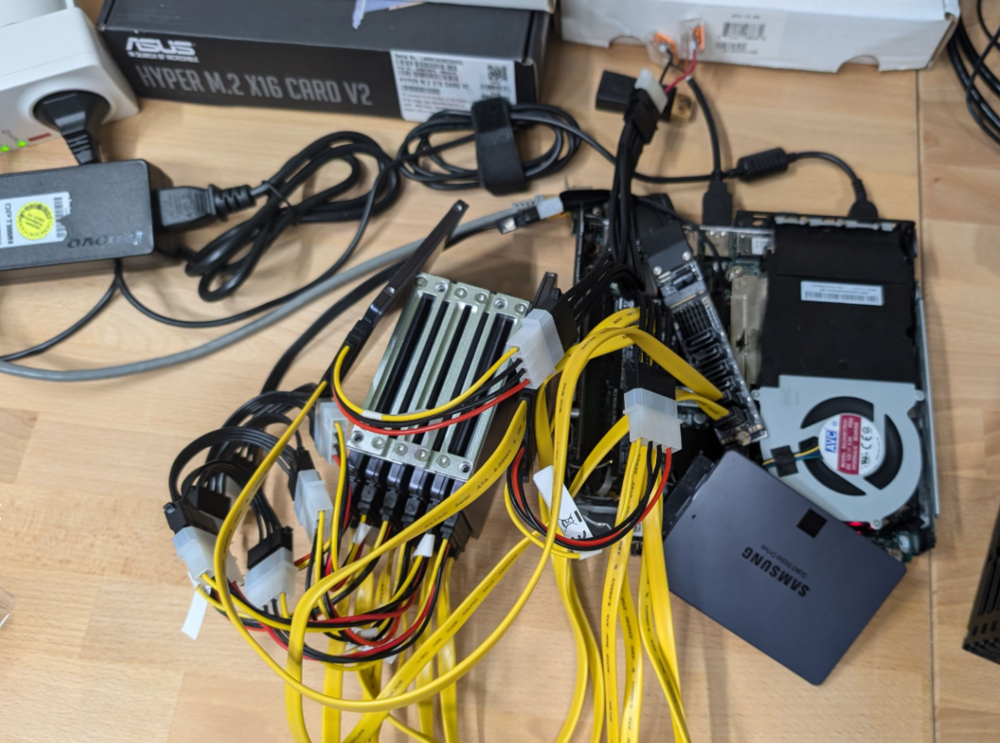
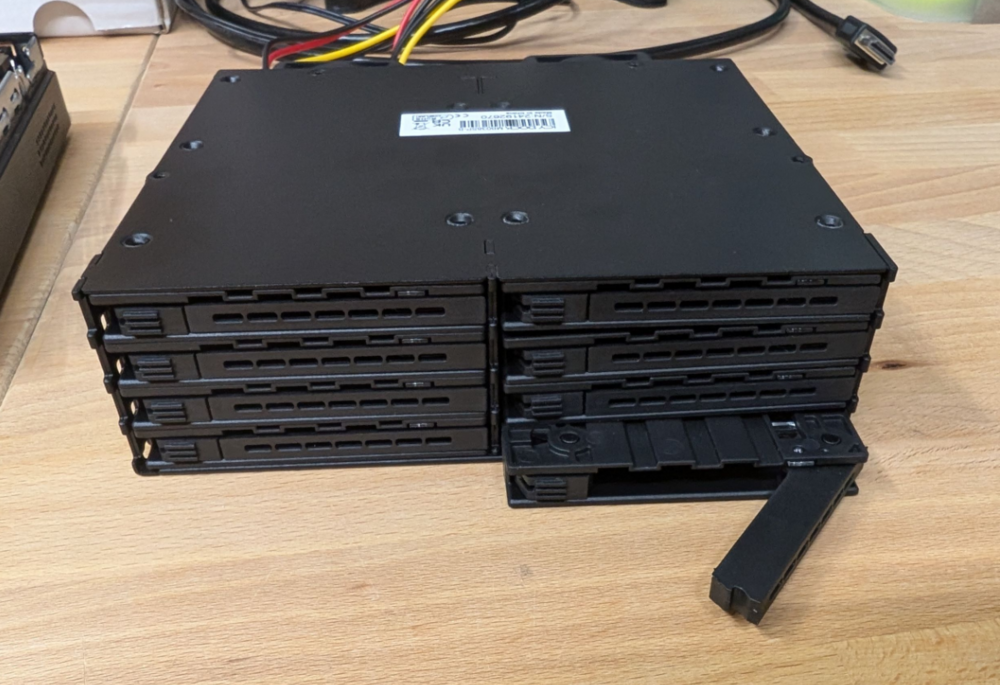
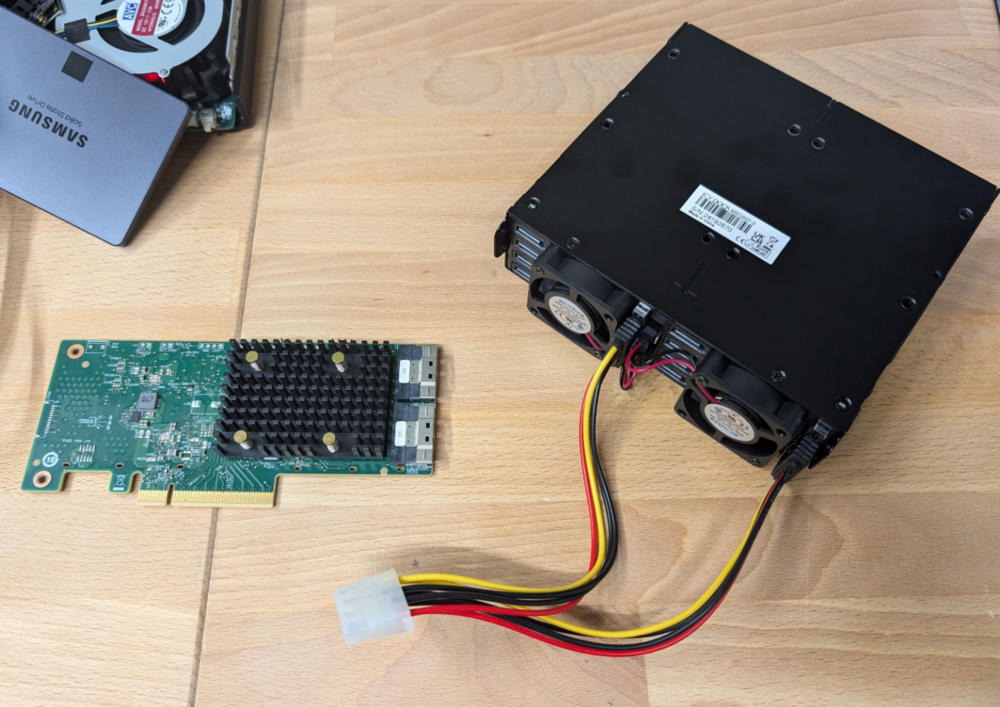
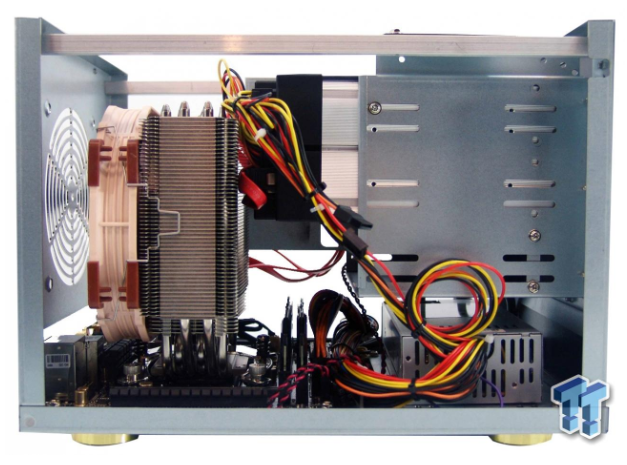
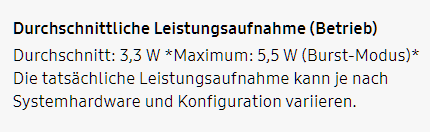
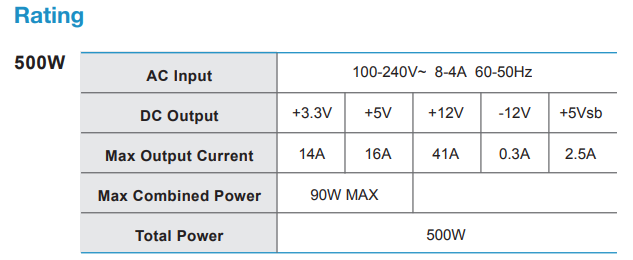
It's time for a new project. This time SSD only. I mean theoretically I already finished it 😅 Joke aside, although I installed my second M.2 ASM1166 card and could connect up to 13 SSDs, I'm fairly sure this Lenovo M920q is already above its 5V amperage limit. 🙈 And as it's already consuming 17W in idle I don't see a reason to stay with this "efficient tiny pc" 😅 The targets- 24 SATA SSDs - ECC RAM - 2.5G Ethernet (could be onboard, wifi slot adapter or USB adapter, but it should allow deep C-states) - compact and nice looking - undercut 17 watts 😅 Where to put all those SSDsFirst I thought using these Trio-Adapters (EZ-Fit MB610SP), to install 3 SSDs in a single 3.5 inch HDD slot, but they are sold out and for 24 SSDs I would need a case with 8 HDD slots. This would work with the big 22 liter Silverstone DS380, but then I have to solve the cabling as the Backplate is at the back of the slots and the SSD connectors would be at the front?! https://www.techspot.com/review/826-silverstone-ds380-nas/page2.html In addition it allows only SFX power supplies (we don't know any low load efficient one). Alternatively we could install additional 3.5 inch cages into a Li Q25B, if you get one as it's is out of production since many years: https://forums.unraid.net/topic/45070-hardware-question-build-skylake-and-lian-li-pc-q25b/#comment-442862 By the way I own the bigger Lian Li Q26B. It has 10x 3.5 inch slots, but it's a way bigger with its 32 liters. By using Icy Dock EZ-Fit Pro MB082SP Dual Adapters I could install up to 22 SSDs. I keep this option open... With much less hassle we could use 5.25 inch cages with 8x 2.5 inch hot swap bays. For example: - Icy Dock ExpressCage MB038SP-B https://de.icydock.com/product_1359.html ~ 125 € - Icy Dock ToughArmor MB998IP-B https://de.icydock.com/product_169.html ~ 250 € (Feature: SFF-8643, so much less cabling neededl - Fantec MR-SA1082 https://www.fantec.de/produkte/serverprodukte/backplane-systeme/backplane-systeme-mr-serie/produkt/details/artikel/2196_fantec_mr_sa1082-1/ ~ 110 € I started through buying the MB038SP-B, I mean... Wow this type of parts are expensive. I thought Chia Mining is dead 🫣 How to connect all those SSDs Aside of the 6 SATA ports of an ASM1166 card (of which we would need three, to connect 24 SSDs), I did in the past some research about power efficient HBA controllers, but they were extremely expensive. In the meantime the prices dropped and a few days ago I was able to by a Broadcom 9500-16i for 300 €. It was sold from a different Unraid user. I'm excited if it reaches any deep C-states. Which ITX mainboard with 8 SATA ports and ECC RAM support As far as I know, there is no power efficient HBA supporting 24 SATA ports (?), so mainboard with 8 sata onboard ports is required (16 from HBA + 8 onboard). Another requirement of mine is support of ECC RAM. Which leaves us with the following: - Gigabyte C246N-WU2, only available as chinese import for 300-400 € - Asrock Industrial IMB-X1231 + M2X4-SATA-4P, presumably more than 500 €, if you find a reseller, and power consumption is unknown - Asrock Rack C246 WSI, sold out, I had it in the past and it needed more than 12 watts, which is worse compared to the Gigabyte But don't beat around the bush: I bought a very expensive Gigabyte C246N-WU2 🙈 This videos fits perfectly to this problem: I will install a Xeon E-2126G (6 cores, no HT, used 120 €) and 64GB ECC RAM. Which ITX Case offers enough space for multiple 5.25" baysSurprisingly only two: - iStarUSA S-35EX, 16 liters, https://www.istarusa.com/en/istarusa/products.php?model=S-35EX - Urack P4003N0000, 12 liters, no shop found, https://www.urack.com.tw/product/mini-itx-nas-chassis/p4003n0000 So I ordered the iStarUSA S-35EX. Here is an installation video: Sadly it does not officially support installing an ATX power supply. But from the images it seems it could fit (in a similar position as with the Lian-Li PC-Q25B, but this case is bigger). Nevertheless I will try to squeeze it in 😅 If it does not fit, at least I could install a huge CPU cooler: https://www.tweaktown.com/reviews/5936/istarusa-s35-mini-itx-nas-tower-chassis-review/index.html How to power all those SSDsThat will be a problem. As the iStarUSA case only supports a Flex ATX power supply I ordered the FSP FlexGURU PRO FSP500-50FDB: https://www.fsplifestyle.com/en/product/Flexguru500W.html Regarding the specs it delivers 16 amps over 5V: https://gzhls.at/blob/ldb/8/3/1/3/9643c7f2aaf12c55234d12d850b1afaa5c25.pdf As of Samsung an 8TB QVO needs 5.5 watts in "Burst Mode", which is Random Write I assume: https://www.samsung.com/de/memory-storage/sata-ssd/ssd-870-qvo-sata-3-2-5-inch-8tb-mz-77q8t0bw/ Which means: 24 SSDs x 5.5 Watt = 132 Watt / 5 Volt = 26.4 Ampere Even if the Corsair RM550x (2021) ATX power supply fits, with 20 amps its to less, too. Although it should be very unusual to create Random Write on all SSDs in paralle inside the Unraid Array. I think I will measure a pack of 8 SSDs when everything is setup. Else I could use a 12V to 5V step down converter as follows: https://www.ebay.de/itm/276038390560 (this one is crap, read some posts later!) Yeah that's the plan by now. As soon the parts arrive I will start assembling. 2.5G networkMaybe I used the Intel I226-T1 2.5G card, but the PCIe slot is already occupied by the HBA card. I have to think about that. Or I will use a bifurcation adapter or M.2 adapter or USB Adapter. 🤷
-
I don't think its "easier" but it would save a little bit time. Especially if you enabled thumbnail creation. But: Is there a guide to move from windows installation to docker? I mean if it is easy to transfer, why not, but if it costs hours I would rebuild everything.
-
Gibt es dazu ein Update?
-
Ich tippe darauf, dass das Teil alleine mehr verbraucht als der ganze Tiny PC, die Performance Schrott sein wird und die Unraid Parität nach kurzer Zeit Fehler auswirft, weil die USB Verbindung kurz mal weg war. Deswegen sind USB Platten auch nicht empfohlen von Unraid.
-
Did you delete it, to only use your loadbalancer.conf? Then I would say you missed to pass the traffic: proxy_pass $forward_scheme://$server:$port; EDIT: sorry, now I have seen your proxy_pass setting. Hmmm strange. EDIT2: AI says you need to put the location block inside a server block like so: server { listen 80; location / {
-
Usually this works for me, but finally I prefer splitting. You can obtain a black frame with avidemux: https://superuser.com/a/1508481 And then use the timestamp (reduced by a millisecond, as MKVToolNix finds the next black frame AFTER the timestamp) with MKVToolNix to split it into two mkv files.
-
This API port is not mentioned by the dev. I randomly found it because I had a conflict with a different container try to use port 3000. That's why I added to the container template so nobody else hits this problem. But finally I don't know why it even exists. A discussion related to this port: https://github.com/caprover/caprover/issues/1194
-
Das ist ja eher abarbeiten einer guten Doku. Vom Prinzip gibt es mehrere Möglichkeiten. Zb könnte man einen Docker Container installieren, in dem ein One Drive Client läuft. Ich vermute aber, dass rclone den geringsten Overhead resultiert. Da man bei One Drive nicht endgültig über die API löschen kann, sondern nur über die Website (so viel ich weiß, sollte aber man aber mal testen), wäre sogar ein permanenter Mount denkbar. Dh das One Drive ist 24/7 in Unraid als Ordner eingebunden und dann nimmt man was auch immer, um die Dateien dorthin zu kopieren. Ich kann da helfen oder man sucht sich einen Guide, der erklärt wie man rclone zum Laufen bringt. Ich bin da offen
-
i put this like u told in the post arguements Hmm looks good. Please.try only: --skip-grant-tables
-
Not sure what you are doing, but it don't seem you are using the steps mentioned in the guide.
-
Ok, hat er nicht getestet, sondern die Werte von den Cybernetics Tests übernommen: https://tilde.zone/@notthebee/111754741589977816 Schade, dass Cybernetics nicht bei 10W testet.
-
Er will die alle bei 20W getestet haben. Kommt mir Spanisch vor. Aber davon abgesehen sind 20W schon viel zu viel. Ein N100 oder auch Kontron Setup beginnt bei 5W. 10W sind gute Low Load Server. Laut seiner Liste ist zb Seasonic Titanium führend. Nach meiner Messung verbraucht das 3W mehr als eine PicoPSU: https://gutt.it/seasonic-titanium-netzteil-bei-niedriglast-keine-option/ Verfügbar und effizient wäre das Bequiet 12M 550W. Das 11 FM ist in Wolfgangs Liste übrigens auch ziemlich weit unten. Finde ich auch komisch. Aber wie gesagt verhalten sich die Netzteile gerade bei Low Load extrem unterschiedlich.
-
Ich denke die Antwort ist: Kostenersparnis. Lenovo kann das selbe Netzteil wie bei den Laptops nehmen. Und die Bauteile auf der Platine dürften weitestgehend auch die selben wie beim Laptop sein. Dass Lenovo auf 20V statt 19 setzt, dürfte zudem an USB-C liegen, wo es keine 19V gibt. Also waren sie schon immer perfekt auf USB-C vorbereitet, haben uns aber mit dem proprietären Stecker getrollt 😅
-
Danke. Ich verzichte auf den China Bomber😅
-
Nur mal so: Ganz leer darf die nicht sein. In der Go File wird die Unraid WebGUI gestartet: /usr/local/sbin/emhttp & Falls du das gelöscht hattest, war das dein Problem
-
Die Liste taugt rein gar nichts. (ich musste sie auch erst googlen). Dort sind nur einfach besonderes effiziente Netzteile laut Zertifikat aufgelistet. Die Zertifikate haben aber keine Aussagekraft zum Low Load Verhalten. Das Corsair RM550x (2021) ist zB nur Gold, aber effizienter bei 10W als jedes Titanium Netzteil.
-
Je nachdem wie sich ZFS verhält, könnte es sein, dass die NVMe nie in den tiefen Schlafzustand verfallen. Hast du es mal ohne probiert? Das sollte man eh, also mit möglichst wenig Datenträgern anfangen und sich dann langsam vorantasten.
-
Wurde das schon in Sachen Low Load getestet? Bei Be Quiet ist ja leider nicht jedes Modell in der Hinsicht gut. Evtl verschenkst du da schon 3 bis 4W.
-
Noch nicht. Der nullt gerade die zwei neuen SSDs. Danach wäre das der nächste Test.
-
@MPC561 Die SSDs brauchen übrigens nur 5V und keine 12V. Ich hatte es mal mit einem normalen ATX Netzteil probiert, aber hatte direkt 4 Watt Overhead. Daher hab ich die Idee dann verworfen. Ein zusätzlicher Spannungswandler macht die Sache eben nicht effizienter. Eine PicoPSU wäre da sicher etwas besser, aber die ist dann auch wieder nicht für eine so hohe 5V Last gedacht, denn die darf eigentlich nur 30W bei 5V liefern (6A). So wie es jetzt ist, ist es auf jeden Fall die kompakteste / effizienteste Lösung. Mal sehen, ob es auch langfristig stabil läuft 😅
-
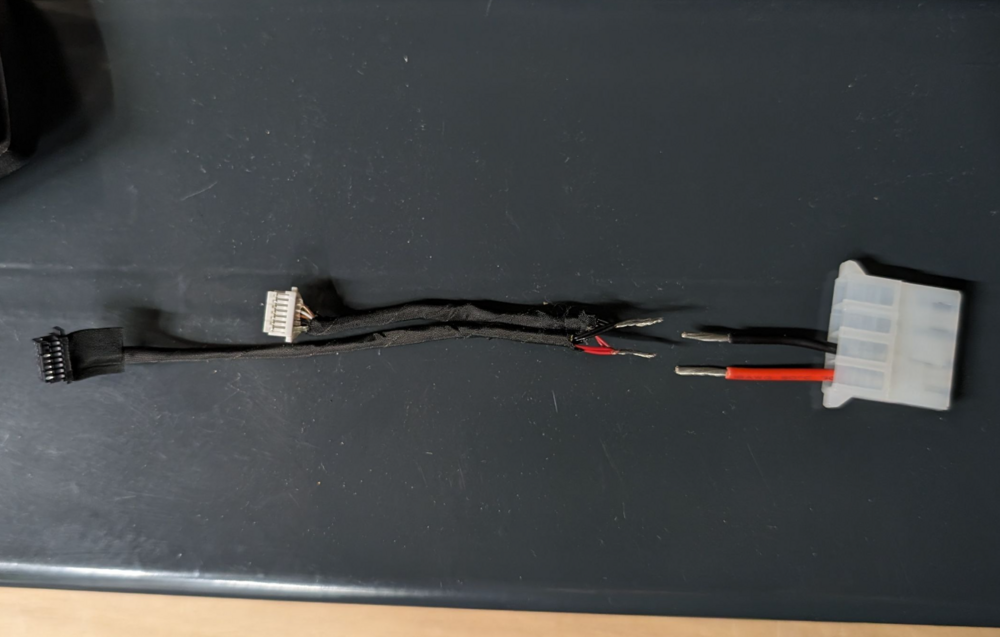
Nachdem ich 100 € in falsche Lenovo Stecker/Adapter investiert habe, habe ich endlich einen gefunden, der in den M920x passt. Damit erfüllen diese beiden Kabel/Stecker die Voraussetzungen, um sich 4x 5V vom Board zu holen: - Lenovo 04X2733 (COM-Stecker) - Lenovo 01YW371 (Floppy-Kabel) Außerdem brauchte ich: - InLine 26622A (Floppy to Molex) - geht aber auch jede andere Molex Buchse mit Kabel dran - Molex 1 auf 6 (gibt es nur in China, sollte man nicht für HDDs verwenden wegen der hohen Gesamtleistung!) Ich habe dann alle Adern bis auf Masse und 5V entfernt und verzwirbelt: Dann gelötet und isoliert: Das ganze verbunden und 6x SATA SSD angeschlossen: Macht dann mit dem Onboard SATA insgesamt 7x SSD, also 48 TB 😁 Für die perfekte Optik fehlt jetzt nur noch der Hot-Swap Deckel. Mal sehen wann ich das umgesetzt bekomme.
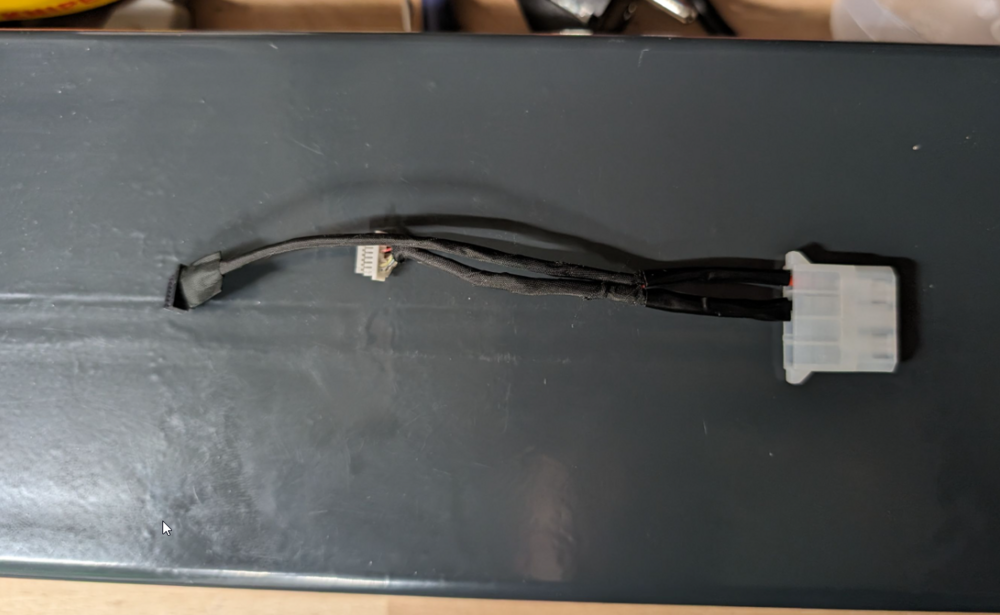
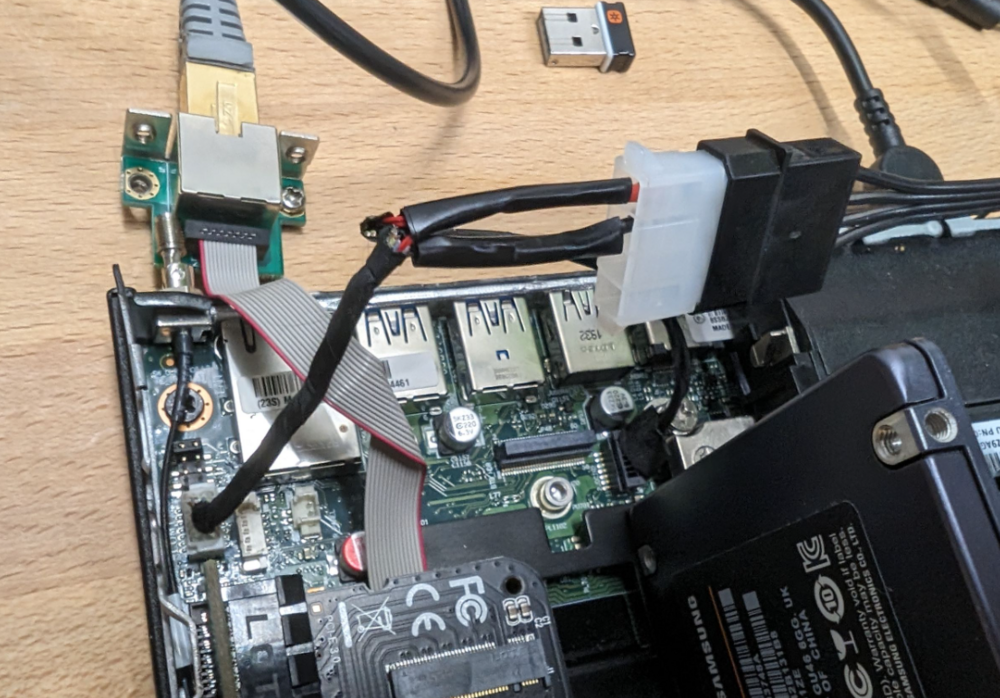
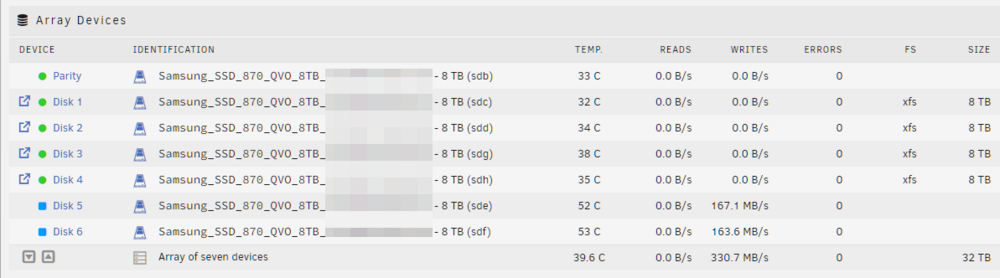
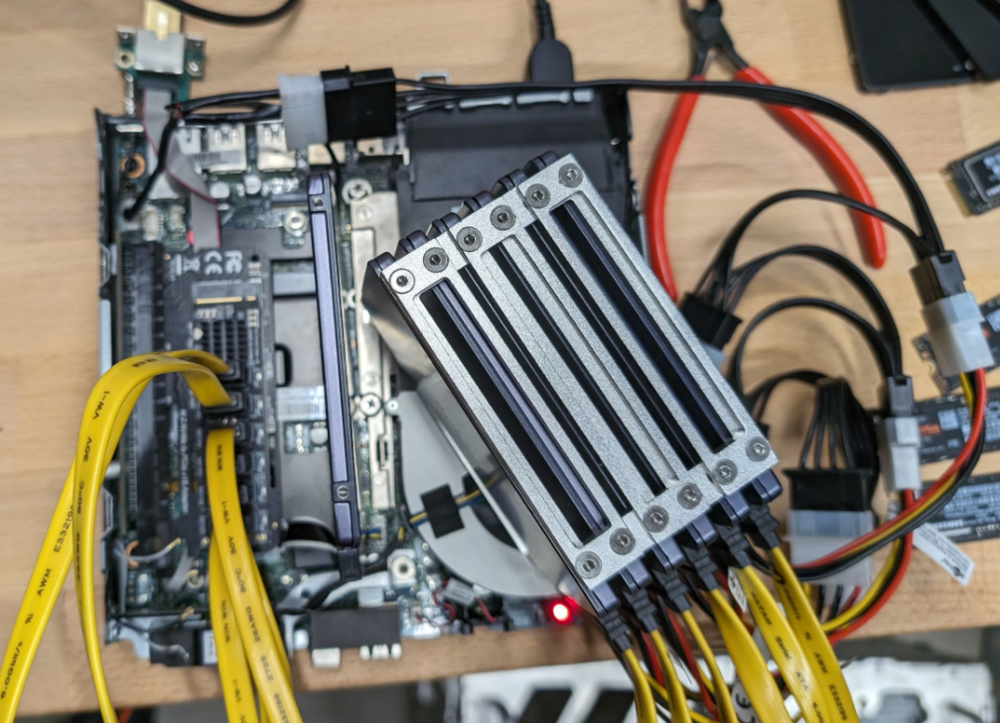
-
I don't really understand what you try to accomplish, but I think this is absolutely correct. File browser listens to port 8666 and supports only http. Note: Each port can only support http OR https, not both. I think you want to file browser through the Internet and you are having a subdomain at duckdns like filebrowser.duckdns.org. Did you already add this domain to NPM and did you set the target to 192.168.178.99 with the port 8666 and the protocol http? Then you should be able to open http://filebrowser.duckdns.org and if you claimed the SSL certificate through this hosts settings, than you should be able to open https://filebrowser.duckdns.org Maybe you think you need to use https between npm and your file browser container?! Then no. This is irrelevant for a secure access as NPM communicates locally (inside unraid) with your file browser container.
-
The router forwarding is wrong. You are forwarding from port 80, which is http, to port 1880 on your unraid server. In your last screenshot of your containers, you showed, that you forward port 80 of your host (unraid) to port 80 of the container (npm). As nothing is listening on port 1880, this explains why the connection can't be established. Two options: - change the router forwarding from 80 to 80 - or change the host port of the container to 1880






