





Trunkton
Members
-
Joined
-
Last visited
Everything posted by Trunkton
-
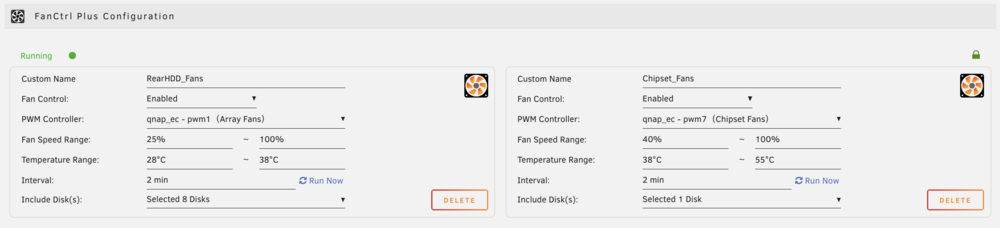
Sharing settings for my TS-873A using the QNAP-EC plugin. Went with aggressive 28°C → 38°C cooling for HDD array fans to prioritize drive longevity, and 38°C → 55°C for M.2/chipset cooling. Just implemented these settings so too early for performance data, but wanted to share the configuration in case it helps others.
-
The pricing change has long been overdue. I support this measure to sustain and grow the company because I selfishly want this product to be improved, I want it to be around in several years time. Buying a license and expecting support/updates for life was/is not sustainable. 1Password you used to be able to buy major version upgrades but now they're all in on the monthly/annual payments model. Sublime Text and RoyalTS still do version upgrades which I prefer. You can't earmark or advertise a salary to a 'what if they hold off on upgrading' like you can to an annual subscription so I get it. If you're still looking for feedback I would suggest to consider giving users the option to early upgrade or swap out their existing keys? Came here after listening to the podcast. Looking forward to a newer kernel so that QNAP-EC plugin will work with Intel Arc GPU. SIDENOTE: Tom's a trekkie everybody! Hopefully next time he does a podcast we'll learn his favourite series.
-
Hoping to see QNAP-EC support for 6.7.0 please. I see the latest txz posted was 3 weeks ago for 6.6.9. Added an Intel Arc GPU to my QNAP TS-873A and having full sensor/fan support restored under 6.7.0 would help a lot.
-
Tried latest unRAID USB Flash Creator on Windows 11 and when attaching a SanDisk Cruzer Glide 3.0 64GB I see the 'incompatible' error. I then moved that USB drive to macOS and it sees the GUID allowing me to create the unRAID USB Flash drive without issue. Just sharing my experience with SanDisk. UPDATE: I re-installed with W10 with all latest updates and same issue, just macOS seems to be able to work.
-
Tried latest unRAID USB Flash Creator on Windows 11 and when attaching a SanDisk Cruzer Glide 3.0 64GB I see the 'incompatible' error. I then moved that USB drive to macOS and it sees the GUID allowing me to create the unRAID USB Flash drive without issue. Just sharing my experience with SanDisk. UPDATE: I re-installed with W10 with all latest updates and same issue, just macOS seems to be able to work.
-
Dynamix System Autofan doesn't work, but that's on that plugin not the driver. To know if the drivers loaded properly you can check under Settings > System Temp. My settings are as follows: Available drivers: k10temp Processor Temp: k10temp - CPU Temp - (Value) Mainboard Temp: qnap_ec - MB Temp - (Value) Array fan speed: qnap_ec - Array Fan - (Value), (I have two checkmarked) To control the fans you would utilize the user scripts plugin then add a script for fan control from something like this. https://github.com/kmwoley/unRAID-Tools/blob/master/unraid_array_fan.sh Attached is my fan control script. The cron job is set to scan every 5 minutes for changes then apply according to my settings. 5 mins schedule is 'custom': */5 * * * * I have 5 HDD's so the file is crafted around that. You'd of course edit the parameters according to your needs. unraid_array_fan.sh
-
I picked up a QNAP to run unRAID on last month, within days @ich777 gave me a test plugin to try based off a github project that fell behind due to unRAID compilation issues and just like that I had fan control (through scripts) and mobo temperatures reporting. Now, there's a regularly compiled plugin that I can expect to use thanks to his work on making it available. The service @ich777 provides to the community is substantial and valued. Thanks for all you do!
-
Found this guidance from 10-11 years ago that had success. https://forums.unraid.net/topic/14719-solved-installed-to-ssd-license-file-on-a-usb-drive/ The ideas there should apply towards the same outcome but I don't know if they still work today without someone testing and confirming it. You'd still keep a USB attached but only for retrieving the license file. Current slackware cpio package (matches latest RC7 slackware) https://slackware.pkgs.org/15.0/slackware-x86_64/cpio-2.13-x86_64-3.txz.html
-
hey @HarryMuscle just tried to load this driver into my unRAID QNAP TS-873A by doing the following: Place qnap-ec-1.0.0-x86_64-1.txz into /boot/extra/ installpkg qnap-ec-1.0.0-x86_64-1.txz depmod --quick modprobe qnap-ec Getting the following after manually moving qnap-ec.ko.xz from the hard-coded directory /lib/modules/5.10.28-Unraid/extra/ to the only other directory under /lib/modules: /lib/modules/5.15.37-Unraid/extra/ Output from 'modprobe qnap-ec' command: modprobe: ERROR: could not insert 'qnap_ec': Exec format error Casual searches about this kind of error say that the binary must be compiled against the current kernel in order to get past that error. I'm sorry to bother you @ich777, is there any chance to compile this for latest RC7 version of unRAID? Additional information shown during pkgremove which is where I got the idea to move that binary. --> Deleting /lib/modules/5.10.28-Unraid/extra/qnap-ec.ko.xz --> Deleting /usr/lib/libuLinux_hal.so --> Deleting /usr/sbin/qnap-ec --> Deleting empty directory /lib/modules/5.10.28-Unraid/extra/ --> Deleting empty directory /lib/modules/5.10.28-Unraid/
-
Yes, if you're wanting to use plex then other distros will bring faster support than unRAID due to how they perform base OS updates. I've also been monitoring this unRAID thread to see if/when iGPU will have support. Keeping an eye on plex forums is going to be the way to go. https://forums.plex.tv/t/anyone-have-been-able-to-hw-transcode-on-an-intel-nuc-11-iris-xe/695381/464 https://forums.plex.tv/t/plex-media-server-on-ubuntu-21-10-with-intel-12th-gen-alder-lake/768123/8
-
-
How to run iGPU on Windows 10 VM thanks to the posters here that shared their knowledge. I am rehashing this to be more understandable if you're not used to doing this some of the things people are talking about are hard to understand and presume you know more than you may. Unraid Settings: - Host boots in UEFI (no legacy mode no CSM) - Have to recreate my USB Boot media because that option is not the default and you have to hit Customize on the unRAID Boot Media tool - Adjust BIOS to default boot UEFI USB media - Set a password for User > root (or SSH won't work). SSH into your unRAID and cd /boot/syslinux/ - nano syslinux.cfg - Go to Main > Flash > Replace everything in Unraid OS with this, afterward select Apply: kernel /bzimage append pcie_acs_override=downstream vfio-pci.ids=8086:a3f0 video=efifb:off,vesafb:off modprobe.blacklist=i2c_i801,i2c_smbus,snd_hda_intel,snd_hda_codec_hdmi,i915,drm,drm_kms_helper,i2c_algo_bit initrd=/bzroot As of this time of writing, VFIO-PCI Config is not on Community Apps but you can find the package to install on unRAID forums here: - After the package installs, reboot and login to unRAID web GUI. Now, go to Settings > VFIO-PCI Config > checkmark only "VGA compatible controller: Intel Corporation Iris Pro Graphics 580 (rev 09)" and hit Build VFIO-PCI.cfg then hit save. Reboot again. VM Settings: - Windows 10 OS, BIOS: OMVF, i440fx-5.1, Hyper-V: Yes. Virtual IO drivers to get them current you go to Settings > VM Manager > Download. Select the current Virtual IO drivers on VM Settings. - Graphics Card: START WITH VNC NOT THE GPU, I tried the GPU first and Windows 10 install won't show on the hardware when you plug in to HDMI if you attempt to skip this step like I did. Install Windows 10, add all virt.io drivers from the attached virtual CD drive. There is a larger executable in the root folder that will do them all for you. Here's where my steps may differ because this unit is headless for the time being, if you use a screen then RDP probably isn't necessary. - Set a user password by pressing CTRL+ALT+DEL in the VNC session, enable RDP, note the VM's IP address then shut it down. Go back into the VM Settings then change over to "Intel Corporation Iris Pro Graphics 580 (00:02.0)", no Graphics ROM BIOS. - Turn on the VM, RDP in and install Intel Driver & Support Assistant, check for updates and install the DCH driver. You'll get kicked off RDP during driver install, reconnect. - Reboot Works on my Skull Canyon NUC i7-6770HQ
-
Thank you for sharing doesntaffect! With regards to the Power Consumption stats, do you also have figures to compare against while its running at 65W? Power efficiency has become a driving impetus for how I choose to improve upon current build as well, currently using a 35W TDP Athlon 200GE.
-
Its reading stuff like this that adds fuel to my itch to burn money up on a Quattro to play with the new NVIDIA UNRAID support even though there is just 3 users max running plex. [emoji28] So plex, now jellyfin, possibly a minecraft docker and who knows what else.
-
Another vote for the new CA! It is quite a luxury to have. Thank you. Running 6.7 rc3
-
Thanks for this very excellent template! Under Settings > Dashboard > Server > Transcoding the ffmpeg path is blank, should I be concerned about that or is it not a big deal anyway?
-
Thanks for the detailed walkthrough! I see that you're using the SSH Config tool, I noticed I can disable root login and use my same user setup for accessing shares with this plugin. It activates and adds the user to sudo (not so without the plugin) so I can escalate into root as necessary. I forget if I had to manually edit the sudoers file or create one but needless to say I prefer not having a root user to even be able to login on the system.
-
Squid! Thanks for an amazing app, I'm using it on all my new docker containers which sit outside of the array (but mounts encrypted with the array) and absolutely appreciate all the service and support you are doing.
-
Thanks for this plugin! I shut down my array, identified things and realized my soon to be parity drives are occupying bay 1 and 4 instead of 1 and 2 lol. Just a suggestion, if you were to put this repo on github I wonder if others would collaborate or fork to make their own improvements on this great app then merge them back in for a better experience?
-
THANK YOU!!! I am adapting this to simply: # auto unlock array cp -f /boot/config/keyfile /root/keyfile I copied the mounted keyfile under /root out to /boot/config/keyfile and placed this as first thing in go script. Hope it works, rebooting now. My reasons for not having to use some other devices are simple, I still want encryption and automatic mounting without wrecking my docker containers on my encrypted and unassigned SSD and if I ever want, can just get a USB drive out and plug it into unraid as "Encryption key" or something if I need that level of safety. UPDATE: It worked!
-
Perhaps name either systems email addresses differently in senders so you'll know who it's coming from, for example: [email protected] [email protected]
-
Roger that! I'll leave well enough alone to 5AM daily in that case.
-
Yep! Had an idea that something like this should exist, then search it out and find Squid's all ready on the case!
-
Thank you!!! I was getting annoyed with plugins continuously needing handholding for me to take them through an update >_< If possible, would love to see update checks every few hours if that is okay or even better when the app somehow triggers to say that an update is available just to do it at that time. You make a real difference with this program thanks for sharing sir!
-
Appreciate this info! I used it to update my own docker compose as well. Just wondering if I will break things by doing this or if its better left alone? Fresh unraid install today, all plugins current. You are using pip version 10.0.1, however version 18.1 is available. You should consider upgrading via the 'pip install --upgrade pip' command.


