Squid
Administrators
-
Joined
-
Last visited
Everything posted by Squid
-
Power Supply? Cat playing with the reset button on the server?
-
CA works via the templates that were stored on your flash drive. All you could do would be to look at the docker tab and make a note of the paths and ports that are listed there, and then reinstall each app and recreate the template with them
-
Fixed on today's update. (If side bar was never opened after clearing cookies (or on a brand new CA install), plugins couldn't be installed via the cards
-
If you removed the apps from Apps, Previous Apps and removed them from the list then that will happen. Also, the plugin tries to be as conservative as possible so as to avoid any inadvertent deletion of actual data (not appdata) if you've really misconfigured things. If it doesn't pick stuff up, then use Dynamix File Manager to delete the folders
-
Look for a docker container which is referencing /mnt/qbittorent. It will wind up recreating it and causing the error
-
Try it again in about 5 minutes
-
Are you using Jumbo frames by chance? Is this only with containers that are ghcr.io/xxxx? Try removing the ghcr.io/ (or lscr.io) from the repository entry on the edit template screen
-
^^^ And that is the entire reason why I will not take over the maintenance / updates on this plugin. I don't believe in the entire concept of it. I've only kept it published as people would complain about it's disappearance. But, since there are no takers on anyone wanting to maintain it, it is going to die its death that should have happened a long time ago.
-
Since it looks like you're on 6.12, latest version is 2024.12.20 If checking for updates doesn't fix that up, then you're still not hitting GitHub properly. Post your diagnostics
-
CA isn’t up to date as that message doesn’t exist anymore. but the reason for it was that you are unable to pull anything from GitHub which may also affect your docker pulls set static dns addresses in network settings to 208.67.222.222 and 208.67.220.220
-
Are you running Theme Engine? Can you uninstall it? Other than that, post your diagnostics
-
@ljm42 ^^^ Thoughts on the posts from @wgstarks?
-
Can you show me a screenshot of the notification. And include your diagnostics
-
community.applications.plg - 2022.06.18 You need to update CA. You can do this via the plugins tab
-
I can't help with any OS version below 6.12, as CA is not compatible with anything earlier (IE, the version of CA you're running is almost 1.5 years old. You should upgrade to 6.12+
-
Installing Unassigned Devices Preclear (requires Unassigned Devices) will get it in there. Beyond that, you have to manage packages yourself via the extra folder on the flash drive
-
What's the free space on the flash drive?
-
You might want to re-download the en_US files. A number of problems I saw in your zip file (on the English side) have been fixed
-
How are you "uploading" them? I do see some mistakes on the "english" side (not your fault) in VMs.txt, and one of my projects in a week or 2 is to sort out all of the languages.
-
Try setting static DNS addresses of 208.67.222.222 and 208.67.220.220 Barring that, post your diagnostics
-
Can you give me your diagnostics. Also, a screenshot of what appears within Tools - PHP Settings, View Log The extra logging isn't showing what went wrong, and I still cannot replicate
-
I can't replicate, but pumped out a new release which includes more debugging that should tell me what went wrong here
-
Probably the exclamation point immediately followed by the bracket. Putting in a space between the two might fix
-
And how did you change it?
-
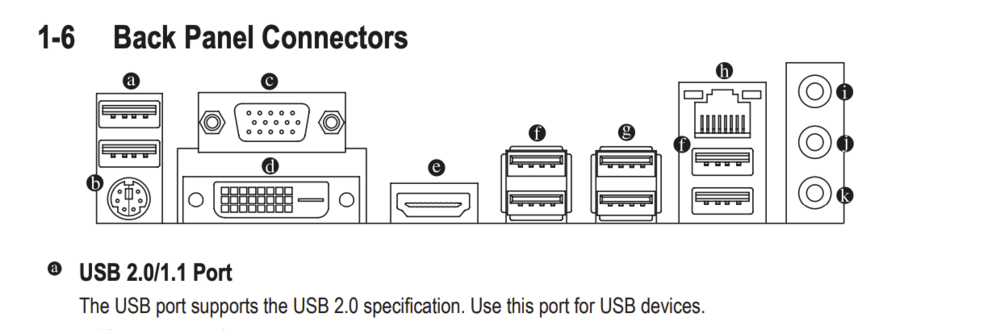
To rule it out, there are two USB2 ports on the back of your motherboard