





CS01-HS
Members
-
Joined
-
Last visited
Everything posted by CS01-HS
-
This doesn't confirm your "shut down after" setting works but you can confirm the shutdown procedure works by STOPPING THE ARRAY (to avoid data corruption if something goes wrong) and running upsmon -c fsd From help: usage: upsmon [OPTIONS] -c <cmd> send command to running process commands: - fsd: shutdown all master UPSes (use with caution) - reload: reread configuration - stop: stop monitoring and exit -D raise debugging level -h display this help -K checks POWERDOWNFLAG, sets exit code to 0 if set -p always run privileged (disable privileged parent) -u <user> run child as user <user> (ignored when using -p) -4 IPv4 only -6 IPv6 only
-
I upgraded to beta35 then installed intel-gpu-telegraf for the first time. I'll try again and report back
-
Well that explains it, thanks.
-
Here's a strange problem: I have an always-attached (mechanical) USB hard drive mounted through UD. I have SSD Trim set to run 7AM daily through the built-in scheduler. It seems? unRAID recognizes this USB disk as an SSD and tries to trim it. I don't know if that's because UD's reporting it as an SSD or SSD detection happens outside UD. (I don't see the error every time trim runs but syslog server's been buggy lately so maybe it's just not logged.) Sep 30 07:00:03 NAS kernel: blk_update_request: critical target error, dev sdb, sector 76096 op 0x3:(DISCARD) flags 0x800 phys_seg 1 prio class 0 Oct 1 07:00:02 NAS kernel: blk_update_request: critical target error, dev sda, sector 76096 op 0x3:(DISCARD) flags 0x800 phys_seg 1 prio class 0 Oct 2 07:00:02 NAS kernel: blk_update_request: critical target error, dev sda, sector 76096 op 0x3:(DISCARD) flags 0x800 phys_seg 1 prio class 0 Oct 7 07:00:09 NAS kernel: blk_update_request: critical target error, dev sda, sector 76096 op 0x3:(DISCARD) flags 0x800 phys_seg 1 prio class 0 Oct 9 07:00:02 NAS kernel: blk_update_request: critical target error, dev sdb, sector 76096 op 0x3:(DISCARD) flags 0x800 phys_seg 1 prio class 0 Oct 11 07:00:02 NAS kernel: blk_update_request: critical target error, dev sdb, sector 76096 op 0x3:(DISCARD) flags 0x800 phys_seg 1 prio class 0 Oct 13 07:00:08 NAS kernel: blk_update_request: critical target error, dev sdb, sector 76096 op 0x3:(DISCARD) flags 0x800 phys_seg 1 prio class 0 Oct 22 07:00:08 NAS kernel: blk_update_request: critical target error, dev sdb, sector 76096 op 0x3:(DISCARD) flags 0x800 phys_seg 1 prio class 0 Oct 24 07:00:08 NAS kernel: blk_update_request: critical target error, dev sdb, sector 76096 op 0x3:(DISCARD) flags 0x800 phys_seg 1 prio class 0 Oct 26 07:00:01 NAS kernel: blk_update_request: critical target error, dev sdb, sector 76096 op 0x3:(DISCARD) flags 0x800 phys_seg 1 prio class 0 Oct 27 07:00:09 NAS kernel: blk_update_request: critical target error, dev sdb, sector 76096 op 0x3:(DISCARD) flags 0x800 phys_seg 1 prio class 0 Oct 30 07:00:08 NAS kernel: blk_update_request: critical target error, dev sda, sector 76096 op 0x3:(DISCARD) flags 0x800 phys_seg 1 prio class 0 Nov 6 07:00:08 NAS kernel: blk_update_request: critical target error, dev sdb, sector 76096 op 0x3:(DISCARD) flags 0x800 phys_seg 1 prio class 0 Nov 10 07:00:08 NAS kernel: blk_update_request: critical target error, dev sdb, sector 76096 op 0x3:(DISCARD) flags 0x800 phys_seg 1 prio class 0 Nov 11 07:00:02 NAS kernel: blk_update_request: critical target error, dev sda, sector 76096 op 0x3:(DISCARD) flags 0x800 phys_seg 1 prio class 0 Nov 13 07:00:09 NAS kernel: blk_update_request: critical target error, dev sdb, sector 76096 op 0x3:(DISCARD) flags 0x800 phys_seg 1 prio class 0 Nov 14 07:00:09 NAS kernel: blk_update_request: critical target error, dev sda, sector 76096 op 0x3:(DISCARD) flags 0x800 phys_seg 1 prio class 0 Nov 15 07:00:09 NAS kernel: blk_update_request: critical target error, dev sdb, sector 76096 op 0x3:(DISCARD) flags 0x800 phys_seg 1 prio class 0 Nov 16 07:00:08 NAS kernel: blk_update_request: critical target error, dev sdb, sector 76096 op 0x3:(DISCARD) flags 0x800 phys_seg 1 prio class 0 Nov 17 07:00:02 NAS kernel: blk_update_request: critical target error, dev sdb, sector 76096 op 0x3:(DISCARD) flags 0x800 phys_seg 1 prio class 0 Nov 20 07:00:09 NAS kernel: blk_update_request: critical target error, dev sdb, sector 76096 op 0x3:(DISCARD) flags 0x800 phys_seg 1 prio class 0 Nov 22 07:00:08 NAS kernel: blk_update_request: critical target error, dev sda, sector 76096 op 0x3:(DISCARD) flags 0x800 phys_seg 1 prio class 0 Nov 24 07:00:08 NAS kernel: blk_update_request: critical target error, dev sdb, sector 76096 op 0x3:(DISCARD) flags 0x800 phys_seg 1 prio class 0 Nov 26 07:00:03 NAS kernel: blk_update_request: critical target error, dev sda, sector 76048 op 0x3:(DISCARD) flags 0x800 phys_seg 1 prio class 0 Dec 2 07:00:08 NAS kernel: blk_update_request: critical target error, dev sdb, sector 76048 op 0x3:(DISCARD) flags 0x800 phys_seg 1 prio class 0 nas-diagnostics-20201203-0844.zip
-
Since 6.8.3 I've used a modprobe call in config/go to load the i915 drivers. In beta35 this still works (with or without a monitor connected.) The new method however (touch /boot/config/modprobe.d/...) only works with a monitor connected. Without a monitor it doesn't boot to a point where I can ssh and investigate. nas-diagnostics-20201202-1340.zip
-
I updated, tested and confirmed it now passes that parameter but only if Force all SMB remote shares to SMB v1 = Yes. It doesn't pass it if it degrades to SMB1 after failing higher versions. Not a problem if that's by design. Nov 23 17:59:31 NAS unassigned.devices: Mount SMB share '//10.0.1.1/Data' using SMB1 protocol. Nov 23 17:59:31 NAS unassigned.devices: Mount SMB command: /sbin/mount -t cifs -o rw,nounix,iocharset=utf8,file_mode=0777,dir_mode=0777,uid=99,gid=100,vers=1.0,credentials='/tmp/unassigned.devices/credentials_Data' '//10.0.1.1/Data' '/mnt/disks/time-capsule'
-
Ha! I saw that and thought "how could I miss that in the logs?" but I get continuous "bogus file nlink value" cifs errors with SMB1 so by habit I end every syslog tail with | grep -vi 'cifs' which of course removes it. I'm glad my stupidity wasn't an obstacle. Thanks again.
-
Nice, thank you so much. Do you mind telling me how my diagnostics helped? Maybe a hidden UD log that might help me in the future.
-
Sure, thanks. There's a bunch of spam in my syslog from an incompatible docker, let me know if you want me to clean it up. nas-diagnostics-20201123-1144.zip
-
I may be an edge case but in beta35 this (very handy) docker fills up my syslog with the following error until the system's overloaded. Nov 23 10:00:10 NAS kernel: bad: scheduling from the idle thread! Nov 23 10:00:10 NAS kernel: CPU: 0 PID: 0 Comm: swapper/0 Not tainted 5.8.18-Unraid #1 Nov 23 10:00:10 NAS kernel: Hardware name: To Be Filled By O.E.M. To Be Filled By O.E.M./J5005-ITX, BIOS P1.40 08/06/2018 Nov 23 10:00:10 NAS kernel: Call Trace: Nov 23 10:00:10 NAS kernel: dump_stack+0x6b/0x83 Nov 23 10:00:10 NAS kernel: dequeue_task_idle+0x21/0x2a Nov 23 10:00:10 NAS kernel: __schedule+0x135/0x49e Nov 23 10:00:10 NAS kernel: ? __mod_timer+0x215/0x23c Nov 23 10:00:10 NAS kernel: schedule+0x77/0xa0 Nov 23 10:00:10 NAS kernel: schedule_timeout+0xa7/0xe0 Nov 23 10:00:10 NAS kernel: ? __next_timer_interrupt+0xaf/0xaf Nov 23 10:00:10 NAS kernel: msleep+0x13/0x19 Nov 23 10:00:10 NAS kernel: pci_raw_set_power_state+0x185/0x257 Nov 23 10:00:10 NAS kernel: pci_restore_standard_config+0x35/0x3b Nov 23 10:00:10 NAS kernel: pci_pm_runtime_resume+0x29/0x7b Nov 23 10:00:10 NAS kernel: ? pci_pm_default_resume+0x1e/0x1e Nov 23 10:00:10 NAS kernel: ? pci_pm_default_resume+0x1e/0x1e Nov 23 10:00:10 NAS kernel: __rpm_callback+0x6b/0xcf Nov 23 10:00:10 NAS kernel: ? pci_pm_default_resume+0x1e/0x1e Nov 23 10:00:10 NAS kernel: rpm_callback+0x50/0x66 Nov 23 10:00:10 NAS kernel: ? pci_pm_default_resume+0x1e/0x1e Nov 23 10:00:10 NAS kernel: rpm_resume+0x2e2/0x3d6 Nov 23 10:00:10 NAS kernel: ? __schedule+0x47d/0x49e Nov 23 10:00:10 NAS kernel: __pm_runtime_resume+0x55/0x71 Nov 23 10:00:10 NAS kernel: __intel_runtime_pm_get+0x15/0x4a [i915] Nov 23 10:00:10 NAS kernel: i915_pmu_enable+0x53/0x147 [i915] Nov 23 10:00:10 NAS kernel: i915_pmu_event_add+0xf/0x20 [i915] Nov 23 10:00:10 NAS kernel: event_sched_in+0xd3/0x18f Nov 23 10:00:10 NAS kernel: merge_sched_in+0xb4/0x1de Nov 23 10:00:10 NAS kernel: visit_groups_merge.constprop.0+0x174/0x3ad Nov 23 10:00:10 NAS kernel: ctx_sched_in+0x11e/0x13e Nov 23 10:00:10 NAS kernel: perf_event_sched_in+0x49/0x6c Nov 23 10:00:10 NAS kernel: ctx_resched+0x6d/0x7c Nov 23 10:00:10 NAS kernel: __perf_install_in_context+0x117/0x14b Nov 23 10:00:10 NAS kernel: remote_function+0x19/0x43 Nov 23 10:00:10 NAS kernel: flush_smp_call_function_queue+0x103/0x1a4 Nov 23 10:00:10 NAS kernel: flush_smp_call_function_from_idle+0x2f/0x3a Nov 23 10:00:10 NAS kernel: do_idle+0x20f/0x236 Nov 23 10:00:10 NAS kernel: cpu_startup_entry+0x18/0x1a Nov 23 10:00:10 NAS kernel: start_kernel+0x4af/0x4d1 Nov 23 10:00:10 NAS kernel: secondary_startup_64+0xa4/0xb0
-
The latest version won't mount my SMB1 share. I think it might not be passing sec=ntlm but I don't see a mount command in the logs. Any way to debug it? I've tried removing/readding the share with Force all SMB remote shares to SMB v1 set to Yes (as I had it) and No, neither works.
-
Maybe an oversight by Apple or maybe intentional. NAS is my unraid server. The closest supported server type I found was macpro-2019-rackmount so I customize the smb.service with the following script: cp -u /etc/avahi/services/smb.service /etc/avahi/services/smb.service.disabled cp /boot/extras/avahi/smb.service /etc/avahi/services/ chmod 644 /etc/avahi/services/smb.service touch /etc/avahi/services/smb.service.disabled Where /boot/extras/avahi/smb.service looks like: <?xml version='1.0' standalone='no'?><!--*-nxml-*--> <!DOCTYPE service-group SYSTEM 'avahi-service.dtd'> <!-- Generated settings: --> <service-group> <name replace-wildcards='yes'>%h</name> <service> <type>_smb._tcp</type> <port>445</port> </service> <service> <type>_device-info._tcp</type> <port>0</port> <txt-record>model=MacPro7,1@ECOLOR=226,226,224</txt-record> </service> </service-group> which gives me this: Poking around I found a pretty good server glyph in an assets package (server.rack.svg) but it's not a recognized bonjour type and I don't know how to add it.
-
After enabling some disk-related power saving features I occasionally see the error below in the logs. Is it anything to worry about? ata3 is a mechanical disk connected to my motherboard's ASM1062 controller. I don't see any indication of a problem except the log message. Nov 13 04:05:04 NAS kernel: ata3: SATA link up 6.0 Gbps (SStatus 133 SControl 300) Nov 13 04:05:04 NAS kernel: ata3.00: supports DRM functions and may not be fully accessible Nov 13 04:05:04 NAS kernel: ata3.00: supports DRM functions and may not be fully accessible Nov 13 04:05:04 NAS kernel: ata3.00: configured for UDMA/133 Nov 13 04:06:34 NAS kernel: ata3.00: exception Emask 0x10 SAct 0x0 SErr 0x4050002 action 0xe frozen Nov 13 04:06:34 NAS kernel: ata3.00: irq_stat 0x08000040, interface fatal error, connection status changed Nov 13 04:06:34 NAS kernel: ata3: SError: { RecovComm PHYRdyChg CommWake DevExch } Nov 13 04:06:34 NAS kernel: ata3.00: failed command: FLUSH CACHE EXT Nov 13 04:06:34 NAS kernel: ata3.00: cmd ea/00:00:00:00:00/00:00:00:00:00/a0 tag 1 Nov 13 04:06:34 NAS kernel: res 40/00:a0:90:1a:0e/00:00:4d:00:00/40 Emask 0x10 (ATA bus error) Nov 13 04:06:34 NAS kernel: ata3.00: status: { DRDY } Nov 13 04:06:34 NAS kernel: ata3: hard resetting link Nov 13 04:06:35 NAS kernel: ata3: SATA link up 6.0 Gbps (SStatus 133 SControl 300) Nov 13 04:06:35 NAS kernel: ata3.00: supports DRM functions and may not be fully accessible Nov 13 04:06:35 NAS kernel: ata3.00: supports DRM functions and may not be fully accessible Nov 13 04:06:35 NAS kernel: ata3.00: configured for UDMA/133 Nov 13 04:06:35 NAS kernel: ata3.00: retrying FLUSH 0xea Emask 0x10 Nov 13 04:06:35 NAS kernel: ata3: EH complete
-
Force a dirty shutdown and consequent parity check on startup Let parity check complete Stop array If you start the array you're forced to run a parity check because the completed run's not recognized. Reboot gets around it.
-
Ah I see, that's still good power savings. Yes, I have the J5005-mITX with 6 HDDs (4 on the card, 2 on the board) and 2 Cache SDDs. More information is linked in my signature. If you want to see great power savings look at this: https://translate.google.com/translate?sl=auto&tl=en&u=https%3A%2F%2Fwww.computerbase.de%2Fforum%2Fthreads%2Fselbstbau-nas-im-10-zoll-rack.1932675%2F He also posts here:
-
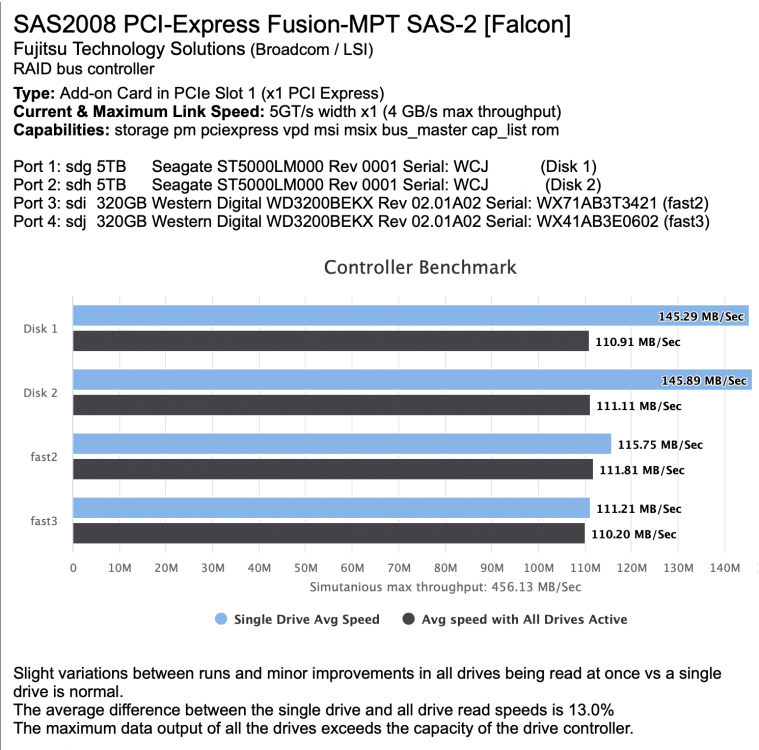
I'm running a j5005 with an H1110 HBA (cut to fit the x1 slot) and 8 disks: 2 SSD Cache (on the integrated intel) 3 Array disks and and a BTRFS Raid 5 Pool of 3 disks (all distributed between the integrated ASMedia and the HBA) It's not a performance server but I don't notice any slowness although your idle wattage with the new setup (22W) is close to mine. Do you remember what your idle wattage was with the J4105 and HBA? Benchmarking the x1 controller in DiskSpeed does show limitations but not enough to affect usability (although if my controller ran 8 disks instead of 4 I could see it doubling? parity check time.)
-
I saw a few of these hard resetting link errors during my mover run. Thankfully (?) no CRC errors reported. ata3 is a spinning disk attached to an integrated ASM1062 controller. I wonder if it might be related to the power-saving tweaks because nothing else changed. For now I've disabled them and will see if they reappear. Maybe coincidence but I'm posting in case others have the same issue. Nov 3 23:17:30 NAS move: move: file /mnt/cache/Download/movie_1.mp4 Nov 3 23:17:33 NAS kernel: ata3.00: exception Emask 0x10 SAct 0x80 SErr 0x4050002 action 0x6 frozen Nov 3 23:17:33 NAS kernel: ata3.00: irq_stat 0x08000000, interface fatal error Nov 3 23:17:33 NAS kernel: ata3: SError: { RecovComm PHYRdyChg CommWake DevExch } Nov 3 23:17:33 NAS kernel: ata3.00: failed command: WRITE FPDMA QUEUED Nov 3 23:17:33 NAS kernel: ata3.00: cmd 61/00:38:58:44:51/04:00:2c:02:00/40 tag 7 ncq dma 524288 out Nov 3 23:17:33 NAS kernel: res 40/00:30:58:40:51/00:00:2c:02:00/40 Emask 0x10 (ATA bus error) Nov 3 23:17:33 NAS kernel: ata3.00: status: { DRDY } Nov 3 23:17:33 NAS kernel: ata3: hard resetting link Nov 3 23:17:33 NAS move: move: file /mnt/cache/Download/movie_1.mp4 Nov 3 23:17:33 NAS kernel: ata3: SATA link up 6.0 Gbps (SStatus 133 SControl 300) Nov 3 23:17:33 NAS kernel: ata3.00: supports DRM functions and may not be fully accessible Nov 3 23:17:33 NAS kernel: ata3.00: supports DRM functions and may not be fully accessible Nov 3 23:17:33 NAS kernel: ata3.00: configured for UDMA/133 Nov 3 23:17:33 NAS kernel: ata3: EH complete Nov 3 23:17:35 NAS move: move: file /mnt/cache/Download/movie_2.mp4
-
I don't search often so I can't say for certain it's the beta but it used to work consistently and now it doesn't, even in safe mode. No results returned no matter how long I wait. I'm running the latest MacOS Catalina. I also tested in MacOS Mojave (unraid VM), same result. I have a Raspberry Pi shared over SMB where search from the same two clients works fine. Diagnostics from safe mode attached. nas-diagnostics-20201027-1319.zip EDIT: Hack "solution" from follow-up post below. Hopefully this helps with a fix. Test: Mount unraid share system on my mac and check its spotlight status: [macbook-pro]:~ $ mdutil -s /Volumes/system /System/Volumes/Data/Volumes/system: Server search enabled. [macbook-pro]:~ $ But "server search" is not in fact enabled. Apparently samba 4.12.0 changed the default from Gnome tracker to noindex. Note that when upgrading existing installations that are using the previous default Spotlight backend Gnome Tracker must explicitly set "spotlight backend = tracker" as the new default is "noindex". To change it back (as it was in 6.8) I add the following to SMB extras: [global] spotlight backend = tracker and explicitly enable spotlight for each share: [system] path = /mnt/user/system spotlight = yes Now when I mount it and check spotlight status I get the following: [macbook-pro]:~ $ mdutil -s /Volumes/system /System/Volumes/Data/Volumes/system: Indexing disabled. [macbook-pro]:~ $ And search works. EDIT: 5/18/2022 I'm enjoying 6.10 improvements but it now marks two major versions and more than a year that basic functionality (search) isn't available to Mac users. Is a fix in the pipeline?
-
I wouldn't take any meaningful risk to save 4W. Would you distinguish between any of the power-saving tweaks (SATA links, I2C, USB, PCI and increasing dirty_writeback) in terms of risk, assuming a UPS/no unexpected power loss?
-
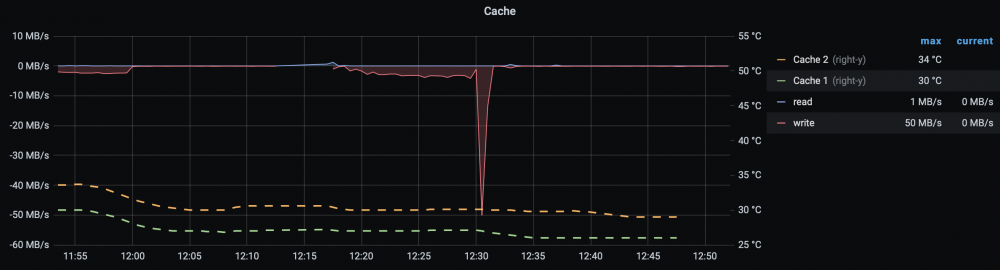
Your go files additions saved me also about 4W. And it might be coincidence but my SSD temps dropped about 4°C post-tuning. I've never seen them so cool. There has to be some cost to this, no? I haven't noticed a difference but nothing's free.
-
Updated the script to work with with 6.9.0-beta30 I don't know if it's the new kernel or unraid itself but now the drive's diskstats seem to increment even without access (maybe SMART polling?) Keying off the partition's diskstats seems to solve it. Note, this looks for reads/writes on the first partition - if you have a multi-partition drive it won't work properly (and may sleep you drive while you're accessing it,)
-
I searched the thread and didn't find an answer so apologies if this question's been asked. I'm new to this plugin and have my first verification running after the initial check. It's been going for around 8 hours and I'm wondering how far it's progressed. Is there an indicator somewhere? The initial check showed a handy progress bar in the page under Tools. I'm also confused about whether "check" and "verify" are used interchangeably in the documentation. The help says Use the Check command to verify files against a previously exported file but the plugin can be configured to verify with Save new hashing results to flash (which I assume is the referenced "export") disabled, suggesting they're not interchangeable.
-
I had the same inaccessible webui problem. It's caused by an initialization failure either because port-forwarding fails on the server end or the container script that detects a successfully-forwarded port fails. Either way, disabling port-forwarding fixed it:

-
My hot/cool: Sep 8 06:55:01 NAS parity.check.tuning.php: TESTING: parity temp=32 (settings are: hot=40, cool=35)) and yours Sep 8 18:20:02 Tower parity.check.tuning.php: TESTING: parity temp=26 (settings are: hot=0, cool=6)) are very different. Are you maybe setting absolute temperatures on the plugin page? They should be relative:

-
I use this snippet in a user script to mount a USB drive by ID: THIS_DISK=`ls -l /dev/disk/by-id/ | grep 'usb-WD_My_Passport_25E2_5758313144393636' | head -1 | tail -c4` /usr/local/sbin/rc.unassigned mount "/dev/$THIS_DISK" if [[ $? -ne 0 ]]; then echo "Exiting due to ERROR." exit 1 fi echo "SUCCESS" And unmount: /usr/local/sbin/rc.unassigned umount "/dev/$THIS_DISK"







