ChatNoir
Moderators
-
Joined
-
Last visited
Everything posted by ChatNoir
-
Then you should probably start your own thread to explore what's happening in your case. Could be overheating of the HBA if there is not enough airflow on the dissipator.
-
No reason it wouldn't. My Dell version handles 14TB and 20TB with no problem. Your FW is not up to date, not sure if it would cause a crash though.
-
Unraid relies on drives serial numbers for it's mapping. Not all USB enclosures behave well and provide correct and reliable information.
-
Bonsoir, De ce que j'ai lu précédemment, avec des symptômes de ce genre, c'est souvent causé par le driver unraid qui plante dans certains cas. Si c'est le cas, un redémarrage d'Unraid règle le problème. J'ai essayé de regarder tes logs mais il s'y passe beaucoup de chose et je n'ai rien vu qui m'a attiré l'oeil. Si tu veux être 100% certain tu peux essayer de demander dans la partie anglophone où tu trouvera des gens plus calés que moi. 🙂
-
Split level is there to determine on what drive Unraid should place the data. It is not a size limit for a share. In any case, I do not want the system to arbitrarily move or delete files without my prompt.
-
The Youtube version is out : (I have not watched it yet)
-
The poll for the next steps of development is there :
-
The main bias I see is that this type of company only sees disks with issues. Either hardware, software or user issues. It's probably not super representative. Less that something like Backblaze that analyses all it's drives, those who have issues and the larger number that does not.
-
The team is limited a has to focus to be efficient. Or the next version adds both and is available in 3 years. 😅
-
Not exactly the same form factor or the same use case.Le fast boot c'est bien quand on boot sur un disque traditionnel, ce n'est pas rare que les cartes mères aient des soucis à initialiser l'USB dans les temps de façon fiable s'il est activé. Content que ça fonctionne.With issues on boot, I would check first that Fast-boot is disabled in BIOS.Happens to me too. I though it would disappear when I set it back up but didn't until I discarded it. It was fine for a few days and it's back this morning.I think that your forum account needs to be linked with a Myservers plugin to be able to post in this subforum. And it is possible that you cannot link an account to the plugin if the forum account is not activated (first post activation by a moderator). TBC.Est-ce que tu as désactivé le fast-boot dans le BIOS ?I confirm, I am not using the compact layout.On what plateform and browser do you see this ? Works fine on Chrome and FF.

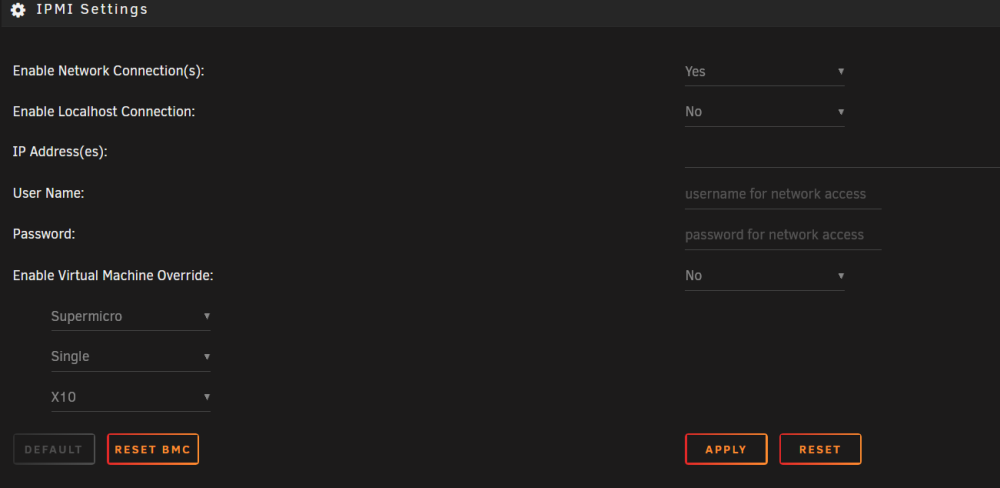
 J'en doute mais la prochaine fois que ça arrive regarde tes logs ou partage ton diagnostics ici.Hello @Suse User, I suppose that you have ReiserFS disks on your system. Once everything is updated you should seriously consider changing that to XFS or BTRFS. ReiserFS support will be dropped from the linux kernel soon.Works for me.Ping me if you need some additional information or need me to do some tests. A message saying that you need to have both the notifications and the fan control OFF to set up the connection would be nice.Ok, disabling both allowed me access to the greyed out fields. I cannot connect for some reason though. Anyway, it's not super important for me, I am really using the plugin for the fan control and that works without being connected.Here is the content of the file The IPADDR, USER and PASSWORD are empty IPMISELD="enable" IPMIPOLL="30" NETWORK="disable" LOCAL="disable" IPADDR="" USER="" PASSWORD="" DISP_SENSOR1="4" DISP_SENSOR2="1009" LOADCFG="enable" IGNORE="540,674,808,942,1344,1411,1478,1545,1612,1746,1813,1880,1947" DIGNORE="205,339,406,540,674,808,942,1344,1411,1478,1545,1612,1746,1813,1880,1947" DASH="enable" DEVIGNORE="" DEVS="enable" OVERRIDE="disable" OBOARD="Supermicro" OCOUNT="0" OMODEL="10" DISP_SENSOR3="1143" DISP_SENSOR4="99"I replaced the old addon but yours Simon. It seems to have recovered the old settings and quieted the server back to it's normal behavior. I have one issue though. I can't seem to enable the Network connection as it was before. When I select Yes, the fields are greyed out and not active (the MB is properly detected). When I try to apply, I get back to the 'No' setting and never have the possibility to enter the IP address, login and password.