ChatNoir
Moderators
-
Joined
-
Last visited
Everything posted by ChatNoir
-
If you want to post in German, please do it in the German section of the forum. Everywhere else, please use English.
-
Just to clarify, I did not try that card myself, my answer is purely based on what is indicated on the Amazon page. I edited the original post to reflect that. It might be a defective part or you might be limited in the number of PCIe lanes available on your system. What is plugged in your motherboard ?
-
Have you tried to do the update manually ?
-
You should set up a syslog server so it can catch the crash and post the file after the next crash.
-
Please attach your diagnostics anyway, it might still show something. You can set up a syslog server so it can catch the crash, post the file after the next crash. Did you check this part of the FAQ ? It might be relevant.
-
On a V5 or older system ? If not, please post in the proper subforum : https://forums.unraid.net/forum/55-general-support/
-
That's fair, I was not very explicit. Only this in indicated on the bottom of the forum : No link to facebook or discord, while those are available on the main website. (as shown on posts above). Adding the links to fb and discord would be helpful for users I think and it would be more uniform.

-
Are you using the Recycle bin plugin ?
-
This means that the template for the forum is not up to date. @SpencerJ
-
It seems that you have an issue with your flash drive if it is now read only. You should back up the flashdrive, stop the server and plug the flashdrive to another computer to run an check disk on it. While on the other computer, delete the file. If our are able to repair the flash drive, then try it again on the server.
-
As per Seagate's site : A field update is not available for this serial number I will see what's the behavior with the 6.x kernel and report then. Thanks for confirming what I was thinking. Hopefully that can help some other users.
-
Didn't had to wait too long to see the issue again. Different error now on the HBA, same result as the two drives stay spinned up. Oct 15 17:46:34 mediahub emhttpd: spinning down /dev/sdf Oct 16 00:53:33 mediahub emhttpd: spinning up /dev/sdf Oct 16 00:53:48 mediahub kernel: sd 5:0:2:0: [sdf] tag#1286 CDB: opcode=0x85 85 06 20 00 00 00 00 00 00 00 00 00 00 40 e3 00 Oct 16 00:53:50 mediahub emhttpd: sdspin /dev/sdf up: 22 Oct 16 00:53:50 mediahub emhttpd: read SMART /dev/sdf Oct 16 00:32:41 mediahub emhttpd: read SMART /dev/sdn Oct 16 00:52:39 mediahub emhttpd: spinning down /dev/sdn Oct 16 00:53:51 mediahub emhttpd: spinning up /dev/sdn Oct 16 00:54:06 mediahub kernel: sd 5:0:4:0: [sdn] tag#1247 CDB: opcode=0x85 85 06 20 00 00 00 00 00 00 00 00 00 00 40 e3 00 Oct 16 00:54:07 mediahub emhttpd: sdspin /dev/sdn up: 22 Oct 16 00:54:07 mediahub emhttpd: read SMART /dev/sdn
-
Yesterday the second Seagate drive also started to refuse to spin down. Oct 14 04:56:48 mediahub emhttpd: spinning down /dev/sdc Oct 14 20:02:56 mediahub emhttpd: spinning up /dev/sdc Oct 14 20:03:13 mediahub kernel: ata3: SATA link up 6.0 Gbps (SStatus 133 SControl 300) Oct 14 20:03:13 mediahub kernel: ata3.00: configured for UDMA/133 Oct 14 20:03:13 mediahub emhttpd: sdspin /dev/sdc up: 1 Oct 14 20:03:13 mediahub emhttpd: read SMART /dev/sdc Oct 14 20:47:43 mediahub emhttpd: read SMART /dev/sdc I switched both to the HBA, I am able to spin them down for now. I will monitor and provide an update in a few days.
-
I would guess that's because turbo write is activated.
-
There is a 'Move' button at the bottom of the 'Main' page.
-
Seems a bit more complex than that as it is two volumes in one HDD package. I guess it should work, but can't be sure.
-
Good idea, I'll try during the weekend and report back.
-
Hey, Since I upgraded to 6.11.0 (and also now in 6.11.1), some drive are not spinning down as they were before. It was disks 7 & 8 while on 6.11.0 and now only disk 8 in 6.11.1. For 6.11.0, I am not sure, but for 6.11.1, I know that for the first few hours/days, all drives were able to spin down. And after a time, disk8 would not. I checked the usual suspects (appdata, system, dockers, etc.) and to the best on my recollection I made no significant change to my system. All shares on disk8 are using my cache. However, I see errors on the Disk log information of the problematic drives that are not present on drives that do spin down properly, the Security freeze and Device configuration overlay. Oct 9 09:13:31 mediahub kernel: ata9: SATA max UDMA/133 abar m2048@0xfb716000 port 0xfb716300 irq 57 Oct 9 09:13:31 mediahub kernel: ata9: SATA link up 6.0 Gbps (SStatus 133 SControl 300) Oct 9 09:13:31 mediahub kernel: ata9.00: ACPI cmd f5/00:00:00:00:00:00(SECURITY FREEZE LOCK) filtered out Oct 9 09:13:31 mediahub kernel: ata9.00: ACPI cmd b1/c1:00:00:00:00:00(DEVICE CONFIGURATION OVERLAY) filtered out Oct 9 09:13:31 mediahub kernel: ata9.00: ATA-10: ST6000VN0041-2EL11C, SC61, max UDMA/133 Oct 9 09:13:31 mediahub kernel: ata9.00: 11721045168 sectors, multi 16: LBA48 NCQ (depth 32), AA Oct 9 09:13:31 mediahub kernel: ata9.00: Features: NCQ-sndrcv Oct 9 09:13:31 mediahub kernel: ata9.00: ACPI cmd f5/00:00:00:00:00:00(SECURITY FREEZE LOCK) filtered out Oct 9 09:13:31 mediahub kernel: ata9.00: ACPI cmd b1/c1:00:00:00:00:00(DEVICE CONFIGURATION OVERLAY) filtered out Oct 9 09:13:31 mediahub kernel: ata9.00: configured for UDMA/133 Oct 9 09:13:31 mediahub kernel: sd 9:0:0:0: [sdh] 11721045168 512-byte logical blocks: (6.00 TB/5.46 TiB) Oct 9 09:13:31 mediahub kernel: sd 9:0:0:0: [sdh] 4096-byte physical blocks Oct 9 09:13:31 mediahub kernel: sd 9:0:0:0: [sdh] Write Protect is off Oct 9 09:13:31 mediahub kernel: sd 9:0:0:0: [sdh] Mode Sense: 00 3a 00 00 Oct 9 09:13:31 mediahub kernel: sd 9:0:0:0: [sdh] Write cache: enabled, read cache: enabled, doesn't support DPO or FUA Oct 9 09:13:31 mediahub kernel: sd 9:0:0:0: [sdh] Preferred minimum I/O size 4096 bytes Oct 9 09:13:31 mediahub kernel: sdh: sdh1 Oct 9 09:13:31 mediahub kernel: sd 9:0:0:0: [sdh] Attached SCSI disk Oct 9 09:14:20 mediahub emhttpd: ST6000VN0041-2EL11C_ZA1A27S5 (sdh) 512 11721045168 Oct 9 09:14:20 mediahub kernel: mdcmd (9): import 8 sdh 64 5860522532 0 ST6000VN0041-2EL11C_ZA1A27S5 Oct 9 09:14:20 mediahub kernel: md: import disk8: (sdh) ST6000VN0041-2EL11C_ZA1A27S5 size: 5860522532 Oct 9 09:14:20 mediahub emhttpd: read SMART /dev/sdh Oct 9 09:29:23 mediahub emhttpd: spinning down /dev/sdh Oct 9 10:49:15 mediahub emhttpd: spinning up /dev/sdh Oct 9 10:49:32 mediahub kernel: ata9: SATA link up 6.0 Gbps (SStatus 133 SControl 300) Oct 9 10:49:32 mediahub kernel: ata9.00: ACPI cmd f5/00:00:00:00:00:00(SECURITY FREEZE LOCK) filtered out Oct 9 10:49:32 mediahub kernel: ata9.00: ACPI cmd b1/c1:00:00:00:00:00(DEVICE CONFIGURATION OVERLAY) filtered out Oct 9 10:49:32 mediahub kernel: ata9.00: ACPI cmd f5/00:00:00:00:00:00(SECURITY FREEZE LOCK) filtered out Oct 9 10:49:32 mediahub kernel: ata9.00: ACPI cmd b1/c1:00:00:00:00:00(DEVICE CONFIGURATION OVERLAY) filtered out Oct 9 10:49:32 mediahub kernel: ata9.00: configured for UDMA/133 Oct 9 10:49:32 mediahub emhttpd: sdspin /dev/sdh up: 1 Oct 9 10:49:32 mediahub emhttpd: read SMART /dev/sdh What's odd is that I see those errors on the syslog for other ataX.00 but only for the device that cannot spin down on the Disk log information. It feels like a bug, but I wanted to discuss it here before starting a proper bug report. For the moment, I only saw that on my old ST6000VN0041-2EL11C drives. My diagnostics have the issue with for the share 'compute' so I add the screenshots. PS : the integrity plugin is present but deactivated for months as I move things around, so most probably not the culprit.
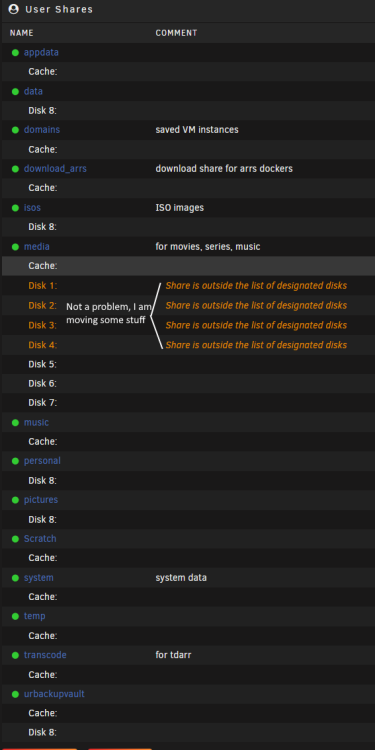
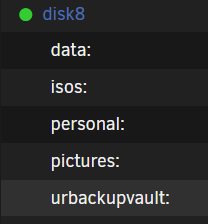
-
Did you check on the flashdrive ? ( /boot/ probably in the /config/ subdirectory )
-
https://wiki.unraid.net/Manual/Upgrade_Instructions https://wiki.unraid.net/Articles/Getting_Started#Manual_Install_Method
-
It can be larger than the current drive, as long as it is not larger that any parity drive.
-
Please attach your diagnostics in your next post.
-
The log is stored in RAM and thus lost on a reboot. You should set up a syslog server and analyse or share the file here.
-
Please attach your diagnostics, it might show something.
-
There is no general recommendation as different people look for different characteristics (size, material, etc). Still you should ideally look for a USB2 flashdrive, from a reliable seller (lots of fakes out there) and while many users have been using Sandisk -me included- it is not recommended after a large number of issues from users and no company feedback. If it was for me I'd still go with the Sandisk Cruzer Blade I am using now (or your selection), but be aware that there are no guaranties. Not a great answer I know.