






bmartino1
Members
-
Joined
-
Last visited
Everything posted by bmartino1
-
@SimonF as I've tried to talk about it on the fourm... but may not be in general as I see more of this in the mutilange thread...
-
a tesla p4 a pascal card is a vgpu card that still works in NVIDIA grid v16 lts channels and lattest v6 kernels... Nvdia driver line 535... its would be nice to get cheap telsp4 and still be able to use them... @SimonF is an example of a vgpu card that DOESN'T REQUIRE UNLOCK! that with the v16 535 nvdia gridd driver installed can use and support vgpu.. vgpu_gridd would then need a license file in /etc/nvida/client somthing.. mdevctl would then add options for use the 3d acelator telsa p4 in brances for VMs. example debain linnux which would also need a grid license. but on a legal license sytems its is posble to get a vgpu instance working... ATM VGPU on unraid is posble in v6 and the github dev claims it stall works on v7 ... after major kenral changes and witht eh intrduciton of limetech adding opensoure novea drivers is when theses thigns broke... Where One can have unraid see a vgpu card bare metal and make vgpu instances for docker, VMs, etc on unraid... https://github.com/stl88083365/unraid-nvidia-vgpu-driver https://forums.unraid.net/topic/195204-unraid-virtualized-nvidia-vgpu-guest-driver/ This was more during the series 4000 and 5000 cards where nvida tyring to close markets.... 1 eye open 1 eye closed... and with the AI boom the keep Unraid a bit mroe relvant and a option I thought it worth a mention... As this topic was more on teh open driver static which is curently implemented! but ther are 4 nvdia linux drives stuff. nouvea - the kerneal upstream nvdia driver and open source drivers. nvdia run file consumer nvdia run file Gridd nvida run file grid_guest driver the issue lies in trying to implemnt and use gridd on unraid due to kernal access to build against... last offical legacy working instance was back on v7.0.1 which had the disk bug and was pulled from archive... And with the introduciton of nouvea movbeing forward this breaks teh nvidia run install options and workarounds...
-
unraid docker notfication *uses notify and unraid notfications to check on dockers at corn intervals.. (can ber used to check on dockers via unraids notfication system.... Set for unfi docker... edit env at top and text in notfiy respone in script... could rework to call docker name form env... #!/bin/bash # Unraid User Script: Export UniFi container health to an SMB-visible file # - Preserves the image's built-in HEALTHCHECK (we don't run curl ourselves) # - Writes a single small status file (KV pairs) + an append-only log # - Safe for cron: idempotent, atomic writes set -Eeuo pipefail ### ======== CONFIGURE ME ======== ### CONTAINER_NAME="unifi-controller-reborn" # container name (as shown by docker ps) OUTPUT_DIR="/mnt/user/health/unifi" # SMB-exposed folder (make/share this as needed) STATUS_FILE_NAME="unifi.status" # simple KV file Pi will read LOG_FILE_NAME="unifi_health.log" # append-only log for historical checks # If your SMB share is different, change OUTPUT_DIR accordingly, e.g.: # OUTPUT_DIR="/mnt/user/YourShare/health/unifi" ### ======== /CONFIGURE ME ======== ### STATUS_FILE="${OUTPUT_DIR}/${STATUS_FILE_NAME}" LOG_FILE="${OUTPUT_DIR}/${LOG_FILE_NAME}" mkdir -p "${OUTPUT_DIR}" ts() { date -Iseconds; } # ISO-8601 timestamp # --- Detect Docker engine status early --- if ! docker info >/dev/null 2>&1; then ENGINE_STATE="down" CONTAINER_STATE="unknown" HEALTH_STATE="unknown" OK=0 else ENGINE_STATE="up" # Resolve container id (exact name match) CID="$(docker ps -aqf "name=^${CONTAINER_NAME}$" || true)" if [[ -z "${CID}" ]]; then CONTAINER_STATE="notfound" HEALTH_STATE="none" OK=0 else # Read container state and health (health may be absent) CONTAINER_STATE="$(docker inspect -f '{{.State.Status}}' "${CONTAINER_NAME}" 2>/dev/null || echo unknown)" HEALTH_STATE="$(docker inspect -f '{{if .State.Health}}{{.State.Health.Status}}{{else}}none{{end}}' "${CONTAINER_NAME}" 2>/dev/null || echo none)" # Policy: OK=1 only when container is running AND (health is healthy OR health not defined) if [[ "${CONTAINER_STATE}" == "running" ]] && [[ "${HEALTH_STATE}" == "healthy" || "${HEALTH_STATE}" == "none" ]]; then OK=1 else OK=0 fi fi fi # --- Atomically write the status file (so the Pi never reads a partial write) --- TMP="$(mktemp)" { echo "WHEN=$(ts)" echo "ENGINE=${ENGINE_STATE}" echo "CONTAINER=${CONTAINER_NAME}" echo "STATE=${CONTAINER_STATE}" # running|exited|paused|created|notfound|unknown echo "HEALTH=${HEALTH_STATE}" # healthy|unhealthy|starting|none|unknown echo "OK=${OK}" # 1=good, 0=bad } > "${TMP}" mv -f "${TMP}" "${STATUS_FILE}" # --- Append a one-line log entry (easy to tail on the Pi) --- echo "$(ts) CONTAINER=${CONTAINER_NAME} STATE=${CONTAINER_STATE} HEALTH=${HEALTH_STATE} ENGINE=${ENGINE_STATE} OK=${OK}" >> "${LOG_FILE}"
-
terminal consloe shows syslog as main output... *WARNING UINATEND ROOT ACCESS LEFT LOGED IN AT TERMAINL! #!/bin/bash set -euo pipefail # ===== FIXED SETTINGS (edit if you want a different TTY or log) ===== TTY_DEV="/dev/tty1" TTY_BASENAME="tty1" INIT_ID="c1" LOG_FILE="/var/log/syslog" WRAPPER="/usr/local/sbin/tty-console.sh" # ==================================================================== echo "[*] Configure ${TTY_DEV} as a live syslog console (Ctrl+C -> root shell)" [[ -e "$TTY_DEV" ]] || { echo "[-] ${TTY_DEV} not found"; exit 1; } # 1) Install the wrapper process that *is* the console on TTY_DEV mkdir -p "$(dirname "$WRAPPER")" cat > "$WRAPPER" <<'EOS' #!/bin/bash # Bind to the console and make this our controlling TTY exec </dev/tty1 >/dev/tty1 2>&1 stty sane >/dev/null 2>&1 || true printf "\033[2J\033[H" # clear screen TTY_WANT="/dev/tty1" LOG_WANT="/var/log/syslog" echo echo "=== Live syslog on ${TTY_WANT} ===" echo "Press Ctrl+C to drop into a root shell on this console." echo # Ctrl+C -> switch to an interactive root login shell trap 'exec /bin/bash -l' INT # Show entire file then follow in foreground tail -f -n +1 "$LOG_WANT" EOS chmod 755 "$WRAPPER" # Bake your chosen TTY/log into the wrapper sed -i \ -e "s#^exec </dev/tty1 >/dev/tty1 2>&1#exec <${TTY_DEV} >${TTY_DEV} 2>\&1#" \ -e "s#^TTY_WANT=.*#TTY_WANT=\"${TTY_DEV}\"#" \ -e "s#^LOG_WANT=.*#LOG_WANT=\"${LOG_FILE}\"#" \ "$WRAPPER" # 2) Point c1 to our wrapper (no agetty, no autologin) if grep -qE "^${INIT_ID}:" /etc/inittab ; then sed -i "s#^${INIT_ID}:.*#${INIT_ID}:12345:respawn:${WRAPPER}#" /etc/inittab else echo "${INIT_ID}:12345:respawn:${WRAPPER}" >> /etc/inittab fi # 3) Apply now: make init reread, and kill any current agetty on that TTY so it respawns our wrapper telinit q || true pkill -f "agetty .*${TTY_BASENAME}" || true sleep 0.5 # Debug echo "[D] inittab ${INIT_ID}: $(grep "^${INIT_ID}:" /etc/inittab || echo 'missing')" echo "[D] process bound to ${TTY_BASENAME}:" ps ax | grep -E "(${WRAPPER}|agetty).*${TTY_BASENAME}" || echo " (init will spawn it)" echo "[✓] ${TTY_DEV} is now a live syslog console." echo " Ctrl+C -> root shell; 'exit' -> back to log view (init respawns)." # -------- OPTIONAL: quick revert helper (comment out if you don't want it) -------- # To revert to standard login on tty1, run these two lines manually: # sed -i 's#^c1:.*#c1:12345:respawn:/sbin/agetty 38400 tty1 linux#' /etc/inittab ; telinit q ; pkill -f "(/usr/local/sbin/tty-console\.sh|agetty .*tty1)" || true # ---------------------------------------------------------------------------------
-
Force Docker updates - if temaplate exist but webui shows 3rd party... #!/bin/bash # Get the list of running Docker container names CONTAINER_NAMES=$(docker ps --format '{{.Names}}') # Check if there are any running containers if [[ -z "$CONTAINER_NAMES" ]]; then echo "No running containers found." exit 0 fi # Iterate over each container name and run the update command for CONTAINER_NAME in $CONTAINER_NAMES; do echo "Updating container: $CONTAINER_NAME" /usr/bin/php -q /usr/local/emhttp/plugins/dynamix.docker.manager/scripts/update_container "$CONTAINER_NAME" done echo "Update process completed."
-
Reviewing old codes over the years and post to remove some Personal data and have some security... Stubbed across this old thread... remove the Ctrl+Alt+Del reboot *Better as a syslinux grub edit... https://forums.unraid.net/topic/178395-etcinittab-not-working-after-change/ #!/bin/bash # Disable CTRL-ALT-DEL in /etc/inittab if grep -q '^ca::ctrlaltdel' /etc/inittab; then echo "Disabling CTRL-ALT-DEL in /etc/inittab..." sed -i 's/^ca::ctrlaltdel/# ca::ctrlaltdel/' /etc/inittab telinit q else echo "CTRL-ALT-DEL is already disabled in /etc/inittab." fi # Disable kernel-level handling of CTRL-ALT-DEL echo "Disabling kernel-level CTRL-ALT-DEL handling..." echo 0 > /proc/sys/kernel/ctrl-alt-del # Confirm the settings have been applied echo "Current /etc/inittab entry for CTRL-ALT-DEL:" grep 'ctrlaltdel' /etc/inittab echo "Kernel-level CTRL-ALT-DEL setting:" cat /proc/sys/kernel/ctrl-alt-del echo "CTRL-ALT-DEL has been disabled."
-
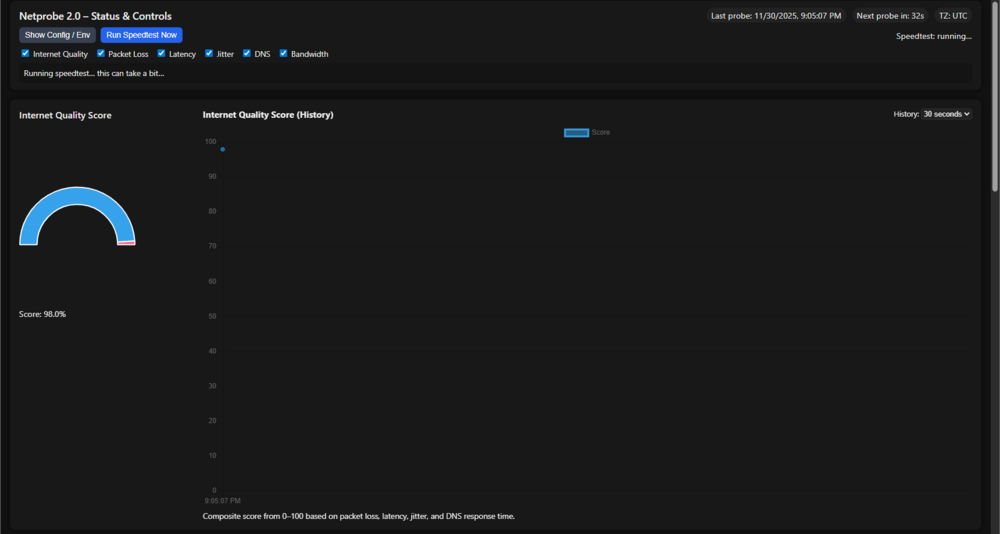
I've decided to rebuild somthign for a project... Since gfrafan has moved to a different direction and with bitanmi company back ends chagnes(no redis)... esental this needs 3 components... 1 grafan to display the data. 2 a database (I wil use postgress) to hold the dat) I don't like promethus.... 3 a docker to run the tests and colet and store the data -the comands and script that run to colect the dns response times the latecny etc... https://github.com/bmartino1/NetProbe_Python WIP... Bare Bones ATM lots to rebuild and think.. Similar to other muti docker stacks I may add to CA latter... with a all in one docker done I will now add this to the CA...
-
What I really what is the kernel files to build against... If I run a slack Linux VM or use ich777 docker I have no way to transfer or translate the files on unraid... The issue is getting or keeping kernel build files. That what's stoped me from running the Nvidia run file...
-
Vgpu unlock is a proof of concept only...vgpu unlock is not required... And yes there is a licensing in the hyper v and per VM...
-
I've found that the unraid log will show this when a docker will stop or start a continers if your getting log spam this tells me that a docker is constaly crashing and not running...
-
bump... maybee this could be a plugin ...
-
simlar to the smb extra. I would like the abilty to edit adn mange unraids avahi config. especaly whith vlnas I would want reflt option on to go over the vlans! https://forums.unraid.net/topic/183175-support-bmartino1-avahi/#findComment-1514223
-
... bump: https://forums.unraid.net/topic/195204-unraid-virtualized-nvidia-vgpu-guest-driver/?&do=getLastComment
-
to be clear I want a docker option to stop the creation of unriads control and use over creating the custom br0 network... i would rather have preserve user defined and let teh user defiune them!!!
-
testparm
-
bind and unbind require a full OS reboot. you may have somthign else running preventing or adding a blacklist of the i915 driver at this time..
-
no thats part of the probelm bind removes form host so the docker will never see it... daig didn't show a bind before.. you would bind if you were passing that into a vm for only the vm.
-
i'd do both per simons modprobe. Depends on which one you want to use. this is more a issues with UHD and intel upstream driver in the kerneal. per the transocde for that hardware: so in the modprobe file you should see xe and i915 with the option text...

-
no, may things use fastcgi. this telms me you have a script, task or somthign runing that hit the php mzx child limit. usualy becaue somethigns ran along side somthign elses or a memeory leak. I've seen this more common with appdata backup and misconfiruation with backups as it takes a while to backup a docker... some scirpt and docker comunication require a highers fastcgi limit. thus the script to rasie the limit... I'm just warnnign that rasing the limit is not the solution you need to find the combination or use onthe server that is hitting the limit...
-
you didn't save them... text files can also be placed in the config folder modprobe folder.... be sure to hit rebuild modules: make sure the modprobe file gets saved on the flash drive for reboot: cd /boot/config/modprobe.d/

-
this is a intel i915 driver issue with unraid kernel drivers. Please install the intell i915 driver. The intel gpu top plugin... And if needed (depending on the board the beta driver...) 00:02.0 VGA compatible controller [0300]: Intel Corporation Alder Lake-S GT1 [UHD Graphics 770] [8086:4690] (rev 0c) Subsystem: Super Micro Computer Inc Device [15d9:1c48] Kernel driver in use: i915 Kernel modules: i915, xe
 unraids web ui uses poprt 443 and 80 when rungin a sytem like NPM that has its own web ui and ports 443 and 80 its best to run that on a custom br0 and give it its own lan idenity. tahts a port conflict as unraids emhttp is in use of the ports that teh docker bridge is tryign to bind too.Brandon Martino - Personal SiteGuide-DockerNetworksBrandon Martino - Personal Sitehttps://www.reddit.com/r/unRAID/comments/14zq1mz/video_guide_array_disk_conversion_to_zfs_or_other/ you in a older intel generation but that shouldn't matter. I would upgrade teh ram form 4 GB to 8 GB. 16 recommend. Unriad loads and exist in ram and when you add other docker and complex systems on top like using zfs that requires more ram and resources. unraid is more software raid I wouldn't recommend runnign disk in raid 1/0or JBOD via Bios MotherBoard. Let unraid handle the disk. Manage storage | Unraid Docs https://docs.unraid.net/unraid-os/using-unraid-to/create-virtual-machines/overview-and-system-prep/ The minimum Unraid requirements are a 64-bit CPU, at least 8 GB of RAM (4 GB for very basic use), a USB 2.0 or 3.0 flash drive (4-32 GB) with a unique GUID, and a Gigabit Ethernet connection https://forums.unraid.net/topic/119052-psa-on-sandisk-usbs/ This machine is a good cheap starter addation with unraid 7.0 Depending on disk and space a (no array setup) a single cache disk 1 TB HDD is more then enough to get started.





