bmartino1
Members
-
Joined
-
Last visited
Everything posted by bmartino1
-
yes... your gluten vpn needs the port forwards that qbit is using...
-
please post a bug report and not resurect a dead thread or take form the OP issue. While simalr the isseus as said ont eh first post appears physical given the log and may be kerneal.drvier related with known issues with realtek drivers. again, please post a bug report: https://forums.unraid.net/bug-reports/prereleases/
-
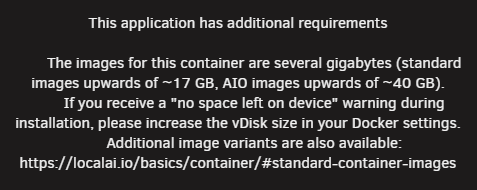
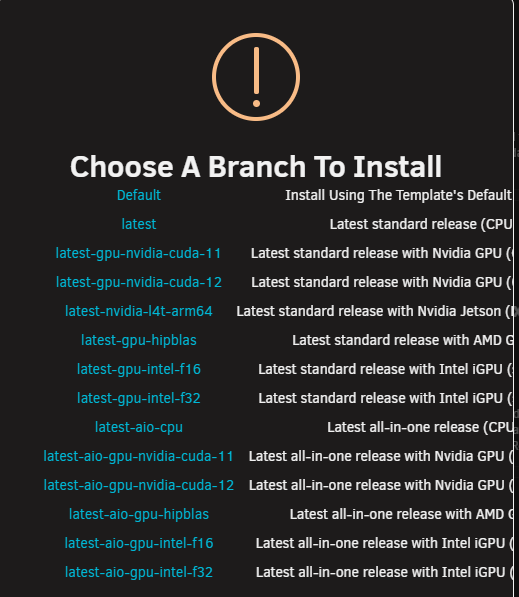
local AI docker. prepackegaes everything for use... the web UI and modles out of the box... be sure to have plenty of gcards and access. review: https://localai.io/ free modles you can use depends on Gcard and memory. a 2 Billion modle needs a min of 3 GB of graphics ram... https://localai.io/gallery.html otherwise theres alot of lxc and proxmox help scripts goin around to run olama and open web UI to run a llm on debain proxmox... https://digitalspaceport.com/how-to-setup-an-ai-server-homelab-beginners-guides-ollama-and-openwebui-on-proxmox-lxc/ ... realy depnds on what hardware you have to run xyz model and how you wnat to interact with xyz models...

-
-
unknown. depends on what runnign how its runnign and if the update script sees a docker update as we esentail are telling unraids update script to redownlad the docker. To many varbles to say each way. Make a bug report other wise... https://forums.unraid.net/bug-reports/ really depends on how urnaids update web ui script works and whats is sent to the update script. if you docker is set to lattest for example then nope your out of luck its whatever github/docker hub have marekd as lattest. if the docker is set to taht verion then only that verion will be pullled and ran through the update script... docker ps and other docker coamnds and other data that don't belong to this post would be needed as this would require other back and forth.
-
run this script. which if your afected by false Unrad CA 3rd party docker. this will fix them... If you just run a termainl docker run line then the webui is correct and its is 3rd party... there was no save template before teh upgraded process they were sitting in memory that was erased at a reboot. This is why its importat to make a new teamplate and fill in teh data to construct the docker run with unraid web ui and not just run the docker run line in unraid termainl... Nothign was saved otherwise and since it was apart of the /var docker sok run stack it was noticed and flaged as 3rd party...
-
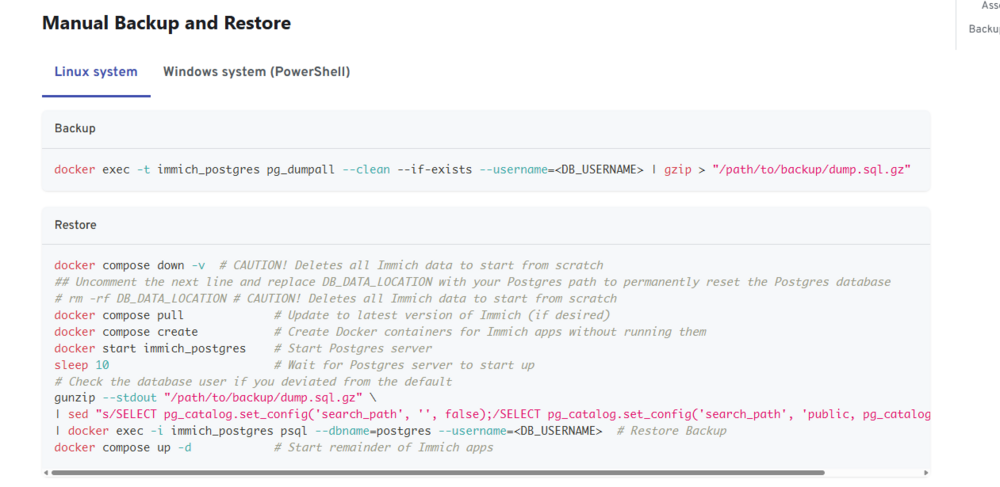
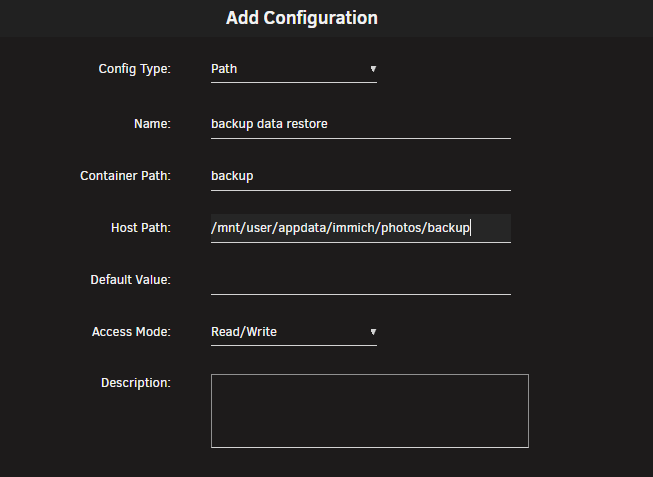
kinda. following the documentation from immich you will need some form of terminal access. First I recommend adding a data path to the docker. I will use unraid CA examples atm... so in the web UI. click the dokcer and edit the docker scrool to the very bottom and add a path link /backup to the path of your immich folder that has the Postgres restore file. *This is needed later to use the docker commands and to bring files into the secure container docker environment. This will make a /backup folder that points to the immich backup that holds the Postgres data we want to restore. so with a Postgres setup, and the docker running: you can click on the docker and go to console. This should open a terminal window as if you are at a ssh connection on the machine that is the docker. here, you need to have a path to the restore file added to the docker. example ls to see folders (*Note this Doesn't have the backup path made above... just example you should see a backup or what ever you called the container path...) it is here that you run sql and other commands to connect to postgres and run the needed commands to restore the backup... ##################################### With that out of the way... Why Kinda... So yes. You will need unraid terminal access. However, There are many ways to accomplish the same thing. As The goal here is to get access to a terminal that can connect to the Postgres database to write a sql file to replace and update the database running to restore from a backup. Other software and dockers exist that can connect to Postgres to run the sql backed up file to restore the database... So now lets review the immich documentation... Immich from command line since Postgres is a docker we use docker tools and on unraid host(we open the web terminal) we would execute something like this: docker exec -t immich_postgres pg_dumpall --clean --if-exists --username=<DB_USERNAME> | gzip > "/path/to/backup/dump.sql.gz" Learn more on docker execute here: Docker Documentationdocker container exechere, the command is ran to dump the current Postgres database in a docker named immich_postgress. pg_dump is the Postgres command to dump the database to a text file. Now the other half... if gzip the linux application is installed as database can grow big. it will attempt to compress and make the sql file smaller. *last i checked, gzip is not a default unraid package and thus ignored the command will fail... you will have a sql file on unrad wher you ran the docker exe command.... However, You can use other tools as well to extract the zip file to get the sql file you need to restore... or compress. so from the documentation ocne you have the sql file we can then use terminal commands to restore docker exec -i immich_postgres psql --dbname=postgres --username=<DB_USERNAME> # Restore Backup this restores the sql file to a database named postgres. as again many ways to accomplish it.. Postgres's comands https://www.youtube.com/watch?v=5kPFhTqlRIE https://www.youtube.com/watch?v=QcZHk70CK0o and as some what explained here in documentation: as you will need to get a blank postgress database working with the correct database name and user credential and then run a restore command to get your old sql file on the new Postgres. Then use the data folder and same docker image in the compose file to reuse your restore. we can also take a look at Postgres admin docker called pgadmin4 https://hub.docker.com/r/dpage/pgadmin4/ if your not comfortable running terminal commands. or other 3rd party applicaiton antraes for example https://antares-sql.app/ that can connect to portgres for use to run the sql file...




-
see guides post for CA and Compose Docker Guides: Immich Docker-compose Setup Immich Unraid-Template in the CA Please ask questions here. looks like you went Compose route... you will need to install the unraid CA Postgres docker and restore your previous postgress database. then update immich to the docker appdata path for immich. *once you restore the database, the previous immich passord will be needed to connect to the database... SO, essential install the immich postgress docker I made in the CA. Run your tools and commands to restore your postgress. stop the CA docker and add your compose file editing the path to reuse the CA docker data... -You are responsible for your own data!
-
FYI: -You are responsible for your own data! you may need to delete your old the Postgres appdata as it appears your immich docker password is not the same password that is the appdata folders configurations. Postgress is a set once at first start. once the dabase is inatlized if you edit the template and change the password it will not update the password. -You will then need to use pgadmin or other sql connection and run sql comands to cahge the passowrd. OR delete the postgress database and let postgress recreate by deleting the previous data... if you restored a previous Postgres database it will use the old restored database password... just because you uninstall the docker done't mean the docker data that docker used is uninstalled.
-
see guides post for CA and Compose Docker Guides: Immich Docker-compose Setup Immich Unraid-Template in the CA
-
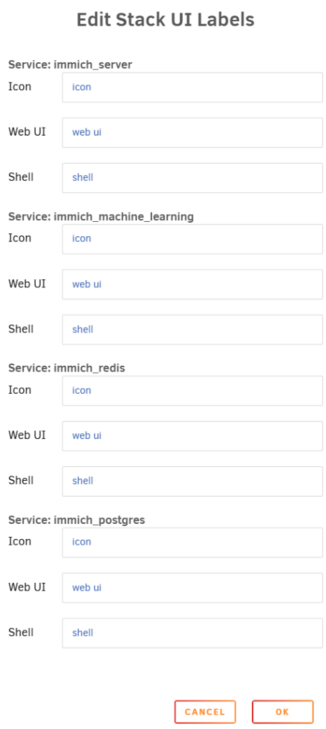
also if you manual edit the stack UI it will override the compose file info. or have the compose file fill it once then edit the compose file... it will not update form the compose as ui labels hav been filled. ther is no relaod and update you must clear or edit the UI Labels manualy at that point... Double check that you are using the compose file to fill in once otherwise you need to empty the UI labels. and edit the comspe and save again to repopulate...
-
if the dns fails to access the web link you need to make a file location local and specify the unraid host file access to the png file. I have yet to have a issues using compose and the label sytem to add additional docker metata data to the web ui. Example Of What I use in my compose for unraid docker web UI intergration. the icon can be a local path of /mnt/user/appdata/icons/name.png and still work... I can only asume at time of refresh the png file was not accessible... labels: net.unraid.docker.icon: 'https://raw.githubusercontent.com/imagegenius/templates/main/unraid/img/immich.png' net.unraid.docker.webui: http://[IP]:[PORT:2283] folder.view: immich net.unraid.docker.managed: 'composeman'
-
it is recomned to run HA as a VM on unraid and not use the dockers. Home Assistant CommunityInstall Home Assistant as a VM on UnraidThe video version of this tutorial can be found here: install Home Assistant as a VM on Unraid. Step 1: Get qcow2 image Go to https://github.com/home-assistant/operating-system/releases/ and get thein the docker you will need to open your appdata config and transition the yaml config and setting accordingly.
-
Unless you installed 3rd paty application on rasp pi that are used by scripts and configs. I believe you just need to export the home assistant yaml config file to the new device: See HA Forum:https://community.home-assistant.io/t/migrate-ha-to-new-system/166737 and redit: https://www.reddit.com/r/homeassistant/comments/z04opz/how_to_move_home_assistant_to_a_new_machine/ https://www.youtube.com/watch?v=Xcdu9i4SEks
-
see post for nerd tools and unget install here: you may require a 3rd party tool installed like 7zip or rar or rar2fs per: GitHubGitHub - shinji257/unraid_pkgsContribute to shinji257/unraid_pkgs development by creating an account on GitHub. Then use Unraid web terminal or user script plugin to run a temrinal comand to unzip the rar file.
-
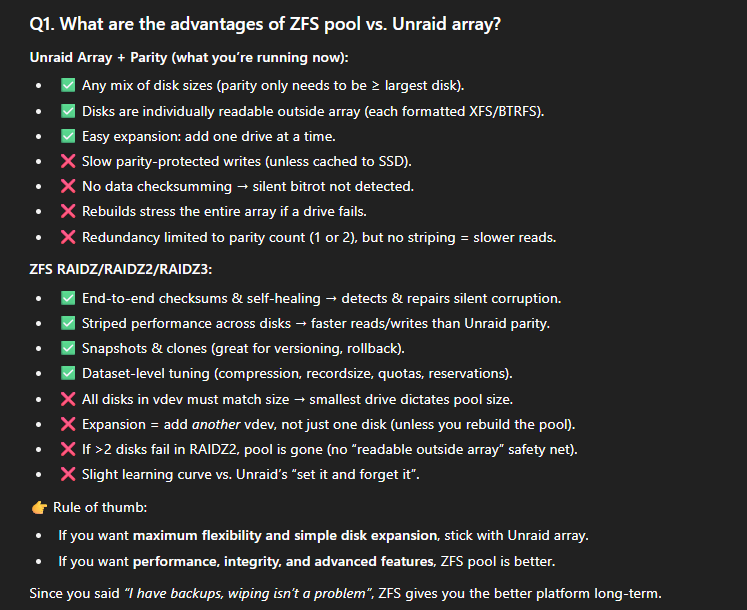
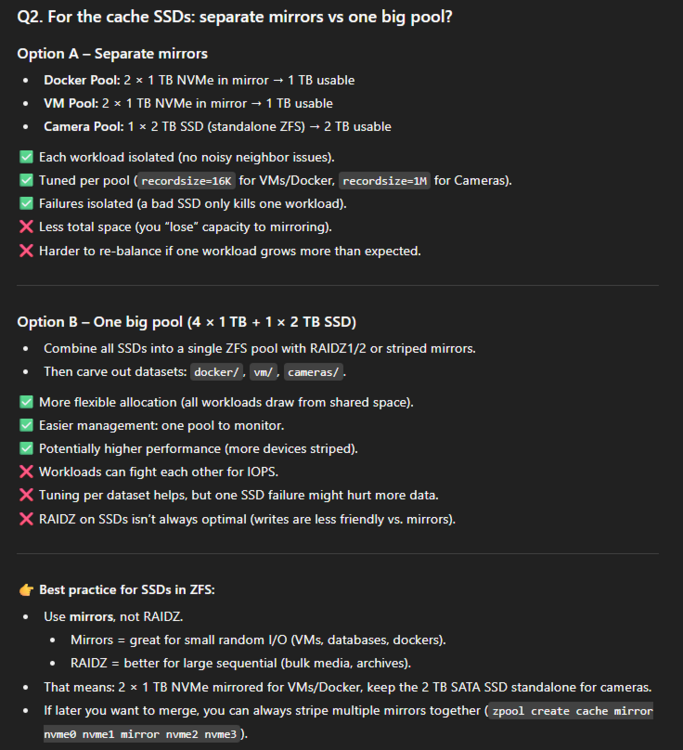
good questions. you need a min of 3 disks for a raid z1 and 5 for a raid z2. this is due to how many disk can fail and still ahve the storage and capacity for data. I'm going to use AI to help answer this with some summary. Q3. So what’s the recommended structure? HDDs (20 TB × 5): ZFS RAIDZ2 → main media pool (~52–54 TiB). Cache – Docker: 2 × 1 TB NVMe mirror. Cache – VM: 2 × 1 TB NVMe mirror. Cache – Cameras: 2 TB SATA SSD (standalone). This gives you ZFS integrity + performance while still isolating workloads. Later, if you want more space/flexibility, you can migrate the two NVMe mirrors into a single striped mirror pool.
-
1. Long-Term Storage (Media, ~19 TB)Best option: Create a ZFS RAIDZ2 vdev with your 5 × 20 TB HDDs. Usable: ~52–54 TiB after parity + ZFS overhead. Great balance of redundancy (tolerates 2 disk failures) and usable space. Data integrity benefits from ZFS (checksums, self-healing). You’ll want to create ZFS datasets for each type of data (e.g., media/photos, media/music, media/videos) so you can apply compression, quotas, or snapshots independently. Configure your Unraid shares to point at the ZFS pool for long-term storage, while still leveraging the Unraid array for parity-protected “drop space” if needed during migration. 2. High-Speed / Active WorkloadsKeep your SSD/NVMe devices split by function: Cache_docker (1 TB NVMe): Dedicated for docker appdata. Use ZFS with recordsize=16K or 32K, compression enabled. Cache_vm (1 TB NVMe): Dedicated for VMs. Use ZFS with recordsize=16K, sync=always (if you want VM crash consistency, pair with a UPS). Cameras (2 TB SATA SSD): Dedicated ZFS pool for Frigate/NVR footage. Video files are sequential writes, so set recordsize=1M. Consider disabling compression here. When your 2 extra NVMEs arrive: Mirror them (RAID1) to get redundancy + speed, and either: Expand Cache_vm to a mirrored ZFS pool, or Use them as a separate high-performance pool (e.g., fast_storage) for scratch space, databases, or active projects. 3. Share StrategySet up Unraid shares so that: Active writes land on the SSD pools (docker/VMs/cameras). Media shares bypass cache and go directly to the ZFS RAIDZ2 pool. Use Mover or scripts only if you want to stage large incoming transfers on SSDs before migrating to HDDs. Otherwise, point media shares directly at the RAIDZ2 pool. 4. Migration PlanFinish merging old NAS → Unraid. Create your ZFS RAIDZ2 pool for the 20 TB disks. Move media shares from XFS array → ZFS pool. Retire/repurpose the Unraid array if desired (once you trust the ZFS pool).
-
There's nothing wrong with using the unraid array and parity. It comes down to what you want it to do and how you want to interact with it. Do you want to move to ZFS? -May require some data wiping... Some Best Practices for a ZFS only Setup: View ZFS Forum Info ZFS Unraid Docs with 5 as a pool device only no array, no unraid parity. I would recommend a raidz2 with 1 vdev. (can Lose 2 disk with no data loss) this would make a 5x 20 TB disk volume Here’s a quick, realistic estimate for a single RAIDZ2 vdev of 5 × 20 TB drives: Raw (sum of disks): ~100 TB (decimal) ≈ 90.95 TiB of Total disk space RAIDZ2 usable (N−2 disks): ~60 TB ≈ 54.57 TiB realistic space usable in zfs (striping, partiy, snapshots....) After ZFS overhead/slop (~3%): ~58.2 TB ≈ 52.9 TiB allocatable Practical “keep ≤80% full” target: ~48 TB ≈ 42–43 TiB This would be your Deep storage so shares would be setup to move things like camera data off into the zfs pool.
-
You have a corrupted database file and need to recreate the database... Please make your own general post and not hijack another...
-
As Frank said you would most likely use rsync over sftp. User script plugin to automate. I have a docker Linux server filezilla that I user script to start the docker that is automated to sync file using file zila. It's pre pointed to directly not the easiest to setup but a example. Most would use a ssu connection of some form to access the system. As Michael said other apps like u backup, sync thing and other backup docker can be setup and automated. Docker start XYZ name of backup. Still comes down to what you want it to do and how you want to interact with it. There are many ways to accomplish this.
-
@Squid you wanted to know some things if this was encountered again. My understanding that this was patched / fixed. I mad a script found at the bottom of this forum regarding similar https://forums.unraid.net/topic/182004-nchan_max_reserved_memory-errors-varlog-full-what-to-do/#findComment-1496660 please file a bug report. here https://forums.unraid.net/bug-reports/stable-releases/ As this is kinda a known issues but still not 100% reproducible. I have yet to see or hit the error personaly. however, this is a new error I haven't seen from nginx: nginx: 2025/08/28 15:20:53 [error] 18252#18252: MEMSTORE:01: force-reaping msg with refcount 1 *The Nginx error message "MEMSTORE:01: force-reaping msg with refcount 1" indicates an issue related to Nginx's internal memory management, specifically within a component or module that utilizes a memory store. Explanation of the error: MEMSTORE:01: This likely refers to a specific memory store or a particular instance of a memory management component within Nginx. The ":01" might indicate a specific type or identifier for that store. force-reaping msg: This suggests that Nginx is actively attempting to reclaim memory associated with a "message" or data structure. "Force-reaping" implies that this action is being taken due to a necessity, possibly to prevent memory exhaustion or to clean up resources that are no longer properly referenced. with refcount 1: This is a crucial part of the error. "Refcount" (reference count) indicates how many pointers or references currently point to a particular piece of data in memory. A refcount of 1 means that only one entity is currently referencing this data. When Nginx is "force-reaping" a message with a refcount of 1, it implies that the data should ideally have been deallocated or handled by the single entity referencing it, but for some reason, Nginx is stepping in to forcibly reclaim the memory. Possible Causes: This error often points to: Memory Leak or Improper Resource Deallocation: A module or process within Nginx might be failing to properly release memory or deallocate resources when they are no longer needed. Module-Specific Issues: If you are using third-party Nginx modules, the issue could be within one of those modules, particularly if it's handling data or messages in a way that leads to orphaned memory or incorrect reference counting. Race Conditions or Concurrency Issues: In highly concurrent environments, race conditions could lead to situations where a reference count is not correctly decremented, or memory is not released at the appropriate time. Configuration Errors: While less common for this specific error, misconfigurations related to memory limits or specific module settings could indirectly contribute to memory management issues. My First thought is out of Physical Ram. so Page file / other data is needed. ?runnign any user scirpt or editing nginx on the host?
-
I'm not familiar with Mullvad VPN nor unraids default web UI for its WireGuard VPN and can only point you to unraid WireGuard documentation... https://unraid.net/blog/unraid-server-to-server-backups-with-rsync-and-wireguard?srsltid=AfmBOopLcU22z8MqJ3LXdItAT3Z-K4XxhD5RPDGsEaGg7USXlKwnwDdW However, I know its possible and have similar using the unraid tailscale plugin and using tailscale at the host as the main VPN to connect too. This way tails scale setup and using a subnet route... You can make a tailscale vpn connect back to the unraid system and connect to tailscale to access as if it were on your lan... TailscaleSubnet routers · Tailscale DocsUse subnet routers to give devices outside your local network access to services within specific subnets. Extend your private network with Tailscale.
-
https://unraid.net/blog/unraid-server-to-server-backups-with-rsync-and-wireguard?srsltid=AfmBOopLcU22z8MqJ3LXdItAT3Z-K4XxhD5RPDGsEaGg7USXlKwnwDdW spaceinvader zfs backup script https://github.com/SpaceinvaderOne/Unraid_ZFS_Dataset_Snapshot_and_Replications https://github.com/SpaceinvaderOne/backup_server_scripts looking for mgutt script as there is a post somewhere on the forum that goes over this as well
-
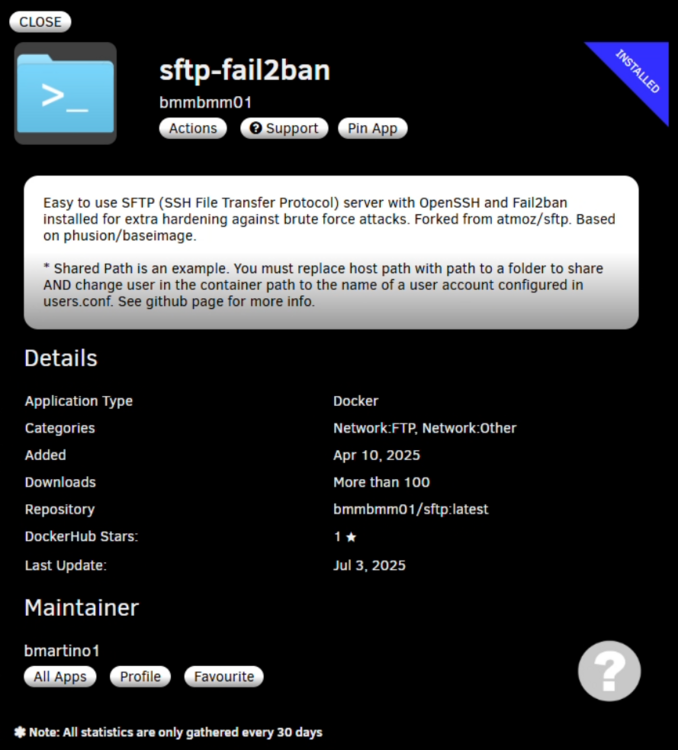
I would recommend a file transfer ring network using sftp. It really depends on the file type, confirmation and what you're tying to back up and send. Yes a VPN is similar and can be used to act as if his severe is on the network and right next to your PC. (albite a bit more complicated than that) I do a ring network of the sftp docker and filezilla (docker/windows over samba share) to move file between our systems. There a few plugins and apps that exist in the CA as well that can help you here. Like the appdata backup plugin to back up the unraid flash drive and docker configurations and data. Even a rsync/rclone other docker solutions such as syncthing. But I personally am a fan of the sftp filezilla SSH connect and share. I've even update and made a docker for this that includes Fail2ban. You can even use tail scale or WireGuard to make and self-host a inner communicated internet network for secure access to send and receive... It comes down to what you want it to do and how you want to interact with it. Since I'm mainly dealing with large files for data I thought it best to use the actual FTP for a proper protocol systems to interact between the 2 machines and have scripts using zfs to zfs send, snapshot and monitor the data. I edit unraids samba to force and set certain file permission as I run a windows VM out of the unraid system. I would first recommend making and having a share setup as a staging area.
-
as this is simlar to watch tower. you run the auto heal dokcer. that will restart a docker is its unhealthy Idelay the master check auto hela docker run and is set to use the label any docker you want to have auto heal gets a new environment variable -e AUTOHEAL_CONTAINER_LABEL=true so whats the issue? how to add to unraid in gerneral? or how to use with a exisitng docker / application stack? as unraid has simalr default options to killl and stop a docker non functional and simalr things can be scripted and used with portainer and proper healthcheck where the docker doesn't kill but internal services restart. esentail you have to ask what make the dockeer unhealthy. and whne does it need to restart. Helath check can be mis represneted and fail marking a docker as unhealthy. that doen't mean a restart will fix the issue...