






bmartino1
Members
-
Joined
-
Last visited
Everything posted by bmartino1
-
I would need the output of the log to help verify and where you may need to look to correct and fix. Since you went compose, I would recommend using the edited one I mad and fix volume pathing in the compose to correlate to your data dirrctoeis. If you didn't delete the postgress appdata folder for reinstall the previous database may be causing issues.
-
on unraid there are 2 way to install and setup immich. I have 2 guides written for this. The Compose Method: and the Unriad Template CA Method. https://forums.unraid.net/topic/190531-guide-immich-docker-setup-unraid-ca Additional support can be found here: also the unriad immich docker CA template support thread is located here: https://forums.unraid.net/topic/146106-immich-docker-self-hosted-google-photos-setup
-
"Error: connect ECONNREFUSED 192.168.1.112:5432 at TCPConnectWrap.afterConnect [as oncomplete] (node:net:1636:16) { errno: -111, code: 'ECONNREFUSED', syscall: 'connect', address: '192.168.1.112', " Usualy point to an issue and a inabilty to communicate to the postgres docker.
-
on unraid there are 2 way to install and setup immich. I have 2 guides written for this. The Compose Method: and the Unriad Template CA Method. https://forums.unraid.net/topic/190531-guide-immich-docker-setup-unraid-ca Additional support can be found here: also the unriad immich docker CA template support thread is located here: https://forums.unraid.net/topic/146106-immich-docker-self-hosted-google-photos-setup
-
yes high temps can cause ram modules to fail. The Borg (A unraid machine I check in for a fridned from time to time...) was running some old hardware with a AMD Operon... This machine had problems being in the top of our server rack due to heat. after known heat issues with this system, As in our sumers for 3 years as the heat issues got worse over time... due to other issues more with direct sunlight problems in the home/rack placment... eventual the heat kiled the ram modules. As, It takes a lot to kill ram modules theses days. Even if its having issues it will still atampt to function and do things. as long as memory live test a unraid plugin is function and the system is staying cool... I don't see a issues with running the current hardware as is. We eventually added additional fan cooling / heatsincson ram for its replacment. I would still strongly recomend a reboot to clear MCE events. as this would reload unrad back into Ram. Other than that it more alerts if temps (Usually HD) getting to a certain temp and telling it to sleep / shutdown to protect hardware. Some hardware have temp controls and will auto shutdown due to high heat to protect hardware. Silicone lottery. IF heats your culprit watch temps and pontental add additional cooling around the dims of the motherboard. adational memroy cooling fans may benefit you hear: example: https://a.co/d/eepcPZX
-
this sounds like something in the ldconfig failed with the disk... https://linux.die.net/man/8/ldconfig was encryption setup or used on the disk previously?
-
No not other data is needed atm, Your seem to be back in a stable networking setup. If you encounter an error let us know, we will glady assist where we can. I assume you were testing Vlans or some form of network separation. Now that you at least know and have a configuration that is stable and you can revert / default back too. More on adding and setting up vlans. https://www.youtube.com/watch?v=9Ta9e09KyYw https://www.youtube.com/watch?v=0xk7LsWwp2I and network docker isolation: https://www.youtube.com/watch?v=LyeywgTOxHk
-
If memetest is passing then its not the cpu memory controler / ram hardware its software... For some reason... forum downloads apear to be broken for me... would lik to have taken a look at your diag file... If plex is happen befre the seg faults if could be a memory overflow issue... it where you mount your config folder.. Plex config = /mnt/user/appdata/plex... / config /Library/Application Support/Plex Media Server/Codecs stop the plex docker and delete the contents of this folder. Plex will redownload the codecs again when needed. start plex usualy the code folder is tied to GPU transcode and needs flushed with chagne of hardware as teh codec for the hardware that was downloaded is not the same file sand codec for another...
-
Some helpfull tools https://www.composerize.com/ https://www.decomposerize.com/ as the CA Docker Template helps construct the docker run line. I'd advise a new post for a potential docker project be made. https://forums.unraid.net/topic/114415-plugin-docker-compose-manager/
-
run dcoker compose plugin and dcokr compose file: https://github.com/tphakala/birdnet-go/blob/main/Docker/docker-compose.yml I have no problem make CA Docker templates of 1 application if you can find me a compose file like so. Its usauly when a applciaiotn requires mutiple dockers then I'm out. it can be chalenging and problematic to add a stack and with recent isseus with others That I'm suporting I want nothign to do with muti docekr stacks Unless its Compose only... This one seems more resonalbe form the last year / lattest month review this thread... services: birdnet-go: image: ghcr.io/tphakala/birdnet-go:nightly container_name: birdnet-go restart: unless-stopped ports: - "${WEB_PORT:-8080}:8080" environment: - TZ=${TZ:-UTC} - BIRDNET_UID=${BIRDNET_UID:-1000} - BIRDNET_GID=${BIRDNET_GID:-1000} # Optional: uncomment to configure via environment variables # - BIRDNET_LOCALE=en-us # - BIRDNET_LATITUDE=60.192059 # - BIRDNET_LONGITUDE=24.945831 # - BIRDNET_SENSITIVITY=1.0 # - BIRDNET_OVERLAP=1.5 volumes: - ./config:/config - ./data:/data # Mount HLS stream segment files directory as tmpfs (RAM disk) tmpfs: - /config/hls:exec,size=50M,uid=${BIRDNET_UID:-1000},gid=${BIRDNET_GID:-1000},mode=0755 # For ALSA audio input (sound card) devices: - /dev/snd:/dev/snd # Add any host mappings needed extra_hosts: - "host.docker.internal:host-gateway" My Issues is maintaining dockers / templates. a Single porject / Docker that can easily be turned into a template. but without someone willing to test as it more explaing how to make your own CA tempaltes or run your own docker compose files under unriad.. alot of theses woruld require back and forth and 1 on 1 consulataion... As Me jsut copying the Compose to a CA tempalte is not the same as that docekr working or running once Unraid sees it. and sicne I ahve no need or want of the application its harder to stay focsded on bug and fixes and edits to fix... I would honely sugest users look into docker compose and the plugin support forum...
-
?why not use calibre? https://github.com/stumpapp/stump/tree/main/docker https://www.stumpapp.dev/installation/docker What I'm realy seeing here is alot of github pages that have dockers and docekr affilations with compose. not all compose options equate nciely to a CA unraid template. GrtGoblin and otehr take docker request seing as this started and dated back form 2014 to OG forum. A lot of theses would be better as there own seperate post.
-
https://github.com/GeiserX/genieacs-docker https://genieacs.com/docs/ https://forum.genieacs.com/t/genieacs-docker-install/2211 sicne a docker compose exisit why not run the compose plugin and add teh compose file to unraid? https://github.com/GeiserX/genieacs-docker/blob/master/docker-compose.yml
-
ich777 usualy has teh game servers... This is acomplised via steamcmd SCUM steam CMD https://steamdb.info/app/3792580/ Most would run steamcmd in a debian LXC. @ich777 thoughts on another steam game server https://docs.google.com/document/d/1y3zrrNbyEIw_TB2SsQ6clKBZVxIzpV4h-1z8EpUgPAQ/preview?tab=t.0#heading=h.ulattif5w9wv
-
I think this already exists as: most porject pages have a docker compose any more... Compe plugin will facialte this While its not hard to make a unraid CA Template. IT more on maintain and generating the config. or use Docker Compose services: iplayarr: image: "nikorag/iplayarr:latest" container_name: "iplayarr" environment: - "API_KEY=1234" - "DOWNLOAD_DIR=/mnt/media/iplayarr/incomplete" - "COMPLETE_DIR=/mnt/media/iplayarr/complete" - "PUID=1000" - "PGID=1000" ports: - "4404:4404" volumes: - "/mnt/media:/mnt/media" - "./cache:/data" - "./config:/config"

-
I'm on C-gnat Fiber these days.. using a fiber media convertor to ethernet for a modem that conect to ubquity hardware. Paying for a static IPv4. I then I use unifi curently a UCG: https://store.ui.com/us/en/products/ucg-ultra as its a esentail a debain linux box running networking software in guise as netorking equipment. with ssh terminal access I can run scirpt and patch / run other stuff (even though Unbquity frowns about it).. the main CVE Is usualy with mongdb and thing that unifi doesn't update there unifi software stack as often as they should. Debain unattend updates application for security only and soem side stuff onthe unifi forum... At one time I did run pfsense, ipfire, openwrt, opensense, even a machien with bare OS ubuntu/debain with networking coamnds. Some name brads I have run int he past have been Firewalla, netgear, linksys, asus, intel mini PC.. all of them have pros/cons but all of them failed. Unfi while it has some problems hasn't broken or been an attack vector for me for soem time. Also due to my ISP work this is what we ran and setup so i'm more comfortable with arm hardware form unifi. But i'm more into enterprse equipment. Frebsd has some of the best networkign tools and dev on the platform. but the OS itself refused to acept and handle base CVE at the OS Level Even rungin mitigate and check softwre it fails making them an atack vecotr and since frebsd(Pfsens) once in has all my router and networking info... Don't get me wrong unfi has some backdoor and problems too, I just haven't been hit and protected with unfi equimpent then I have with other platforms. The only otehr Great linux box router I used and trusted was IPfire whcih is based of freebsd and ipcop ... ipcop is long dead and ipfire is compiled and written form scratch linux. but some settings I'm do like for dhcp options and other ipfire has killed in lattest os updates under teh guies of security. Depends on your risk factor what you want it to do and how you wnat ti interact with it. pfsense isn't bad I just dont' trust the underling OS I would have you look at https://www.ipfire.org/
-
run mem test. this looks like memory contoelr issues on the CPU hopefuly just early signs of ram failure. segfaults are in ram / memory
-
You will most likly have to hevaily eidt things on both devices. as this is local PRT as it is in a "trusted" lan and thus pfsense has 0 need to run encrypted traffic to the local lan network. Pfsense setups: Secure DNS: https://www.youtube.com/watch?v=8VRk38h33TY&pp=ygUHI3BzZW5zZQ%3D%3D Dnssec - TLS https://www.youtube.com/watch?v=Z3-E90VEIbY https://docs.netgate.com/pfsense/en/latest/recipes/dns-over-tls.html Here's how to configure DNS over TLS on pfSense: 1. Disable DNS Forwarder and Enable DNS Resolver: Navigate to Services > DNS Forwarder and disable the DNS Forwarder service. Only one DNS service can listen on port 53 at a time, according to pfSense documentation. Navigate to Services > DNS Resolver and enable the DNS Resolver service. 2. Configure DNS Resolver Settings: Network Interfaces: Choose the interfaces where the DNS Resolver will listen for queries. Typically, you'll select LAN and any other internal networks. Outgoing Network Interfaces: Select the interface(s) that connect to the internet (usually the WAN interface). Enable Forwarding Mode: Check this option to forward queries to external DNS servers. Use SSL/TLS for outgoing DNS Queries to Forwarding Servers: Check this option to enable DNS over TLS. Enable DNSSEC Support: Disable this initially if you plan to use a forwarding server that doesn't support it, says a Medium article. Advanced Settings: Enable Prefetch Support, Prefetch DNS Key Support, and Harden DNSSEC Data on the Advanced tab. 3. Configure DNS Servers: Go to System > General Setup. In the DNS Server Settings section, you can choose to use the DNS Resolver or Forwarder on the firewall, or specify external DNS servers. If you are using a specific DNS provider (like Cloudflare or Google), enter their IP addresses (e.g., 1.1.1.1 and 1.0.0.1 for Cloudflare). Uncheck Allow DNS server list to be overridden by DHCP/PPP on WAN to prevent external devices from changing the DNS settings. Uncheck Do not use the DNS Forwarder/DNS Resolver as a DNS server for the firewall if you want the firewall to resolve its own hostnames internally. 4. Apply Changes: Click Save on the DNS Resolver configuration page. Click Apply Changes on the General Setup page. 5. Test your configuration: Use Diagnostics > DNS Lookup to test if DNS resolution is working correctly. Use Diagnostics > Packet Capture to verify that DNS queries are being sent over port 853 (for TLS). You can also check for states using port 853 in Status > System Logs > Firewal Then you can edit lan systems to use tls encrypted dns... as You're observing Unraid using port 53 (unencrypted DNS) instead of secure DNS over TLS (port 853) or DNS over HTTPS (DoH). This behavior is expected unless you explicitly configure your network (specifically your pfSense router) to force DNS encryption. Many way to go about it honestly. and is more dictated on what your using for upstream dns servers. ?cloud flare 1.1.1.1 ?unbound/stubby as we can also Block and/or redirect unencrypted DNS port 53 on the LAN... 2. Block Unencrypted DNS (Port 53) on LANTo prevent any device from using port 53 DNS, create firewall rules: Steps:Go to Firewall > Rules > LAN Add a new rule at the top: Action: Block Protocol: TCP/UDP Destination Port: 53 Destination: Any Description: Block Port 53 DNS Apply Changes 3. Redirect Port 53 to 127.0.0.1:853 (optional)You can optionally redirect port 53 traffic to pfSense (to catch devices that hardcode 8.8.8.8 etc.): Go to Firewall > NAT > Port Forward Add a new rule: Interface: LAN Protocol: TCP/UDP Destination: ! LAN net Destination Port: 53 Redirect target IP: 127.0.0.1 Redirect target Port: 853 Description: Redirect DNS to pfSense DoT Its been awhile since I messed with pfsense... Left due to issues with freebsd. ITs not a secure OS and I don't wnat a unsecure OS being the head of my network... Attack vector risk is too hight for me ... Simlar with opensense... Better asked on the pfsense forum as this is more on hwo to edit pfsesne setting to enfroce encrypted dns
-
I'm so used to having a debain client to test soem of theses most linux coamnds may not be compatiable with slackware unraid without a 3rd party install... netstat -tunlp | grep :53 netstat: A utility for displaying network connections, routing tables, interface statistics, masquerade connections, and multicast memberships. -t: Displays TCP connections. -u: Displays UDP connections. -n: Displays numerical addresses and port numbers instead of trying to determine hostnames and service names (speeds up the output). -l: Lists only listening sockets. -p: Displays the Process ID (PID) and the name of the program that owns the socket. |: Pipes the output of netstat to the next command. grep :53: Filters the output to show only lines containing ":53" (the DNS port number). Should work on unraid. see if the other 853,784 ports exisit and have listening address.
-
Form my testing UNraid dns never was encrypted unless you setup dockers and other systems... As port 53 is the default dns port yes... if you have and use dns encrypt and other than it will use the other ports.. *Would requires other 3rd party dns servers running... (Unraid is not networking equipment) Standard Linux network setup and internal routing will still go over port UDP 53 per the /etc/resolv.conf Unraid doesn't run nor uses encrypted dot/doh dns systems... Per some examples from Adguard Home for IANNA / IEEE Port Standards Here's a breakdown of the key ports: 53/UDP: Standard DNS port used by clients to query the AdGuard Home DNS server and any linux server to handled DNS. 853/TCP: Used for DNS-over-TLS (DoT) connections. 443/TCP: Used for DNS-over-HTTPS (DoH) connections. 784/UDP: Used for DNS-over-QUIC. 67/68: Used for DHCP if AdGuard Home is also acting as a DHCP server or any dhcp service. This is often why others run pihole / adguard on unraid. Theses would be the ports I'd look for as listening address on the system if it has and is using dns encryption.
-
Resizer was before my time on unraid. this is what I have/know: Most are refered here with these questions. https://docs.unraid.net/unraid-os/manual/storage-management/#converting-to-a-new-file-system-type This is the second time I've tried to access a download from the forum and it fail...

-
ok that would make sense and yes bond is recomend in that situation. as previous though ther is mutiple configuration networking that needs setup to acomidate this. Correct unraid webUI will only affect br0 and eth0 depengin on settings. more on how you direct bridgin and waht interfaes are llistening to hte br0 as teh defualt docker shim bridge is set to target br0 it more telling what is br0 assocatied with However we have liunx commadns taht can make and edit ad bridges as noted with the script above to change the ip address of the shim bridge. if postgress is functional and immgich web ui is working / postgress is not disconecting then we can now proced with network layout and configurations. as you have 10 GB and a 4port nic what interfcae is conected to what and how do you want them to connect to your network. what do you want it to do and how do you want to interact with it.
-
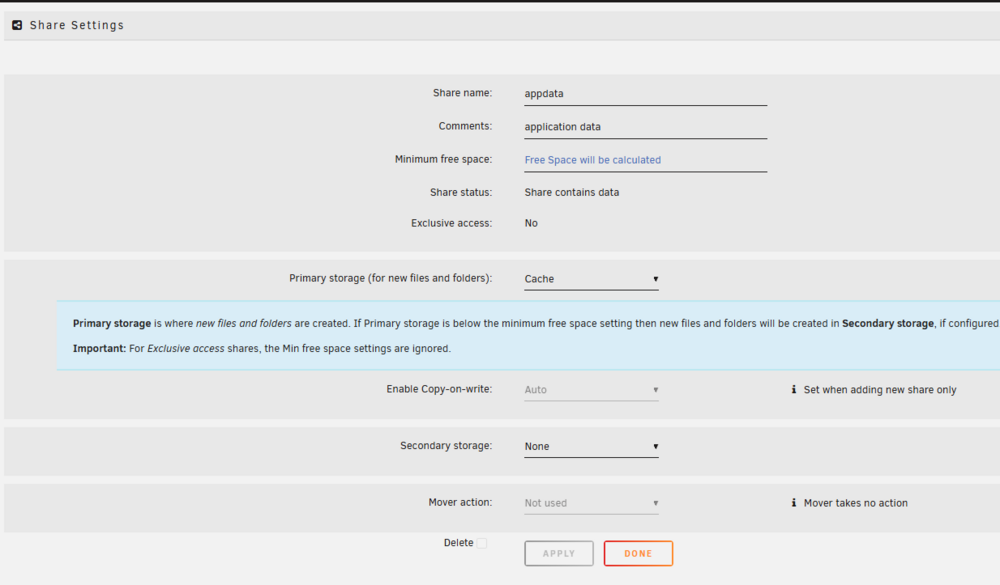
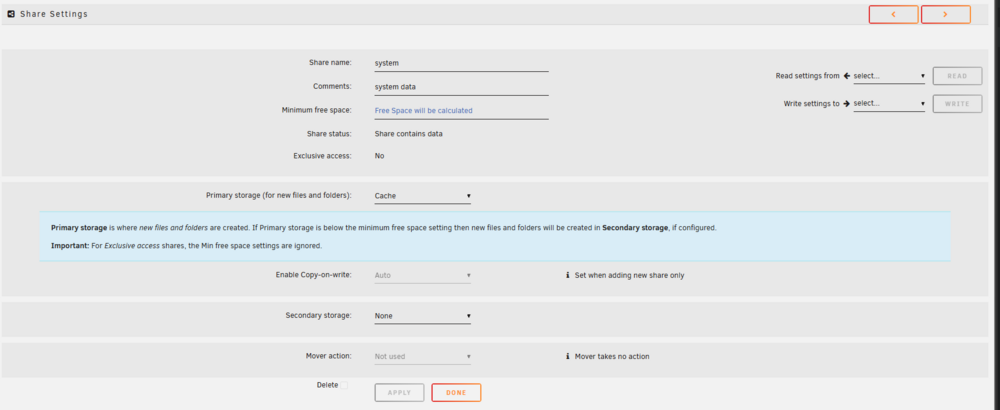
also make sure the docekr vdisk file is stored corretly. usualy the system share: as it should only be set to primary and only set to 1 disk.
-
reboot unraid and verify that docekr is running... cd /etc/rc.d/ root@Tower:/etc/rc.d# ls rc.0@ rc.apcupsd* rc.crond* rc.inetd* rc.local_shutdown* rc.ntpd* rc.serial* rc.wireguard* rc.4* rc.atd* rc.dnsmasq rc.ip_forward* rc.loop* rc.openldap rc.setterm* rc.wireless* rc.4.local* rc.avahidaemon* rc.docker* rc.kadmind rc.mcelog* rc.php-fpm* rc.smartd rc.wsdd2* rc.6* rc.avahidnsconfd* rc.elogind* rc.keymap* rc.messagebus* rc.ptpd* rc.sshd* rc0.d@ rc.K* rc.bind rc.flash_backup* rc.kpropd rc.modules* rc.rpc* rc.swapfile@ rc6.d/ rc.M* rc.cgconfig rc.font rc.krb5kdc rc.modules.local* rc.rsyslogd* rc.sysstat rc.S* rc.cgred rc.inet1* rc.library.source rc.mysqld rc.runlog rc.sysvinit* rc.S.cont* rc.cgroup2unraid* rc.inet1.conf rc.libvirt* rc.nfsd* rc.samba* rc.udev* rc.acpid* rc.cpufreq* rc.inet2* rc.local* rc.nginx* rc.saslauthd rc.unraid-api* root@Tower:/etc/rc.d# ./rc.docker status if you have something else running, a go script/user script?, other docker or side applicaiton then thats what failed... -You can disable the netowkr change for testing as this can cause the docker system to stop if your not corret at touching the corect interface... as this will fix shim bridge... woudl need ip a to see what interfaces chagned adn configmred.... I Curently need and would like you to cd into /etc/rc.d folder as this is all of unraid servce sripts... and verify that docker is indeed running ./rc.docker restart ./rc.docker stop ./rc.docker start and then post a unraid diag file. as the instruction above are explicit and don't result in unraid borken nor docker error, unless you fubar your docker xfs storage at disk creation... another reboot may alos be needed as soem setting wont' load corectly after edits... As syslog would have more information here to what failed where. as what we did: we removed the old docker database (removed docker networkis...) stoped/disabled docker/VM to not interfere with settings. we killed unraid configuration to start fress a reboot and fresh start was setup we killed and delted teh vdisk file a new vidsk image was made a reboot again? script were setup not enoth info to further assist.

-
It appears If I copy a older one I can get the code box back: Example: Can we re-enable the creation of this code box? Then I Can gurantee Line Syntaxing!

-
Thank you for sharing. "Containers": { "18fb80f6b1e3307e4b181186987c95afc1f61f476daa0bd69036ccf61fd86ca9": { "Name": "GiteaSQL", "EndpointID": "cc55edf9dea1f0483ab1e36c1c55c6936699b4e1195d948587f7e3304bdddec7", "MacAddress": "", "IPv4Address": "192.168.1.250/24", "IPv6Address": "" }, "268d078be482c4d8b1f393063a826c47faaa2489a0fec97380aad333b100a2fd": { "Name": "LeantimeSQL", "EndpointID": "7cf263ee21e2779f24f6ec4d5869cd0b96cf5e82d2f10b6a515da85fda7a4f0e", "MacAddress": "", "IPv4Address": "192.168.1.6/24", "IPv6Address": ""Appears to be your mysql instances. in which both sql instances are set to a static Ip on the lan and all ports should be accessible. "Driver": "ipvlan", tells me the default unraid settings are using ipvlan thus each docker is using the same mac address. This could be causing communication issues. I recommend stopping all dockers. going to docker settings and change ipvlan to macvlan and try again. I also recomend upgradign to 7.1.4 due to some fixes to the unraid network you reported your are on UnRaid version is 7.1.2 https://docs.unraid.net/unraid-os/release-notes/7.1.4/#networking





