





Veah
Members
-
Joined
-
Last visited
Everything posted by Veah
-
My thoughts exactly. Grab the RTL8126 PCI Drivers plugin from CA.
-
Some digging looks like this Killer nic is Realtek RTL8126 chip.
-
Speculating on a future question ... Samsung Bar is a good USB stick.
-
Have you tried to disable docker? If it goes back to normal, it's one of your containers.
-
Second! I use a 12600k and it has no trouble at all transcoding for my family usage.
-
Did some searching and this is what I found. Here is BIOS settings to look at. In this post, Hoopster had a informative explanation of trying to boot legacy vs UEFI mode. The final post here was a solution for a slightly newer ASRock MB that would not boot. Hoping something useful cause I got nothing else.
-
I see Eth0 is up so that's good. Is this the address you are trying to access it on? br0 UP 192.168.0.177/24 metric 1 I noticed a different address as vibr0 that's down. virbr0 DOWN 192.168.122.1/24
-
If that's the case, I need to watch more closely. If they do it on top of CMR then I'm all in. Thanks for the legwork Frank
-
I think HAMR is still SMR. If ok with that, then sure.
-
Also a more complex trick... With some HBAs it is possible to stripe a pair of disks and have that aggregated drive show up in unRAID as a single device. Ie: hardware raid a pair of 18TB drives into a single 36TB that unRAID sees. Use that as parity. I've tested that with an adaptec 71605, I don't know if the LSI may also be capable of that while having the other ports show up like regular IT mode.
-
I would find the sweet deal i can now and buy a few of them all the same. If you find good deals later on for larger drives, just upgrade your parity drive first.
-
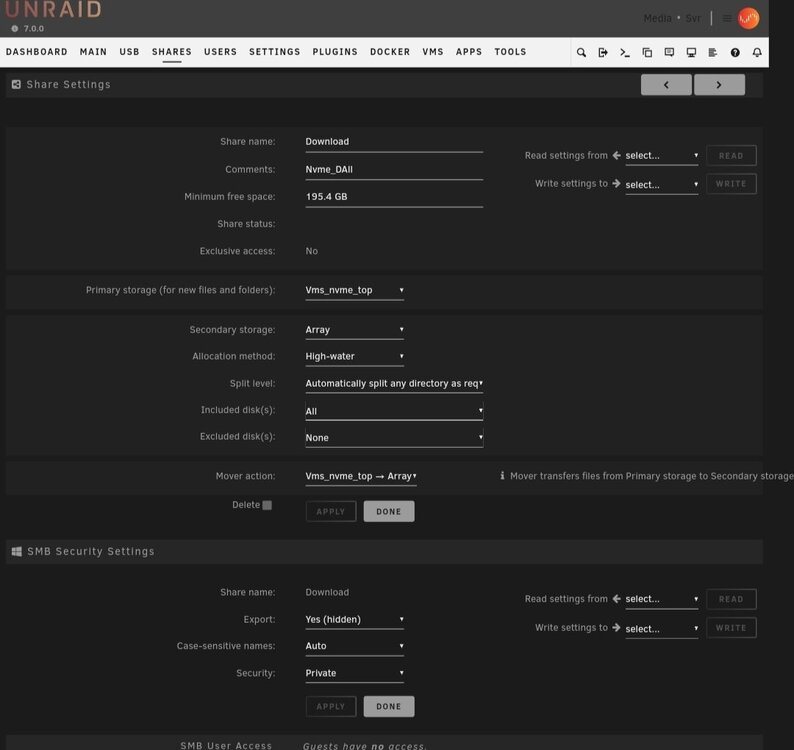
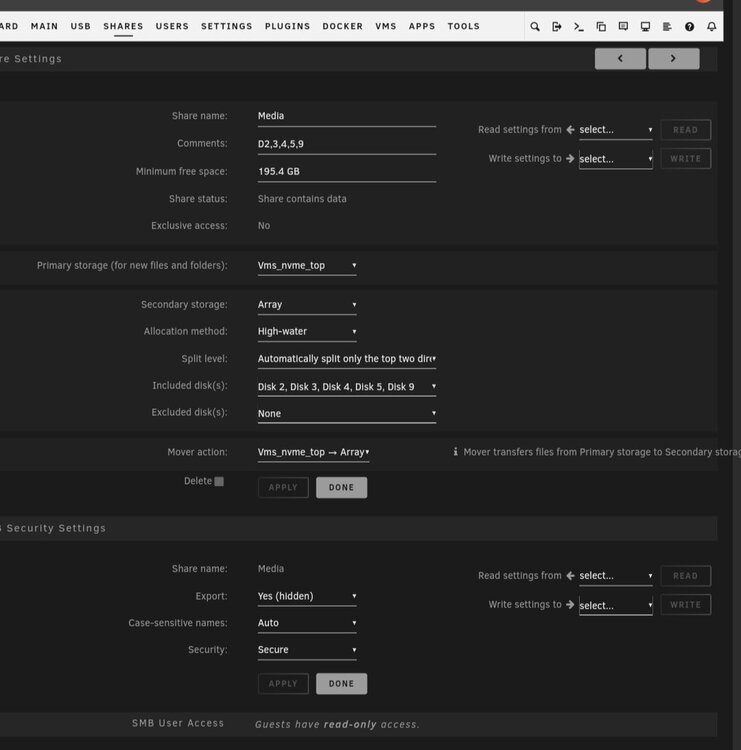
Working down. -Dual nvme is great. I use btrfs but I've read folks use zfs as well. I believe it's slower but offers lots of other options that I am not best suited to speak on. -You could put appdata and have usenet unpacking on the same drive. That's what I do. Sounds like you have another ssd you want to use anyway so either way seems valid. -I think you got your mover going backwards on the Downloads share; don't know if that's part of your loading problem. The images here are my Media and Download share settings. My nvme_top is a btrfs mirror and the array is all 18TB spinners with 1 parity. I think you can get to where you want if you try and copy those settings. Use the Download for both your Downloads and Unpacking drives. -If you are the only user, security probably won't be an issue provided you don't mess with things you don't know about. Just be sure you are not using default passwords on your home router. -Looks like a good build. Might not even need to install the quadro, I'm not sure how well that igpu transcodes. Could save a bit on power if you don't need to put it in there. Same with the lsi card. If you have enough sata available on MB, you can leave it out too. -Parity drive, it needs to be equal or larger than the rest. 16 and 18 have been good cost/TB for a while. The 20s may be getting there next. I shop in this area for now. It mostly depends how much money you want to spend. FOR PERFORMANCE... Go with CMR drives! Do not do SMR. -If course play around with left over drives as desired. Even smaller capacity ssd can host VMs which could be something to play with later on down the road.
-
For #1.. I cannot speak to a sata ssd, but a gen3x4 or higher nvme drive (in raid1) is plenty fast for my arr/nzbget suite as well as hosting all my system, appdata, isos, and domains where I run Pfsense, a Ubuntu server, and HAOS. You would be best served to utilize CPU pinning especially for your unpacking. If you let your entire CPU loose on that, you will probably feel it if using other functions like video transcoding. #2. (This is for environments with <5 simultaneous users) I watch all my somethings directly from spinners on the array. I takes maybe 20-30 seconds to spin up the drive and go. For TV show binges, use the Split Level function in Share Settings to make it so you keep all your TV series on same drive. That will eliminate disk spin up time between episodes. Suggest a pair of nvme in raid1 btrfs for the redundancy. Parity... I run it once a month still. Reading around, seems many options for once a quarter. Every week seems overkill. Users... Only give them the highest permission they need Security ... This is a rabbit hole. Here's a couple: keep your shares hidden. Don't punch a bunch of holes in your firewall. Did you have certain hardware you were leaning toward? I imagine something with an igpu would do the trick for you.
-
V7 has some pretty nice things about it. Might be a shame to write it off so quickly.
-
Have a look into the Unbalanced plugin. Edit: the Scatter function.
-
I got nothing else. Hoping to learn something now.
-
That looks about right. Try and manually move some of that data to disk 3 and see if your next iso gets downloaded right to disk 1 again. It's basically full at this point and even if you got all the settings perfect, it will not clear off D1 without some intervention.
-
This setting determines how Unraid OS will choose which disk to use when creating a new file or directory: High-water Choose the lowest numbered disk with free space still above the current high water mark. The high water mark is initialized with the size of the largest Data disk divided by 2. If no disk has free space above the current high water mark, divide the high water mark by 2 and choose again. The goal of High-water is to write as much data as possible to each disk (in order to minimize how often disks need to be spun up), while at the same time, try to keep the same amount of free space on each disk (in order to distribute data evenly across the array). Fill-up Choose the lowest numbered disk that still has free space above the current Minimum free space setting. Most-free Choose the disk that currently has the most free space. If you click on the 'Allocation method:' text, a box describing the options will pop up that explains pretty well.
-
The memory could be it. There have been issues with USB drives too. Try formatting it with Rufus and then manually copy over your unRAID files to it with specific focus on config directory. See what that yields. There are some cases with certain MB just not cooperating, but few and far between.
-
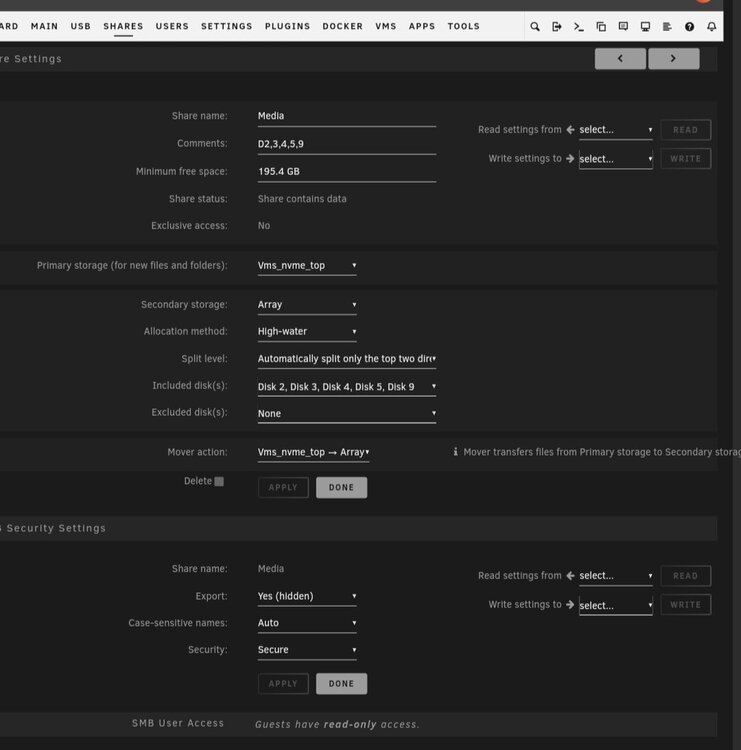
Check your share settings. Specifically look at included and excluded disks. Attached img of one of my shares for comparison.
-
Disable any quick boot type options too.
-
Looks like you did some of these already, but here goes: Disable quick boot Disable secure boot Disable TPM 2.0 Disable CSM If still no luck, try removing memory to just use 1 stick. Then swap stick.
-
Is your router connected to Internet? Can you access Internet from other PCs on same network? Try resetting your modem and then router. These could be a single device. Then reset any switch in between your router and unRAID. That may shake something loose.
-
Try 'ping 8.8.8.8' instead.
-
[Edit: remove old HDDs and install the new HDDs in original server. Turn on, array won't start, that's ok.] Use the New Config option under Tools. Read closely the checkbox options so you preserve your cache if that's what you want.




