





Veah
Members
-
Joined
-
Last visited
Everything posted by Veah
-
Fwiw, my example came from the shelf at a local Meijers store. Maybe you are just lucky.
-
Hah. Give us slowpokes a chance. An enthusiastic tortoise is still a tortoise.
-
Performed update from 7.0.1 and caught an 'Unknown pci header type '127' for device' error related to a pfsense VM. Specifically pointing at an intel i226v rev4 dual nic (first port). Could not resolve quickly and rolled back to 7.0.1 and it came back up. No interest in troubeshooting this one, more of an fyi.
-
Did a bit of digging. Looking like really no GUID on that drive. Going through (Win10) Device Manager I am able to put together the GUID on a known good USB by going to USB Controllers > USB Mass Storage Device (May have to sort through several). Go to Details tab then property select Hardware Ids. There you should the first 2 quartets looking something like this: USB\VID_####&PID_####&REV_110 Get the last half of GUID by selecting Bus relations under Property. Scroll right and you will see something like ..._DL17\################&0 None of that shows up on the Sandisk Ultra Dual Drive Go USB Type-C (128BG) Got to figure out where that number hides at least.
-
I did not. Mostly I was just assessing what I have available to choose from cause I was going to play with one of my licenses. Labeled it 'junk' for Unraid and moved a license to the next one. Then thought of this thread so shared the make/model. If there's an quick way to verify a good GUID on it, I'll give it a go and update the post.
-
I am liking the Samsung Bar line. Reliable, not wide, it IS tall on the top, and I like to believe the metal case helps a bit keeping it cool. https://www.amazon.com/Samsung-BAR-Plus-128GB-MUF-128BE3/dp/B07BPK3XWW
-
Just tried a Sandisk Ultra Dual Drive Go USB Type-C (128BG) Its one of those type A and C style. No GUID. UPC # 19659-17719
-
Does it come together if you swap the gpu to pcie slot 1? I realize it shouldn't matter...
-
Happened upon something possibly relevant here. Problems with hdr and Windows 11 24h2 update.
-
Make backup current Plex Try creating a new plex container and leave the current one offline. If test works out, restore your backup to new container. If it works, mission complete. If not, install the fresh one again and import your files as if creating from new database. Even dare a different repository, I see both binhex and linuxserver have options available.
-
Yes, Yes, it does not hurt. Making your own thread helps keep issues separate and less confusing for anyone trying to help as well as the individuals seeking it. Also ensure syslog is enabled and post your diagnostics in your new thread.
-
Swap pcie slot?
-
Could be a bad load or the USB itself. Try loading up a trial on a fresh USB and see if that boots up.
-
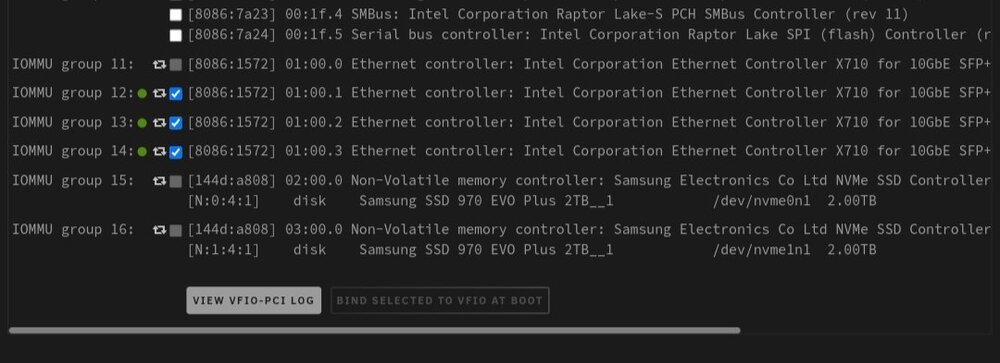
Tools > System Devices Checking a box and hitting the bind button is where you pass through devices that you could use for VMs. It requires a restart to make active. Mine looks like the attached where the 3 checked nics do not show up under my network settings, only the greyed out one does.
-
Don't need to stop while array. Just stop docker and vm in settings. If you do not need to use your onboard nics (or any other nic) you can bind them to vfio and they will stop showing up under network settings.
-
Hope it works out. If not, JorgeB is probably right about hardware.
-
Here's some bios settings to check Disable fast boot Disable secure boot Disable TPM 2.0 Disable CSM
-
I like the Samsung Bar. Have one of those and a fairly new Cruzer fit that hasn't given me any issues. Get a full size, not a small thing... this is better for heat. Spend a little extra for the name brand too. Think I saw a psa somewhere that SanDisk sticks may be prone to counterfeits, not sure what the deal is with those.
-
That sounds like a bad USB stick or port. Are you able to change either or both? Alternate shot, try reseating your memory.
-
Grab some snacks, get comfy and meet one of the unRAID legends: https://m.youtube.com/@SpaceinvaderOne
-
Looking close at the dhcp image above... I see start IP 192.168.68.5 and end IP 192.168.71.250 That 3rd octet don't match. Yep, I see it now. NM that part.
-
That should do it. Admittedly I rely on the webgui for this sort of thing myself. Should not need a reboot. Is there a cable also connectd to the usb nic?
-
No problem. Under network settings you should see your eth0 eth1 and eth2 ports. Near each, there is a button that says port down. Basically turns it off. We want to do that. Ignore the odd one.
-
In fact, just port down eth0 and see what happens.
-
Yes confusing. Eth2 shows linked at 1000Mbps Eth1 shows no link Eth0 shows confusion: Link detected: yes Speed: Unknown! Duplex: Half Auto-negotiation: off I'm not sure what to make of that. Do you have more than one cable plugged in? If so, Eth0's may be bad or not seated well.
