





Veah
Members
-
Joined
-
Last visited
Everything posted by Veah
-
Suggest posting this here.
-
Occurred to me now with v7 you don't even need to assign array anymore to start. Try that might be even better.
-
I would just load fresh and use trial. Assign your drives the same way you have in your current array. Load up a few docker containers and just test fresh. If that works out, then run a restore on that new USB.
-
Did you try loading up a trial USB? When those things start to fail it can cause all sorts of inexplicable problems.
-
More likely to be an individual container. Some have been reported to hog resources for one reason or another causing the whole system to crash.
-
Yes- There's an option in the creator to install from a backup. and Yes- you can install then copy over your config directory. Top is easier.
-
Glad it's booting now. Go back into BIOS and verify all these are settings are disabled which can cause different issues: Quick Boot, Secure Boot, TPM 2.0, and CSM. One of those may help clear up your nvme issue. And while there (in BIOS) see if it is seeing that nvme. It probably is but worth verifying while there.
-
Along with what Vr2lo suggest, look at disabling secure boot, TPM 2.0, and CSM while you are in there. Check if there is a BIOS update as well.
-
My last idea is to change DNS IP to 1.1.1.1 or 9.9.9.9 or something. Just give it an option that is not a recursive/unbound DNS like what you may be using.
-
In the image it shows network type is custom: bond0 Can you change that to read something more like custom br0 - eth0?
-
Is it by chance a Plex type program where a user could have access to delete media files?
-
Yes. Likely win a parity rebuild in the process. I have some skipped disks from the same scenario. I force myself to leave it alone and call it mental toughening.
-
What happens when you disable wireguard?
-
The USB stick is either NOT ok, or your MB is not set to boot from it. Suggest loading up a trial USB stick and see if it fires up.
-
That's the one
-
Without diagnostics someone like Jorgeb won't be able to pinpoint the actual error here so suggest getting that attached if possible. My input is to check your cables, both data and power. I've had those thin blue data cables get really finicky when being wiggled even when the sata/sas port is connected good.
-
If unable, here's some general pointers. Check network cables. Look for link light on nic and switch. Under Network Settings: Set inactive all network ports except the one you are plugging in to. Disable bonding. Enable bridging. Bridging member Eth0. Network protocol ipv4 only. Set a static IP address outside the DHCP range if known. If not make it a high number such as xxx.xxx.xxx.251 Assign gateway address as appropriate. DNS server assignment Static. DNS server Use 1.1.1.1 See if that gets you connected.
-
Attach diagnostics please.
-
Seems to work using latest 134.0.1 Privacy & Security on Strict No extensions No add-ons
-
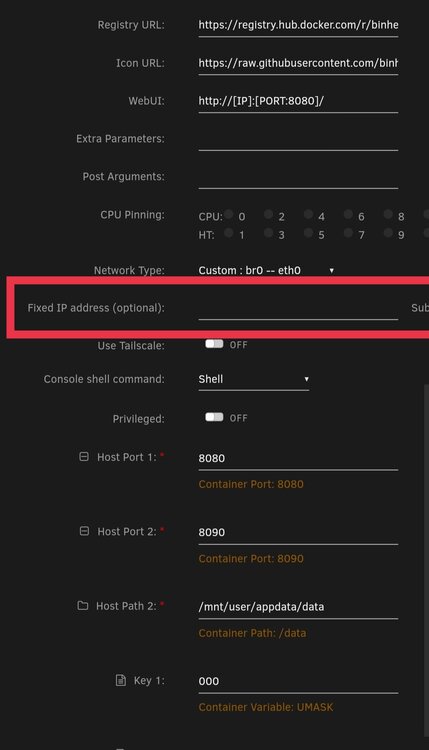
If you console into the container and do ifconfig there, you will see the mac address that unRAID gave it. With that mac, you should be able to configure your DHCP server to assign your chosen IP to it (the mac). The easiest is to assign your IP address manually though.
-
Create trial USB with creator to v7. Use your activation code from original unRAID/ LimetTech email under Tools > Registration. There is a spot to paste your activation link. Once done, it will ask you if you want to transfer the license to your current USB and also blacklist the prior USB. Once confirmed, your license is transferred. If you want to keep the USB you have, just plug it in, let it boot up, and update os. It is a surprisingly cooperative OS and since you don't seem concerned with preserving anything, it should fire right up with minimal issue. Edit: A quick email to support and they can easily transfer your license to another USB as well.
-
Intel i226. The dual port cards small, inexpensive, pcie x1, run cool, and consume around 4-8W. New on Amazon $50 New on eBay ~$35
-
A failing USB can cause an inexplicable variety of problems. Keep that in mind if wierd stuff starts happening later on.
-
If you attach diagnostics some more info can likely be found by some of the pros that hang out on these forums.
-
If you want your containers to have a different address than your host you can either assign it in the optional spot (if already built in) or got to the container console and run ifconfig. You should find the Mac address in there that you can use to configure your DHCP server.
