





Veah
Members
-
Joined
-
Last visited
Everything posted by Veah
-
7900x is alot of GPU for an unRAID for most people. I do all my lifting with just a 12600k igpu. Transcoding for small user count mostly. Maybe more what you are looking for in this section: https://forums.unraid.net/forum/9-hardware/
-
This It does not take much to host some files. If you are doing things like hosting resource intense VMs, then your requirements will be based on what you are trying to accomplish.
-
A failing flash drive can be the source of the craziest symptoms. Probably lucky you are finding it this quickly.
-
Try disabling wake on lan in bios.
-
I wonder if that 14900 cpu is somehow involved. Those 13 and 14 series cpu don't have a great reputation these days.
-
You need to mark the parity disks so you can assign them correctly. The rest of the array will sort itself out on a new config.
-
So google and ai and other voodoo magic is pushing the long blurbage below regarding power features on your card. See if you can verify all this junk is turned off so unraid can do it's thing. ******** The LSI 9600-24i is a Tri-Mode 24G SAS eHBA, and its power settings can be configured through the Broadcom documentation and user guides. Here are the key points to consider: Power Management: The 9600-24i supports various power management features, including Link Power Management (LPM) and Port Power Management (PPM). These features help reduce power consumption by dynamically adjusting link speeds and port power states. Power Settings: The recommended power settings for the 9600-24i are: LPM: Enabled (default) PPM: Enabled (default) Link Speed: Auto-negotiate (default) Configuration: To configure power settings, refer to the Broadcom documentation and user guides, specifically the “96xx-MR-eHBA-Tri-Mode-UG” document available on the Broadcom website. Note: The 9600-24i is designed to operate within specific power envelopes, and excessive power consumption may affect its performance or longevity. Ensure that your system’s power supply and cooling infrastructure can support the 9600-24i’s power requirements. Additional Considerations Backplane and Expander Compatibility: When using expanders or backplanes with the 9600-24i, ensure they support the required power levels and have adequate power filtering to prevent noise and interference. System-Level Power Management: Configure your system’s power management settings to optimize power consumption and performance. This may involve adjusting BIOS settings, operating system power profiles, or using third-party power management tools. By following these guidelines and consulting the relevant documentation, you should be able to configure the power settings for your LSI 9600-24i to ensure optimal performance and power efficiency.
-
Ya something is telling them to check smart
-
Sure. Attached diagnostics better attract the real pros attention
-
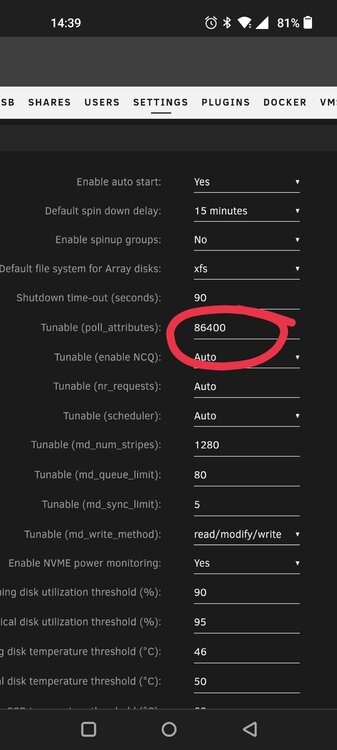
Mine was weird too. Kept getting Svr emhttpd: read SMART /dev/sdg on just some drives. That timer in the setting above changed it to a 24hr query. Edit: never figured out why it was just some drives.
-
Could be HW or a dying flash drive. The automatic reboots are typically HW issues. You could try running some memtest. If you get errors, bad ram. If no errors it's not definitive. If you can get diagnostics attached, that could help folks identify something.
-
My only other thought is to be sure the hba power control/monitor settings are all disabled so unraid doesn't fight it.
-
Stop vm and docker. Rename /boot/config/network.cfg to something different. Reboot and unRAID will build you a new network.cfg
-
Try this. Had something like yours trouble me a long time til I found that setting.
-
This may be why the webui stopped working Oct 12 06:29:20 JonBigTelly kernel: nvidia_uvm: module uses symbols nvUvmInterfaceDisableAccessCntr from proprietary module nvidia, inheriting taint. Not sure if there's a way to repair that one.
-
Create a new trial USB key. See if the system runs on that so as to rule out hardware as the issue. The Corefreq plugin has some stress tests built in to make the rig sweat some. If it looks ok, it may be more efficient to set it up again from scratch (and hopefully some backups) rather than peeling through the onion you have been dealing with.
-
Yes it could be an indicator. Test that by removing a stick (or more) and pushing it again. Using up all of the memory during a transcode should not cause a crash if memory is good; it would just slow down the video playback. If it crashes again on one stick of memory, swap it out for a different stick and use the same slot. If both runs crash, try again in a different slot. If you go through 4 tests, 2 sticks on 2 different slots and still crashing, then the problem is likely elsewhere.
-
TLDR: Look into Tailscale Recent buzzword I keep seeing is Tailscale. It's even popping up as official plugin in 7.0beta3. I am slowly reading into it and it seems like what you are looking for... Specifically a thing called Funnel. That looks to be behind a paywall. The whole concept is quite the curiosity to me. Rambling so putting TLDR above.
-
Does it make a difference if you plug them all into separate USB controllers?
-
I run a 12600k for emby as a docker. Emby does its transcoding and I can boot local GUI just fine with no other gpu.
-
That's an interesting idea that they may be shucked. Why they would show up on the HBA and not direct sata... assuming power was coming from the same place, I got no clue. Regarding the 3.3v mod, what would be the damage to a drive if the mod is done and it did not need it? If no harm, then give it a shot. I dont know how that would work either.
-
If an update is available I would. If you default the bios settings, will it detect the HDDs? Is their FW available for the WD drives?
-
Have a look here and see the JorgeB post about docker image being corrupt. I do not know if that's your problem, but maybe those links from him are worth a read.
-
Are you able to change your host access to custom networks to enabled? I know docker uses their own network and maybe it's related
-
Had one last idea dawn on me. Is your server time set correct?

