





Mainfrezzer
Members
-
Joined
-
Last visited
Everything posted by Mainfrezzer
-
its 1000 in unraid 7
-
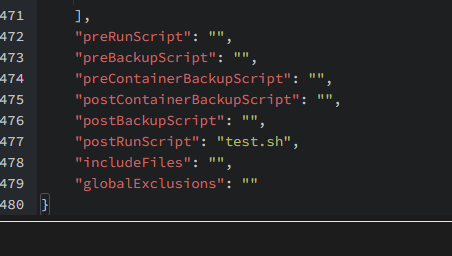
Thats odd, what browser are you using? odd.mp4 Diagnostics might be helpful to find out why nothing is being written to your flashdrive
-
The Tailscale Plugin has nothing to do with the Tailscale Docker setting. You need to specify the --login-server command in the Docker settings "Tailscale Extra Parameters" under "Tailscale Show Advanced Settings:"
-
Looks like your docker uses /mnt/cache but for some reason your share is setup to use the cache instead of being cache only. So every file thats not in use is being moved by the mover to the disk and thus those files are gone for everything expecting it to be at /mnt/cache
-
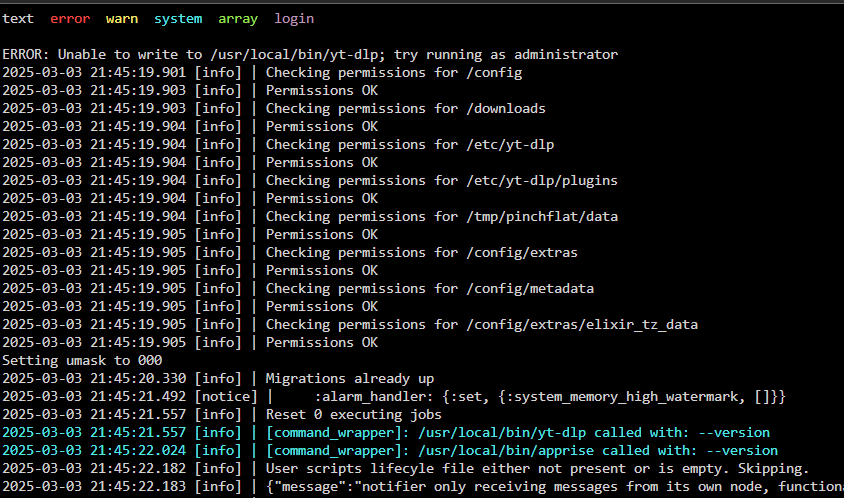
odd. As which user are you running the container then? by default it has the --user 99:100 parameter in the template and i can say that ive never seen that. Edit: Okay, its no longer odd, well kind of. Because its hiding for me up here. But the downloading has worked so far. This is strange
-
Theyre the same. (if you dont count the extra rules for plugins in general) Edit: i just saw that you already have something in the CA, just drop the xml for the Plugin in your Repo and Squid will check it before it appears in CA
-
with any docker container/vms or lxc container running, probably not. Unless its something as simple as a webserver.
-
yeah that would achive the same, while disabling the healthchecks is generally not a problem, not having logs at all could be^^
-
This is just for the docker logs and health status checks, any container writing in appdata (like pihole to the database) or anywhere else on in their respective image will not be put into ram. The intent is just to avoid write amplification by the logs and checks. Lets say, one line of log (or health status check) is about 108 Bytes, it would write a total of 4KB on the ssd. Which is terrible because that happens every couple seconds for each container. If you have the backup enabled, it just writes all the logs that happened until that point once into the 4KB (if its less than that)
-
As long as you dont execute that script anymore (via go file or userscripts) and perform a reboot, its all gone. At the moment the script version of it is still running.
-
If i read that correctly, it seems like youre missing the reboot after deinstalling the userscript. Removing the user script doesnt remove the modification it has done to it. You can quickly confirm that by looking into the syslog for
-
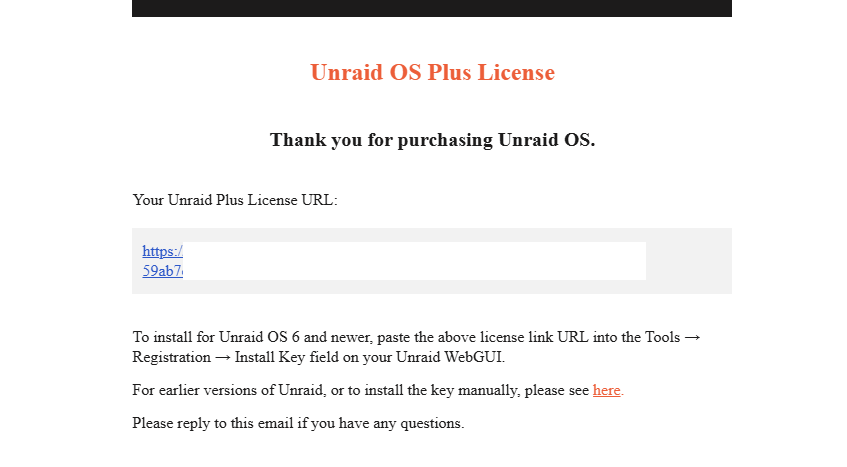
Your email should look like this thats the url it asks for.
-
You setup the server to use a vpn as usual (vpn tunnled access for system), with the exception that you exclude local traffic heres a calculator to define what subnets should be routed over wireguard and which not https://www.procustodibus.com/blog/2021/03/wireguard-allowedips-calculator/
-
Yes, that is correct. You either have no br0 container allowed talk to the host or all of them. If you really set on that route, you could technically have that container speak to the host over a vpn for example. But i would just advise you to use the lxc plugin. The lxc container can communicate with the host and vice versa without issue over the veth interface.
-
Are you sure that this is your *only* issue? Given that it complains about that it cannot write in a location, which is usually within the docker image, i highly suspect that your docker image might have seen the best of its days and is borked. (granted you didnt map that path) For your root thing https://github.com/kieraneglin/pinchflat/pull/437
-
change the repo link to include ghcr.io/ich777/containername and then its fixed Heres an example for Ark

-
I would say, you fucked around and found out. Reboot will fix that, unless you actually put that in your go file, then remove that line via the webgui or worst case by pluggin the usb into another pc to edit it out
-
Ich weiß doch nicht wie das Python Script aussieht. Auf jeden Fall gehe ich sehr stark davon aus, dass in dem Python Script ein relativer Pfad benutzt wird. I.e "Garagendatenbank.txt" Das funktioniert aber nicht, weil der Ort der Ausführung des Script relevant ist. Die Garagendatenbank.txt befindet sich in /mnt/disk1/appdata/Scripte nicht in /root Daher sollte im Python Script direkt statt "Garagendatenbank.txt" "/mnt/disk1/appdata/Scripte/Garagendatenbank.txt" stehen. Ich hab keine Ahnung von Python und ob's da ne Möglichkeit gibt relative Pfade sauber als absolute Pfade auszugeben.
-
Mal versucht den absoluten Pfad zur .txt Datei anzugeben im Python Script? Das schreit danach.
-
The issue seems to be that the database path is missing from the template. Heres one that mirrors the run command they show on the repo my-IBRACORP-Fastenhealth.xml tagging @Sycotix so youre aware of the issue^^
-
I can already say that the script for 7/7.0.1 won't work with 7.1.0 when it comes out. The plugin will. Will edit this post with the 7.1.0 one when it comes out or at least the beta of it. # ------------------------------------------------- # RAM-Disk for Docker json/log files v1.6 for 7.1.0 # ------------------------------------------------- # check compatibility echo -e "c1b259ee25f4515c2bc9ad86139447aa /etc/rc.d/rc.docker\n599b889ae544489329bfa813fd6e3765 /usr/local/emhttp/plugins/dynamix/scripts/monitor" | md5sum --check --status && compatible=1 if [[ $compatible ]]; then # create RAM-Disk on starting the docker service sed -i '/nohup/i \ # move json/logs to ram disk\ rsync -aH --delete /var/lib/docker/containers/ ${DOCKER_APP_CONFIG_PATH%/}/containers_backup\ mountpoint -q /var/lib/docker/containers || mount -t tmpfs tmpfs /var/lib/docker/containers || logger -t docker Error: RAM-Disk could not be mounted!\ rsync -aH --delete ${DOCKER_APP_CONFIG_PATH%/}/containers_backup/ /var/lib/docker/containers\ logger -t docker RAM-Disk created' /etc/rc.d/rc.docker # remove RAM-Disk on stopping the docker service sed -i '/tear down the bridge/i \ # backup json/logs and remove RAM-Disk\ rsync -aH --delete /var/lib/docker/containers/ ${DOCKER_APP_CONFIG_PATH%/}/containers_backup\ umount /var/lib/docker/containers || logger -t docker Error: RAM-Disk could not be unmounted!\ rsync -aH --delete ${DOCKER_APP_CONFIG_PATH%/}/containers_backup/ /var/lib/docker/containers\ logger -t docker RAM-Disk removed' /etc/rc.d/rc.docker # Automatically backup Docker RAM-Disk sed -i '/^<?PHP$/a \ $sync_interval_minutes=30;\ if ( ! ((date("i") * date("H") * 60 + date("i")) % $sync_interval_minutes) && file_exists("/var/lib/docker/containers")) {\ exec("\ [[ ! -d /var/lib/docker_bind ]] && mkdir /var/lib/docker_bind\ if ! mountpoint -q /var/lib/docker_bind; then\ if ! mount --bind /var/lib/docker /var/lib/docker_bind; then\ logger -t docker Error: RAM-Disk bind mount failed!\ fi\ fi\ if mountpoint -q /var/lib/docker_bind; then\ rsync -aH --delete /var/lib/docker/containers/ /var/lib/docker_bind/containers && logger -t docker Success: Backup of RAM-Disk created.\ umount -l /var/lib/docker_bind\ else\ logger -t docker Error: RAM-Disk bind mount failed!\ fi\ ");\ }' /usr/local/emhttp/plugins/dynamix/scripts/monitor else logger -t docker "Error: RAM-Disk Mod found incompatible files: $(md5sum /etc/rc.d/rc.docker /usr/local/emhttp/plugins/dynamix/scripts/monitor | xargs)" fi
-
You need to use words to describe your problem. Full sentences, which contain letters that form words that help us to understand what it is, that is troubling you.

-
Ich glaube das liegt am ACL, was OMV bei smb benutzt. Unraid hat das nicht. Könnt mich jetzt aber auch irren ob es daran liegt.
-
then the tunnel isnt running
-
It does, if you keep it running on a bridge. (which by default, it ships with) if you change the network mode to host. That always involves a lot "work". Depending on how the docker container is build, you *could* have it as simple as declaring the port that runs on via a variable or over the config file, if it doesnt, you need to build the docker image yourself to make it work with your usecase. Edit: Given that the default ships with bidge as network and port 80, which is used by unraid, its as simple as this. Container works.mp4


