kizer
Moderators
-
Joined
-
Last visited
Everything posted by kizer
-
Id probably agree its a little bit of everything you did to improve your system. My i7 4790k was getting 85Mbs when I was using Western Digital Green 2TB drives at 5400RPM 125Mbs Now I'm running 4TB Iron Wolf drives at 5900RPM Are you running Parity every 2weeks? I honestly think 1x a month is good since it doesn't trash on your drives as often and gets the same results in the end.
-
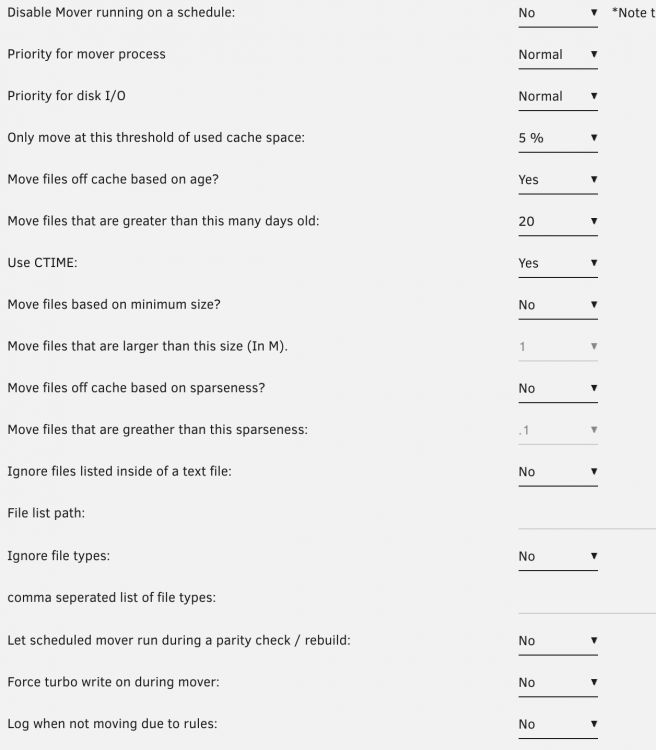
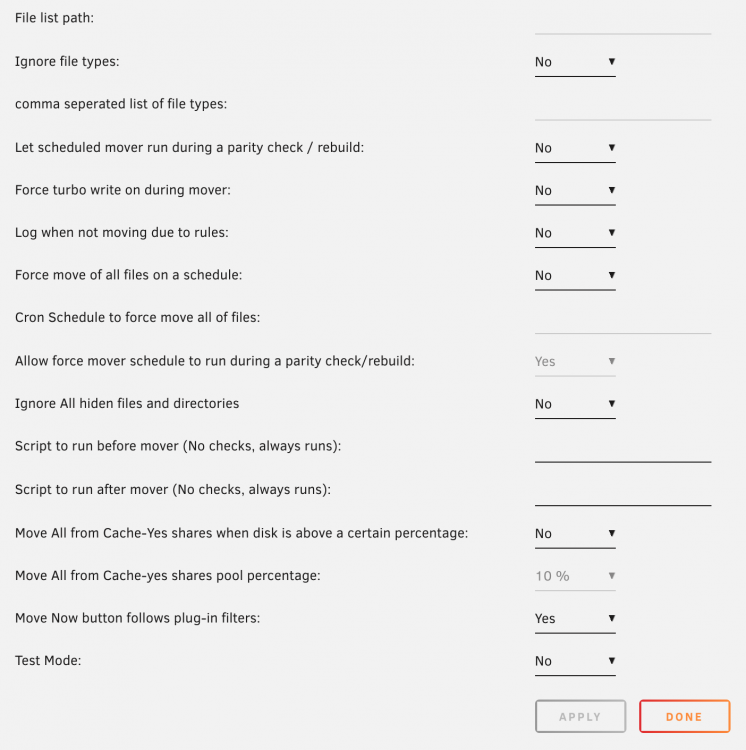
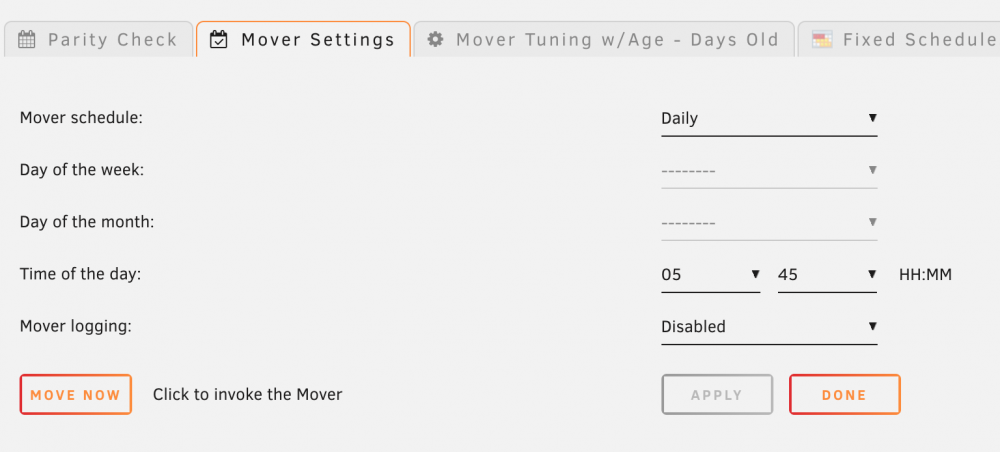
@HDT Like I said I have my system setup to move files daily at 5:45 and it only moves files 20 days old
-
Sure when I get a chance later tonight when I get home I'll take a snap of what I have going on. Its nothing really special, but I know sometimes a little bit of info goes a long way when your trying to explain something or understand something.
-
Nice Job guys. Like many I've had several conversations with these guys and I'm sure many many more.
-
Nothing like a MegaFloppy lol
-
I have my system setup to check every day in the AM, look for at least 10% used and move files that are 20 days old. So in a sense it does move the oldest files first the 20day files and then keeps moving the oldest every day
-
My first one was the Atari 600XL that I had to drive my parents nuts to get a tape drive. https://en.wikipedia.org/wiki/Atari_8-bit_family
-
I'm guessing none of them are 64bit.... 😃
-
Ok newest update. #Rsync path STORAGE_PATH="/mnt/user0/TV/" CACHE_PATH="/mnt/cache/TV/" CACHE_DISK="/dev/sdh1" CACHE_MIN_FREE_SPACE_PCT="90" CACHE_MAX_FREE_SPACE_PCT="85" Delivers: Welcome to /tmp/user.scripts/tmpScripts/Plex-Caching-Script/script stat: cannot statx '/tmp/user.scripts/tmpScripts/Plex-Caching-Script/log.txt': No such file or directory Info: Log size is ---------------------------- 1 active(s) plex session(s): ---------------------------- - 1/1: Serie: Suits Season 9 - Episode 4/-1: Cairo --------------------- Cache disk usage: 16% --------------------- - Info: 16% space used, quota is 90%, nothing to do -- Info: Cleaning empty directories... It just doesn't cache anything thou.
-
@JonathanM @trurl Totally understand. I'm trying to peak under the curtain some. I'm trying to figure out what the magic is here since it has me really intrigued but I want to make sure there isn't anything that would cause my system or somebody else's system to go haywire. Also if it does what its supposed to it would put a pretty cool spin on what I have going on at my place.
-
Is my Storage Path Correct for Plex to read from? Its the current location of my TV shows when they are temporary before the mover moves them. Meaning I use /mnt/user/TV for my Tv shows and /mnt/user/Movies for movies. I'm not as worried about my Movies as much as my TV shows. I'll give this a try tonight. I'm currently at work and thank you for your time to look at this for me.
-
df -h /mnt/cache/ Filesystem Size Used Avail Use% Mounted on /dev/sdh1 932G 153G 779G 20% /mnt/cache
-
No harm or foul. I'm quick to ask questions even if they are obvious as long as it helps somebody else if they have the same problem. I did have the lastest version of the plugin installed. Who knows I'll install it again on 6.9.2 and give it a whirl and try it again on 6.10.3 later.
-
To be fair I didn't see anything in the 6.10.3 patch notes from 6.9.2 to 6.10.3 unless I simply missed it. Lol I just happened to check the documentation after I upgraded to 6.10.3 and removed the plugin knowing something was off. Also you are right about the figuring it out that's why I tagged it as (SOLVED) just to make sure if anybody else found this they would know they aren't the only one scratching their head. 😃 Don't get me wrong I'm not pointing fingers for anybody's mistake. Just saying I had some oddities and maybe I'm simply missed a note somewhere which would of saved me some head scratching.
-
Currently I'm on 6.9.2 and decided to give 6.10.3 a try. When I was on 6.10.3 I noticed in my URL it said HTTPS not secure and it was red in Chrome. I also found a few other things that seemed to be giving me trouble in 6.10.3 so I decided to downgrade back to 6.9.2. Now I can't seem to remote login via unraid.net even though it shows I'm online, but I've decided to remove the plugin and will give it another try soon. However I noticed that I still have the long url even when the plugin is removed. so I am looking at 348ffsfsdfkj458443987vljsafoiewor.unraid.net/login vs 192.168.x.x on my browser. Is this behavior normal? Yesterday when I was on 6.10.3 if I typed in my short url 192.168.x.x it wouldn't forward to the long and I had to copy and paste the long in to connect to my server or I had to visit unraid.net to remote in locally. Anyways I'm looking to start over fresh with this plugin, but I want to make sure I'm starting off from Square on to remove some items that might be glitching me out. Lol ************************************************************************** update. I forgot to turn off SSL After I turned it off it removed the hash url. Also I noticed it says here https://wiki.unraid.net/My_Servers to remove the Plugin prior to installation of 6.10.3 Maybe that glitched out my install and caused some issues going from 6.9.2 to 6.10.3 and then when I returned back to 6.9.2. I did restore a USB backup, which I thought would of corrected everything, but hey who knows. Lol I'll tinker with this some more when I get a chance. Before I upgraded this plugin has worked flawlessly and I'm sure it will continue to after I learn how to read.
-
STORAGE_PATH="/mnt/user0/TV/Shows/" CACHE_PATH="/mnt/cache/data/" CACHE_DISK="/mnt/cache/data/" I noticed you had CACHE_DISK= /dev/mapper/ and a NVE device. I only have /dev/mapper/control
-
Congrats guys. Thank you to everybody that recognizes their efforts and the efforts of all that keep this place moving as smoothly as it does.
-
I tried using this, but I get a path not found. I created the data share on my system, but it seems to delete it every time I run it. I'm running 6.10.3
-
Yep utilize the 500GB SSD and pick yourself up at least with a decent UPS to avoid the power outages. I have a simple 800Watt APC UPS that utilizes the USB plug on my Server and if there is a power outage gracefully shuts down.
-
I'm assuming id=0 is for first video card and you'd use id=1 for second? I gave this a whirl on m 1050-TI root@Tower:~# nvidia-smi --id=0 --gpu-target-temp=80 All done. root@Tower:~# nvidia-smi -q|grep Target GPU Target Temperature : 80 C I also found this. nvidia-smi -q|grep Target Shows your current target Temp setting. GPU Target Temperature : 83 C Ran your above code and set it to 80C nvidia-smi --id=0 --gpu-target-temp=80 nvidia-smi -q|grep Target GPU Target Temperature : 80 C This is kinda neat.
-
If you create a Share for the misses and set it to Cache = Yes, it should store your files on the Cache and move them to the array on its scheduled move time. If the Cache is full it should write directly to the array.
-
To be fair it took a few minutes for me to run the same command that @trurl asked you to run. For instance Plex is a large folder on my system and it had to crawl every folder and subfolder gathering up totals. You just don't see it. Also don't forget to account for the docker.img file that is sitting on your Cache drive too.
-
I used to use 240GB, which seemed like enough for my needs with Dockers and Data, but not to long ago I upgraded to a 1TB SSD. I'm sure for my needs I could get along with a 500GB drive. The price for the 1TB was to good to pass up so I jumped to an even larger drive. How much honestly would depend on what you normally put on it and have time to store until mover runs. If you are moving mass data constantly and the mover isn't moving enough then you'll need a much larger drive. All my Dockers take up around 32GB and my docker.img file. So I have plenty of space for other items.
-
The only thing I'm doing differently is including the Resolution and the Audio. We all know Plex scans the video for Resolution and Audio. I'm including the extra for my benefit not Plex's. I'm grateful for your concern and mentioning it to me, but I'm not worried at all.
-
All my Files are in the following format Movies Folder - Transformers-(2007)-(1080p)-(DTS) File - Transformers-(2007)-(1080p).mkv Tv Shows Folder Breaking.Bad-(2008) Breaking.Bad-_-S01E01.mkv I've never had an issue with Plex ever.