





sasbro97
Members
-
Joined
-
Last visited
Everything posted by sasbro97
-
Anybody with an idea?
-
I have the same problem as many here before. I don't see anything suspicious in the logs. What is the maximal size of the log? I guess the syslog was getting filled too much but I don't understand why syslog has 0 kb but there are syslog.1 and syslog.2. But it makes sense that the logs stopped 5 or 6 days ago because I guess since then I got the problem again that I cannot see anything in the Unraid frontend. The main page won't load. Also not the Docker page. Everything that needs to be fetched is broken then. Had this so many times now already and it happens after a while of uptime but did not always really appear. I was also running with an uptime of 15 days or more without any problem one time. But I guess it has something to do with the log I see in the syslog: Aug 7 01:07:24 UNRAID-Server nginx: 2023/08/07 01:07:24 [alert] 12552#12552: worker process 4095 exited on signal 6 It won't get fixed until I restart the server then. And today I got the warning from my server **/var/log is getting full (currently 100 % used)** Can somebody tell me what the reason is and how I can fix it? It's not nice to run into this every week. The logs seem to crash the frontend. unraid-server-diagnostics-20230813-0451.zip
-
Like very many others, I too ask myself the question of how best to make additional backups. Additional means besides RAID1 pool or just parity. Of course, the best would be a location-independent backup, but unfortunately I only have the location where the server is. Thus, I thought of an external HDD, which is connected via USB. Is there a way to keep it connected but disable the USB port except when the backup is to take place? This way the HDD would not get unnecessary runtime and would not consume power. Now maybe if I could eventually do backups to another location, what would you guys recommend? I have UrBackup running to backup my PC to Unraid. I could of course backup Unraid files to my PC, but I wonder how useful that is, since the PC isn't always and regularly running. In general, also the question of how I best save a backup. I mainly want to backup the appdata folder for my Docker infrastructure. But it is big. Therefore compression makes sense. Which tool do you recommend? Or the old-fashioned way via Linux tools? Thank you.
-
I would need an custom entrypoint. I tried to just add an entrypoint in the extra_parameter like --entrypoint="/bin/entrypoint.sh /bin/strelaysrv -listen=0.0.0.0:22067 -status-srv=0.0.0.0:22070" but it does not work. How can I manage it? I am referring to this: https://github.com/benphelps/homepage/pull/230#issuecomment-1253053472
-
Hey there guys. How do you back up your data? My data is on a RAID1 ZFS pool anyway. But probably a backup on an external medium still makes sense. Unfortunately I have no way to store the data outside my home. My idea now is to permanently connect an external USB hard drive. But this should now consume power or turn on when I perform a backup. I thought of something like Syncthing, which I have in use anyway. But that should only trigger when I have set it to backup quasi like a cronjob.
-
And even after 3 years buggy.
-
@mgutt I also cannot believe this value to be honest. I'm thinking about putting a Zigbee socket with energy meter before the USV. You think its okay? Okay I added a userscript at array start for powertop thank you. I don't need to worry about the warnings, right?
-
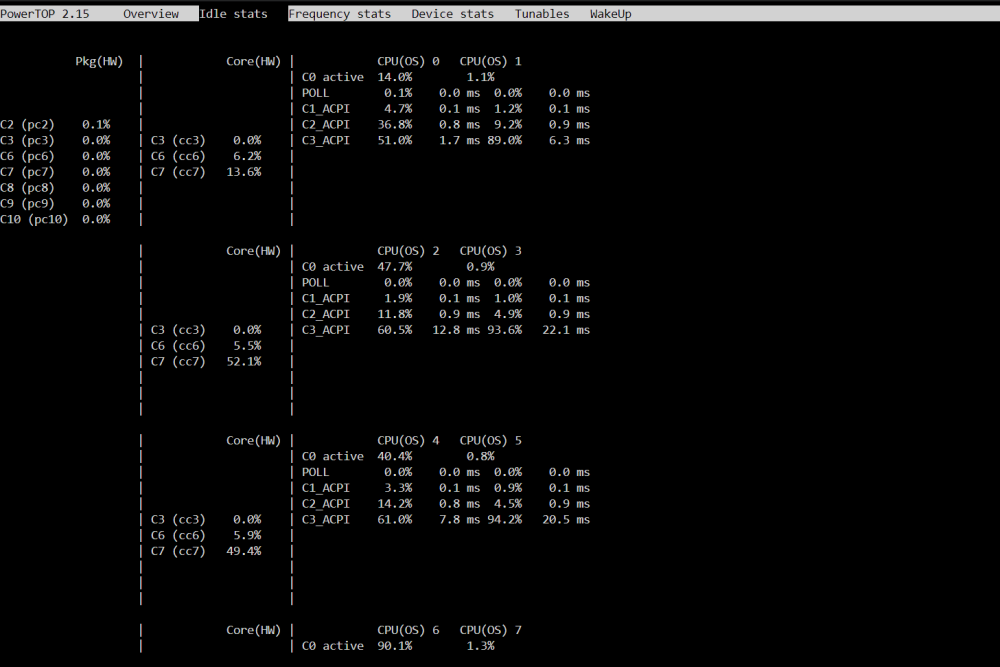
Hey guys. I used powertop --quiet --auto-tune when I started to setup my server on I guess 6.12 rc. Now if I have a look at powertop all tunables are bad. Sometimes they also show as good (I guess when I use the powertop auto-tune command even though I get this "error"). If I try to execute powertop --quiet --auto-tune again I always get the following response: Cannot load from file /var/cache/powertop/saved_parameters.powertop File will be loaded after taking minimum number of measurement(s) with battery only Cannot load from file /var/cache/powertop/saved_parameters.powertop File will be loaded after taking minimum number of measurement(s) with battery only How can I fix this? It does not look good anyway. But I seem to have a good power consuption with 52 Docker containers running all the time. My Eaton USV says 20W and that with my router attached additionally to the server. The setup: Intel Core i5 13500 be quiet! PURE POWER 12 M 550W ASUS Prime Z790M-PLUS D4 LGA1700 Kingston FURY Beast 64GB (2x32GB) 3200MHz DDR4 2x 1TB Samsung SSD 980 M.2 that are always running as cache 2x 4TB Western Digital Red that are always running as zfs pool 2x Toshiba MG09 Series MG09ACA18TA with shutdown 1x 6TB Toshiba X300 HDD with shutdown LSI 9207-8i (IBM M5110) FLASHED TO IT MODE PCI-E 3.0 SAS2308 (probably the problem) 4x Tower-Fan Fractal Design Silent R2 120mm
-
@Howboysnot true because look at the main repo releases: https://github.com/jimsalterjrs/sanoid/releases We are still at Sanoid 2.1.0.
-
Dann glaub es nicht, aber es ist so. Bin ja auch nicht der erste Nutzer der damit Probleme hat, wenn man mal googlet. Ich sag ja Upload passt ja von mir aus. Aber Download bleibt auch immer zwischen 3 MB und 5 MB / Sekunde. Das ist einfach unterirdisch.
-
@alturismo kein Problem. Ich sag mal 5MB im Upload sind vollkommen in Ordnung. Im Download aber nicht. Wird da auch so kastriert? Edit: Hab gerade mal Proxy ausgeschaltet. Dasselbe in grün.
-
Bei mir ist Cloudflare mit Proxy dahinter und ich erreiche ganze 5MB/s mit i5-13500 64GB RAM und 1 Million Leitung von Vodafone... joaaaa Leben ist scheiße Ideen? Hab auch noch AdGuard Home für DNS am laufen.
-
I had the same problem after resetting my Docker Engine. Had to delete the docker directory or maybe for others the docker.img vdisk. After that every container with an WebUI link was broken and only opened about:blank#blocked. I have used a custom docker network and that was the problem. It could not be restored even though it was selected in the Docker Template for each application. I had to run all of my 50 containers manually one time with the bridge network and back again to my custom network. Everything works again. I figured out by seeing that the container do not have an IP address:

-
-
@primeval_god okay got it thanks. I mean anyway its just a warning and not more.
-
Hey there. I cannot rearrange any folder. Not sure what the reason is but I see an error in the console logs. If I call the Docker tab in UNRAID I always see in the console the following: Uncaught (in promise) TypeError: callback is not a function apply_folder http://192.168.178.29:85/Docker:4290 waitForGlobal http://192.168.178.29:85/Docker:3176 apply_folder http://192.168.178.29:85/Docker:4243 anonymous http://192.168.178.29:85/Docker line 3924 > Function:36 c http://192.168.178.29:85/webGui/javascript/dynamix.js?v=1680052794:5 fireWith http://192.168.178.29:85/webGui/javascript/dynamix.js?v=1680052794:5 l http://192.168.178.29:85/webGui/javascript/dynamix.js?v=1680052794:5 o http://192.168.178.29:85/webGui/javascript/dynamix.js?v=1680052794:5 send http://192.168.178.29:85/webGui/javascript/dynamix.js?v=1680052794:5 ajax http://192.168.178.29:85/webGui/javascript/dynamix.js?v=1680052794:5 i http://192.168.178.29:85/webGui/javascript/dynamix.js?v=1680052794:5 anonymous http://192.168.178.29:85/Docker line 3924 > Function:5 <anonymous> http://192.168.178.29:85/Docker:2020 e http://192.168.178.29:85/webGui/javascript/dynamix.js?v=1680052794:5 t http://192.168.178.29:85/webGui/javascript/dynamix.js?v=1680052794:5 setTimeout handler*Deferred/then/l/< http://192.168.178.29:85/webGui/javascript/dynamix.js?v=1680052794:5 c http://192.168.178.29:85/webGui/javascript/dynamix.js?v=1680052794:5 fireWith http://192.168.178.29:85/webGui/javascript/dynamix.js?v=1680052794:5 fire http://192.168.178.29:85/webGui/javascript/dynamix.js?v=1680052794:5 c http://192.168.178.29:85/webGui/javascript/dynamix.js?v=1680052794:5 fireWith http://192.168.178.29:85/webGui/javascript/dynamix.js?v=1680052794:5 ready http://192.168.178.29:85/webGui/javascript/dynamix.js?v=1680052794:5 $ http://192.168.178.29:85/webGui/javascript/dynamix.js?v=1680052794:5 EventListener.handleEvent* http://192.168.178.29:85/webGui/javascript/dynamix.js?v=1680052794:5 <anonymous> http://192.168.178.29:85/webGui/javascript/dynamix.js?v=1680052794:5 <anonymous> http://192.168.178.29:85/webGui/javascript/dynamix.js?v=1680052794:5 I guess this error is the reason why I can rearrange it like I want but I will never be saved. Any idea what is causing it? Using Unraid 6.12.0 and tried Chrome and Firefox.
-
@Kilrahany idea why it is not saving? Am I forgetting anything else?
-
@Kilrahoh my god... thats so silly of me... thank you...
-
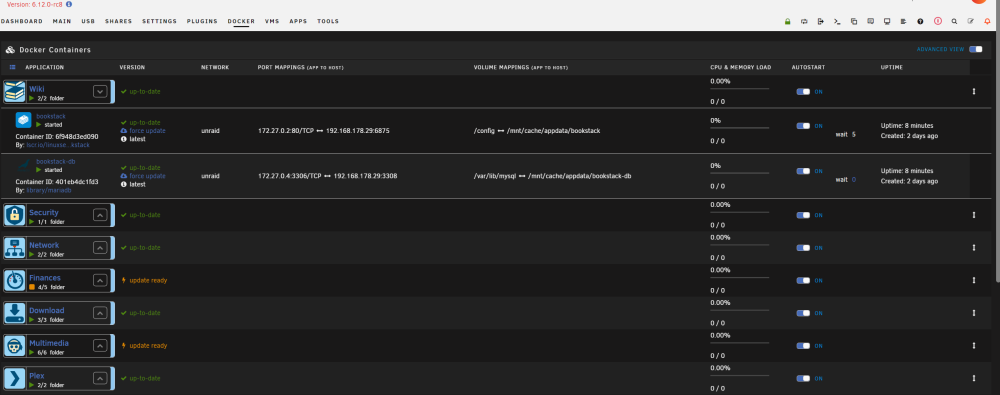
Hey there. I've seen in many videos and tutorials how to change the starting order of Docker containers but unfortunately it doesn't work for me. I got the arrows there but if I hover over them the cursor won't change and I cannot move them. It stays the basic cursor. What is the reason? All containers are started over the GUI.
-
I have a question regarding permissions and SMB shares in Unraid. I have the problem that when I upload a file in my cache disk share, for example, that the user created for another SMB private access becomes the owner. I read somewhere here in the forum that this is due to Windows and that only one user is supported by Windows. Well is stupid, but then that is probably so. But also the permissions are not quite correct, because they are set to -rwxrw-rw- instead of -rw-rw-rw-, as set by the Fix Permissions Tool. Is there any possibility there? Of course I would also always prefer the owner to be nobody instead of smb_user, but I don't think that can be done differently for private access, can it?
-
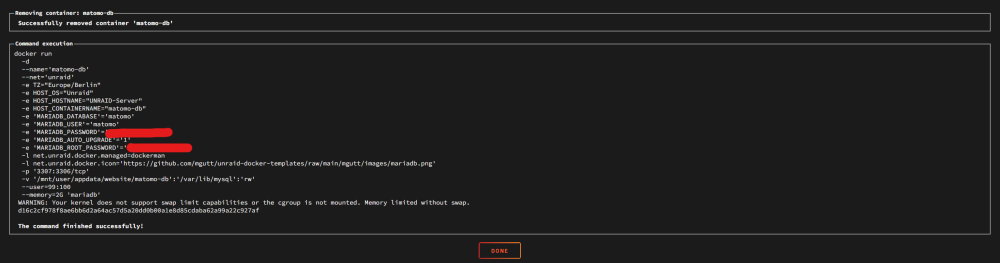
For every Docker container I start in the GUI of Unraid I see the following warning: Why? And how can I fix it? I seem to be the first / only one. I did nothing special.
-
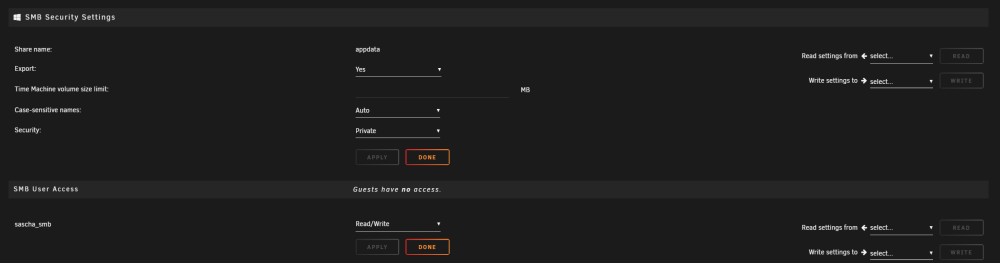
@itimpi okay we take another example. Can you just tell me if I'm right or wrong? It is always mandatory to set the other permission to Read/Write if I want Read/Write access on a private/secure SMB, right? And in addition the user needs the same permissions, right?
-
You are not answering my question. I am not a kid and just want to edit my files on my Windows PC. I always did it like this. For example a dashboard. Can you now tell me what is going on technically and answer my question?
-
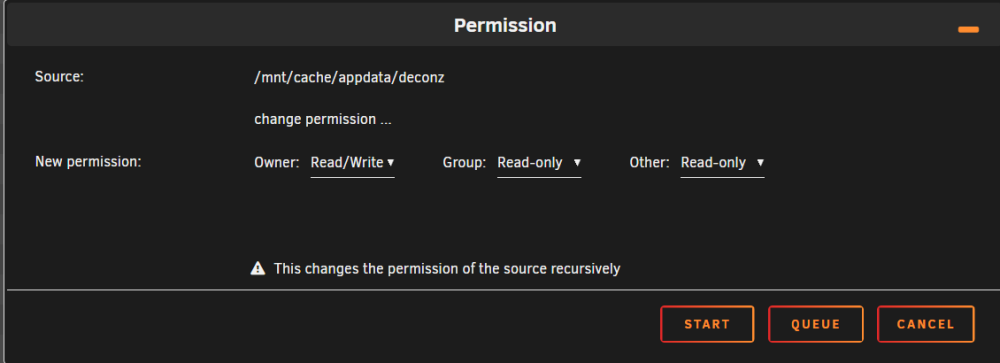
I'm new to Unraid and a bit confused about the permissions for files. I created a separate user just for SMB access on my PC. I gave him Read/Write rights for a user share. My files in this folder have different permissions. I don't know. Happend after migration from another server. Its only important that the other permission is set to Read/Write. Otherwise it won't work. But why? I thought I got a user for that. Okay it's not the owner but why does it not belong to the group? Seems strange to me.

-
Same issue here in 6.12.0-rc6. May 20 00:50:48 Server emhttpd: shcmd (14375): exit status: 1 May 20 00:50:48 Server emhttpd: Retry unmounting disk share(s)... May 20 00:50:49 Server flash_backup: adding task: /usr/local/emhttp/plugins/dynamix.my.servers/scripts/UpdateFlashBackup update May 20 00:50:53 Server emhttpd: Unmounting disks... May 20 00:50:53 Server emhttpd: shcmd (14376): /usr/sbin/zpool export cache May 20 00:50:53 Server root: cannot unmount '/var/lib/docker/zfs/graph/fbdd434d278a6b358e9f110837ca89f2bba5eff09a3b4cb74f2ed64d8de68e7a-init': unmount failed






