





bonienl
Community Developer
-
Joined
-
Last visited
Everything posted by bonienl
-
Do you have any PHP errors? Check: Tools -> PHP Settings -> View Log
-
Can you post your diagnostics?
-
Ok, I found a bug which explains your issue, will be fixed in the next release. As a workaround, set the "Regulatory region" to your country instead of ''automatic' and then join a network.
-
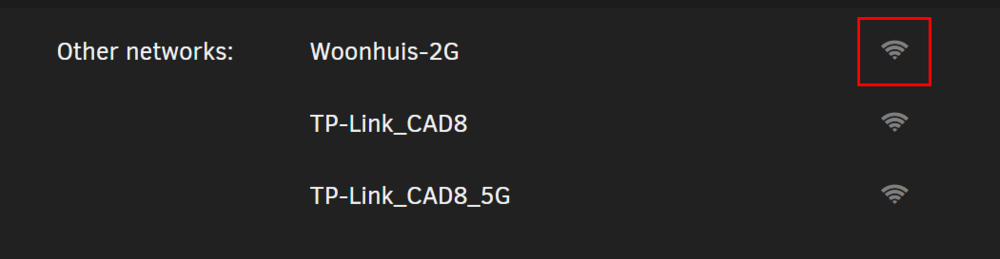
Can you open a terminal window and type ip link set wlan0 up Then open the wireless page and see if it populates. You need to click on the wifi icon to join a network.
-
The current implementation in Unraid 7.1-beta2 only pauses Nchan communications, most plugins don't use Nchan but use regular 'post' requests to obtain information from the server. These post requests are not paused, but a browser may pause post requests by itself for any out-of-focus (hidden) pages. Post requests have no impact on Nchan communication (i.e. can not cause Nchan to run out of memory).
-
This looks like a problem with your USB stick not being read properly. Please take the USB stick out (shutdown server first) and run a file system check on a windows machine.
-
How do remotely access the server? Are you using vpn or other method? The picture shows there is no nchan communication (this is the background communication to update the gui). Some how your remote access blocks this.
-
Kubernetes is aimed at datacenter environments, the Unraid solution is mostly used in home environments. Probably this is not a widely requested feature for home use.
-
Unraid should detect address changes and update. Can you provide diagnostics after an address change happened and the gui still listens to the old address. Ps. Are you not using ipv4?
-
Thanks for the recommendations. I made some updates for Unraid 6.13.
-
@SpencerJ can you have a look?
-
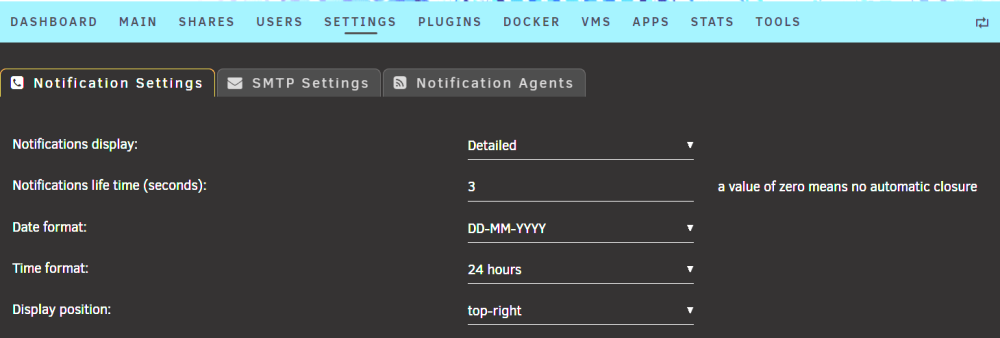
For upcoming version 6.12.4 I added a new option to specify the life time of notifications. Default is 3 seconds.
-
Looks like a wrong network configuration, please provide diagnostics
-
This is docker renaming the interfaces and perfectly normal.
-
Bridging is only needed when VMs are used, otherwise it can be disabled.
-
These error messages come from 'netbios' I recommend to disable netbios and use WSD instead for host discovery. See Settings -> SMB settings
-
You have two wireguard tunnels with the same IP address, that won't work. Delete the duplicate tunnel. We made some additional fixes in the upcoming version. I recommend you use the new version once available, it should work better with WG VPN tunnels.
-
Since 6.11.4, see https://docs.unraid.net/unraid-os/release-notes/6.11.4 Only for new installations, existing installations (people upgrading) need to change manually.
-
With "gear" I mean different equipment from Ubiquiti, including a router, the USG-Pro-4 in my case. This is only a display thing. Connections work fine. Unifi shows MAC addresses but does not further split out the table when multiple IP addresses have the same MAC address. If it is a concern, why not report an issue to Ubiquiti?
-
I have Unifi network gear and no issues. For those who need macvlan, because ipvlan doesn't work for them (Fritz users), an alternative solution is to disable the bridge function of br0 and make it a plain eth0 interface. Disabling the bridge function is only applicable when no VMs are used using br0. In the docker container settings, the network needs to be re-assigned to the custom-eth0 interface instead of the custom-brr0 interface. We are collecting as much information as possible about the macvlan issue and are looking into getting the Linux kernel developers involved to find a solution. Rest assurred, we also want this issue to be solved.
-
Not correct. When using ipvlan it is still possible to set up containers on br0 with a fixed ip address. And this works correctly. I have about 10 containers running this way, including Plex.
-
This looks a lot better, it is a bit of a puzzle why IPv6 gives so much grief on your system.
-
Can you test with "IPv4 only" setting on br0 and see if that makes a differrence? Please provide diagnostics of the new test. Thx
-
Unraid 6.12 has improved security, as part of that services are forced to listening to proper network interfaces (both IPv4 and IPv6). If something is not working correctly networkwise due to wrong configurations, it will impact communication.
-
Your logs contains traces of macvlan issues, see https://docs.unraid.net/unraid-os/release-notes/6.12.0 about known issues. Change in your docker settings macvlan to ipvlan Update to the latest stable version 6.12.3






